
Introduction
The administrative burden of manual data entry is the ultimate enemy of sales velocity. When sales representatives spend more time logging activities than actually speaking to prospects, revenue suffers.
Streamline your software evaluation process
For years, small business sales managers have relied on Salesflare to solve this exact problem. Its "zero-touch" data entry capabilities, automatic email syncing, and smart reminders made it a favorite for teams looking to eliminate spreadsheet management and focus on closing deals.
However, as we move through 2026, the CRM landscape has evolved dramatically. For teams asking who offers modern replacements for outdated sales tools?, the market now provides numerous agile, AI-driven platforms. Many small teams are experiencing "Salesflare fatigue," a shift largely driven by recent 2026 pricing adjustments and a growing preference for modern, lightweight, "Notion-like" interfaces over traditional, rigid database views.
Furthermore, the rapid rise of autonomous AI agents means that simple "automated data entry" is no longer a unique selling point—it is the baseline expectation for any modern software. As a result, businesses are actively evaluating alternatives to leading sales automation suites that provide more than just basic syncing.
You might be looking for a Salesflare alternative if you need deeper integrations with your modern tech stack, more advanced visual pipeline management, or an all-in-one platform that bridges the gap between marketing, sales, and customer support.
Choosing the right CRM today requires finding a platform that aligns perfectly with your team's specific sales methodology, whether that is high-velocity outbound calling, relationship-based networking, or highly collaborative team selling.
To help you navigate the crowded 2026 software market, we have analyzed the top Salesflare competitors to highlight the best Salesflare alternatives.
This comprehensive guide breaks down the features, pricing, automation levels, and specific use cases for each tool, helping you make a confident, data-backed decision for your small business without the guesswork.
Key Takeaways
The CRM landscape has shifted: In 2026, the best Salesflare alternatives have moved beyond basic data entry automation to feature autonomous AI agents and predictive lead enrichment.
Top for Workspace Integration: Copper remains the undisputed champion for Google Workspace users, while HubSpot offers the most robust all-in-one ecosystem for scaling teams.
Best for Visual Pipeline Management: Pipedrive is the top choice for sales teams that need highly visual, activity-driven pipeline tracking without unnecessary clutter.
Ideal for Relationship Building: Nimble and Capsule stand out for small teams prioritizing social listening, simplicity, and deep relationship management over complex enterprise features.
Your choice depends on your tech stack: When migrating from Salesflare, prioritize CRMs that natively integrate with your existing email client and automate data hygiene to prevent pipeline rot.
🏆 Top Software Picks
HubSpot — Best for an all-in-one CRM with integrated sales, marketing, and customer service.
Zoho CRM — Best for extensive customization, workflow automation, and value.
Freshsales — Best for AI-powered lead scoring and streamlined sales automation.
Pipedrive — Best for visual sales pipelines and deal management.
Close CRM — Best for high-volume outbound sales, calling, and email sequences.
Nutshell CRM — Best for collaborative sales teams and automated follow-ups.
Copper — Best for CRM workflows integrated with Google Workspace.
Folk — Best for modern relationship management and contact enrichment.
PipelinePRO — Best for combining CRM, sales funnels, and marketing automation.
Capsule — Best for simple, straightforward contact and opportunity management.
Streak — Best for managing sales pipelines directly inside Gmail.
Software Covered in this Article
To help you understand CRM software in the right context, this article refers to a carefully curated set of leading CRM alternatives:










Comparison Table: Top Automated CRM Alternatives at a Glance
Before diving into the detailed breakdowns, use this comparison table to quickly identify which automated CRM aligns with your team's primary needs, budget, and desired level of automation.
Tool | Pricing | Best For | Key Features |
Pipedrive | Starts at $19/user/month | Visual Pipeline Management | Drag-and-drop pipelines, AI sales assistant, email sync |
PipelinePRO | Starts at $67/month | Comprehensive Sales Funnel Automation | Unlimited funnels, SMS automation, calendar booking |
Close | Starts at $19/user/month | Built-in calling, predictive dialer, email sequencing | |
Copper | Starts at $29/month | Google Workspace Power Users | Native Gmail integration, automated data capture |
Streak | Starts at $59/month | Managing Leads Directly Inside Gmail | Gmail-based pipelines, mail merge, email tracking |
Nutshell | Starts at $19/user/month | Collaborative Team Selling | Unlimited CRM contacts, automated email sequences |
Folk | Starts at $30/user/month | Modern, Lightweight Relationship Tracking | Notion-like interface, AI contact enrichment |
Capsule | Starts at $22/user/month | Simple, No-Frills Relationship Management | Minimalist UI, data hygiene, basic sales pipelines |
HubSpot | Starts at $10/user/month | All-in-One Marketing and Sales Scaling | Unified marketing/sales hub, advanced reporting |
Starts at $20/user/month | Advanced Customization and AI Insights | Zia AI assistant, deep workflow automation | |
Freshsales | Starts at $11/user/month | AI-Powered Lead Scoring and Context | Freddy AI, unified customer context, predictive scoring |
*Note: All prices shown reflect typical monthly billing. Vendors often offer lower pricing for annual commitments, but those discounts are excluded here for easier comparison. Actual costs may vary depending on your requirements, usage volumes, and negotiated terms.
Avoid manual data entry—compare Salesflare alternatives on AuthenCIO's neutral platform.
Key Automation Features to Look for in a Salesflare Alternative (2026)
When evaluating automated CRM software in 2026, prioritize the shift from legacy workflows to autonomous AI.
The best CRM packages eliminating manual data entry natively capture emails, meetings, and contact details. Furthermore, if you are evaluating what are the best alternatives to Attention for automatic CRM updates, look for platforms with built-in conversational AI and auto-logging capabilities that eliminate the need for third-party add-ons.
1. Standard Automation vs. Autonomous AI Agents
Legacy CRMs rely on "If X happens, do Y" logic. For example, if a deal moves to a new stage, the CRM automatically sends a pre-written email template.
While helpful, this still requires a human to set up the logic, write the template, and monitor the output.
In 2026, the best Salesflare alternatives utilize Autonomous AI Agents. These agents do not just follow rules; they execute complex tasks independently.
An autonomous follow-up agent can read an incoming email from a prospect, understand the context (e.g., the prospect is asking for a discount), draft a highly personalized response based on your company's pricing guidelines, and queue it for your approval—or send it automatically.
2. Predictive Lead Enrichment
Salesflare pioneered pulling data from email signatures, but modern tools go much further.
Predictive lead enrichment automatically scans the web, LinkedIn, and proprietary databases to build a complete psychological and professional profile of your prospect before you even speak to them.
It automatically fills in missing phone numbers, recent company news, and even predicts the prospect's likelihood to buy.
3. Automated Data Hygiene
A major pain point for small teams is incomplete or "dirty" data caused by human error or overlapping software integrations.
Modern alternatives feature automated data hygiene protocols that constantly scan your database in the background.
They automatically merge duplicate records, standardize formatting (like capitalizing names and fixing phone number structures), and flag outdated contacts for deletion, ensuring your sales managers are always looking at accurate reports.
Deep Dive: The 11 Best Salesflare Alternatives for Small Sales Teams
Best Alternatives for Pipeline Management & Visual Sales
For many sales managers, a CRM is only as good as its pipeline view. If your team relies heavily on moving deals from left to right and needs clear, visual indicators of pipeline health, these alternatives significantly outshine Salesflare's interface.
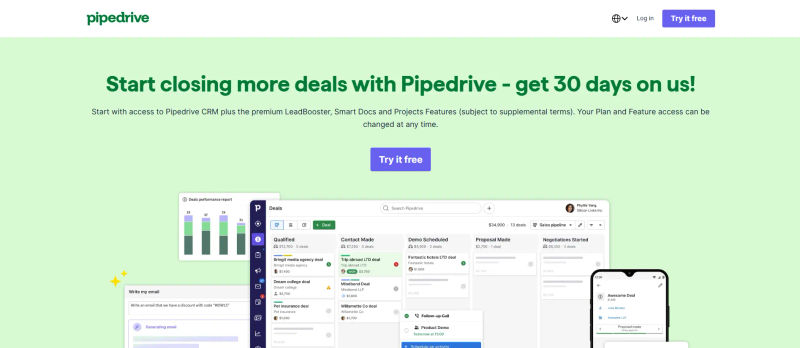
1. Pipedrive
Pipedrive is heavily favored by small B2B teams and ranks among the top CRM alternatives for startups that need sales and follow-up automation alongside visual deal tracking. While Salesflare focuses intensely on background data collection, Pipedrive is designed around the methodology of activity-based selling.
In 2026, Pipedrive has significantly upgraded its AI-powered features, introducing personalized sales tips and automated routine tasks that rival Salesflare's zero-touch entry.
Who is this best for? Startups and small business sales managers who prioritize visual pipeline management and activity-based selling over complex, multi-departmental features.
Key Automation Features:
Smart Contact Data: Automatically pulls social data and company information with a single click, reducing manual research hours.
AI Sales Assistant: Analyzes your past performance to suggest the next best action for stalled deals, acting as a virtual sales coach.
Workflow Automation: Trigger-based automations that move deals across stages instantly when emails are opened or proposals are signed.
Mobile & Connectivity: The 2026 mobile app offers offline sync and native Slack integrations for real-time deal alerts, plus seamless LinkedIn connection for social selling on the go.
Migration Difficulty from Salesflare: Low. Pipedrive offers a highly intuitive data import tool that maps Salesflare CSV exports directly to its pipeline stages.
Time-to-Value: High. Most small teams can set up their pipelines and activate basic email sync automations within 48 hours.
2. PipelinePRO
PipelinePRO takes a different approach by combining traditional CRM capabilities with robust sales funnel architecture.
If you find that Salesflare lacks the ability to capture leads directly from landing pages and automatically route them into complex nurturing sequences, PipelinePRO is the comprehensive upgrade you need. Like Pipedrive, it is one of the top CRM alternatives for startups that need sales and follow-up automation seamlessly tied to their marketing campaigns.
Who is this best for? Businesses that need to combine CRM capabilities with comprehensive sales funnel automation and marketing landing pages.

Key Automation Features:
Unified Funnel Tracking: Automatically logs lead behavior from your landing pages directly into the CRM record without any manual mapping.
Multi-Channel Nurturing: Triggers automated SMS and email sequences based on specific pipeline stage movements, ensuring no lead goes cold.
Automated Calendar Booking: Eliminates the back-and-forth of scheduling by integrating booking directly into the CRM workflow, automatically updating deal stages upon booking.
Migration Difficulty from Salesflare: Medium. Because PipelinePRO includes funnel building, migrating requires mapping out your broader marketing workflows, not just contact data.
Time-to-Value: Medium. It takes time to build the initial funnels, but once active, the automated lead generation saves countless hours.
3. Close
Close is built specifically for teams that live on the phone and in the inbox.
Where Salesflare passively collects data from your existing email client, Close brings the communication channels directly inside the CRM. If you have been searching for a native Salesflare sales dialer or a reliable Salesflare auto dialer integration, Close is a powerhouse for outbound sales velocity that eliminates the need for third-party telephony add-ons.
Who is this best for? High-velocity outreach teams that spend their entire day cold calling, emailing, and texting prospects.

Key Automation Features:
Built-in Dialing: Instead of trying to rig a Salesflare predictive dialer or Salesflare progressive dialer through external tools, Close offers both natively. The 2026 predictive dialer includes built-in AI compliance filters for regional calling regulations, ensuring your team automatically adheres to local telemarketing laws.
Automated Email Sequencing: Enrolls prospects in multi-step drip campaigns that automatically pause the moment a reply is detected.
Call Logging & Transcription: Automatically records, transcribes, and summarizes phone calls using advanced 2026 AI models. Close stands out as one of the best alternatives to big enterprise CRMs for call transcription, ensuring zero manual call logging for small teams.
Migration Difficulty from Salesflare: Low. Close has excellent import tools and a dedicated support team specifically for onboarding small businesses.
Time-to-Value: High. Reps can start making automated calls and sending sequences on day one.
Best Alternatives for Deep Workspace Integration
If you are wondering, is there a CRM that automatically updates from Gmail without manual data entry? The tools below answer that call. If your team lives inside Google Workspace or Microsoft 365, you might want a CRM that doesn't require opening a new tab. These tools offer the best "in-inbox" experiences, rivaling and often exceeding Salesflare's email integration.
4. Copper
When evaluating Copper CRM vs Salesflare, the biggest difference is where the tool lives. While Salesflare integrates well with Gmail, Copper is built natively into it. If you are weighing Salesflare vs Copper CRM to find the best CRM for small businesses that integrates with Gmail and Calendar for automatic data entry, Copper is the premier choice. It is designed to look and feel exactly like a Google product, meaning your team never has to leave their inbox to manage the entire sales cycle.
Who is this best for? Google Workspace power users who want a CRM that lives natively inside Gmail and Google Calendar to maximize team adoption.
.webp?updatedAt=1787637113863&tr=w-800%2Cq-80%2Cf-auto%2Cc-at_max)
Key Automation Features:
Zero-Data Entry: Automatically scrapes email signatures, calendar events, and email threads to populate contact records. It automatically updates from Gmail without manual data entry, mirroring and enhancing Salesflare's best feature.
Contextual Hover: Displays full CRM data, past interactions, and upcoming tasks simply by hovering over an email address in Gmail.
Automated Task Generation: Creates follow-up tasks automatically based on calendar events, email sent dates, and historical engagement metrics.
Mobile & Connectivity: The 2026 mobile app is highly responsive, featuring instant LinkedIn profile sync and deep Slack connectivity to log conversations directly into the CRM on the go.
Migration Difficulty from Salesflare: Low. If you are already using Google Workspace, Copper instantly retroactively syncs your past email history upon setup.
Time-to-Value: Very High. Because it lives exactly where your team already works, adoption friction is virtually non-existent.
5. Streak
Streak takes the inbox integration a step further by turning your Gmail into the actual CRM interface. There is no separate app or dashboard to log into.
For micro-teams and solopreneurs who found Salesflare too detached from their daily email routine, Streak is the ultimate streamlined alternative.
Who is this best for? Solopreneurs and micro-teams managing leads directly inside Gmail who refuse to learn a separate software interface.

Key Automation Features:
In-Thread Pipeline Management: Change a deal's stage, update revenue projections, and assign tasks directly from the active email thread.
Automated Mail Merge: Send highly personalized mass emails with automated follow-ups based on recipient engagement and open rates.
Email Tracking: Real-time notifications when prospects open emails or click links, automatically logged to the deal timeline without manual input.
Migration Difficulty from Salesflare: Low. Export your CSV from Salesflare and import it directly into Streak's spreadsheet-like interface within Gmail.
Time-to-Value: Very High. Installation takes seconds via a simple Chrome extension.
6. Nutshell
Nutshell is a hidden gem for small B2B teams. It combines the workspace integration of Copper with a highly collaborative, team-focused environment.
Unlike many competitors that charge per contact, Nutshell offers unlimited CRM contacts, making it a highly predictable expense for growing teams tired of hidden pricing tiers.
Who is this best for? Collaborative B2B teams that need a straightforward, highly integrated CRM with unlimited contacts and automated email sequences.

Key Automation Features:
Personal Email Sequences: Create automated, one-on-one email drips that trigger based on pipeline stage or specific lead behavior.
Automated Lead Assignment: Routes new leads to specific sales reps based on territory, industry, or round-robin rules to ensure rapid response times.
Form Collection: Automatically captures lead data from your website forms and creates new CRM records instantly, bypassing manual entry entirely.
Migration Difficulty from Salesflare: Low. Nutshell provides a white-glove import service for new customers, handling the data transition and mapping for you.
Time-to-Value: High. The interface is highly intuitive, requiring minimal training for new reps.
Best Alternatives for Relationship Building & Simplicity
Sometimes, CRMs become bloated with features that small teams never use, driving them back to manual data entry. If you are looking for the best CRM alternatives to spreadsheets for sales teams 2026, these platforms are top contenders. They stand out as modern CRM alternatives 2026 for teams that find Salesflare too rigid or simply want a clean interface to manage relationships without enterprise clutter.
Find Perfect Software For Your Business
7. Folk
Folk is a next-generation workspace that feels more like Notion than legacy sales software. As one of the best CRM alternatives for sales teams 2026, it is highly customizable and relies heavily on AI to enrich contacts.
If you hate clunky interfaces and need sales tracking software alternatives to traditional CRM platforms, Folk offers a breath of fresh air.
Who is this best for? Modern sales teams seeking lightweight relationship tracking who prefer a highly customizable workspace over rigid spreadsheets.

Key Automation Features:
Magic Enrichment: Uses AI to automatically find and fill in missing contact details, LinkedIn profiles, and company data with zero manual typing.
One-Click Sync: Pulls contacts seamlessly from Google, Microsoft, and LinkedIn via a powerful Chrome extension that captures context instantly.
Automated Grouping: Dynamically categorizes contacts into specific lists based on automated "if/then" rules tailored to your networking strategy.
Mobile & Connectivity: Offers a flawless 2026 mobile experience with one-click LinkedIn contact import and robust Slack integration for team-wide relationship mapping.
Migration Difficulty from Salesflare: Low. The platform is designed for easy CSV imports and instant synchronization with existing contact books.
Time-to-Value: Very High. You can customize your views, import contacts, and start managing relationships in under an hour.
8. Capsule
Capsule is the definition of a "no-frills" CRM. It strips away the complex automation logic that requires a developer to understand, focusing entirely on ease of use.
If your primary pain point with Salesflare or complex spreadsheets was getting your team to actually adopt and use the platform, Capsule's minimalist approach solves that friction immediately.
Who is this best for? Small businesses seeking simple, no-frills relationship management without the clutter of unused enterprise features.

Key Automation Features:
Automated Sales Tracks: Standardize your sales process by automatically generating a checklist of tasks when a new opportunity is created.
Email Drop Box: BCC a unique Capsule address to automatically log external emails to the correct contact record from any device.
Automated Data Hygiene: Automatically flags duplicate entries and suggests merges to keep your database clean without manual auditing.
Migration Difficulty from Salesflare: Low. Capsule's import tool is straightforward and handles standard contact and organization data easily.
Time-to-Value: High. The learning curve is practically zero, ensuring immediate team adoption and utilization.
Best All-in-One CRM Powerhouses
If your small business is scaling rapidly, you might need more than just an automated contact book. These platforms offer enterprise-grade capabilities scaled down for small businesses, providing an all-in-one solution for marketing, sales, and service to prevent future migrations.
9. HubSpot
HubSpot is the industry giant for a reason. While Salesflare is a fantastic point-solution for sales data entry, HubSpot offers a unified platform that scales infinitely.
In 2026, HubSpot's "Starter" tiers remain highly competitive for small businesses that want to consolidate their tech stack and eliminate overlapping software subscriptions. It is also an excellent consulting CRM software where automated follow-up reminders keep opportunities moving for smaller BD teams.
Who is this best for? Growing companies and consulting firms looking for an all-in-one marketing, sales, and service platform to rapidly scale operations.

Key Automation Features:
Comprehensive Workflows: Automate everything from lead rotation and email nurturing to internal Slack notifications and complex data formatting.
Unified Tracking: See every interaction a prospect has had with your brand, from the first website visit to the final signed contract, automatically logged.
Meeting Scheduling: Built-in calendar links that automatically create contacts, log events, and update deal stages upon booking. If you are wondering what is an alternative to default sales scheduling software, HubSpot's native meeting tool is a powerful replacement that keeps all booking data inside the CRM.
Mobile & Connectivity: The 2026 HubSpot mobile app is essentially a full desktop replacement, featuring advanced LinkedIn Sales Navigator sync and enterprise-grade Slack integration.
Migration Difficulty from Salesflare: Medium. HubSpot is a larger platform. Moving data is easy, but configuring the system to match your specific workflow requires dedicated setup time to avoid feature bloat.
Time-to-Value: Medium. It takes a few weeks to fully customize the platform and train the team on all available hubs.
10. Zoho CRM
Zoho CRM is renowned for offering the most feature-dense platform at the lowest price point. Starting at just $14/user/month, it provides deep customization that Salesflare cannot match.
With the 2026 advancements to its AI assistant, Zia, Zoho is a powerhouse for budget-conscious teams that refuse to compromise on capabilities. Additionally, using Zoho SalesIQ alongside the CRM serves as a cheaper alternative to Leadfeeder that still has strong integrations with CRM tools for website visitor tracking.
Who is this best for? Budget-conscious teams that require advanced customization, deep workflow automation, and predictive AI insights.

Key Automation Features:
Zia AI Assistant: Automatically scores leads, predicts deal closures, and suggests the optimal time to contact prospects based on historical engagement.
Omnichannel Communication: Automate interactions across email, SMS, live chat, and social media from a single, unified interface.
Blueprint Workflows: Force users to follow specific steps before moving a deal forward, ensuring strict data compliance and automated task generation.
Migration Difficulty from Salesflare: Medium to High. Zoho's vast customization options mean you will need to spend time configuring modules and custom fields before importing your data.
Time-to-Value: Medium. The initial setup requires effort and planning, but the long-term automation ROI is massive for small teams.
11. Freshsales
Freshsales (part of the Freshworks suite) strikes a perfect balance between HubSpot's all-in-one capabilities and Pipedrive's ease of use.
It is powered by Freddy AI, which has become incredibly sophisticated in 2026, offering predictive insights and autonomous agents that actively guide sales reps through complex deals.
Who is this best for? Teams looking for AI-powered lead scoring and unified customer context across email, phone, and chat. It is especially useful if you are a customer success manager or customer support rep in the technology industry (from entry-level to manager at companies with 1 to 1,000 employees). If your main motivations are achieving operational efficiency at scale, improving agent experience & CX, coaching your team with performance metrics, and proving your team’s value with reporting, this suite delivers.

Key Automation Features:
Omnichannel Support & Ticket Assignment: When paired with Freshdesk, it provides some of the best tools for help desk ticket assignment. It directly addresses main pain points like managing omnichannel customer interactions and inefficiencies with available agent tools that leave teams siloed without automation, causing agent collision.
Knowledge & Reporting: By centralizing data, it ensures knowledge doesn't just stay with experienced agents, eliminating slow response times that lead to unhappy customers and meeting rising customer expectations. It also replaces manual complex team management with robust analytics, providing the reporting needed to prove team value to the business.
Predictive Contact Scoring: Freddy AI automatically ranks leads based on historical data and engagement metrics, telling reps exactly who to call first.
Automated Sales Campaigns: Set up complex outbound sequences that automatically branch based on prospect behavior (e.g., sending a different email if they clicked a link versus just opening it).
Auto-Profile Enrichment: Automatically populates CRM records with social profiles and company data, eliminating manual research entirely.
Mobile & Connectivity: Freshsales’ 2026 mobile app includes voice-to-text logging and seamless LinkedIn messaging sync, alongside instant Slack notifications for high-scoring leads.
Migration Difficulty from Salesflare: Low. Freshsales offers a dedicated migration tool that handles Salesflare exports smoothly and accurately.
Time-to-Value: High. The intuitive interface allows teams to start utilizing AI scoring and automated campaigns within the first week of deployment.
How to Choose the Right Automated CRM for Your Sales Workflow
Selecting the best Salesflare alternative in 2026 comes down to identifying your team's most significant bottleneck.
If your reps are struggling with outbound volume and manual dialing, a tool with built-in dialers and sequencing like Close is the clear winner.
If your team refuses to leave their inbox and adoption is your main hurdle, Copper or Streak will provide the path of least resistance.
Conversely, if you are planning to aggressively scale your marketing efforts alongside sales, investing in an all-in-one platform like HubSpot or Freshsales will prevent the need for another painful data migration next year.
When evaluating these tools, always take advantage of free trials.
Pay close attention to the "Time-to-Value" and "Migration Difficulty" metrics to ensure that the switch doesn't cause a temporary dip in your sales velocity.
Test the automated data hygiene features, ensure the mobile app meets your on-the-go needs, and verify that the pricing structure aligns with your growth projections—always watching out for hidden automation limits or API costs.
Try AuthenCIO
Move to faster, smarter software evaluation with AI
Final Verdict: Which Salesflare Alternative Wins in 2026?
There is no single "best" CRM—only the best CRM for your specific use case.
The era of manual data entry is over, and the 11 tools listed above all provide exceptional automation to keep your sales managers focused on closing deals rather than updating spreadsheets.
Take the time to assess your team size, your primary communication channels, and your long-term scaling goals.
By aligning your operational needs with the specialized strengths of these modern platforms, you can build a highly automated, frictionless sales machine.
Top 3 Recommendations by Team Size:
Best for Solopreneurs & Micro-Teams: Streak or folk (Maximum simplicity and inbox integration).
Best for Teams of 5-10: Pipedrive or Close (High-velocity pipeline management and built-in outreach).
Best for Rapid Scaling: HubSpot or Freshsales (All-in-one platforms that grow with your revenue).