
Introduction
You’ve done the research, sat through the demos, and finally invested in a powerful Customer Relationship Management (CRM) system. You were promised streamlined sales, automated marketing, and a 360-degree view of your customers. But six months in, the reality is a cluttered dashboard, frustrated team members, and a nagging feeling that you’re not just failing to get the value you paid for—you're actively missing out on significant growth opportunities.
Streamline your CRM evaluation process
This is the expensive mistake countless small and medium-sized business (SMB) owners make. They focus on the CRM software's features while neglecting its foundation. Think of your CRM as a high-performance engine; it has incredible potential, but it can’t run on dirty, contaminated fuel. In this world, your customer data is the fuel. Without a clear customer data management CRM strategy, a 'garbage in, garbage out' approach becomes the number one reason promising CRM implementations fail.
This guide isn’t another technical manual. It’s a business owner’s blueprint for getting the data right first. We’ll provide a clear, non-technical framework for building rock-solid CRM data foundations—the true key to unlocking your CRM's power and driving sustainable business growth.
Key Takeaways
Data is your most valuable asset: Clean, well-organized customer data drives personalized marketing, improves customer retention, and directly impacts revenue growth.
Quality over quantity: Collecting massive amounts of data is useless without strict data hygiene. Regular audits and standardized entry processes are essential to prevent costly errors.
Break down data silos: Integrating your CRM with other business tools ensures a single source of truth, preventing fragmented customer views and disjointed communication.
Security is non-negotiable: Protecting customer information builds trust and ensures compliance with evolving privacy regulations.
Align CRM choice with business goals: The best CRM isn't the one with the most features, but the one that seamlessly integrates with your existing workflows and scales with your specific growth objectives.
Software Covered in this Article
To help you understand CRM Software in the right context, this article refers to a carefully curated set of players:






Why Customer Data is the Lifeblood of Your Business (and Your CRM)
Before we dive into the 'how,' let's solidify the 'why.' In a competitive market, understanding your customer is your most significant strategic advantage. Your customer data, when managed correctly, is the raw material for every smart decision you make. It transforms your CRM from a glorified digital rolodex into a dynamic engine for growth.
👉 Cut through the CRM chaos faster — Try AuthenCIO for free and see what fits your business best.
1. Understanding the Value of Customer Data for Business Owners
Good data allows you to answer fundamental business questions with confidence:
Who are my most profitable customers?
Where are my best leads coming from?
What marketing messages actually resonate with my audience?
Which customers are at risk of leaving?
Having these answers delivers tangible results. According to Forrester, advanced insights-driven businesses are up to eight times more likely to report revenue growth of 20% or more compared to their less data-mature peers. These organizations aren't just making better guesses; they systematically outperform the competition by turning customer information into strategic action. A solid data foundation separates businesses that merely survive from those that scale efficiently.
2. Common Pain Points Solved by Effective Customer Data Management
A strong approach to managing customer data for business directly addresses these common frustrations:
Pain Point | What’s Going Wrong | How Clean Data Solves It |
Wasted Marketing Budget | Generic campaigns reach wrong audiences | Segmentation via accurate data improves targeting and ROI |
Inaccurate Sales Forecasting | Duplicate/incomplete lead info | Reliable, unified data makes forecasting predictable |
Poor Customer Retention | Missed re-engagement opportunities | Personalized automation restores lapsed relationships |
Fragmented Customer View | Data scattered across tools | Unified CRM view improves coordination and decision-making |
Low CRM Adoption | Cluttered, untrusted data | Clean data encourages team use and confidence |
What Exactly is Customer Data in a CRM? (Types & Categories)
To get control over your data, you first need to understand what it is. Breaking it down into manageable categories transforms the abstract concept of 'data' into tangible assets you can organize and use. Here are the key types every business owner should know.
Data Type | What It Is (The 'Who') | Why It's Valuable for Business Decisions | Common Mistake to Avoid |
Demographic | Foundational identity data: Name, email, phone, job title, company, industry, location. | Essential for basic communication, lead routing, and high-level market segmentation. It helps you decide who to target with specific campaigns. | Collecting sensitive data (like age or marital status) that you don't have a clear business reason to use. Keep it lean. |
Behavioral | How customers interact with you: Website pages visited, email clicks, content downloads, product usage. | Reveals customer interest and intent. It helps you decide when to follow up or what content to show them next. | Tracking vanity metrics. Focus on behaviors that indicate purchase intent, not just any click. |
Transactional | What customers buy: Purchase history, order dates, average order value (AOV), lifetime value (LTV). | Your most direct measure of customer value. It helps you decide who your best customers are and what to upsell them. | Only looking at the last purchase. Analyze the entire purchase history to understand buying cycles and LTV. |
Communication | How you engage with customers: Sales call notes, email correspondence, support ticket history. | Provides critical context for every conversation. It helps your team decide how to approach a customer without making them repeat themselves. | Keeping notes in personal documents. All communication history must live in the CRM to be useful for the whole team. |
Preference | What customers explicitly tell you: Communication preferences (email vs. SMS), product interests, survey responses. | The key to true personalization and building trust. It helps you decide what offers are most relevant and how to respect their inbox. | Ignoring the preferences they've shared. Sending emails after they've opted for SMS is a quick way to lose trust. |
Building a Strong Foundation: Key Pillars of CRM Data Management
Building a solid foundation business CRM setup requires actionable best practices, not a team of data scientists. By establishing simple, repeatable habits for data collection, hygiene, and organization, you ensure your customer information is managed effectively to drive sustainable growth.
1. Data Collection Strategies: Gathering the Right Information
Your goal is to collect the right data, not all the data. Start with your primary business goal and work backward. If your goal is to increase customer retention, you must collect data on support interactions and product usage. If it's to generate more qualified leads, focus on website behavior and lead source data.
Integrating Data Sources: Website, Social, Sales, Marketing
Your customer data lives in many places. The power of a CRM is its ability to bring them all together. Use integrations to automatically pull data from your most critical tools. For example, make sure your website's contact form is directly linked to your CRM using its native integration or a tool like Zapier to ensure every new lead is captured instantly.
Consent and Compliance: Navigating Data Privacy (GDPR, CCPA)
Data privacy isn't just a legal hurdle; it's a cornerstone of customer trust. The principles are straightforward: be transparent about what data you're collecting and why, and make it easy for customers to manage their preferences. Recent data privacy benchmark studies show that 94% of organizations recognize their customers will not buy from them if they do not adequately protect personal data. A privacy-first approach is good for business.
To ensure compliance, implement these practical steps:
Implement active consent: Use clear, unchecked opt-in boxes on all lead capture forms. Avoid pre-checked boxes, which violate GDPR standards.
Maintain a transparent privacy policy: Clearly state what data you collect, how it is used, and who it is shared with. Link this policy directly at the point of data collection.
Establish data subject access request (DSAR) workflows: Create a standardized, documented process in your CRM to quickly export, modify, or permanently delete a customer's data upon request within legal timeframes (typically 30 days).
Audit data access: Restrict CRM data access using role-based permissions so only essential personnel can view sensitive personally identifiable information (PII).
2. Data Quality and Hygiene: Keeping Your Information Clean and Accurate
The 'Garbage In, Garbage Out' (GIGO) principle is ruthless. Bad data doesn't just sit there; it actively harms your business. IBM reports that poor data quality costs the U.S. economy over $3.1 trillion annually—a penalty that multiplies as businesses increasingly adopt AI and automated workflows. For your business, this translates to bounced emails, wasted ad spend, and misinformed strategic decisions.
Data Cleansing and Deduplication Techniques
Data hygiene is an ongoing process. Schedule a quarterly 'Data Health Day' and implement these strengthened practices:
Deduplicate: Go beyond manual merges. Configure automated deduplication rules in your CRM to flag or merge duplicate records based on unique identifiers like email addresses or company domains.
Standardize: Fix existing formatting inconsistencies (e.g., changing 'ca' or 'Calif.' to a standard 'CA'). Prevent future errors by replacing free-text fields with standardized dropdown menus.
Complete: Filter reports for high-priority contacts missing critical fields. Use third-party data enrichment tools to automatically append missing info, and task your team with manual updates for key accounts.
Purge: Regularly archive hard-bounced emails and chronically unengaged contacts to protect your sender reputation and reduce storage costs.
Establishing Data Entry Standards and Processes
Prevention is the best cure. Create a simple, one-page document outlining your data entry rules. This doesn't require a data scientist; a business owner or sales manager can own this process. Cover basics like:
Standard Type | Guideline | Example |
Required Fields | Minimum info for new contact | Name, Email, Company, Job Title |
Naming Conventions | Use standardized formats | “California” not “CA” or “Calif.” |
Phone Number Format | Keep consistency | (123) 456-7890 |
3. Data Organization and Structure: Making Sense of Your Information
Well-organized data is usable data. This is where you structure your CRM to reflect how your business actually operates.
Segmentation Strategies for Targeted Marketing and Sales
Segmentation is where your data foundation pays off. Instead of a generic newsletter, you can create highly targeted campaigns, such as:
An upsell offer to customers who bought Product A but not Product B.
A re-engagement campaign for leads who downloaded an ebook but never booked a demo.
A thank-you promotion for your top 10% of customers by lifetime value.
Custom Fields and Object Management
Don't be limited by default fields. Create custom fields to track what's uniquely important to your business. For example, a local gym might create a 'Membership Renewal Date' custom field. This allows them to build an automated workflow that sends a reminder email 30 days before expiration, reducing churn and saving administrative time.
Leveraging Your CRM for Optimal Customer Data Utilization
Once your data foundation is solid, you can start leveraging your CRM's features to their full potential. The focus shifts from data management to data activation.
1. CRM Features for Data Management: A Look at Popular Platforms
Different CRMs handle data differently. Understanding your data strategy before choosing is critical. Modern platforms increasingly leverage AI to reduce manual entry and maintain hygiene.
HubSpot: Unified Data Hub Connects marketing engagement with sales outcomes. It features AI-driven data cleansing and enrichment, allowing you to automatically deduplicate records and optimize spend based on clear attribution.

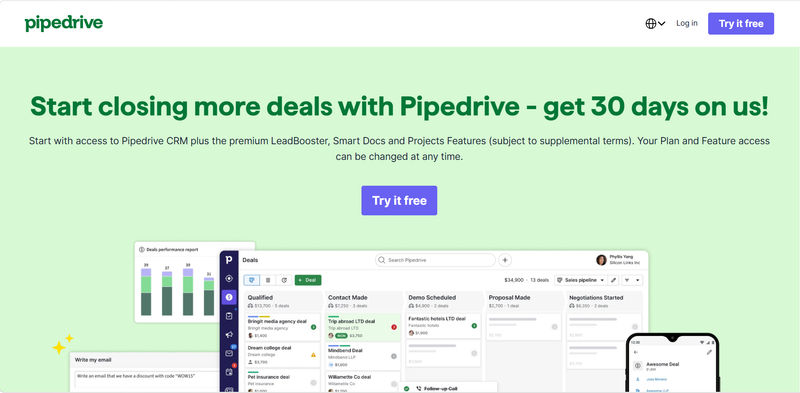
Pipedrive: Sales-Focused Organization Built around the visual sales pipeline, it is ideal for managing deal-centric transactional data. It incorporates automated data entry and surfaces deal insights, giving sales teams a clear process to follow.
Zoho CRM: Comprehensive Customization Offers extensive customization to create unique data modules for specific business needs. Its AI assistant, Zia, actively monitors data anomalies and predicts sales trends based on historical data.

Close, Attio, Keap: Specialized Capabilities Close seamlessly integrates and automatically logs omnichannel communication data (calls, emails, SMS). Attio uses a flexible, relationship-based data model with real-time syncing and AI-driven intelligence. Keap combines CRM with marketing automation, managing preference and transactional data to trigger lifecycle campaigns for SMBs.
2. Turning Data into Actionable Insights for Business Growth
This is the ultimate goal. With clean, organized customer data in CRM, you can achieve real business outcomes.
Personalized Customer Experiences: Send a special offer to customers who viewed a specific product page three times but didn't buy, using automated workflows.
Improved Sales Forecasting and Lead Scoring: Automatically score leads based on their demographic fit and behavioral engagement, allowing your sales team to focus on the hottest prospects.
Enhanced Marketing Campaign Effectiveness: Use detailed segmentation to run A/B tests and discover which messages and offers deliver the best results, continuously optimizing your marketing spend.
Better Customer Service and Retention: Equip your support team with a complete history of every customer interaction, enabling them to solve problems faster and turn service into a retention driver.
Compare CRMs that turn clean data into real insights — in minutes, not weeks.
Common Challenges and How to Overcome Them
Building a data-driven culture isn't without its hurdles. Here are a few common challenges and how to proactively address them.
1. Data Silos and Integration Issues
Challenge: Customer data is trapped in different software that doesn't communicate.
Solution: Prioritize a CRM with strong integration capabilities. Make it the central 'source of truth' and schedule quarterly checks to ensure all your integrated tools are still syncing data accurately.
2. Ensuring Data Security
Challenge: Protecting sensitive customer data from breaches.
Solution: Choose a reputable CRM provider with robust security features. Implement strong password policies and use role-based permissions to control who can access and edit data.
3. User Adoption and Training
Challenge: Your team resists using the CRM, falling back on old habits.
Solution: Involve your team in creating the data entry standards. Show them how clean data makes their jobs easier. Make CRM data quality a part of regular team check-ins to reinforce its importance.
Choosing the Right CRM for Your Customer Data Needs (A Business Owner's Perspective)
By now, it should be clear: you don't choose a CRM and then figure out your data. You figure out your data strategy, and that illuminates which CRM is right for you.
Questions to Ask Yourself Before Choosing a CRM
What is my primary goal? (e.g., Lead generation, sales process management, customer retention)
What are my 5 most critical data points? (e.g., Lead Source, Last Purchase Date, LTV)
Which tools must this CRM integrate with? (e.g., Email marketing, accounting, e-commerce)
How tech-savvy is my team? (Prioritize ease of use vs. advanced features)
What is my realistic budget, including potential integration costs?
Matching CRM Features to Your Business Goals
Instead of asking 'What can this CRM do?', ask 'What do I need my CRM to do for my data?'.
If your goal is sophisticated marketing automation, look for a CRM with strong behavioral tracking and segmentation features, like HubSpot.
If your goal is to streamline a high-volume sales process, prioritize a CRM with excellent pipeline management and communication logging, like Pipedrive or Close.
If you have a unique business model, look for a highly customizable platform like Zoho or a flexible one like Attio.
The market is crowded, but with a clear data strategy, you can cut through the noise and evaluate platforms based on your specific needs, not a salesperson's pitch.
Try AuthenCIO
Move to faster, smarter software evaluation with AI
Conclusion: Building a Data-Driven Future for Your Business
Your customer data is your business's most valuable, non-depreciating asset. Treating it as an afterthought is like building a house on a foundation of sand. The success of your CRM—and by extension, your sales, marketing, and service efforts—hinges on the quality and organization of the CRM data foundations you build.
By taking a strategic approach—understanding the data that matters, establishing processes for quality, and organizing it around your business goals—you transform data from a source of frustration into a powerful engine for growth. A clear data plan not only guarantees you'll get the most out of your technology investment but also paves the way for a smarter, more resilient, and truly thriving customer-focused business that consistently outpaces the competition.