
Introduction
Your marketing emails are bouncing. Your sales team is wasting hours calling wrong numbers. The report on your desk shows last quarter's customer growth, but you have a sinking feeling the numbers are inflated by duplicate entries. If you are wondering, "how do I clean up years of messy home services customer data so I can actually trust the reports I'm pulling?", you are not alone. You are facing the hidden costs of 'dirty' customer data.
Streamline your CRM evaluation process
As a business owner, you're focused on growth, not data science. But the quality of your customer data is directly tied to your bottom line. It's the foundation of your sales, marketing, and customer service efforts. When years of legacy data are messy, inconsistent, or just plain wrong, you're not just losing efficiency—you're losing money. Improving your customer data** quality** is one of the highest-leverage activities you can undertake to ensure trustworthy reporting.
This customer data clean up guide is designed for you. It's a practical, step-by-step playbook to transform your chaotic customer data into a powerful asset. We'll skip the overly technical jargon and focus on what matters: a clear process you can follow to clean and normalize your data, improve your business operations, and drive real growth.
Key Takeaways
Dirty data drains resources: Inaccurate, duplicate, or outdated customer records lead to wasted marketing spend, poor customer experiences, and skewed analytics.
Cleaning vs. Normalization: Data cleaning focuses on fixing or removing incorrect data, while normalization ensures all data follows a standardized format (e.g., standardizing 'St.' vs. 'Street').
A systematic approach is essential: Effective data hygiene requires defining standards, deduplication, standardizing formats, and validating accuracy.
Hygiene is an ongoing process: Pristine data isn't a one-time project. Implement strict entry guidelines, utilize validation rules at the point of entry, and conduct regular audits to maintain data integrity over time.
Software Covered in this Article
To help you understand CRM in the right context, this article refers to a carefully curated set of key players:





Why Clean and Normalized Customer Data Matters for Your Business
Before we dive into the 'how,' let's establish the 'why.' Treating data hygiene as a low-priority task is a critical mistake. The reality is, bad data actively sabotages your business from the inside out.
1. The Cost of Dirty Data: Hidden Pitfalls for Business Owners
Inaccurate customer data isn't just a few messy spreadsheet rows; it's a series of costly problems. Many business owners have a story about sending an email campaign to the same customer three times because of duplicates, making their company look unprofessional. These small embarrassments are symptoms of a larger issue. Research show that companies estimate 10-25% of their marketing budget is wasted due to poor data quality. Think about what that means for your business:
Business Impact | Description | Key Consequence |
Wasted Marketing Spend | Advertising budgets are wasted on duplicate leads, invalid emails, and irrelevant audiences. | Up to 25% of marketing spend can be lost to poor data quality. |
Sales Inefficiency | Sales teams lose trust in CRM data and spend time chasing incorrect or outdated leads. | Around 50% of sales time is wasted on unproductive prospecting. |
Poor Customer Experience | Incorrect names or missing interaction history make the company appear careless and erode trust. | Damaged brand perception and lower customer retention. |
Unreliable Business Decisions | Flawed data produces inaccurate reports and forecasts. | Leads to misguided strategy and lost growth opportunities. |
2. The Benefits: How Clean Data Drives Growth and Profitability
On the flip side, investing time in data quality pays significant dividends. When your customer data is clean, consistent, and accurate, you unlock a powerful competitive advantage.
Increased ROI on Marketing: With accurate segmentation, you can run highly targeted campaigns that resonate with the right audience, dramatically improving open rates, click-through rates, and conversions.
Improved Sales Performance: Your sales team can work with confidence, knowing they have the correct contact information and a complete view of a customer's history, leading to more effective conversations and a shorter sales cycle.
Enhanced Customer Personalization: Clean data allows you to personalize every touchpoint, from marketing emails to support calls, creating a loyal customer base that feels understood.
Accurate Forecasting and Insights: Reliable data leads to reliable reports. You can confidently forecast revenue, identify your most valuable customer segments, and make strategic decisions that propel your business forward.
Understanding the Fundamentals: What is Data Cleaning and Normalization?
Let's demystify these terms. Think of your customer database as a warehouse. If inventory is misplaced, mislabeled, or duplicated, you can't find what you need. Data cleaning and normalization are the processes of organizing that warehouse for maximum efficiency.
1. What is Customer Data Cleaning?
Data cleaning is the process of fixing or removing incorrect, corrupted, incorrectly formatted, duplicate, or incomplete data within a dataset. It's about correcting the errors.
Example: A customer's email is
john.doe@gmal.com. The cleaning process would correct the typo tojohn.doe@gmail.com.Example: You have two entries for "Jane Smith," one with an email and one with a phone number. The cleaning process would merge them into a single, complete record.
2. What is Customer Data Normalization?
Data normalization (or standardization) is the process of transforming data into a single, consistent format. It's not about fixing errors, but about eliminating inconsistencies.
Example: You have customer addresses with the state listed as "CA," "Calif.," and "California." Normalization would change all of them to a single standard, like "CA."
Example: Job titles are entered as "VP of Sales," "Sales Vice President," and "VP, Sales." Normalization would convert them all to a consistent format, such as "VP, Sales."
3. Key Differences and Why You Need Both
Think of it this way: Cleaning fixes what is wrong, while normalization makes everything consistent. You need both. Cleaning ensures your data is accurate, and normalization ensures it's uniform and easy to analyze.
Data Issue | Before | After (Cleaned & Normalized) | Process |
Typo |
|
| Cleaning |
Duplicate | Two records for | One merged record for Jane Doe | Cleaning |
Inconsistent Format |
|
| Normalization |
Inconsistent Value |
|
| Normalization |
Missing Data | Last Name field is blank |
| Cleaning (Enrichment) |
Step-by-Step Guide to Cleaning Your Customer Data
Effective customer database cleaning requires systematic customer data cleanup and unification strategies to consolidate fragmented records. If you are wondering how to clean and update customer data, this six-step framework provides the exact workflow. Crucially, you must clean, dedupe, and standardize a customer database before enrichment. Adding third-party data to a messy CRM multiplies errors; deduplicate and normalize your existing records first to ensure accurate enrichment.
Step 1: Define Your Data Quality Standards
Before changing a single cell, define what 'clean' looks like for your business. Create a data dictionary outlining your rules to prevent future messes.
Quick-Start Minimums: At minimum, decide on standard formats for:
Customer Names: Proper Case (e.g., 'John Smith').
Company Names: Apply strict company name cleaning and normalization rules. Strip legal suffixes like "LLC" or "Inc." unless necessary. Standardize capitalization (e.g., "Apple" not "apple inc.") and use consistent formats for branches (e.g., "Acme - Northeast").
Email Addresses: All lowercase.
Phone Numbers: Consistent formatting (e.g.,
XXX-XXX-XXXX).Key Dropdown Fields: Define exact options (e.g., 'Lead Source').
Step 2: Identify and Remove Duplicate Records
Duplicates inflate contact lists, skew reporting, and cause double-outreach. To clean and resolve inconsistent customer data identities automatically, leverage identity resolution features in your CRM.
Automated deduplication tools use fuzzy matching (identifying variations like "Jon" vs. "John") and deterministic logic (matching exact emails) to link fragmented records. In platforms like HubSpot or Zoho, you can configure automated merge rules. By defining master record criteria—such as prioritizing the profile with the most recent activity—the system automatically merges conflicting identities into a single source of truth.
If using spreadsheets, rely on built-in functions. In Google Sheets or Excel, select your target column, and navigate to 'Data' > 'Data Cleanup' > 'Remove duplicates.' Always work on a copy of your data.
Step 3: Correct Inaccurate or Outdated Information
This step involves finding and fixing obvious errors. This can be a manual process of scanning your data, but you can also use filters to speed it up.
Typos: Look for common misspellings in names, companies, and email domains (
gmal.com,yaho.com).Outdated Data: CRM data degrades by about 22.5% every year. Filter for contacts you haven't engaged with in over a year or whose job titles might be obsolete. Consider a re-engagement campaign to confirm their details or prune the list.
Find software that keeps your CRM data fresh automatically— compare options powered by AuthenCIO’s AI.
Step 4: Standardize Data Formats
Using the rules you defined in Step 1, it's time to enforce consistency. This is where a key part of normalization happens.
Case: Ensure proper capitalization for names (e.g.,
john smithbecomesJohn Smith). Most spreadsheet programs have aPROPER()function for this.Formatting: Apply consistent formats for dates, phone numbers, and addresses.
Values: Use 'Find and Replace' to standardize field values. For example, find all instances of "U.S.A." and replace them with "USA."
Step 5: Handle Missing Data (Imputation or Enrichment)
Incomplete records limit your ability to segment and personalize. A contact with only an email address is far less valuable than one with a name, company, and job title.
Data enrichment is the process of appending third-party data to your existing records. For example, using just an email address, enrichment tools can often find a person's name, job title, and social media profiles. Some CRMs like Close or marketing automation platforms like HighLevel have integrations that can help automate this. While powerful, be mindful that advanced data enrichment often comes with a cost. Prioritize enriching critical fields like missing contact information or company details over less essential demographic data, especially when starting out.
Step 6: Validate and Verify Data Accuracy
Finally, verify that the data is real. The most critical validation is for email addresses and phone numbers.
Email Validation: Use a bulk email verification service to check your list for invalid or non-existent email addresses. This will drastically reduce your bounce rate and protect your sender reputation.
Address Verification: For businesses that ship physical products, address validation services can confirm that a mailing address is correct and deliverable.
Find Perfect Software For Your Business
Mastering Customer Data Normalization: Practical Techniques
Normalization unlocks powerful analytics and segmentation by creating a single source of truth. Beyond basic contact details, businesses must also normalize ad revenue data and related metrics tied to customer profiles. To normalize ad revenue data, convert all currency values to a single standard (e.g., USD), align reporting timezones, and map disparate campaign tags into unified naming conventions. This ensures accurate customer lifetime value (CLV) calculations across your CRM.
Technique 1: Parsing Data Fields
Break down composite fields into separate components. For example, split a 'Full Name' field into 'First Name' and 'Last Name' fields. This allows you to personalize greetings like "Hi John," instead of "Hi John Smith."
Technique 2: Standardizing Categories
Standardize categories that have multiple variations. If you have lead sources like "Webinar," "Live Event," and "Content Download," you might normalize them into a broader category like "Inbound Marketing."
Technique 3: Abbreviation Consistency
Decide on a single standard for all abbreviations, such as St. versus Street or Inc. versus Incorporated. Without normalization, variations like 'USA' and 'United States' create duplicate segments.
Apply strict guidelines for cleaning job titles for professional emails to ensure clean mail-merges:
Standardize acronyms: Consistently use either "VP" or "Vice President."
Remove qualifiers: Strip "Sr.," "Jr.," or tier numbers (e.g., "Marketing Manager II") so automated greetings read naturally.
Eliminate jargon: Convert company-specific titles (e.g., "Chief Happiness Officer") to standard equivalents ("HR Director")
Let AI help you identify CRMs that boost marketing ROI and data accuracy
Standardizing Messy Customer Onboarding Data
The best way to standardize messy customer onboarding data into reusable data products is to implement automated validation and transformation rules the exact moment a new client submits their information. During onboarding, data often arrives in wildly unpredictable formats—inconsistent dates, mismatched company names, and varied contact structures. By intercepting and normalizing this information early, you prevent downstream errors and instantly convert raw inputs into structured, high-value assets your entire organization can leverage.
Choosing the right software to standardize messy customer data into clean reusable data products during onboarding is critical for scaling your operations. Modern data onboarding platforms act as a secure bridge between your customer's raw files and your database. They automatically map columns, flag errors, and enforce your specific formatting rules before the data ever reaches your CRM. If you are looking for software for standardizing messy customer data into clean reusable data products during onboarding, prioritize tools that offer intelligent field mapping and real-time error flagging.
To ensure your software to standardize messy customer data into clean reusable data products onboarding processes run smoothly, look for solutions that empower customers to fix their own formatting errors via self-serve portals. When you let specialized software standardize messy customer data clean reusable data products onboarding becomes a frictionless, automated experience rather than a manual administrative burden.
Tools and Software for Customer Data Cleaning and Normalization
When evaluating tools to clean and normalize customer data, you do not have to rely on manual entry. What tools let you normalize marketing data before storing it? Customer Data Platforms (CDPs) like Segment and mParticle, alongside integration pipelines like Fivetran, allow you to standardize and clean incoming marketing streams before they ever reach your CRM or data warehouse. This proactive approach prevents dirty data from polluting your core systems. Beyond pre-storage solutions, many tools you already use offer powerful features to maintain ongoing data hygiene.
1. CRM Platforms with Built-in Features:
Your CRM should be your first line of defense against dirty data. If you are asking, "what CRM keeps data normalized while still easy to query?", prioritize platforms that offer a normalized data model out-of-the-box. A CRM with normalized data model easy to query ensures that related records (like contacts and companies) are logically separated to prevent redundancy, yet seamlessly connected for reporting.
HubSpot: Offers a dedicated Command Center with data quality tools. It provides a normalized data model out-of-the-box, keeping objects distinct but easy to query via its custom report builder. It can automatically find and suggest merges for duplicate contacts and companies. You can also use workflows to standardize properties, such as capitalizing names or formatting data upon entry.
Zoho CRM: Has strong deduplication features and allows admins to set up validation rules to ensure data is entered correctly from the start. Its relational architecture keeps data normalized while still easy to query. It also includes tools for mass updating and standardizing records.
Pipedrive: Includes a simple but effective 'Merge Duplicates' feature that identifies potential duplicates based on name, email, or phone number. Its strength lies in flexible custom fields, which you can set up with standardized dropdowns to prevent inconsistent data entry.
Keap: Helps maintain clean data through robust tagging and segmentation. By using automated tagging rules, you can keep contacts organized and easily identify segments that may need review or cleanup.
Close: A sales-focused CRM known for its powerful data import and cleanup tools. When importing new leads, it can automatically detect and handle duplicates, preventing them from entering your system in the first place.
2. Project Management & Automation Tools:
Monday: You can use a platform like Monday.com to create a 'Data Hygiene' board. Create tasks for each step of the cleaning process, assign them to team members, and set deadlines to ensure the project stays on track.
HighLevel: This all-in-one platform can automate many data hygiene tasks. You can build workflows that trigger when a new contact is added, automatically formatting phone numbers, standardizing fields, or tagging contacts based on their information.
3. Specialized Data Management Solutions:
Note that specialized platforms often represent a more significant investment and learning curve, typically suited for businesses with growing data complexity that require robust customer data platform hygiene.
Centripe: A Customer Data Platform (CDP) that specializes in unifying customer data from multiple sources into a single customer view. It's designed to be the central hub for all your customer information, automatically cleaning and normalizing data as it flows in. This automated approach ensures strict CDP data hygiene, preventing the downstream errors caused by poor customer data platform hygeine.
Attio: Offers a uniquely flexible data model. You can build your CRM exactly how you want it, defining objects and properties with strict rules. This preventative approach ensures data is structured and consistent from the moment it's created. As a flexible "data normalization" tool founder brand teams frequently adopt, it significantly reduces the need for future cleanup.
Ongoing Data Hygiene: Best Practices for Sustained Quality
Cleaning your data once is great, but keeping it clean is the real goal. This requires a shift from a one-time project to an ongoing business practice.
1. Implement Data Entry Standards and Guidelines
This is your rulebook for data. It should define who is responsible for data quality, how data should be entered, and how often it should be audited. Your data dictionary from Step 1 is the core of this policy.
2. Regular Data Audits and Reviews
Schedule a data audit on your calendar—quarterly is a good starting point. During this audit, run a health check on your database. Look for duplicates, incomplete records, and formatting inconsistencies that have crept in.
3. Utilize Data Validation Rules at Point of Entry
Use the features in your CRM and other tools to automate data hygiene. Set up workflows to standardize data upon entry. Use required fields in your web forms to prevent incomplete submissions. The more you can automate, the less manual cleanup you'll have to do.
4. Train Your Team on Data Management Protocols
Your team is the primary source of new data. If they aren't following the same rules, your database will quickly become a mess again. Hold a brief training session to walk them through your data governance policy. A good 'golden rule' for them to remember is: "If in doubt, search first, then standardize, then save."
5. For Businesses Without a Central CRM
If you're using multiple simple tools (e.g., an email platform, a spreadsheet, and invoicing software), a full CDP might be overkill. Instead, consider a quarterly export-and-merge strategy. Export customer lists from each tool into a master spreadsheet where you can perform your cleaning and normalization. This creates a temporary 'single view' for analysis and cleanup.
Detailed Examples: Cleaning and Normalizing Data in Action
Let's make this concrete with some real-world scenarios.
1. Example: Merging Duplicate Leads in HubSpot
Scenario: You notice your email campaign report shows two contacts,
bill@abccorp.comandwilliam@abccorp.com, are the same person: Bill Smith.

Action: In HubSpot, you navigate to 'Contacts,' select the two records, and click 'Merge.' HubSpot shows you the data from both records side-by-side. You choose
william@abccorp.comas the primary email and HubSpot intelligently combines the remaining properties, creating a single, comprehensive record for William Smith.
2. Example: Standardizing Address Formats in Zoho CRM
Scenario: Your sales reps have been entering state information inconsistently. You have records with "NY," "N.Y.," and "New York."

Action: In Zoho CRM, you create a view to filter all contacts where the 'Mailing State' contains any of these variations. You then use the 'Mass Update' feature to change the 'Mailing State' field to your standard format, "NY," for all selected records in a single action.
3. Example: Identifying Inconsistent Company Names in Pipedrive
Scenario: You have multiple deals associated with what should be the same organization, but they're listed as "ABC Corp," "ABC Corporation," and "ABC Inc."
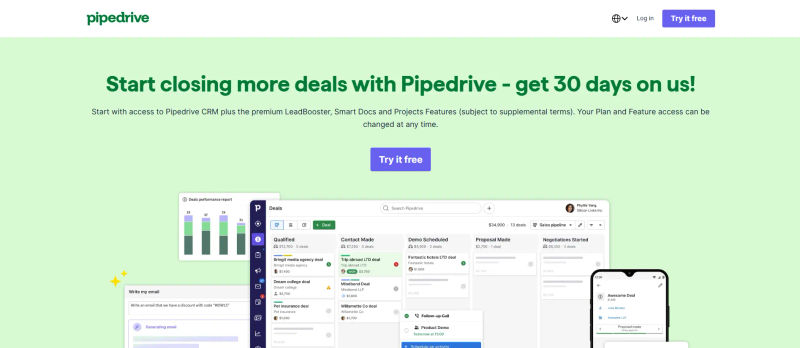
Action: In Pipedrive, you go to your 'Organizations' list and search for "ABC." You can then manually merge these organizations into a single entity. To prevent this, you train your team to always search for an existing organization before creating a new one.
4. Example: Using Monday.com to Track a Data Cleaning Project
Scenario: You've decided to do a full Q4 data audit.

Action: You create a board in Monday.com titled "Q4 Data Audit." You create tasks like "Export all contacts from CRM," "Identify and merge duplicates," "Validate emails for top 1,000 leads," and "Standardize all job titles." You assign each task to a team member and set a due date. This turns a vague goal into an actionable project plan.
Try AuthenCIO
Move to faster, smarter software evaluation with AI
Conclusion: Empower Your Business with Pristine Customer Data
Your customer data is one of the most valuable assets your business owns. It's the lifeblood of your growth engine. Treating it as such isn't a one-time chore; it's an ongoing commitment to excellence.
By following the steps outlined in this guide, you can move from being reactive—fixing problems as they arise—to being proactive, creating systems that maintain high-quality data as a standard practice. Clean, normalized data is the foundation for meaningful personalization, accurate sales forecasting, and a superior customer experience. It's how you achieve true data normalization for business and turn raw information into a real competitive advantage.
Feeling overwhelmed by the software options? Choosing the right CRM or data tool is the first step.