
Introduction
Choosing a Customer Relationship Management (CRM) system feels like a high-stakes decision because it is. Get it right, and you unlock streamlined processes, happier customers, and sustainable growth. The average ROI for CRM is a staggering $8.71 for every dollar spent, with 2026 industry benchmarks showing even higher returns for AI-integrated systems. Get it wrong, and you're left with a costly piece of software your team hates using, leading to wasted money and frustrated employees. In fact, recent 2026 reports show that a staggering 83% of senior executives still struggle with user adoption.
Streamline your CRM evaluation process
So, what is a CRM? At its core, a CRM is a system that helps you manage all your company's relationships and interactions with customers and potential customers.
The goal is simple: improve business relationships to grow your business. A CRM system helps companies stay connected to customers, streamline processes, and improve profitability.
With the global CRM market having been valued at over $101 billion in 2024 and projected to surge past $130 billion in 2026, the number of options is overwhelming. Every crm vendor promises to be the ultimate solution. But the truth is, the best vendor crm isn't a one-size-fits-all product. It's the one that fits your unique processes, team, and goals.
If you are asking yourself, "how to choose the right crm vendor today?", this crm vendor guide provides a clear, step-by-step framework to cut through the noise. We'll walk you through a structured CRM vendor evaluation process to master crm vendor selection, helping you make a confident, data-driven decision that fuels your business for years to come.
Key Takeaways
Define your needs before shopping: Avoid paying for unnecessary features by mapping your specific business goals, current bottlenecks, and essential integrations before looking at software.
Match the vendor to your primary use case: There is no one-size-fits-all CRM. Choose platforms like HubSpot for all-in-one marketing, Pipedrive for sales-focused pipelines, or Zoho for deep customization.
Calculate the total cost of ownership: Look beyond the monthly subscription fee. Factor in hidden costs such as implementation, premium add-ons, team training, and future scaling.
Test with your actual team: Never skip the trial phase. Run structured demos and hands-on trials with the employees who will use the system daily to evaluate true user experience and workflow compatibility.
Software Covered in this Article
To help you understand CRM in the right context, this article refers to a carefully curated set of key players:







Step 1: Define Your 'Why' — Map Your Business Needs Before You Shop
The most common mistake in CRM selection is starting with features. Before you look at a single vendor website, you must look inward. The process begins with a deep understanding of the problems you need to solve and the goals you want to achieve.
Think of it like hiring a new employee. You wouldn't just look for someone with a generic list of skills; you'd define the specific role, responsibilities, and outcomes you expect them to deliver. Do the same for your CRM.
1. Map Your Customer Journey: Trace the path a customer takes from their first interaction (e.g., visiting your website) to becoming a loyal advocate. Identify every touchpoint and the teams involved. Where are the handoffs? Where do leads get dropped? Where does communication break down?
2. Identify Bottlenecks and Pain Points: Talk to your sales, marketing, and customer service teams. What are their biggest daily frustrations?
Sales Team: - "We spend too much time on manual data entry."
"We don't know which leads to prioritize."
"Handoffs from marketing are a mess."
Marketing Team: - "We can't track which campaigns are driving actual sales."
"Our email lists are disorganized."
Service Team: - "We don't have a full history of a customer's interactions when they call for help."
"We're managing support tickets in a shared inbox, and it's chaos."
3. Set Quantifiable Goals: Translate those pain points into clear, measurable objectives. This transforms a vague desire for "better organization" into a concrete business case.
Instead of: "We need better sales tracking."
Try: "We need to reduce our average sales cycle from 60 days to 45 days."
Instead of: "We want faster lead follow-up."
Try: "We need to reduce lead response time from 24 hours to under 1 hour."
This internal audit is your North Star.
For example, if your primary goal is to fix a complex, multi-stage sales process, a sales-focused CRM like Pipedrive or Close, with their strong visual pipeline management, should be on your initial list. If your biggest headache is disorganized customer support, a service-centric platform like Zendesk or Freshworks might be a better starting point.
Step 2: Prioritize Key Features — What Really Moves the Needle?
Once you know your 'why,' you can start evaluating the 'what.' But beware the feature trap—getting dazzled by a long list of functionalities you'll never use. Research shows that 43% of CRM users utilize fewer than half of the features available to them. To avoid this, use a prioritization framework.
Categorize features into three buckets:
Must-Haves: Non-negotiable features essential to solving your core problems.
Should-Haves: Important features that would significantly improve efficiency but aren't deal-breakers.
Could-Haves: 'Nice-to-have' features that are appealing but not critical to your primary goals.
Here are the core feature categories to evaluate:
Feature Category | Why It Matters | Example Tools | Tip |
User Interface & UX | Drives user adoption | Attio, HubSpot | Look for clean, intuitive design |
Integrations | Prevents data silos | Pipedrive, Zoho | Check email, calendar, and marketing tool compatibility |
Customization | Aligns CRM with your workflows | HubSpot, Monday.com | Ensure it can scale with your growth |
Automation | Increases efficiency | Close, Freshworks | Automate lead routing and follow-ups |
Reporting | Enables data-driven decisions | HubSpot, Zoho | Focus on clear dashboards and analytics |
1. User Interface (UI) and User Experience (UX)
This is the make-or-break factor for user adoption. If your team finds the CRM clunky, confusing, or slow, they simply won't use it. Look for a clean, intuitive interface that requires minimal training.
Example: Modern CRMs like Attio are gaining popularity for their sleek, consumer-app-like interfaces that feel intuitive from day one. In contrast, more powerful enterprise systems can sometimes feel overwhelming and may require dedicated training sessions to master.
2. Integration Capabilities
Your CRM doesn't live on an island. It must connect seamlessly with the tools you already use every day. A lack of integration creates data silos and forces your team into time-wasting manual workarounds.
Key Integrations to Check: Email (Gmail/Outlook), Calendar, Marketing Automation (e.g., Mailchimp), Accounting (e.g., QuickBooks), and Customer Support tools.
Example: Zoho CRM is part of a tightly integrated ecosystem of business apps (Zoho Books, Zoho Campaigns, etc.). This can be a massive advantage if you're building your tech stack from scratch. If you rely on a diverse set of third-party tools, look for a platform with an extensive app marketplace, like Pipedrive, or robust Zapier compatibility.
3. Customization and Scalability
Your business is unique, and your CRM should adapt to your processes, not the other way around. Can you create custom fields, pipelines, and dashboards that reflect how you actually work? Also, consider your future. Will this CRM grow with you, or will you outgrow it in two years?
Example: HubSpot offers a high degree of customization, especially in its higher-tier plans, allowing you to create custom objects to track anything from shipments to projects. A platform like Monday.com is built on a foundation of flexibility, allowing you to build custom workflows for CRM, project management, and more, all in one place.
4. Automation and Workflow
Automation is where you get a significant return on your CRM investment. It eliminates repetitive manual tasks, ensures consistency, and frees up your team to focus on high-value activities like talking to customers.
Look for: Automated email sequences, task creation, lead routing, and data entry.
Example: Close is known for its powerful, sales-focused automation, including features like Power Dialer and automated email workflows designed to help sales reps be more efficient. Freshworks also excels here, with AI-powered bots and intelligent workflows that can automate actions across sales and support.
5. Reporting and Analytics
If you can't measure it, you can't improve it. A good CRM provides actionable insights into your business performance. You need clear, easy-to-understand dashboards and reports that help you track progress against your goals.
Example: HubSpot CRM is renowned for its robust reporting capabilities, offering deep insights into marketing attribution, sales forecasting, and service team performance. Even out of the box, it provides dashboards that give you a 360-degree view of your customer journey.
Find Perfect Software For Your Business
Step 3: Compare Top CRM Vendors: A Practical Overview
Effective CRM vendor evaluation requires matching your prioritized features to each platform's core philosophy. If you are wondering which vendors you should consider for CRM, look at the specific use cases below—ranging from all-in-one growth to dedicated sales. When determining how to evaluate enterprise CRM software vendors, look beyond basic features and prioritize advanced data security, complex role permissions, and global scalability.
CRM | Best For | Key Strength | Consider If... |
HubSpot | All-in-one growth platform | Integrated marketing, sales & service | You want an easy-to-use, scalable CRM |
Zoho CRM | Deep customization | Affordable, flexible ecosystem | You need tailored modules |
Pipedrive / Close | Sales-focused teams | Visual pipelines, automation | You prioritize deal management |
Project-based teams | Work OS flexibility | You need CRM + project tracking | |
Zendesk / Freshworks | Service-oriented orgs | Support + sales integration | You focus on customer experience |
Attio | Modern teams | Sleek, collaborative design | You value UX and simplicity |
1. For the All-in-One Growth Platform: HubSpot

Best for: Businesses that want a single, integrated platform for marketing, sales, and service. HubSpot's free CRM is a powerful entry point, and its platform scales to meet the needs of large enterprises. Its strength lies in its seamless data flow between departments and its excellent reporting.
Consider if: You value ease of use and want to build your entire customer-facing operation on one system.
2. For Deep Customization and an Integrated Suite: Zoho CRM

Best for: Businesses needing a highly customizable CRM and integrated applications at a competitive price.
Vendor Comparison & Trust Signals: To evaluate the customer relationship management company Zoho CRM on vendor comparison, it rivals Salesforce in deep customization but at a significantly lower cost. It also provides strong trust signals, including SOC 2 compliance, ISO certifications, and over 100 million global users.
Consider if: You have unique processes requiring custom modules and want a unified app experience.
3. For Laser-Focused Sales Teams: Pipedrive & Close
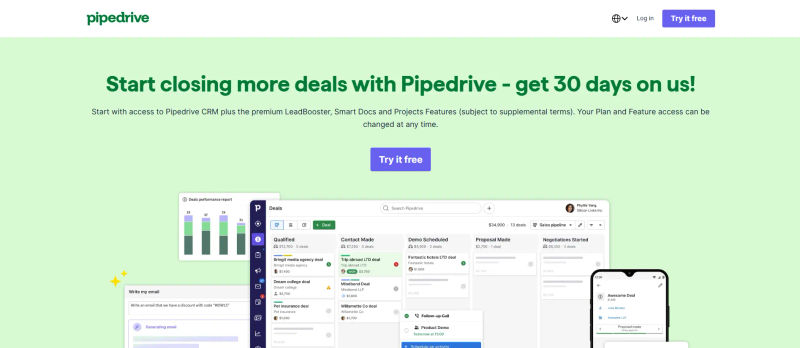
Best for: Sales-driven organizations whose primary goal is to manage and close deals efficiently. Pipedrive is famous for its visual, intuitive sales pipeline management and post-sale tracking. When managing projects in Pipedrive, you can easily configure who each board is visible to using granular visibility settings. Close excels with its built-in communication tools (call, email, SMS) and powerful automation for high-volume sales teams.

Consider if: Your top priority is improving sales team performance and you don't need extensive marketing or service features.
4. For Flexible Work and Project Management: Monday.com

Best for: Teams that need to manage customer projects and relationships in the same place. Monday.com is a flexible "Work OS" that can be configured into a powerful CRM, offering strong project management and collaboration features alongside traditional CRM functionality.
Consider if: Your business is project-based (e.g., agencies, consulting firms) and you need a tool that bridges the gap between sales and delivery.
5. For Customer Support-Centric Businesses: Zendesk & Freshworks

Best for: Companies where customer service is a key differentiator. Zendesk started in support and has built a robust sales CRM (Zendesk Sell) that integrates tightly with its support platform, giving a complete view of the customer. Freshworks offers a similar all-in-one approach with a strong emphasis on user-friendliness and AI-driven automation.

Consider if: You need to break down the silos between your sales and support teams to provide a seamless customer experience.
6. For Modern, User-Friendly Design: Attio

Best for: Startups and modern teams who prioritize a beautiful, fast, and collaborative user experience. Attio is built around flexible data models and a relationship-first approach, automatically enriching contact data and fostering team collaboration.
Consider if: User adoption has been a challenge with past tools and your team values a modern, intuitive interface above all else.
Step 4: Calculating the True Cost — Beyond the Monthly Subscription
The sticker price of a CRM is just the beginning. To avoid budget surprises, calculate the Total Cost of Ownership (TCO), which includes all direct and indirect lifetime costs.
Here’s a simple TCO framework:
Cost Component | Description | Example Consideration |
Subscription Fees | Per-user, per-month pricing | Will costs scale as your team grows? |
Implementation & Migration | Data import & setup | Do you need external help? |
Training & Onboarding | Time and resources for adoption | Is vendor training included? |
Customization & Integration | Additional setup or API costs | Are integrations built-in or paid? |
Support | Ongoing help and maintenance | Is premium support extra? |
Subscription Fees: Model the per-user, per-month cost for your current team and projected 1-3 year growth. A tool like Freshworks may have an attractive entry-level plan, but calculate costs as you add users and require higher-tier features.
Evaluating Lower-Cost Alternatives: Figuring out how to evaluate CRM vendors with similar features at lower cost requires checking the fine print. To effectively evaluate CRM vendors similar features lower cost, look for hidden usage caps. A cheaper vendor might restrict API calls, data storage, custom fields, or automation runs. Always ask how to evaluate CRM vendors with similar features but lower cost by comparing these specific usage thresholds.
Implementation & Data Migration: Will you need a third-party consultant to set up the CRM and migrate data? This is often a major one-time cost.
Training, Onboarding, and Support: When evaluating vendor support onboarding training CRM vs BI tools, the context differs significantly. CRM adoption relies on daily data entry by non-technical staff (sales, support), meaning onboarding must prioritize intuitive workflow integration and user adoption. Conversely, BI tools are used by specialized analysts focusing on data modeling. Understanding how to evaluate vendor support onboarding training CRM vs BI tools also means recognizing that CRM downtime halts active sales cycles, requiring much faster, real-time support SLAs.
Customization & Integration: Do you need custom development to integrate proprietary systems, or are there extra fees for API access?
By mapping out the TCO, you can make a much more informed comparison. A CRM with a higher monthly fee but inclusive support and easy implementation might end up being cheaper in the long run than a low-cost option with numerous hidden fees.
Step 5: The Shortlist — How to Run Effective Demos and Trials
You've done your research and narrowed your options down to 2-3 top contenders. Now it's time to see the software in action. If you are wondering how to compare CRM vendors without bias, the key is taking control of the demo and trial process rather than letting the vendor run a generic sales pitch.
1. Create a Demo Scorecard: To understand how to compare CRM vendors objectively without bias, rely on a standardized scorecard. Based on your 'Must-Have' and 'Should-Have' features from Step 2, create a checklist. Score each vendor on how well they meet each requirement. This prevents flashy features or charismatic sales reps from skewing your evaluation.
2. Prepare Standardized Key Questions: Go into the demo with a list of specific, scenario-based questions and ask every vendor the exact same set to ensure an apples-to-apples comparison:
"Show me how a new lead from our website's contact form is automatically assigned to a sales rep."
"Walk me through the exact steps for generating our key monthly sales report."
"How does your system integrate with QuickBooks? Can we see it in action?"
"What does your onboarding and customer support process look like for a company our size?"
3. Use Free Trials for Real-World Testing: A free trial is your chance to truly kick the tires. Don't just import a few contacts. Involve a small group of your end-users (a sales rep, a marketing manager) and have them test 2-3 of your most critical, real-world use cases.
Example: During your Zendesk trial, don't just look at the interface. Create a mock customer support ticket. See how that ticket is tracked, how the agent communicates with the customer, and how that interaction data becomes visible to the sales team in the CRM. Can the sales rep easily see if they are talking to an unhappy customer?
This hands-on testing is the single best way to gauge usability and determine if the CRM's workflow truly fits your team's day-to-day reality.
Try AuthenCIO
Move to faster, smarter software evaluation with AI
Conclusion: Making Your Final Decision with Confidence
Choosing a CRM is a journey that starts with introspection and ends with a strategic business decision. By following this framework—defining your needs, prioritizing features, calculating the true cost, and testing your shortlist—you move from being overwhelmed by options to being empowered with a clear process.
Remember, the goal isn't to find the 'perfect' CRM, but the right CRM for your business right now, with the flexibility to grow with you tomorrow. A well-chosen system will become the backbone of your customer operations, driving efficiency and growth for years. By investing the time in a thorough CRM vendor evaluation, you are setting your business up for long-term success and finding the best CRM software for business owners like you.
Feeling overwhelmed? The structured process we just outlined is exactly what our platform is built to simplify.