
Introduction
By 2026, the landscape of Small and Medium-sized Business (SMB) sales has fundamentally shifted from volume-based outreach to high-precision relationship management. The days of the "rolodex" mentality are long gone, replaced by a demand for hyper-personalized interactions and data-driven insights. However, for many relationship-driven sales teams, a significant friction point remains: the administrative burden of maintaining a Customer Relationship Management (CRM) system. It is a paradox that has plagued the industry for decades—sales representatives are hired to sell, yet they often spend upwards of 20% of their week on manual data entry rather than engaging with prospects.
Streamline your software evaluation process
In this environment, Salesflare has solidified its position as a specialized tool designed to solve the "Black Hole" problem—where leads vanish due to a lack of follow-up and data decay. Unlike generalist platforms that attempt to be everything to everyone, Salesflare focuses intensely on intelligent automation and relationship intelligence. It promises a "zero-input" experience, leveraging advanced scraping and API integrations to populate data that would otherwise require hours of manual typing. While the software handles the quantitative data, it is crucial to acknowledge that the human element remains the primary closer. Salesflare clears the administrative clutter so that the sales professional can focus on the nuance of the deal.
As the global CRM market is projected to reach over $262 billion by 2032, the sub-segment of automation-first CRMs is growing rapidly. SMBs are no longer satisfied with empty databases; they demand systems that work for them. This guide provides an authoritative, deep-dive analysis of Salesflare’s capabilities in 2026, evaluating its pricing, automation features, and how it stacks up against titans like HubSpot, Salesforce, and Zoho, as well as nimble competitors like Attio, Capsule, Freshworks, Monday, and Pipedrive.
Key Takeaways
If you are wondering, "tell me why Salesflare is a great choice for me," the answer lies in its zero-input philosophy. Salesflare CRM is built specifically for B2B small businesses, agencies, and startups that want to eliminate manual data entry and focus entirely on building relationships and closing deals.
Automated Data Entry: Salesflare automatically syncs with your email, calendar, and phone to build out contact profiles, track interactions, and log meetings without requiring manual updates.
Seamless Integrations: It offers deep, native integrations with Google Workspace, Microsoft Office 365, and LinkedIn, ensuring your sales data is always current across your existing tech stack.
Relationship Intelligence: The platform tracks email opens, link clicks, and website visits, giving you real-time insights into prospect engagement so you can time your follow-ups perfectly.
SMB Focus: Unlike bloated enterprise platforms, Salesflare provides a streamlined, visual pipeline that is easy to adopt, making it a top contender in 2026 for teams struggling with CRM adoption.
Pros and Cons: Is Salesflare Right for Your Sales Team?
Every piece of software has trade-offs. While Salesflare excels in automation, it is not the perfect solution for every business model.
Pros
Ease of Setup: Salesflare is operational in under an hour. In comparing Zoho CRM vs Attio vs Pipedrive vs HubSpot vs Salesforce vs Monday.com ease of setup implementation for non-technical users, Salesflare and Pipedrive offer the fastest plug-and-play experience. HubSpot and Monday.com need more workflow configuration, Attio and Zoho CRM have steeper learning curves, and Salesforce requires a dedicated administrator.
Mobile Experience: The fully featured mobile app lets reps access data, log calls, and email on the fly.
Outlook/Gmail Integration: Seamless sidebar integration lets users manage the CRM entirely from their inbox.
Data Accuracy: Removing human error from data entry keeps contact database reliability high over time.
Cons
Reporting Limitations: While improved, Salesflare’s reporting capabilities still lag behind the enterprise-grade analytics of Salesforce or HubSpot. Complex forecasting models, multi-touch attribution reports, and deep cohort analysis are difficult to generate natively.
Lack of Marketing Suite: Salesflare is purely a sales CRM. It lacks the landing page builders, social media management, and CMS features found in HubSpot. Teams needing an all-in-one marketing and sales platform will need to integrate third-party tools.
Document and Contract Management: While it organizes files, native Salesflare contract management is limited. If you need to manage contracts in Salesflare, you will find it lacks built-in e-signatures, redlining, or CPQ (Configure, Price, Quote) features. Teams must rely on third-party integrations (like PandaDoc or DocuSign), whereas competitors like Pipedrive or Freshworks offer these capabilities via native add-ons.
Best for: SMBs and relationship‑driven sales teams seeking hands‑free CRM management.
Verdict: A smart, GDPR‑compliant CRM that simplifies data entry and strengthens customer relationships through AI‑driven automation.

Software covered in this article
To help you evaluate Salesflare CRM in the right context, this article compares it against a carefully curated set of competitors:









Core Philosophy: CRM Automation for Small Business
The driving philosophy behind Salesflare is the elimination of administrative overhead through intelligent automation. In the context of 2026 sales stacks, "automation" does not simply refer to sending email sequences; it refers to the autonomous gathering and organization of data. Salesflare operates on the premise that your CRM should already know who you are talking to without you having to tell it. This is particularly vital for CRM automation for small business, where teams often lack dedicated operations staff.
Automate your CRM data entry and boost SMB sales efficiency instantly with Salesflare.
1. The Zero-Input Concept and API Integration
At the heart of this philosophy is the "Zero-Input" mechanism. Traditional CRMs fail when they rely on human compliance. Salesflare addresses this by connecting directly to your communication layer—primarily Gmail, Outlook, and mobile data—via the dedicated Salesflare connector. It utilizes automated data enrichment algorithms to scrape email signatures, social profiles, and public databases to build complete contact profiles automatically.
Many teams ask: after moving from spreadsheets, we want a single tool combining enrichment, pipeline tracking and basic outbound sequences; which crm ai options deliver all-in-one functionality for smb budgets? Salesflare is built specifically for this use case, positioning itself as an all-in-one AI CRM for SMBs transitioning from spreadsheets without requiring enterprise-level spending.
Technically, Salesflare leverages robust API integrations to synchronize metadata across platforms. It tracks email opens, link clicks, and website visits, feeding behavioral data into the contact timeline. This real-time interaction tracking allows sales teams to gauge lead warmth based on actual engagement. For an SMB, this automated intelligence means a team of three can manage a pipeline volume that typically requires ten people using manual methods.
2. The Reality of Zero-Input: Managing Expectations
While the "Zero-Input" promise is compelling, it requires a realistic perspective. Automation can capture who you spoke to, when you spoke, and what files were exchanged, but it cannot capture the nuance of the conversation without human help. The sentiment of a meeting, the hidden objections raised during a coffee chat, or the personal details about a client’s family still need to be manually noted. Salesflare excels at automating the quantitative metadata (timestamps, contact info, email history), effectively reducing data entry by 70-80%, but it does not replace the need for qualitative note-taking. The most successful teams use the time saved on data entry to write richer, more strategic account notes.
Key Features: Why Salesflare Leads in CRM Automation
To understand if Salesflare is the right fit for your organization, we must dissect its core feature set. These features are designed specifically to reduce churn reduction and increase pipeline velocity by removing friction from the sales process.
1. Automated Data Enrichment and Contact Management
Salesflare’s most lauded feature is its ability to log activity without user intervention. It automatically indexes every email sent and received, every meeting scheduled in the calendar, and phone calls made via the mobile app.
Email Logging: Unlike HubSpot or Zoho, which often require a bcc address or a manual plugin click, Salesflare scans the connected inbox and maps emails to the correct opportunity automatically.
Meeting Tracking: It pulls calendar events and prompts the user to add notes immediately after the meeting concludes, ensuring that qualitative data is captured while fresh.
File Repository: Attachments exchanged via email are automatically sorted into a "Files" tab for each customer, creating a centralized document repository without manual upload.
2. Advanced Relationship Intelligence and Tracking
In 2026, relationship intelligence is a critical differentiator. Salesflare visualizes the strength of a relationship based on the frequency and recency of interactions. It uses a "hotness" algorithm to surface leads that require attention. If a prospect who has been dormant for three months suddenly opens an old proposal email, Salesflare pushes a notification to the sales rep. This feature helps relationship-driven teams prioritize their day based on intent signals rather than a static to-do list. For long-cycle B2B sales, this prevents the "silent drift" where deals are lost simply because the sales rep forgot to check in.
3. LinkedIn Integration and Social Selling
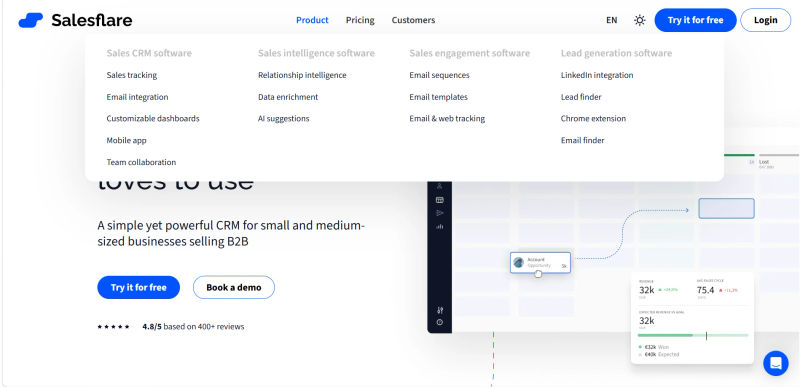
With the dominance of social selling in 2026, Salesflare’s integration with LinkedIn is a standout feature for relationship-driven teams. The Salesflare sidebar sits directly within the LinkedIn interface. When a user visits a prospect's profile, the sidebar automatically surfaces existing CRM data or offers to create a new contact with a single click.
Crucially, the tool scrapes publicly available information—job title, company, location, and email addresses—to populate the CRM record instantly. This eliminates the "tab-switching tax" that slows down prospecting. Furthermore, Salesflare can track messages sent via LinkedIn (depending on the specific plan and API permissions active in 2026), treating social messages with the same weight as emails in the relationship timeline. This holistic view is essential for modern SMBs where a deal might start on LinkedIn, move to Zoom, and close via email.
4. Email Workflows and Drip Campaigns
While it is not a full-fledged marketing automation platform, Salesflare offers robust email workflow capabilities for sales. Users can set up personalized drip campaigns that trigger based on pipeline stages.
Merge Fields: You can use custom variables to personalize emails at scale.
Automated Follow-ups: If a lead does not reply within X days, the system can automatically send a gentle nudge, ensuring no deal falls through the cracks.
Engagement Analytics: The system provides granular data on open rates and click-through rates, allowing teams to A/B test their messaging for better conversion.
5. Mobile App Experience and Offline Capabilities
For field sales representatives, the mobile experience is often the deal-breaker. Salesflare’s mobile app mirrors the desktop functionality with remarkable fidelity. It includes a "Live" tab that shows real-time tracking of email opens and website visits. Importantly for 2026, the app supports robust offline caching. Reps can view customer history, add notes, and update pipeline stages while on a flight or in a dead zone; the data synchronizes seamlessly once connectivity is restored. This reliability is a key advantage over web-wrapper apps that become useless without a signal.
Salesflare Pricing 2026: Detailed Plan Breakdown
When evaluating Salesflare pricing, you will find a refreshingly straightforward model. While pricing in the broader SaaS CRM market has fluctuated due to inflation and the addition of AI capabilities, Salesflare CRM pricing avoids the complex add-on fees typical of competitors like Salesforce or Freshworks.
For teams researching Salesflare pricing 2026, the platform maintains a simplified three-tier structure: Growth, Pro, and Enterprise. This transparent approach to Salesflare CRM pricing 2026 ensures small and medium-sized businesses can accurately forecast their software expenses without worrying about hidden costs. Below is a detailed breakdown of the current plans.
Table 1: Salesflare 2026 Pricing Tiers
Plan | Price | Best For | Top Features |
Growth | $39 / month | Solopreneurs & Early Stage Startups | • Automated CRM data input |
Pro | $64 / month | SMB Sales Teams (3-20 users) | • All Growth features |
Enterprise | $124 / month | Scaling Agencies & Mid-Market | • All Pro features |
Note: All prices shown reflect typical monthly billing. Vendors often offer lower pricing for annual commitments, but those discounts are excluded here for easier comparison. Actual costs may vary depending on your requirements, usage volumes, and negotiated terms.

Total Cost of Ownership (TCO) Analysis
When evaluating the price, it is vital to consider the Total Cost of Ownership (TCO). For teams comparing this to Zoho or Capsule, Salesflare appears more expensive on the surface ($65 vs. ~$20-30). However, Salesflare includes native data enrichment (email finding, signature scraping) and email sequence tools. With other CRMs, you often need to purchase separate subscriptions for tools like Hunter.io (for emails) or Outreach.io (for sequences), which can add $50-$100 per user/month.
When conducting a sales coaching software pricing comparison, managers often realize that adding dedicated coaching tools increases costs by $50-$150 per user. To keep the overall tech stack SMB affordable, Salesflare’s automated activity tracking provides managers with baseline performance metrics, reducing the immediate need for standalone coaching platforms. Therefore, for a feature-parity comparison, Salesflare often comes out cheaper for relationship-heavy workflows.
Regarding hidden costs, Salesflare is generally transparent, though the "Enterprise" tier includes custom training that is highly recommended for teams larger than 20 to ensure adoption. This training is often included in the annual contract but may incur a one-time setup fee for monthly subscribers.
Top 8 Salesflare Alternatives for SMBs
Finding the right Salesflare alternative depends on your team's specific workflow. When evaluating Salesflare alternatives, no data entry CRM for reps is often the top priority. While Salesflare leads in automation, several competitors now offer similar automated relationship management. Here is a comparative analysis against the major players in 2026.
1. Salesflare vs. HubSpot: Enterprise Power vs. SMB Agility
When comparing Salesflare vs HubSpot CRM, the decision comes down to your primary growth engine. HubSpot remains the giant of the industry, offering a massive all-in-one ecosystem. If your business relies heavily on inbound marketing, content creation, and complex ticket management for support, HubSpot is superior. It offers a seamless transition from marketing lead to sales opportunity.
However, in a direct matchup of Salesflare vs HubSpot, HubSpot’s free tier is notoriously limited, and costs escalate rapidly as you unlock automation features in the Sales Hub. Salesflare is a better choice for lean, outbound B2B sales teams who do not need a heavy marketing suite attached to their CRM and want to avoid the "feature bloat" and steep learning curve of a massive enterprise platform.
2. Salesflare vs. Pipedrive: Comparing Visual Sales Pipelines
When comparing Salesflare vs. Pipedrive, the core difference is automation versus activity tracking. Pipedrive is the closest direct competitor regarding pipeline management. Pipedrive is laser-focused on the sales process and activity management. It is highly customizable and offers a wider range of third-party integrations than Salesflare.
However, Pipedrive requires more manual input to keep data pristine. If your team needs strict enforcement of sales activities (e.g., "make 50 calls a day"), Pipedrive’s activity-based philosophy is a better fit. If you prefer a CRM where data fills itself so reps can prioritize quality over quantity, Salesflare wins.
3. Salesflare vs. Attio: The Modern Data-First Challenger
Attio has risen in 2026 as a favorite for tech-forward companies and startups. It offers an incredibly modern, flexible data architecture that feels more like a customizable database (similar to Notion or Airtable) than a traditional CRM. Attio is powerful for teams that want to build entirely custom workflows and data objects. However, it requires significantly more configuration than Salesflare’s "plug-and-play" nature. Salesflare is better for teams that want a standard sales process out of the box; Attio is better for teams that want to engineer their own unique process.
4. Salesflare vs. Capsule: Simplicity for Micro-Businesses
Capsule is known for its extreme simplicity and user-friendliness. It is a strong contender for very small businesses or consultants who just need a digital address book with basic opportunity tracking. It lacks the advanced automation, signature scraping, and "hotness" algorithms of Salesflare, but it comes at a significantly lower price point. If your volume of leads is low and you just need organization, Capsule is a cost-effective alternative.
5. Salesflare vs. Freshworks (Freshsales): Unified Sales and Support
Freshworks (specifically Freshsales) is a strong alternative for teams that need a unified view of sales and support. If your sales team hands off directly to a support team using Freshdesk, the integration here is unbeatable. Freshsales also offers AI-based deal insights (Freddy AI) similar to Salesflare. However, the interface can feel more traditional and "corporate" compared to Salesflare’s modern, relationship-centric UI. Freshworks is the better pick if post-sale support integration is your highest priority.
6. Salesflare vs. Zoho: The Budget Ecosystem
Zoho CRM offers the most features per dollar in the industry. It is part of a massive ecosystem of business apps (finance, HR, projects). However, the user interface (UI) can feel cluttered and dated compared to Salesflare’s sleek design. Implementation often takes longer due to the sheer number of configuration options. Zoho is best for businesses that want to run their entire operation on one low-cost suite and are willing to sacrifice some usability and automation speed.
7. Salesflare vs. Monday.com: Project-Based Sales
Monday.com evolved from a project management tool into a robust CRM layer. When conducting a HubSpot CRM vs Salesforce vs Zoho CRM vs Pipedrive comparison (2025 - 2026), buyers evaluating logistics and sales management often find those traditional platforms lack post-sale workflow tools. Monday.com fills this gap by treating sales as a project to be managed from end to end.
If your process involves complex delivery steps or installation scheduling, Monday handles the entire lifecycle. Salesflare is superior for automated relationship building, whereas Monday excels at the logistics and project execution that follows the sale.
8. Salesflare vs. Salesforce: The Enterprise Standard
Based on reviews, Salesflare vs. Salesforce comes down to zero-input automation versus infinite customization. Users praise Salesflare for its automated data capture, while Salesforce users highlight its enterprise ecosystem but frequently cite manual data entry fatigue.
For SMBs, Salesforce is often overkill. It is expensive, complex, and requires dedicated maintenance. However, if your goal is to scale to an enterprise level rapidly (100+ reps) or require legacy ERP integrations, starting with Salesforce prevents painful migrations.
In a broader HubSpot vs Pipedrive vs Zoho CRM vs Monday.com vs Attio vs Salesforce sales automation features comparison 2025 2026, Salesforce remains the undisputed leader in custom workflows. Yet, for relationship-driven boutique firms and SMBs, Salesflare provides a superior user experience and faster ROI.
Strategic Implementation: Maximizing ROI with Salesflare
To get the most out of Salesflare, teams should move beyond basic installation. A strategic implementation involves mapping out your "relationship signals." Teams should define what constitutes a "warm" lead versus a "cold" one and configure Salesflare’s notification settings accordingly. Furthermore, integrating Salesflare with tools like Slack or Microsoft Teams can centralize notifications, ensuring that the sales team never misses a beat.
Successful adoption also requires a cultural shift. Managers must stop asking "Did you log that call?" and start asking "What did the data tell us about that client's intent?" This shift from data entry to data analysis is where the true ROI of Salesflare lies.
Find Perfect Software for Your Business
The First 30 Days: An Implementation Checklist
To ensure your team actually adopts the software, follow this 30-day roadmap:
Day 1-3: Technical Setup. Connect all email accounts (Gmail/Outlook) and calendars. Install the mobile app on all devices. Install the LinkedIn sidebar extension.
Day 4-7: Data Import & Clean-up. Import existing contacts. Salesflare will automatically enrich them, so spend this time merging duplicates and verifying the "relationship strength" baseline.
Day 8-14: Pipeline Configuration. Customize your pipeline stages to match your actual sales process (e.g., "Discovery," "Proposal Sent," "Negotiation"). Set up "stale deal" triggers (e.g., alert if no contact for 14 days).
Day 15-21: Workflow Automation. Create your first email sequence (e.g., a post-meeting follow-up). Set up custom filtering to view "Hot Leads" instantly.
Day 22-30: Team Training & Review. Hold a team review meeting. Identify any friction points. Ensure everyone understands how to use the "Files" and "Timeline" features for meeting prep.
Migration Framework: Moving from Legacy Systems
Migrating to Salesflare is generally smoother than other CRMs, but it requires care. If you are moving from HubSpot or spreadsheets:
Export Cleanly: Export your contacts and companies as separate CSV files. Ensure you have columns for "Email," "First Name," "Last Name," and "Company Website" (crucial for enrichment).
The "Zero-Input" Backfill: When you connect your email inbox, Salesflare will historically scan your emails. This means you often don't need to import email history manually. The system will rebuild the timeline based on the emails in your server.
Tagging Strategy: Before importing, add a column to your CSV for "Tags" (e.g., "2025-Lead," "VIP-Client"). This allows you to segment users immediately upon import.
Verify Enrichment: After import, allow the system 24 hours to run its enrichment scripts. Check a sample of 10 records to ensure social profiles and avatars have been populated correctly.
Try AuthenCIO
Move to faster, smarter software evaluation with AI
Conclusion: The Verdict on Salesflare for 2026
Salesflare remains the premier choice for SMBs, agencies, and consultancies that value their time over complex reporting structures. Its ability to automate the mundane aspects of data entry allows sales professionals to focus on what they do best: building relationships. While it may not suit large enterprises needing the vast ecosystem of Salesforce or the marketing depth of HubSpot, it dominates its niche of intelligent, low-touch CRM software.
For teams exhausted by the administrative burden of traditional CRMs, Salesflare offers a refreshing, automated alternative that delivers on its promise of "Zero-Input." However, validation is key before making a switch. By utilizing the implementation checklist and understanding the specific trade-offs regarding reporting and marketing features, SMBs can transform their sales operations from a data-entry burden into a relationship-building asset. Finally, for ongoing sales strategies, automation tips, and product updates, the Salesflare blog serves as an excellent resource for further reading to help you maximize your CRM investment.