
Introduction
If you are looking for an honest Keap CRM review, especially regarding its marketing automation, here is the bottom line: Keap remains one of the most powerful automation engines for service-based small businesses, but it requires a commitment to learn. For coaches, agencies, and solopreneurs, Keap excels at turning complex, multi-step marketing funnels into hands-off visual workflows. Its Advanced Automation builder is highly reliable for triggering emails, SMS, and pipeline updates based on granular lead behavior. However, while it has simplified its interface since the Infusionsoft days, setting up these automations still demands time and strategic planning.
Streamline your software evaluation process
Juggling lead follow-ups, client onboarding, scheduling, and invoicing can feel like a full-time job. You know you need a system, but the world of Customer Relationship Management (CRM) software is often a labyrinth of complex features and confusing pricing. Keap aims to solve this by combining CRM, marketing automation, and email marketing into a single platform designed to eliminate operational drag.
This in-depth review will dissect Keap's core functionalities to see if it justifies the investment. We will explore its renowned automation and email tools, break down the pricing structure, weigh the pros and cons, and compare it against top alternatives like ActiveCampaign, HubSpot, and HighLevel to give you a clear, unbiased perspective on whether it fits your business.
Key Takeaways
Ideal for Service Businesses: Keap CRM is purpose-built for coaches, consultants, agencies, and solopreneurs looking to consolidate their sales and marketing tech stack into a single platform.
Powerful Visual Automation: The platform's standout feature is its drag-and-drop automation builder, which seamlessly connects CRM data with advanced email marketing, lead nurturing, and client onboarding workflows.
Unified Pricing Structure: Keap offers tiered pricing based on contact volume. While it requires a moderate upfront investment, the time saved through automated sales pipelines typically delivers a strong ROI for lean teams.
Strong Alternatives Available: While Keap excels in all-in-one simplicity, businesses requiring enterprise-grade integrations might prefer HubSpot, and marketing-heavy agencies might consider ActiveCampaign or HighLevel.
Keap CRM — What Works & What Doesn’t
What Works
Powerful automation: Easily builds automated marketing and sales workflows.
All-in-one platform: Combines CRM, email marketing, payments, and sales automation.
Great for service businesses: Well-suited for coaches, consultants, agencies, and solopreneurs.
Strong personalization: Supports targeted customer communication and segmentation.
Good support: Offers coaching and resources to help users get started.
What Doesn’t
Expensive: Pricing can be high for small businesses and startups.
Learning curve: Advanced automation features can take time to master.
Dated interface: Some areas feel less modern than newer CRM platforms.
Limited reporting: Analytics and customizable reporting could be more advanced.
Verdict
A powerful all-in-one CRM for service businesses that want to automate their customer lifecycle.
Best For
Established coaches, consultants, agencies, and solopreneurs looking to scale through automation.
Software Covered in this Article
To help you understand CRM in the right context, this article refers to a carefully curated set of key players:





What is Keap CRM? An Overview for Small Businesses
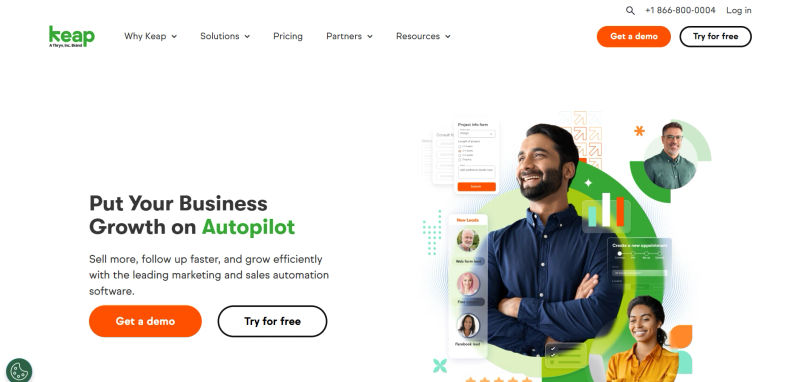
Keap CRM is an all-in-one customer relationship management, sales, and marketing automation platform tailored specifically for small businesses and solopreneurs. Formerly known as Infusionsoft, the company rebranded in 2019 to reflect its core mission. The Keap meaning is straightforward: the software is designed to help business owners keep and nurture their clients, keep their operations organized, and keep growing.
Unlike sprawling platforms like Salesforce that often require a dedicated administrator, Keap is built to be managed directly by the business owner. It consolidates tools that are usually purchased separately—a contact database, an email marketing service, a sales pipeline manager, and an automation engine—into one integrated ecosystem.
The CRM market is booming, projected to reach $262.74 billion by 2032, but much of this growth is driven by large corporations. While over 91% of companies with 10+ employees use a CRM, a significant portion of the small business market remains underserved. Keap targets this gap directly, offering a solution that is more robust than a simple email tool but less cumbersome than an enterprise-grade behemoth.
Keap's Core Philosophy: Simplifying Small Business Growth
Keap's guiding principle is best summarized by its well-known slogan: "grow without the chaos." The platform is built specifically to eliminate the administrative overload that stifles small business growth. Keap CRM achieves this "grow without the chaos" philosophy through lifecycle automation—automating the entire customer journey from lead capture to loyal client.
This is executed by centralizing client data, automating repetitive tasks, and providing clear visibility into your sales process using built-in landing pages and forms to capture leads directly into automated sequences. The ultimate goal is a predictable, scalable system for attracting leads, nurturing them into clients, and delivering an exceptional customer experience. For a coach, this means less time chasing down discovery call no-shows. For an agency, it means a standardized client onboarding process that ensures quality and consistency.
Keap Automation Features: Streamlining Your Workflow
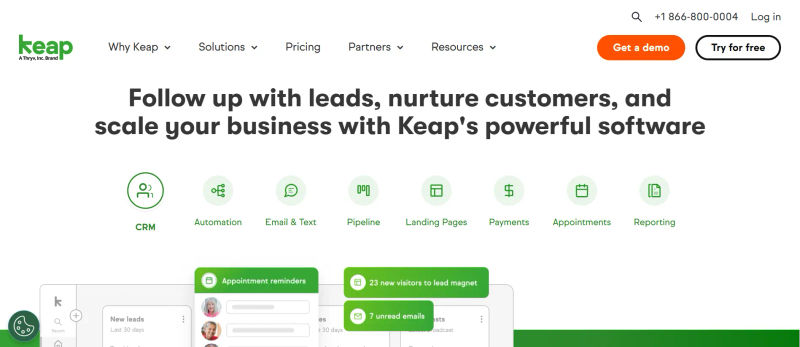
Automation is where Keap truly shines. For small businesses, effective automation is the key to scaling without a corresponding increase in headcount. A recent survey found that 45% of companies prioritize automation as the main feature they seek in CRM tools. Keap delivers on this with one of the most powerful and intuitive visual automation builders on the market.
1. Visual Automation Builder: Crafting Seamless Journeys
At the heart of Keap's automation suite is the Campaign Builder, a drag-and-drop canvas where you can map out entire customer journeys visually. You start with a 'Goal' (e.g., a contact fills out a web form) and connect it to a 'Sequence' of actions like sending emails, creating tasks, applying tags for segmentation, or even sending text messages.
This visual approach is a game-changer for non-technical users. Instead of writing complex 'if-then' rules, you can see the path your customer will take, making it easy to design and troubleshoot sophisticated workflows. For example, a solopreneur could build a workflow that automatically delivers a lead magnet, follows up with educational emails, and then creates a task to personally call the lead once they've shown engagement.
2. Lead Nurturing & Follow-Up Automation Examples
Consistent follow-up is the difference between a lost lead and a new client. Keap’s Campaign Builder allows you to create intricate lead nurturing sequences that run on autopilot. Imagine a potential coaching client downloads your free guide:
Day 1: Send an email with the guide.
Day 3: Send a follow-up with a related blog post.
Day 5: Send a client success story and introduce your coaching program.
Day 7: Send an email with a call-to-action to book a discovery call.
This workflow becomes highly effective when using the native calendly keap integration. Through a seamless calendly autopilot journeys integration, Keap automatically updates contact records and shifts leads into new workflows the moment a meeting is scheduled. You can add behavioral logic and decision points: if a contact books a discovery call through your integrated Calendly link, they are immediately pulled from the general nurture sequence and put into a targeted pre-call reminder sequence. If they don't book by Day 9, Keap can automatically send a different follow-up or create a task for personal outreach, ensuring no lead is truly lost.
This level of dynamic automation is a hallmark of powerful platforms like Keap and its close competitor, ActiveCampaign. While both offer robust visual builders, Keap's interface is often considered slightly more intuitive for beginners, whereas ActiveCampaign provides more granular control that power users may prefer.
3. Sales Pipeline Automation: From Prospect to Client
Keap includes a visual sales pipeline to track leads as they move through your sales process (e.g., New Lead > Contacted > Proposal Sent > Won). The real power comes from automating actions as a deal moves from one stage to the next.
When you drag a deal into the 'Proposal Sent' stage, Keap can automatically:
Send the proposal via a templated email.
Create a task for you to follow up in 3 days.
Apply a 'Hot Lead' tag to the contact record.
This ensures no lead falls through the cracks. Compared to a dedicated sales CRM like Pipedrive or Close, which offers more sales-specific reporting, Keap provides the ability to seamlessly blend marketing nurtures with sales actions in a single workflow—a massive advantage for a solopreneur managing the entire customer lifecycle.
4. Client Onboarding & Retention Automation
For service businesses, a clunky, manual onboarding process can create immediate buyer's remorse. Keap allows you to automate this entire workflow. An agency could build an onboarding campaign that triggers when a deal is marked as 'Won':
Instantly: Send a welcome email with a client intake form and a scheduler link.
Internally: Create a new project in a tool like Asana or Monday.com (via integration) and assign tasks to the team.
Simultaneously: Trigger an invoice to be created in an integrated accounting tool like QuickBooks.
2 Days Later: Send a 'What to Expect' email outlining the next steps.
This level of process automation is a key differentiator from many simpler CRMs. While a platform like HighLevel is built specifically for agencies, Keap's strength lies in its flexibility to serve a broader range of service businesses with the same powerful automation engine.
Keap Email Marketing Tools: Engage Your Audience
Effective email marketing is about sending the right message at the right time. Keap's email tools are deeply integrated with its CRM, allowing for a high degree of personalization and segmentation.
1. Email Campaign Creation & Segmentation Capabilities
Keap offers a user-friendly drag-and-drop email builder with a library of templates. Because every contact interaction is tracked, you can segment your audience with incredible precision. For example, a coach could send an email about an advanced workshop only to clients who have completed their introductory program. The platform also facilitates easy import of existing contact lists and includes features to manage unsubscribes and ensure compliance with regulations like GDPR, crucial for maintaining a healthy email ecosystem.
2. A/B Testing & Performance Analytics
To optimize your campaigns, Keap provides A/B testing for email subject lines, allowing you to test two versions and automatically send the winner to the rest of your list. After a campaign is sent, Keap offers detailed analytics, including open rates and click-through rates. More importantly, you can track how email engagement translates into actual sales by seeing which campaigns are driving leads through your pipeline. Keap also focuses on email deliverability, providing tools and best practices to help ensure your messages land in the inbox, not the spam folder.
3. Email Templates & Personalization
Personalization goes beyond just using a contact's first name. With Keap, you can use any information stored in the CRM—custom fields, tags, purchase history—to dynamically change email content. This level of personalization is on par with what you'd expect from marketing-centric platforms like HubSpot. While HubSpot's Marketing Hub offers a similarly powerful suite of email tools, Keap's integration of these tools directly within its core automation builder provides a uniquely streamlined workflow.
Keap Reporting Interface: Usability vs. Freshsales. When asking how intuitive is the reporting interface in Keap compared to Freshsales for non-technical marketing managers, the answer depends on your need for customization. Keap prioritizes pre-built simplicity, offering an out-of-the-box dashboard that requires zero advanced data analysis skills to operate.In our Keap reporting interface usability review for non-technical users, the platform excels at visual clarity. Marketing managers can instantly pull standard reports on email open rates, campaign ROI, and pipeline movement using basic dropdown menus. However, you are largely confined to Keap's native templates, lacking the drag-and-drop widget flexibility found in more advanced systems.Freshsales, by contrast, provides a highly customizable analytics suite. While it allows users to build complex, multi-module dashboards, this introduces a steeper learning curve. Ultimately, Keap wins on immediate usability and approachability for solopreneurs, while Freshsales is better suited for managers who need granular, custom data visualization and are willing to learn a slightly more complex interface.
Keap CRM Pricing: Is It Worth the Investment?
Evaluating Keap CRM pricing 2026 requires looking beyond the base cost. While Keap pricing 2026 reflects a premium product, analyzing Keap pricing features pros cons 2026 shows its true value. The biggest pro is consolidating multiple tools into one automated platform; the main con is the higher entry price for budget-conscious solopreneurs.
A. Unified CRM Pricing
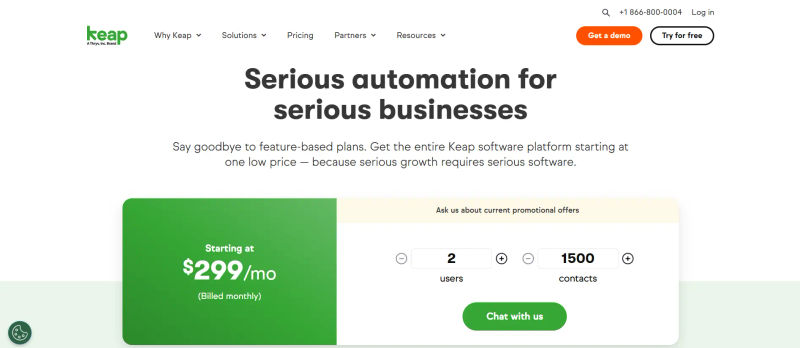
For 2026, Keap CRM pricing has completely transitioned to a unified, all-in-one model starting at $299/month. Unlike older tiered plans that restricted features based on cost, every subscription now includes the full platform—from the visual Campaign Builder and automation to email marketing, sales pipelines, payments, and more. Your investment scales based on the number of team members and contacts you manage, rather than feature access.
Element | Current Reality |
Pricing model | Single tier starting at $299/month (contact-based scaling) |
Base contacts | 1,500 contacts (adjustable) |
All features included | Campaign Builder, automation, email, SMS, payments, and more |
Price variability | Based on number of users and contacts (custom quotes) |
If you are looking for legacy tiers like Keap Lite, Keap Pro, or Keap Max, these have been officially discontinued. The unified Keap pricing plans for 2026 represent a significant shift from that old structure. While the $299/month entry price is higher than the old Keap Lite plan, you now get access to all enterprise-grade features from day one. Most coaches and agencies see a fast ROI through reduced manual work and faster client onboarding. Keap also bundles implementation services and requires Expert Coaching at sign-up, ensuring you use the platform to its full potential rather than just buying software you won't fully leverage.
B. Cost-Benefit Analysis for Coaches/Agencies/Solopreneurs
Is Keap worth it? For a coach or consultant with a high client value, the investment can be a no-brainer. If automating your follow-up helps you land just one extra client per year, the system could pay for itself. Consider the 'cost of inaction': if you save 10 hours a month, what is that time worth? For an agency, the value lies in creating scalable, repeatable processes. However, if you are just starting out with a tight budget, a more affordable solution like Zoho CRM might be a more practical starting point.
Find Perfect Software For Your Business
Keap CRM Alternatives & Competitors: Finding Your Best Fit
Keap operates in a competitive space. Understanding how it stacks up against the alternatives is key.
1. Keap vs. ActiveCampaign
This is the most common comparison. ActiveCampaign often wins on price, offering similar automation power at a lower entry point. Keap's main advantages are its all-in-one nature (with a more integrated pipeline and invoicing) and an interface that many find slightly easier to grasp for foundational campaigns.
2. Keap vs. HubSpot
HubSpot offers a powerful free CRM as its entry point and a modern, user-friendly interface. The main drawback is cost. Its paid Marketing and Sales Hubs can become very expensive, often eclipsing Keap's price point for similar functionality.
3. Keap vs. HighLevel
HighLevel is built specifically for marketing agencies, featuring the ability to white-label the platform for client resale. In contrast, while many search for Keap Infusionsoft agency features for marketing agencies, Keap lacks true Keap Infusionsoft agency features white label capabilities. For agencies providing branded CRM services, HighLevel is compelling. For a coach or non-agency business, HighLevel's feature set can be overwhelming.
4. Keap vs. Zoho CRM
Is Keap or Zoho CRM a better choice for a small business owner looking for quick time-to-value and marketing automation? Keap wins. In any 2025–2026 Keap vs Zoho CRM comparison for small business, Zoho offers a broad, affordable app suite but requires connecting complex modules. Keap’s unified marketing automation platform eliminates steep learning curves, delivering faster ROI.

Other Notable Alternatives
Pipedrive: A sales-first CRM ideal for businesses focused on managing a high volume of deals.
Monday.com: A work OS with a flexible and visually appealing CRM, excellent for managing projects and sales in one place.
Salesforce: The enterprise king of CRM. Its small business solution is often too complex and expensive for the typical Keap user, with a significant learning curve.
Freshworks: Offers a suite of business tools with a clean interface, presenting a solid alternative to the Zoho ecosystem.

Who is Keap CRM Best Suited For?
After a thorough analysis, a clear picture emerges of the ideal Keap user.
1. Ideal Users: Coaches, Consultants, Agencies, Solopreneurs
Keap is best for established service-based small businesses ready to invest in a system to scale. If you have a proven business model and are feeling the pain of manual processes, Keap is designed for you. You value automation for the entire client lifecycle and want a single platform to manage core sales and marketing functions.
2. When to Consider Other Options
You should consider other options if you are a brand new business with a limited budget. If your business is heavily focused on complex, high-volume sales deals, a dedicated sales CRM like Pipedrive or Salesforce might be a better fit. If you are a marketing agency that wants to resell CRM services, the white-labeling capabilities of HighLevel are more suitable.
Try AuthenCIO
Move to faster, smarter software evaluation with AI
Conclusion: Is Keap CRM the Right Choice for Your Business?
Keap stands as a powerful and proven ally for service-based businesses aiming to break through the ceiling of manual operations. Its strength lies in its holistic approach to customer lifecycle automation, anchored by the intuitive Campaign Builder. It provides the tools to create sophisticated, personalized customer journeys that can save dozens of hours a month.
However, it is a significant investment. The price point and learning curve demand a commitment that may not be suitable for every business. The limitations of its Lite plan and the dated feel of some interface elements are valid considerations.