
Introduction
For operations managers and leaders of project-led teams, the search for a single source of truth is relentless. The constant shuffle between spreadsheets, project management tools, and a separate CRM creates data silos, hinders collaboration, and drains productivity. This fragmentation is a critical operational bottleneck, often leading to wasted hours and project delays, making it impossible to get a clear, 360-degree view of the client journey—from initial lead to final project delivery and beyond. As businesses head into 2026, the demand for a unified platform that breaks down these barriers has never been greater. The global CRM market is projected to grow by 12% annually through 2028, a testament to the critical role these systems play in modern business infrastructure.
Streamline your software evaluation process
Enter Monday.com, a platform that began as a project management tool and evolved into a comprehensive "Work OS" with a powerful, integrated CRM. But is it the right solution to solve the unique challenges of a project-driven organization?
This deep-dive review will dissect Monday CRM, examining its features, usability, automation simplicity, and pricing through the specific lens of an operations manager. We'll explore its core strengths, uncover its potential limitations, and compare it against top alternatives like Zoho, HubSpot, and Salesforce to help you determine if it's the right fit to streamline your operations and drive your team forward in 2026.
Key Takeaways: Monday CRM in 2026
For operations managers and project-led teams evaluating monday.com crm features pricing 2026, the platform remains a top-tier choice that seamlessly blends sales tracking with post-sale project execution. Here is a quick summary of what to expect this year:
Standout Features: Monday CRM is built on a highly visual Work OS, offering drag-and-drop pipeline management, no-code automations, and customizable dashboards. Recent monday.com features pricing reviews 2026 highlight its intuitive user interface and robust contact management as major advantages over traditional, rigid CRMs.
Competitive Pricing: The platform uses a tiered pricing model (Basic, Standard, Pro, Enterprise) requiring a minimum of three seats. When analyzing monday.com pricing features reviews 2026, most teams find the Standard or Pro tiers offer the best ROI, unlocking the essential automations and integrations needed to scale operations efficiently.
Current Reviews: Users consistently praise Monday CRM for its flexibility and collaborative capabilities. While it may require some initial setup time to customize boards to your exact workflow, it is widely reviewed as a powerhouse for teams that need to manage both their sales pipeline and complex project delivery in one unified workspace.
Monday CRM — Key Advantages & Limitations
Pros
Easy to use: Intuitive interface makes it easy for teams to get started with minimal training.
Highly customizable: Teams can customize pipelines, workflows, fields, and boards to match their processes.
Strong project management: Combines CRM and project management, making it useful for managing the entire customer journey.
Powerful automation: No-code automations help reduce repetitive tasks and streamline workflows.
Good collaboration: Provides strong visibility and collaboration across sales, operations, and project teams.
Cons
Can get expensive: Costs can increase significantly as the number of users and advanced features grows.
Limited advanced sales features: May not meet the needs of organizations requiring sophisticated sales forecasting or territory management.
Reporting limitations: Advanced reporting and cross-board analysis may require additional setup.
Learning curve for complex workflows: While basic features are easy to use, advanced customization can take time to master.
Verdict: A flexible, user-friendly CRM that works especially well for project-driven teams.
Best For: SMBs, agencies, consultants, and project-based teams that want CRM and project management in one platform.

Software Covered in this Article
To help you understand CRM in the right context, this article refers to a carefully curated set of key players:









What is Monday CRM? An Overview for Operations & Project Teams
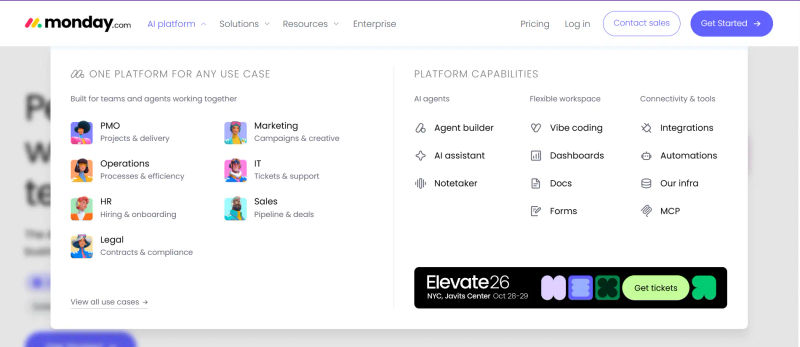
Monday CRM is not a traditional, standalone Customer Relationship Management system. Instead, it's a product built on top of the Monday.com Work OS (Work Operating System). This fundamental difference is crucial for operations managers to grasp. While a conventional CRM like Salesforce is built around a rigid, sales-centric data model (leads, accounts, opportunities), Monday provides a flexible, Lego-like framework of boards, items, and columns that can be configured to manage virtually any workflow.
For project-led teams—such as marketing agencies, consulting firms, or software development houses—this is a significant advantage. It means you can manage the entire client lifecycle within a single, interconnected environment. A client can start as a lead on a sales pipeline board, and once the deal is won, that same client data can seamlessly transition to a project onboarding board, then to an active project management board, and finally to a client support or retention board. This eliminates the manual data entry and potential for error that occurs when migrating information between disparate systems, solving the pervasive problem of fragmented data.
Understanding Monday.com's Work OS Foundation
The Work OS foundation is what gives Monday its signature visual appeal and flexibility. It's designed to be a centralized hub where all work happens. Think of it as a digital workspace where you can build custom applications to fit your exact processes without writing a single line of code. This approach is a direct response to the rise of hybrid and remote work, where shared visibility across distributed teams is paramount.
The core components of the Work OS include:
Boards: Highly visual and customizable tables that hold all your data. A board can be a sales pipeline, a project timeline, a resource allocation tracker, or a client contact list.
Items: The individual rows within a board. An item could represent a client, a project, a task, or a lead.
Columns: The columns define the data you track for each item. Monday offers a vast library of column types, including status, timeline, people, numbers, text, and integrations with other apps.
This structure allows operations managers to build workflows that mirror their real-world processes, rather than forcing their processes to conform to the software's limitations. The result is a system that can manage not just client relationships, but the complex, multi-stage projects that define your business.
Key Features of Monday CRM for Project-Led Teams
Monday CRM leverages its Work OS foundation to offer a suite of features specifically tailored to the needs of teams managing client projects. It's less about rigid sales methodologies and more about providing a holistic view of the client relationship from every angle.
1. Intuitive UI & Usability for Operations
One of Monday's most lauded attributes is its user interface. For operations managers tasked with ensuring high user adoption, this is a critical factor. The platform is colorful, visual, and highly intuitive. The drag-and-drop interface for building boards and dashboards means that teams can get up and running quickly with a minimal learning curve. This ease of use is a stark contrast to the often-intimidating complexity of enterprise-grade CRMs like Salesforce, which can require extensive training and customization. High CRM adoption driven by intuitive interfaces can reduce implementation time from months to weeks, significantly lowering training costs and boosting team morale.
2. Robust Project Management Capabilities
This is where Monday truly shines for its target audience. Because it's built on a project management chassis, its capabilities in this area are native and deeply integrated. You can manage project timelines with Gantt charts, track resource allocation across multiple projects, set dependencies between tasks, and monitor project health with visual dashboards. For an operations manager, this means you can finally connect the sales pipeline directly to resource capacity. You can see in real-time how a new deal will impact team workloads, preventing burnout and ensuring projects are staffed appropriately from day one.
3. Client & Contact Management
Monday CRM provides a centralized location to manage all client and contact information. You can create dedicated boards to track every interaction, store important documents, and log key details. Custom columns allow you to track any data point relevant to your business, from contract renewal dates to client satisfaction scores.
4. Tracking Communication History
A crucial feature is the ability to centralize client communication. Through integrations with Gmail and Outlook, emails can be automatically logged against a client's record. This creates a complete, chronological history of all interactions, accessible to the entire team and eliminating the need to search through individual inboxes for context.
5. Sales Pipeline & Lead Tracking
In our Monday sales CRM deal management pipeline features review for 2026, the platform excels through visual clarity and customization. You can create custom pipeline stages that match your exact sales process, assign leads, set deal values, and track progress via Kanban or list views.
While it lacks the deep, AI-driven forecasting of Salesforce, Monday's deal management strength is its seamless operational handoff. For instance, a marketing agency can track a lead from inquiry to proposal. Once a deal is marked "Won," automations instantly create a new project board for the client and notify the execution team. This eliminates data silos between sales and operations, making its pipeline features highly effective for project-led businesses.
6. Reporting & Analytics for Performance Insights
Monday's dashboards provide powerful operational oversight. Pulling data from any board creates high-level views, though complex cross-board reporting requires careful planning and setup. Once configured, managers can display pipeline value, project bottlenecks, resource allocation, and client satisfaction metrics.
When evaluating the best crm for churn reduction 2025 2026 salesforce hubspot zoho monday.com, data visibility is key. Comparing zoho vs hubspot vs salesforce vs monday.com churn prevention customer retention features highlights distinct strengths: Salesforce uses predictive AI for at-risk accounts, HubSpot leverages engagement tracking, and Zoho utilizes support analytics. Monday.com stands out by directly tying post-sale project delivery to client health scores. If your retention relies on operational execution, Monday is highly competitive as the best crm for churn reduction 2025 or 2026 salesforce hubspot zoho monday.com.
Key Performance Indicators (KPIs) for Ops Managers
Customizable widgets provide real-time insights for data-driven decisions. You can visualize critical KPIs like average project margin, utilization rates, and client churn rate, eliminating the need to manually compile reports across systems to assess business health.
7. Customization & Flexibility
The platform's flexibility is its core value proposition. You are not locked into a predefined structure. You can create custom objects, fields, and workflows for anything. This is particularly valuable for businesses with unique processes. For example, a product development team could create a workflow that tracks a client feature request from initial idea, through design and development sprints, to final deployment, all linked to the original client record in the CRM.
Monday CRM Automation: Streamlining Workflows
For any operations manager, the goal is to eliminate manual, repetitive tasks that consume valuable time and introduce the risk of human error. Monday's automation engine is a cornerstone of its value proposition, designed with simplicity and power in mind. It helps solve the high administrative burden that comes from juggling disparate tools.
A. No-Code Automation Simplicity
Monday's automations are built using a simple, human-readable recipe format: "When this happens, do that." This no-code approach empowers managers and team members to build complex workflows without needing a developer. With hundreds of pre-built automation recipes and templates available, teams can get started quickly. This accessibility is a game-changer, as it puts the power of process improvement directly into the hands of the people doing the work. Furthermore, these automations are key for enforcing compliance and standardized processes, ensuring every client receives the same high-quality experience.
B. Real-World Automation Examples
The possibilities with automation are nearly limitless. Here are practical examples relevant to project-led teams:
Sales to Project Handoff: When a deal's status in the Sales Pipeline board changes to 'Won', automatically create a new project on the Project Management board, duplicate a predefined task template, and notify the assigned Project Manager in Slack. This single automation solves one of the most common communication gaps in business.
Client Onboarding: When a new client is added to the Client Onboarding board, automatically send a welcome email with a link to a form, create a shared folder in Google Drive, and assign a task to the account manager to schedule a kickoff call. This ensures a consistent and professional onboarding experience for every new client.
Milestone Alerts: When a project's timeline indicates a key milestone is one week away, send a notification to the client and the internal project team. This proactive communication enhances client transparency and keeps everyone aligned.
Task Dependencies: When a task's status is changed to 'Complete', automatically change the status of the next dependent task to 'Working on it' and assign it to the relevant team member. This keeps projects moving forward without manual intervention. For instance, a task managed in a tool like Asana or Jira could, via integration, trigger a status update in Monday, which then notifies the finance team using a system like Zoho Books to prepare an invoice.
Find Perfect Software For Your Business
C. Integrations for Enhanced Productivity
No CRM exists in a vacuum. Monday's strength is amplified by its extensive integration capabilities. It connects with hundreds of popular tools, allowing you to create a truly unified tech stack. Key integration categories for operations managers include:
Communication: Slack, Microsoft Teams (for real-time notifications)
Email: Gmail, Outlook (for syncing communication and creating items from emails)
File Storage: Google Drive, Dropbox (for linking documents to projects and clients)
Marketing: HubSpot, Mailchimp (for syncing marketing leads with the sales pipeline)
Finance: Stripe, QuickBooks (for tracking payments and invoicing)
Development: Jira, GitHub (for linking technical tasks to client projects)
These integrations ensure that Monday can act as the central hub, the single source of truth, pulling in relevant data from the specialized tools your team already uses and loves.
Monday CRM Pricing Plans: Finding the Right Fit for Your Team
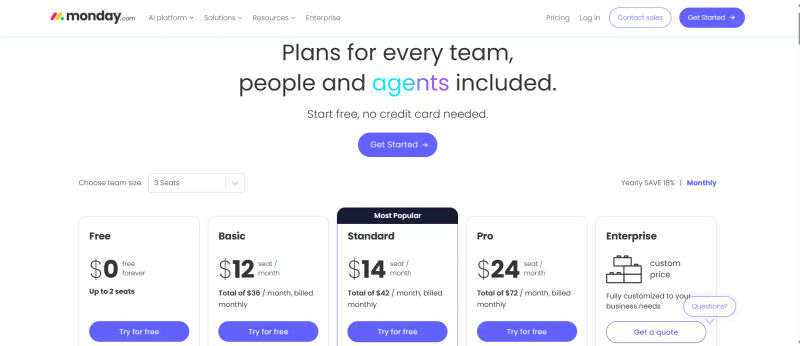
For monday.com pricing plans 2026, the monday sales crm pricing official 2026 is user-based (minimum 3 users). Researching monday crm pricing 2026, monday sales crm pricing 2026, monday sales crm pricing 2026 official, monday.com crm pricing 2026, monday crm pricing official 2026, monday.com pricing 2026, monday.com crm or sales pricing 2026, monday.com sales crm pricing 2026, monday crm pricing plans 2026, or monday crm pricing 2026 official reveals four flexible tiers requiring careful calculation to understand true team costs.
Breakdown of Pricing Tiers (Basic, Standard, Pro, Enterprise)
Plan | Price | Key Inclusion & limits | Best Suited For | Important Notes |
Basic CRM | $12/PUPM | Unlimited contacts and pipelines; no automations; no integrations; no advanced reporting. | Not sufficient for serious project-led teams; only for very simple use cases. | Minimum 3 users; pricing typically based on annual billing. |
Standard CRM | $14/PUPM | Limited automations and integrations (250 actions/month each); guest access; dashboards combining up to 5 boards. | Smaller teams with simpler workflows; realistic entry point for most teams. | Minimum 3 users; monthly billing is usually higher than quoted rates. |
Pro CRM | $24/PUPM | 25,000 automation and integration actions/month each; private boards; time tracking; dashboards across up to 10 boards. | Growing teams needing more power and advanced reporting; most popular tier for scaling operations. | Supports more complex, cross-board reporting without needing Enterprise. |
Enterprise | Custom price | Enterprise-grade security and governance; premium support; advanced analytics; dashboards combining up to 50 boards. | Large organizations with complex compliance and large-scale deployments. | Custom pricing; suited to strict governance and advanced reporting needs. |
It's important to note that the listed prices are often based on annual billing. Monthly billing is typically more expensive.
Value for Money: ROI for Operations Managers
When evaluating the cost, operations managers must look beyond the per-user price and consider the potential Return on Investment (ROI). Research shows that CRM, on average, delivers a 139% ROI. For a 20-person team on the Pro plan, the annual cost would be approximately $5,760. This investment is realized through:
Reduced Administrative Overhead: How many hours per week are saved by automating manual data entry, notifications, and report generation?
Increased Project Profitability: By connecting sales, project management, and time tracking, you can get a clear view of project profitability and identify scope creep early.
Improved User Adoption: An easy-to-use system that teams actually adopt means you get the full value from your investment, unlike complex systems that become expensive, glorified address books.
Enhanced Client Retention: Streamlined communication and transparent project tracking lead to higher client satisfaction. Companies using CRM tools see a 27% increase in customer retention.
A cost-benefit analysis should weigh license fees against these tangible gains in efficiency, profitability, and client satisfaction.
Top Monday CRM Alternatives for 2026
Among direct competitors of monday.com, pricing changes in 2025-2026 saw HubSpot and Salesforce increase premium rates, making Monday highly cost-competitive. Comparing HubSpot vs monday.com vs Attio lead management reviews on G2 and Capterra reveals distinct trends: reviewers favor HubSpot for inbound routing, Attio for data enrichment, and Monday for linking leads to project workflows.
1. Zoho CRM: The Comprehensive Contender
Zoho offers an incredibly broad suite of business apps (Zoho One) that includes a powerful CRM, project management, finance, and more. Its strength is its all-in-one ecosystem and value for money. For businesses looking for a single vendor to cover almost all their software needs, Zoho is a compelling alternative. However, its interface can feel less modern and intuitive than Monday's.
2. HubSpot CRM: Marketing & Sales Powerhouse
HubSpot is renowned for its powerful inbound marketing and sales automation tools. Its free CRM is a major draw, and its paid Hubs (Marketing, Sales, Service) offer deep functionality. If your business is heavily focused on content marketing, lead generation, and complex sales sequences, HubSpot may be a better fit. Its project management capabilities are less native and visual compared to Monday.
3. Pipedrive: Sales-Focused Simplicity
Pipedrive is designed by salespeople, for salespeople. Its entire interface is built around a clean, visual sales pipeline. It excels at activity-based selling, prompting reps on what to do next to move a deal forward. If your primary need is to optimize a high-volume sales process and you have a separate system for project management, Pipedrive's focused simplicity is hard to beat.
4. Salesforce: Enterprise-Grade Solution
Salesforce is the undisputed market leader in CRM. It is infinitely customizable and powerful, with a vast ecosystem of third-party apps. For large enterprises with complex sales processes and deep pockets, Salesforce is often the default choice. Its primary drawbacks are its high cost, complexity, and the steep learning curve, which often requires dedicated administrators.
5. Keap: All-in-One for Small Business
Keap (formerly Infusionsoft) combines CRM, marketing automation, and e-commerce, targeting small businesses. Its strength lies in automating follow-up and nurturing leads for smaller service-based businesses. It's generally less suited for the complex project management needs of larger teams.
6 & 7. Attio & Folk: Emerging Relationship Management Tools
Newer players like Attio and Folk are redefining the CRM space by focusing on relationship intelligence, automatically syncing and enriching contact data. They are highly flexible and collaborative but may lack the structured project management and reporting features of a platform like Monday.
8 & 9. Freshdesk & Capsule: Specialized CRM Options
Freshdesk is primarily a customer support platform with CRM capabilities, ideal for support-driven organizations. Capsule is a simple, no-fuss CRM for businesses that need basic contact management and sales tracking without complexity.
Choosing the Best CRM: Key Factors for Operations Managers
Selecting a CRM is a critical infrastructure decision. For an operations manager, the evaluation process must go beyond a simple feature checklist. Here is a decision framework to guide your choice.
1. Assessing UI & User Adoption
The 15-Minute Test: Can a new team member understand the basics and perform a core task within 15 minutes of logging in? If not, adoption will be a constant struggle.
Flexibility vs. Rigidity: Does the system force you into its way of working, or can you easily adapt it to your team's existing processes?
Mobile Accessibility: How functional is the mobile app? The ability to update tasks and check project statuses from anywhere is crucial for hybrid teams.
2. Data Migration & Governance
Migrating data into a new system is a major operational hurdle. Evaluate the ease of importing existing client and project data into the platform. Look for robust data governance and access control features; for operations managers, ensuring data integrity and controlling who can view or edit sensitive information is critical. While Monday offers permission settings, understanding their granularity is key. The learning curve for advanced customization and troubleshooting can also be steeper than initial setup, requiring a dedicated internal resource.
3. Scalability & Future-Proofing
Pricing Tiers: Review the features available in higher pricing tiers. Will the platform support your needs in three years? Avoid systems where a critical future function is locked behind a prohibitively expensive plan.
API & Integration Ecosystem: Does the platform have a robust API and a wide range of integrations? This ensures you can connect it to new tools as your tech stack evolves. Also, consider integration reliability—how are outages handled and how easy is maintenance?
Company Trajectory: Is the company innovating? Monday, for example, has shown rapid growth, reaching $100 million in ARR for its CRM product just three years after launch, indicating strong investment and development.
4. Support & Community
Onboarding & Training: Assess provided resources like live webinars, documentation, and video tutorials.
Customer Support: Check unbiased feedback on response times. The monday crm g2 rating 2026 (listed as monday.com crm g2 rating 2026) is 4.7/5, highlighting excellent support.
Community & Startup Fit: Active communities share valuable workflows. In the g2 best crm for startups 2026 monday hubspot salesforce reports, Monday CRM often outpaces HubSpot and Salesforce in community-led agility and straightforward setup.
Try AuthenCIO
Move to faster, smarter software evaluation with AI
Conclusion: Is Monday CRM Right for Your Operations & Project Teams in 2026?
Monday CRM presents a compelling proposition for operations managers and project-led teams in 2026. Its core strength lies in its ability to unify the entire client lifecycle—from sales and onboarding to project execution and support—within a single, highly visual, and intuitive platform. By breaking down the traditional silos between CRM and project management, it directly addresses the primary pain points of fragmented data, inefficient workflows, and poor cross-functional collaboration.
For organizations where the project is the product—consulting firms, marketing agencies, service providers—Monday's Work OS foundation provides the flexibility to build processes that mirror reality. Its user-friendly interface and no-code automations empower teams, drive high adoption, and deliver a tangible ROI by reducing administrative waste.
However, it is not a one-size-fits-all solution. For sales-heavy organizations that require deep, AI-driven forecasting and complex sales methodologies, a more traditional CRM like Salesforce or HubSpot might be more appropriate. Similarly, for those on a tight budget or with very large teams, the per-user pricing model requires careful consideration.
The ultimate decision depends on a clear-eyed assessment of your team's unique operational needs. The challenge is that comparing these complex systems is time-consuming and often clouded by biased sales pitches.