
Introduction
This comprehensive Microsoft Dynamics 365 CRM review is designed for CIOs, IT Directors, and enterprise architects evaluating the platform for 2026 and beyond. When searching for reliable 365 CRM reviews or a detailed Microsoft Dynamics CRM review, enterprise buyers need factual analysis rather than marketing rhetoric.
The global Customer Relationship Management** (CRM)** market continues its rapid expansion, with mid-2026 projections indicating it will surpass $145 billion. For enterprise IT buyers, selecting a CRM is not merely a software procurement exercise; it's a strategic decision that impacts the entire technology stack, data architecture, and long-term business agility. Navigating challenges like data silos, integration complexities, scalability concerns, and vendor lock-in is paramount. In this high-stakes environment, Microsoft Dynamics 365 CRM has emerged as a formidable contender, challenging established leaders and offering a unique value proposition deeply rooted in its native ecosystem. Compared to other Dynamics CRM reviews, our evaluation focuses heavily on enterprise architecture, AI capabilities, and total cost of ownership.
Streamline your software evaluation process
In this Dynamics 365 CRM review, we dissect its core features, analyze its complex pricing models, weigh its strategic pros and cons, and benchmark it against key competitors to provide one of the most thorough Microsoft Dynamics CRM reviews available.
Our goal is to provide the analytical framework necessary to determine if Dynamics 365 is the right strategic choice for your organization.
Key Takeaways
Microsoft Dynamics 365 CRM is a highly customizable, enterprise-grade platform that unifies sales, customer service, and marketing operations. It is best suited for mid-market to large enterprises, particularly those already invested in the Microsoft ecosystem (such as Office 365, Teams, and Azure) looking for advanced AI and automation capabilities.
Here is a quick summary of our 2026 review findings:
Ideal Use Cases: Complex B2B organizations, large-scale field service operations, and enterprises requiring deep data connectivity across multiple departments.
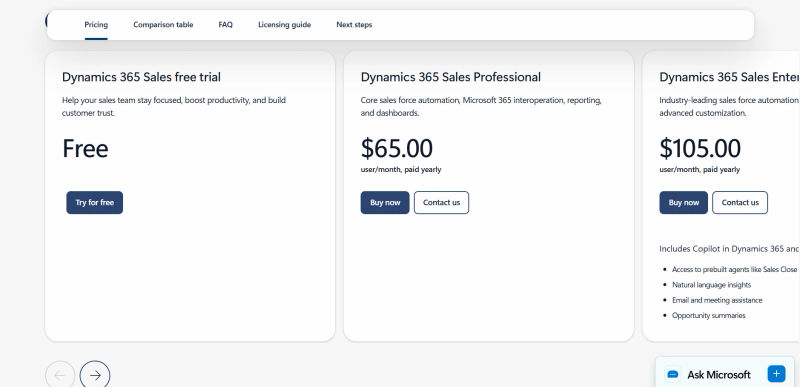
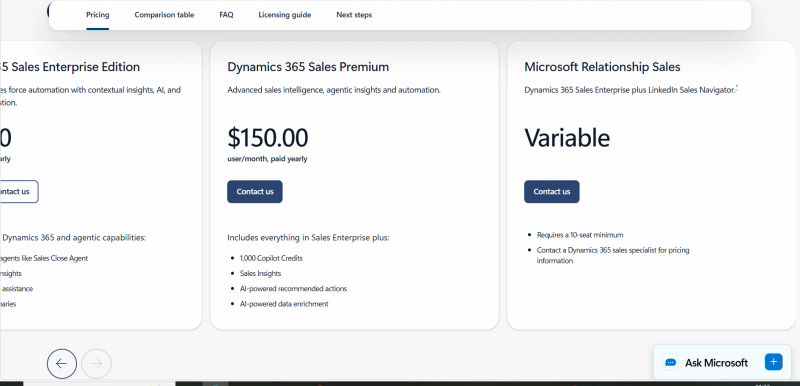
Pricing Overview: Licensing is highly modular. Core applications like Sales Professional start around $65 per user/month, while Enterprise and Premium tiers (including advanced AI Copilot features) scale upwards of $150+ per user/month.
Top Pros: Unmatched native integration with Microsoft products, powerful AI-driven analytics, and a highly flexible architecture built on the Power Platform.
Top Cons: A steep learning curve for new users, complex licensing structures, and high implementation costs that can price out smaller businesses.
Pros and Cons of Dynamics 365 CRM
Evaluating Microsoft Dynamics CRM pros and cons reveals a powerful but complex platform tailored for enterprise environments.
Pros:
Ecosystem Integration: Native connectivity with Microsoft 365, Teams, and Power BI streamlines user workflows.
Advanced AI: Embedded Copilot features deliver predictive analytics, automated data entry, and intelligent lead scoring.
Scalability: Highly customizable via the Power Platform and Dataverse to support complex, global enterprise needs.
Cons:
Steep Learning Curve: The extensive feature set and dense interface require significant user training and onboarding.
High TCO: Modular licensing, premium add-ons, and ongoing customization costs can quickly become expensive.
Resource Intensive: Deployment and maintenance generally require specialized IT staff or certified implementation partners.
Key Advantages for Enterprise IT Buyers
Deep Microsoft Ecosystem Integration: This is the platform's foremost advantage. Native integration with Microsoft 365, Teams, Outlook, Power BI, and Azure provides a seamless user experience and a unified data fabric that is difficult for competitors to replicate.
Scalability and Flexibility: Built on the Azure cloud, Dynamics 365 is designed for global scale. Its modular, app-based approach allows enterprises to adopt functionality as needed.
Powerful AI and Analytics: With Copilot and native Power BI integration, Dynamics 365 offers cutting-edge, embedded AI and business intelligence capabilities that can drive significant productivity gains.
Unified CRM and ERP: The ability to combine CRM modules with ERP functionalities like Finance and Supply Chain on a single platform can dramatically reduce integration complexity and TCO for many organizations.
Potential Challenges and Considerations
Complexity and Learning Curve: The platform's power and flexibility come at the cost of complexity. Users and administrators face a steep learning curve compared to simpler CRMs.
High Total Cost of Ownership: While the per-app licensing can seem competitive, the full TCO, including implementation, customization, and support, can be substantial and rival that of Salesforce or SAP.
Reliance on Implementation Partners: Successful enterprise deployment is heavily dependent on the quality of your chosen Microsoft implementation partner. A poor partner choice can lead to significant project delays and budget overruns.
Potential for Vendor Lock-in: The deep integration with the Microsoft ecosystem, while a benefit, can also lead to vendor lock-in, making it more difficult and costly to migrate to other platforms in the future.
Best for: Large enterprises needing deep integration across departments and analytics-driven decision support.
Verdict: A powerful enterprise CRM offering unmatched flexibility—best for organizations ready to invest in customization and training.
.webp?updatedAt=1783634317433&tr=w-800%2Cq-80%2Cf-auto%2Cc-at_max)
Software Covered in this Article
To help you understand CRM Software in the right context, this article refers to a carefully curated set of players:







What is Dynamics 365 CRM?
Microsoft Dynamics 365 CRM is a comprehensive suite of interconnected cloud applications rather than a single, monolithic system. For organizations looking to evaluate the CRM company Microsoft Dynamics on cloud computing software, its primary advantage is this modular Software-as-a-Service (SaaS) approach. It is designed to unify customer data and business processes by combining traditional CRM capabilities—sales, customer service, and marketing—with elements of Enterprise Resource Planning (ERP). This creates a holistic platform capable of managing the entire customer lifecycle, from lead generation to post-sale support and financial reconciliation.
For enterprise IT buyers, the key differentiator is its architectural foundation. When you evaluate the CRM company Microsoft Dynamics on cloud data platform capabilities, it stands out by being built directly on Microsoft Dataverse, the Power Platform, and Azure cloud services. This composable architecture allows organizations to deploy specific cloud applications and expand over time, creating a tailored solution without the rigidity of traditional enterprise systems. However, this flexibility necessitates a robust governance framework to manage application lifecycle management (ALM) and ensure consistency across a distributed development environment.
Key Modules and Functionalities
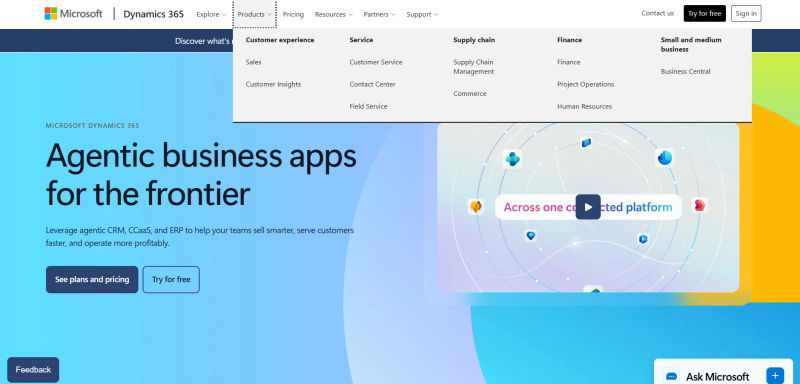
Dynamics 365's modularity is one of its core strengths. Enterprises can license individual applications or bundle them for a more comprehensive solution, often leveraging multiple modules to create end-to-end business processes. For example, an opportunity originating in Dynamics 365 Sales can seamlessly convert into a project in Project Operations, with all associated data remaining consistent. The primary CRM-focused modules include:
Dynamics 365 Sales: The core sales force automation (SFA) engine for managing leads, opportunities, accounts, and contacts.
Dynamics 365 Customer Service: A comprehensive toolkit for omnichannel customer support, case management, and knowledge base creation.
Dynamics 365 Marketing: A marketing automation platform for journey orchestration, lead nurturing, and event management.
Dynamics 365 Field Service: A specialized module for organizations with mobile workforces, enabling scheduling, dispatch, and work order management.
Dynamics 365 Project Operations: Unifies sales, project management, and financials to manage the entire project lifecycle from quote to invoice.
These modules are built on a common data model, Microsoft Dataverse, ensuring data consistency and enabling seamless process flows between departments—a critical factor for mitigating data silos in large organizations.
Want a CRM stack that matches your real-world use cases, not generic demos? 💡 Discover how AI can map Dynamics 365 against your needs.
Core Features of Dynamics 365 CRM
Beyond its modular structure, the platform's power lies in its deep feature set, which is increasingly infused with artificial intelligence. As organizations plan for 2026, the efficacy of AI and the depth of integration are paramount evaluation criteria.
1. Sales Automation & Management
Dynamics 365 Sales provides foundational tools to manage complex sales cycles. When evaluating the CRM company Microsoft Dynamics on CRM automation, it excels at automating lead routing, forecasting, and quote-to-order processing. To evaluate the CRM company Microsoft Dynamics on business process automation, the platform leverages native Business Process Flows and Power Automate to guide sellers through predefined stages, ensuring strict compliance and data consistency.
Unlike lighter-weight CRMs like Pipedrive or Monday, Dynamics 365 matches Salesforce Sales Cloud in enterprise-grade complexity. To evaluate the CRM company Microsoft Dynamics on payment processing software, note that it lacks a native payment gateway. Users must integrate third-party payment processing software via Microsoft AppSource or connect to Dynamics 365 Finance to handle transactions.
2. Customer Service & Support
When you evaluate the CRM company Microsoft Dynamics on enterprise service cloud capabilities, its Customer Service module excels by unifying omnichannel engagement (email, chat, voice, social) into a single agent desktop. Engineered for enterprise contact centers, it improves first-call resolution through automated case routing and integrated knowledge management.
To evaluate the CRM company Microsoft Dynamics on AI chatbots for businesses, its Copilot Studio enables rapid deployment of low-code virtual agents. These AI chatbots effectively deflect routine tickets and seamlessly hand off complex issues to human agents with full context. This native enterprise service cloud unification surpasses solutions like Freshworks or Zoho Desk, which often require third-party integrations to achieve a similar 360-degree customer view.
3. Marketing Automation & Engagement
Dynamics 365 Marketing competes with platforms like HubSpot by providing tools for multi-stage customer journey orchestration. When you evaluate the CRM company Microsoft Dynamics on B2B marketing strategy, its core strength is native Account-Based Marketing (ABM), allowing teams to target high-value accounts, align with sales pipelines, and score leads using complex organizational hierarchies.
To evaluate the customer relationship management company Microsoft Dynamics 365 on top Google keywords and search data, the platform integrates seamlessly with external ad networks. Marketers can ingest keyword performance metrics to optimize paid campaigns and trigger personalized content based on a prospect's search intent.
The platform automates campaigns across email, social, and events using real-time triggers (e.g., website visits). Its robust segmentation builds dynamic marketing lists using demographic, behavioral, and search data stored within the Dataverse.
4. Field Service & Project Operations
These specialized modules are where Dynamics 365 often stands out against pure-play CRM vendors. Field Service provides IoT-driven predictive maintenance, automated scheduling, and a mobile application for technicians, aiming to increase asset uptime and technician productivity. Project Operations offers a complete solution for service-based businesses, managing everything from project sales and quoting to resource management and project accounting. For large consulting, engineering, or manufacturing firms, having these capabilities on the same platform as the core CRM eliminates complex and costly integrations with third-party ERP or project management tools, a significant TCO advantage.
5. AI & Analytics Capabilities
When enterprise IT buyers evaluate the SaaS company Microsoft on AI-powered CRM capabilities, its 2026 architecture stands out. Microsoft Copilot has matured from a basic generative assistant into a fully embedded, agentic AI engine across the Dynamics 365 ecosystem. In Dynamics 365 Sales, Copilot autonomously executes multi-step workflows, such as scoring leads based on real-time intent data, drafting hyper-personalized outreach, and providing live conversation intelligence during Teams meetings. In Customer Service, it resolves standard tier-1 tickets autonomously while assisting human agents by instantly synthesizing complex case histories and generating context-aware resolutions.
To evaluate the CRM company Microsoft Dynamics on data analysis software, organizations must look beyond standard reporting to its deep integration with Microsoft Fabric and Power BI. This unified data foundation delivers predictive analytics and real-time data modeling without requiring data duplication. For enterprise IT leaders, Microsoft's 2026 AI and analytics architecture offers a critical advantage in data governance. Copilot is grounded in organizational data via the Microsoft Graph but strictly adheres to existing Role-Based Access Control (RBAC) and Microsoft Purview compliance policies. This ensures that AI-generated insights respect enterprise data residency, privacy, and security postures, providing a robust, compliant alternative to Salesforce's Einstein platform.
Dynamics 365 CRM Pricing & Plans (2026)
Microsoft’s 2026 pricing relies on a "Base" and "Attach" licensing model. Organizations buy a primary app at full price and add subsequent apps per user at a discount.
Base Licenses: Sales or Customer Service Enterprise cost $105/user/month; Premium is $150/user/month.
Attach Licenses: Adding a second app is $20/user/month.
Team Members: Light access is $8/user/month.
This prevents overpaying but requires strict role auditing to avoid over-provisioning.
Plan | Price | Best for | Key features (top 5–7) |
Dynamics 365 Sales Professional | $65.00 user/month, paid yearly | Small to mid-sized sales teams that need core sales force automation tightly integrated with Microsoft 365. | - Core sales force automation (leads, opportunities, accounts, contacts, quotes, orders, invoices) |
Dynamics 365 Sales Enterprise Edition | $105.00 user/month, paid yearly | Larger or more sophisticated sales organizations that need advanced customization, forecasting, and contextual AI insights. | - All Sales Professional capabilities |
Dynamics 365 Sales Premium | $150.00 user/month, paid yearly | Enterprises that want Sales Enterprise plus prebuilt, customizable intelligence solutions and bundled Copilot capacity. | - All Sales Enterprise capabilities |
Microsoft Relationship Sales | Variable (quote-based; requires 10-seat minimum) | Organizations that want Dynamics 365 Sales Enterprise bundled with LinkedIn Sales Navigator for relationship-led selling. | - Dynamics 365 Sales Enterprise plus LinkedIn Sales Navigator integration |
*Note: All prices shown reflect typical monthly billing. Vendors often offer lower pricing for annual commitments, but those discounts are excluded here for easier comparison. Actual costs may vary depending on your requirements, usage volumes, and negotiated terms.
Understanding Licensing Models
There are two primary ways to license Dynamics 365 applications:
License by Application: The most common approach, where you purchase a user license for a specific application (e.g., Sales Enterprise). This gives a user full access to that application's capabilities.
Attach Licenses: If a user is already licensed for a qualifying base application, subsequent applications can be added at a reduced "attach" price. For example, a user licensed for Sales Enterprise can add a Customer Service Enterprise license for a fraction of the standalone cost. This model encourages the adoption of multiple D365 applications.
Total Cost of Ownership (TCO) Considerations
Licensing is merely the starting point. A comprehensive Total Cost of Ownership** (TCO)** analysis must account for several other significant cost factors:
Cost component | What it includes |
Implementation & Customization | Enterprise deployments almost always require an implementation partner, with costs ranging from tens of thousands to millions of dollars depending on business process mapping, data migration, and customization. |
Data Migration | Moving data from legacy systems like SAP or Oracle is a complex project in itself, requiring specialized tools and expertise to ensure data integrity. |
Ongoing Maintenance & Support | Even as a SaaS platform, administrative overhead, premium support plans, and ongoing configuration adjustments contribute to the operational budget. |
Training & Change Management | User adoption is critical for ROI, so enterprises must budget for comprehensive training programs and change management initiatives across a large, distributed workforce. |
Hidden Costs | Includes data storage overages, API call limits, and premium Power Platform connectors required for certain integrations, which can materially increase overall spend. |
These TCO components often exceed headline licensing fees and should be modeled over a 3–5 year horizon for realistic budgeting. Enterprises shortlisting Dynamics 365 CRM should compare these cost buckets directly against alternatives like Salesforce, SAP, and Oracle to understand true long-term value.
Struggling to model licenses, attach SKUs, and user roles? 💡 Let AI estimate what different CRM pricing scenarios could look like for your team.
Integrations & Ecosystem Advantages
While the native Microsoft ecosystem integration is a core strength, enterprise IT infrastructure is rarely homogenous. Evaluating Dynamics 365 CRM integrations with third-party systems is a critical due diligence step.
1. Seamless Integration with Microsoft Products
The synergy within the Microsoft stack is unparalleled. For example, a seller can track an email in Outlook, which automatically creates a timeline activity in Dynamics 365. They can collaborate on an opportunity via a Teams channel that is automatically linked to the CRM record, and build an interactive sales dashboard in Power BI using live CRM data with just a few clicks. This unified environment boosts user adoption and reduces context-switching.
2. Third-Party Integrations and API Capabilities
When you evaluate the CRM company Microsoft Dynamics on CRM API capabilities, it stands out for its enterprise-grade extensibility. For non-Microsoft systems, the Power Platform provides a robust integration layer featuring hundreds of pre-built SaaS connectors. For legacy or custom systems, including deeply entrenched ERPs, Microsoft facilitates complex enterprise integrations through:
Dataverse Web API: Dynamics 365 exposes a comprehensive OData v4 RESTful API, allowing developers to execute CRUD operations, trigger custom actions, and achieve deep programmatic integration.
Custom Connectors: IT teams can wrap existing REST APIs into custom connectors using the platform's API framework.
Azure Integration Services: For high-volume data synchronization, Azure Logic Apps and Azure Data Factory leverage these APIs to build resilient integration pipelines.
Effective data governance and API management are essential for maintaining data integrity across these hybrid IT landscapes.
Want a clearer view of 3–5 year TCO across vendors? 👉 Compare Dynamics 365 with alternatives in one place, without vendor bias.
Dynamics 365 CRM Competitors & Comparison
Evaluating Dynamics 365 CRM competitors is critical for IT buyers in 2026. Historically estimated between 4-9%, Microsoft's market share has accelerated significantly, driven by Copilot AI features and Microsoft 365 bundling. While trailing the overall market leader, Dynamics 365 now aggressively captures enterprise market share, competing directly against legacy ERP-backed systems and pure-play CRM platforms.
1. Dynamics 365 CRM vs. Salesforce
Salesforce is the undisputed market leader, with a share of around 22%. The primary battleground is the enterprise market. Salesforce excels with its mature AppExchange marketplace, vast developer community, and a reputation for being the gold standard in SFA. Dynamics 365 competes aggressively on TCO, especially for companies already heavily invested in Microsoft technologies. Its key differentiator is the seamless, out-of-the-box integration with Microsoft 365 and the unified CRM/ERP platform story.
2. Dynamics 365 CRM vs. SAP & Oracle
SAP and Oracle are legacy enterprise giants, often deeply embedded in an organization's financial and operational backbone. SAP's C4/HANA and **Oracle's **Siebel/CX Cloud are powerful platforms, particularly for companies that already use their ERP systems. The choice often comes down to corporate strategy. An organization running on SAP S/4HANA may find a tighter integration story with SAP's CRM. However, Dynamics 365 presents a compelling alternative for those looking to modernize their stack and leverage the Microsoft cloud ecosystem, often offering a more modern user interface and stronger productivity tool integrations.
3. Dynamics 365 CRM vs. HubSpot, Zoho, Freshworks, Pipedrive, Monday
These vendors primarily target SMBs. While HubSpot offers powerful marketing automation, and Monday or Pipedrive provide user-friendly sales pipeline management, they lack the enterprise depth, customization, and scalability of Dynamics 365.
When evaluating Gold-Vision CRM vs Dynamics 365 for SMB CRM and sales management: which offers better features, pricing, and ease of use? Gold-Vision wins on straightforward pricing and out-of-the-box ease of use for small teams. Conversely, Dynamics 365 offers superior advanced features, AI capabilities, and scalability, though it requires a steeper learning curve and higher enterprise licensing costs.
For niche sectors, buyers often seek tailored overlays. Altus Dynamics CRM suite reviews frequently highlight its effectiveness for non-profits and the public sector, as it builds specialized functionality directly onto the secure, scalable Dynamics 365 architecture.
Implementation & Scalability for Enterprises
Deploying an enterprise CRM requires meticulous planning. When evaluating CRM 2016 vs Dynamics 365 for legacy upgrades, the architectural shift is significant. CRM 2016 relies on a traditional on-premise setup requiring manual updates and local server maintenance. In contrast, Dynamics 365 utilizes a modern, scalable Azure cloud infrastructure. This cloud-first approach delivers automatic updates, elastic scalability, and native AI capabilities, drastically reducing the IT overhead of legacy deployments.
A. Deployment Options and Customization
Dynamics 365 is a cloud-first platform hosted on Microsoft Azure, which provides global data centers to address data residency requirements. While on-premise deployments are being phased out, hybrid scenarios are common. The platform's extensibility is a core feature. The key is to favor configuration over customization. Use built-in tools like Power Apps to create custom model-driven apps and business process flows. Reserve custom code (plug-ins, JavaScript) for complex requirements, as heavy customization can increase the complexity and cost of future upgrades.
B. Data Migration and Security
Data migration requires a phased approach focused on data cleansing and mapping. Security-wise, Dynamics 365 leverages the Microsoft stack, supporting Identity and Access Management (IAM) via Azure Active Directory, multi-factor authentication, and conditional access. It holds certifications like GDPR, HIPAA, SOC 2, and ISO 27001.
Regarding Microsoft Dynamics CRM vs MobileIron EMM, these are complementary technologies rather than direct competitors. Dynamics 365 manages customer data, whereas MobileIron is an Enterprise Mobility Management (EMM) platform securing the devices accessing that data. Enterprises integrate Dynamics 365 with EMMs like MobileIron or Microsoft Intune to secure mobile CRM deployments. This allows IT to enforce app-level policies, containerize sensitive data, and execute remote wipes on compromised devices.
Disaster recovery relies on Azure's robust infrastructure, ensuring strict SLAs for uptime and backups.
Future Outlook & Trends for Dynamics 365 CRM
The CRM landscape is evolving rapidly, and Microsoft's roadmap for Dynamics 365 reflects key industry trends. The future of the platform is centered on three pillars:
AI as a Platform Fabric: AI will move beyond being a feature. Copilot will become more deeply embedded, providing proactive insights and automating complex tasks across all modules. The focus will shift to AI trust and governance, with enterprises demanding transparency and control over AI models.
Platform Consolidation: Buyers will continue to favor vendors that can consolidate CRM, ERP, and collaboration tools to reduce TCO and integration complexity. This trend strongly benefits Microsoft's all-in-one platform strategy.
Composable and Vertical Solutions: Demand is rising for industry-specific solutions. Microsoft is investing heavily in vertical cloud offerings (e.g., Cloud for Healthcare, Cloud for Financial Services) that provide pre-built data models and workflows on top of Dynamics 365, accelerating deployment and time-to-value.
Try AuthenCIO
Move to faster, smarter software evaluation with AI
Conclusion: Is Dynamics 365 CRM Right for Your Business?
This Microsoft Dynamics 365 CRM review demonstrates that it is a top-tier platform that should be on the shortlist for any enterprise evaluating a new CRM in 2026. Its core strengths lie in its deep integration with the Microsoft ecosystem, its powerful and ever-expanding AI capabilities through Copilot, and its flexible, modular architecture that can scale to meet the most demanding global requirements.
However, it is not a one-size-fits-all solution. The platform's complexity necessitates significant investment in implementation expertise and change management. The total cost of ownership can be substantial, and organizations must carefully weigh the benefits of ecosystem synergy against the potential for vendor lock-in. The decision to choose Dynamics 365 often hinges on an organization's existing relationship with Microsoft. For enterprises already standardized on Azure, Microsoft 365, and Teams, Dynamics 365 offers a value proposition that is difficult for any competitor to match.
Making the right choice requires a deep, objective analysis of your specific business processes, technical requirements, and strategic goals.