
Introduction
If you are looking for a definitive Nutshell CRM review, the short answer is that Nutshell is a highly capable, user-friendly Customer Relationship Management (CRM) platform built specifically for Small and Medium-sized Businesses (SMBs). While the broader CRM market is vast—valued at USD 112.91 billion in 2025 and projected to grow—Nutshell stands out by offering B2B sales teams powerful pipeline management and sales automation without the steep learning curve or exorbitant costs of enterprise tools.
Streamline your software evaluation process
When analyzing Nutshell CRM reviews from current users, a consistent theme emerges: it excels at aligning marketing and sales efforts, ensuring Marketing Qualified Leads (MQLs) don't get lost during the handoff. If your marketing ROI is unclear because leads aren't tracked effectively post-conversion, Nutshell provides the visibility needed to fix those leaky sales funnels.
This in-depth Nutshell CRM review will dissect its core features, analyze its pricing tiers, evaluate its ease of use, and stack it up against top alternatives. By the end, you will know exactly whether Nutshell is the right long-term investment to streamline your inbound team's workflow.
Key Takeaways
Target Audience: Nutshell CRM is purpose-built for small to medium-sized businesses (SMBs) and inbound sales teams that need a powerful, easy-to-adopt platform without the enterprise bloat.
Core Strengths: The platform stands out for its highly intuitive interface, automated pipeline management, unlimited CRM contacts, and built-in email marketing capabilities.
Pricing: Nutshell remains highly affordable in 2026, with entry-level plans starting at $16 per user per month. Unlike many competitors, it does not charge extra for data storage or basic integrations.
Limitations: While perfect for SMBs, large enterprises might find its native integration ecosystem and advanced customization options lacking compared to giants like Salesforce or HubSpot.
Nutshell CRM Pros and Cons
No CRM is perfect for every business. Here is a balanced look at Nutshell's strengths and weaknesses.
Advantages of Nutshell CRM
Exceptional Ease of Use: This is Nutshell's biggest selling point. Teams can adopt it quickly with minimal training, leading to a higher ROI. The average ROI for CRM is $8.71 for every dollar spent, and high user adoption is key to achieving this.
Excellent Pipeline Management: The visual, drag-and-drop interface makes managing the sales process intuitive and even enjoyable. The ability to create multiple pipelines is a powerful feature for businesses with diverse operations.
Powerful Sales Automation: The automation features in the Pro plan are robust and easy to configure, allowing teams to standardize their sales process and ensure consistent follow-up.
Outstanding Nutshell Support: Nutshell is consistently praised for its free, unlimited, and highly responsive customer support. Live support is available to all users, which is a rarity in the SaaS world.
Transparent Pricing: The pricing plans are straightforward and predictable, with no hidden fees or long-term contracts required.
Disadvantages of Nutshell CRM
Limited Built-in Marketing Suite: While Nutshell offers an email marketing add-on, it's not an all-in-one marketing and sales platform like HubSpot or Freshworks. Inbound teams looking for integrated SEO tools, blogging platforms, or advanced landing page creation will need to integrate other software.
Less Advanced Customization: Compared to a behemoth like Zoho CRM, Nutshell offers fewer deep customization options. While this contributes to its ease of use, businesses with highly unique or complex workflows might find it restrictive.
Basic Lead Scoring: The rule-based lead scoring is functional but lacks the predictive, AI-powered capabilities of more advanced enterprise systems.
Verdict: Nutshell is a practical, sales-focused CRM for SMBs that want simplicity, automation, and clear pipeline visibility.
Best For: Small and midsize inbound sales teams moving from spreadsheets or basic CRMs who need an affordable, easy-to-adopt sales platform.

Software Covered in this Article
To help you understand CRM in the right context, this article refers to a carefully curated set of key players:









What is Nutshell CRM?
Nutshell is a cloud-based CRM and email marketing automation platform built for B2B sales and marketing teams. Launched in 2010, its core philosophy is providing an all-in-one solution that avoids the complexity of enterprise-level systems. Instead of overwhelming users, nutshell crm prioritizes a clean interface focused on the sales pipeline.
To address recent queries regarding nutshell crm ownership private equity backing and acquisition history: crm nutshell was acquired by WebFX in 2022. Despite search trends asking if nutshell crm acquired 2024 2025, or specifically looking for nutshell crm acquired 2023 2024 2025, the company remains under WebFX. There has been no nutshell crm acquired private equity buyout. As of the latest data, nutshell crm ownership 2025 remains with WebFX, meaning rumors that nutshell crm acquired 2024 by another entity are incorrect. The nutshell-crm team continues operating under its existing structure.
For inbound teams, this means a system designed to seamlessly capture and nurture leads without a dedicated administrator. The platform solves low user adoption by emphasizing a short 'Time to Value' (TTV), enabling agile SMBs to get up and running in days.
Who is Nutshell CRM Best For? (SMBs, Inbound Teams)
Nutshell carves its niche by catering specifically to teams that are often underserved by overly complex or overly simplistic software. It's the ideal fit for:
Small to Medium-sized Businesses (SMBs): Companies with sales teams ranging from 2 to 100 reps who need a centralized hub for contacts, leads, and communication without the enterprise price tag. These businesses are often migrating from spreadsheets or basic contact managers and need a system that offers structure and automation without a steep learning curve.
Inbound Marketing and Sales Teams: The Nutshell platform is excellent for teams whose primary function is to convert website visitors, form submissions, and MQLs into customers. Its strength in pipeline visualization and automated sequences is perfect for ensuring no lead falls through the cracks. It helps bridge the common gap between marketing efforts and sales follow-up, a crucial step for improving ROI.
Businesses Prioritizing Ease of Use and Pipeline Flow: If your main goal is to get a clear, real-time view of your sales funnel and empower your team to manage their deals effectively, Nutshell is a top contender. Its design philosophy is built around the concept of 'next-action' sales, prompting users on what to do next to move a deal forward.
If your team is struggling with fragmented data, manual follow-ups, and a lack of visibility into sales performance, Nutshell is designed to address these core pain points directly.
Nutshell CRM Key Features Analysis
A CRM is only as good as its features. Nutshell offers a robust suite of tools that balance functionality with simplicity. Let's break down the core components that are most relevant for inbound teams.
1. Intuitive Interface & Ease of Use
This is Nutshell's standout feature. In a market where CRM implementation failure is often tied to poor user adoption, Nutshell's user-centric design is a breath of fresh air. The dashboard is clean, providing an at-a-glance view of active leads, upcoming tasks, and team performance.
Visual Pipeline: The drag-and-drop pipeline is the heart of the platform. Users can effortlessly move leads from one stage to the next, triggering automated actions along the way. This visual approach to sales process management is far more intuitive than the list-based views found in more dated systems.
Minimal Learning Curve: New users can typically grasp the core functionalities—adding a contact, creating a lead, and managing their pipeline—within a single session. The platform provides helpful tooltips and a comprehensive knowledge base, but most teams can become proficient without extensive formal training.
Centralized Information: Each contact and company record provides a chronological timeline of every interaction, including emails, calls, and notes. This 360-degree view eliminates the need to dig through separate inboxes or spreadsheets to understand a customer's history, a common pain point for growing teams.
Compared to a platform like Zoho CRM, which is incredibly powerful but can be overwhelming due to its sheer number of customization options, Nutshell offers a more guided and focused experience out of the box.
2. Robust Pipeline Management & Sales Automation
The Nutshell pipeline is designed to give inbound teams complete visibility and control over their deal flow. Nutshell excels here by providing tools that not only visualize the pipeline but also automate the processes within it.
Visual Pipeline Management: Nutshell offers four ways to view your pipeline: Board, List, Map, and Chart. The interactive, drag-and-drop Board view is particularly useful for inbound teams, allowing reps to instantly assess deal health, identify bottlenecks, and move leads between stages with a single click.
Multiple Pipelines: You can create distinct pipelines for different processes, such as a 'New Inbound Leads' pipeline, a 'Customer Onboarding' pipeline, or an 'Upsell/Cross-sell' pipeline. This flexibility is crucial for businesses with varied sales cycles.
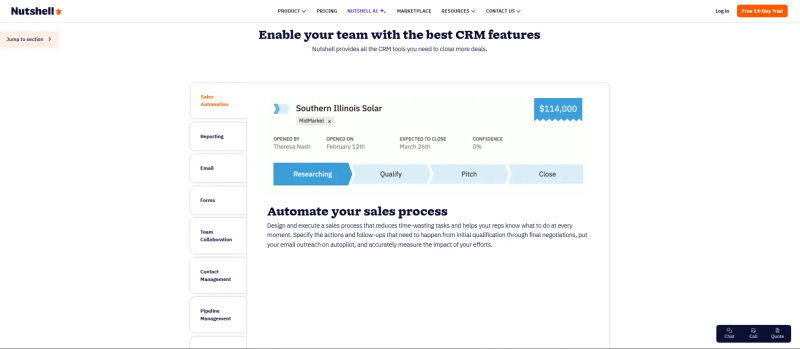
Sales Process Automation: This is where the CRM solution truly shines for SMBs. You can define a set of tasks and goals for each stage of the Nutshell pipeline. When a lead enters a new stage, Nutshell can automatically assign tasks to reps, send templated follow-up emails, and set reminders. For example, when a lead from a 'Contact Us' form enters the 'Qualification' stage, Nutshell can automatically assign it to a sales rep and schedule a 'Follow-Up Call' task for the next day. This level of automation ensures consistency and prevents leads from stagnating.
Rule-Based Lead Scoring: While not as advanced as the AI-driven scoring in a platform like HubSpot, Nutshell allows you to set up simple, rule-based lead scoring. For an inbound team, this is highly practical: you can assign points based on lead source (e.g., +10 for 'Demo Request,' +5 for 'Webinar Signup'), deduct points for inactivity, or add points for specific job titles. This helps your team prioritize the hottest prospects and improve pipeline velocity.
This focus on pipeline flow is a key differentiator from more generic platforms like Monday.com, which can function as a CRM but lacks the dedicated, sales-centric automation that Nutshell provides.
3. Contact Management & Segmentation
A CRM's foundation is its ability to manage contacts effectively. Nutshell provides a flexible and powerful system for organizing your audience.
Unified Database: All contacts, whether they are leads, customers, or partners, reside in a single, searchable database. You can easily link contacts to companies and leads to avoid data duplication.
Custom Fields and Tags: You can customize contact and company profiles with fields and tags that are relevant to your business. To create CRM tags in Nutshell, navigate to Setup > Tags, click Add new tag, and assign it a name. You can then apply these tags directly from any contact, company, or lead profile. This allows for deep segmentation. For instance, an inbound team could tag leads based on the ebook they downloaded or the webinar they attended.
Advanced Filtering: This powerful segmentation allows you to create dynamic lists for targeted outreach. You can filter contacts by any criteria—location, last contact date, tag, lead source, etc.—and save these lists for email campaigns or sales initiatives. This is a feature often found in more expensive CRMs.
For teams looking for a modern, tag-based approach to contact management, Folk offers a compelling alternative, but Nutshell integrates this functionality directly into a more traditional sales pipeline structure.
Find Perfect Software For Your Business
4. Reporting & Analytics Capabilities
What you can't measure, you can't improve. Nutshell's reporting suite is designed to be straightforward and actionable, providing insights without requiring a data science degree.
Sales Reports: Generate reports on your sales forecast, pipeline funnel, activity quotas, and win rates. These reports help sales managers track team performance and identify bottlenecks in the sales process.
Inbound ROI Tracking: A crucial feature for inbound teams is the ability to track leads by source. Nutshell's reporting allows you to see which marketing channels (e.g., organic search, paid ads, social media) are generating the most valuable leads, helping you calculate ROI. While it may not offer the deep attribution modeling of an enterprise solution, it provides the essential data needed to understand MQL-to-SQL conversion rates.
Customizable Dashboards: Each user can customize their dashboard to display the metrics that matter most to them, providing a personalized snapshot of their performance and priorities.
While Nutshell provides excellent sales-focused analytics, businesses that require deep, granular marketing attribution reporting might find the capabilities of a platform like HubSpot Marketing Hub more comprehensive. However, for most SMBs, Nutshell's reporting provides more than enough data to make informed decisions.
5. Nutshell Integrations & Ecosystem
No CRM is an island. Strong Nutshell integrations with a wide range of popular business tools allow you to create a connected tech stack.
Email and Calendar Sync: It offers seamless two-way sync with Google Workspace and Microsoft 365, ensuring that all emails and calendar events are automatically logged in the CRM.
Mailchimp & Marketing Tools: For users seeking Mailchimp Nutshell integrations, the native connection is a standout feature. It allows you to automatically sync CRM contacts to specific Mailchimp audiences, trigger email campaigns based on pipeline stages, and view subscriber engagement directly within Nutshell. It also integrates with Unbounce, Typeform, and Jotform to capture leads directly into your pipeline from various inbound sources.
Accounting Software: Connects with QuickBooks and Xero to streamline invoicing and financial tracking once a deal is won.
Zapier Integration: For any tool not natively supported, Nutshell's robust Zapier integration opens up connections to thousands of other applications, making it highly extensible.
This strong integration ecosystem is crucial for inbound teams who rely on a variety of tools for lead generation.
6. Mobile Accessibility
In today's hybrid work environment, mobile access is non-negotiable. Nutshell offers fully-featured native apps for both iOS and Android.
On-the-Go Access: Sales reps can view and update contact information, manage their pipeline, log activities, and receive notifications directly from their phones.
Business Card Scanner: A particularly useful feature, the mobile app includes a business card scanner that uses OCR technology to create new contacts instantly, saving valuable time after networking events.
Location-Based Search: The app allows you to see nearby contacts on a map, which is perfect for field sales reps looking to schedule impromptu meetings.
The mobile experience is robust and intuitive, ensuring that productivity doesn't stop when your team is away from their desks.
Nutshell CRM Pricing Plans
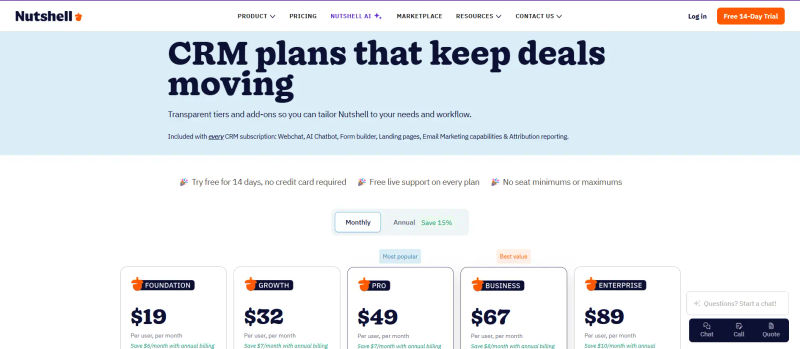
If you are wondering how much does Nutshell cost, the Nutshell CRM pricing 2026 structure is divided into five straightforward plans: Foundation, Growth, Pro, Business, and Enterprise. Overall Nutshell pricing starts at $13 per user per month and scales up to $79 per user per month for advanced needs (when billed annually).
Plan | Price | Best For | Key Features |
Foundation | $19/user /month | Small teams needing an easy-to-use CRM with core sales tools | - Unlimited storage, contacts, and accounts |
Growth | $32/user /month | Small teams needing stronger reporting and visibility into performance | Everything in Foundation plus |
Pro | $49/user /month | Teams needing sales automation, advanced reporting, and multiple pipelines | Everything in Growth plus |
Business | $67/user /month | Organizations needing deeper customization, AI tools, and governance | Everything in Pro plus |
Enterprise | $89/user /month | Larger organizations needing access controls, SQL access, and minimal limits | Everything in Business plus |
Every Nutshell CRM pricing tier includes core contact management, basic reporting, and free live support. As your team grows, upgrading unlocks meaningful enhancements like unlimited pipelines, advanced sales automation, AI tools, and granular admin controls without forcing you to switch platforms.
Nutshell CRM: Top Alternatives & How They Compare
When searching for a Nutshell CRM alternative, it is essential to understand how the platform stacks up against the competition. The best Nutshell CRM alternatives offer comparable pipeline management and sales automation, but often differ in pricing structures, advanced marketing features, and native integrations.
1. HubSpot CRM
When comparing Nutshell vs HubSpot CRM, the choice is between focused sales tools and an all-in-one suite. HubSpot is an inbound marketing and sales powerhouse. Its free CRM is generous, but paid "Hubs" scale steeply in price. Nutshell offers a simpler, more affordable approach to pipeline management.
Choose HubSpot if: You need a single platform to manage your entire customer lifecycle—from marketing to service—and have the budget to scale.
2. Pipedrive
When comparing Nutshell vs Pipedrive, Pipedrive is Nutshell's closest competitor in philosophy. Both are laser-focused on the sales pipeline. However, in a direct Pipedrive vs Nutshell matchup, Pipedrive strictly emphasizes an activity-based selling methodology, prioritizing daily tasks over broad marketing features.
Choose Pipedrive if: Your sales process is heavily driven by a high volume of activities (calls, emails, meetings) and its specific UI and activity-based workflow resonates more with your team.
3. Zoho CRM
When evaluating Nutshell vs Zoho CRM, the main difference is simplicity versus scale. Zoho CRM is part of a massive ecosystem of business apps. It is incredibly powerful and highly customizable, whereas Nutshell focuses on out-of-the-box usability for SMBs.
Choose Zoho CRM if: You have complex business processes requiring deep customization and the technical resources to manage the setup.
4. Freshworks CRM
Freshworks offers a unified platform for sales, marketing, and support. Its AI-powered assistant, 'Freddy,' provides intelligent insights and automation.
Choose Freshworks if: You are looking for a modern, AI-enhanced CRM experience and want to tightly integrate your sales, marketing, and customer support activities on one platform.
5. Capsule CRM
Capsule is another CRM that champions simplicity. It's a great choice for small businesses and freelancers who need a straightforward tool for contact management and sales tracking.
*Choose Capsule if: *Your needs are very basic and you prioritize simplicity above all else, even over the more robust automation features found in Nutshell.
6. Bigin by Zoho
Bigin is Zoho's answer to the demand for a simpler, pipeline-centric CRM. It's extremely affordable and easy to use.
*Choose Bigin if: *You are a very small team or solopreneur on a tight budget and need a simple pipeline tool, but be aware that you may outgrow it quickly.
7. Monday.com
Monday.com is a 'Work OS' that can be configured to function as a CRM. Its strength lies in its extreme flexibility and project management capabilities.
Choose Monday.com if: Your sales process is highly collaborative and project-based, and you value project management features as much as (or more than) traditional CRM functionalities.
8. Folk
Folk is a newer entrant that rethinks the CRM as a collaborative contact manager. It's excellent for networking and relationship management.
Choose Folk if: Your primary need is managing a network of contacts for purposes like PR, fundraising, or partnerships, rather than a structured, multi-stage sales pipeline.
How Nutshell CRM Compares to Other CRMs for Ease of Use and Pipeline Flow
When we isolate the two factors most critical for SMBs—ease of use and pipeline flow—Nutshell consistently ranks near the top. Research shows that ease of use is a primary driver for CRM selection among small businesses, as complex systems often lead to wasted investment.
A. User Experience Comparison
Nutshell vs. HubSpot: Nutshell's interface is arguably more focused and less cluttered than HubSpot's, which can feel sprawling due to its all-in-one nature. For a pure-play sales CRM, Nutshell is faster to navigate.
Nutshell vs. Zoho: There is no contest here. Nutshell is significantly easier to set up and use than the highly complex Zoho CRM.
Nutshell vs. Pipedrive: This is a very close race. Both platforms offer an excellent user experience centered around the pipeline. The choice is subjective, but some users find Nutshell's layout slightly more intuitive.
B. Pipeline Visualization & Automation Comparison
Nutshell's drag-and-drop pipeline, combined with its stage-based automation, provides a seamless and powerful workflow. While Pipedrive offers a similar visual pipeline, Nutshell's automation rules are arguably easier to configure for non-technical users. HubSpot's 'Workflows' are more powerful but also more complex and are locked behind more expensive tiers. Nutshell's Pro plan offers a sweet spot of power and accessibility for SMBs.
Is Nutshell CRM Right for Your Business?
Choosing a CRM is a long-term commitment. You need a platform that can solve today's problems and scale for tomorrow's growth.
Ideal Use Cases
You are an SMB transitioning from spreadsheets and need a structured, easy-to-adopt system.
Your primary goal is to improve sales pipeline visibility and ensure timely lead follow-up.
You run an inbound sales team that needs to automate nurturing sequences and track lead progression.
You need to improve the handoff and tracking of Marketing Qualified Leads (MQLs) to your sales team, ensuring no lead falls through the cracks.
You value excellent, free customer support and a predictable monthly cost.
Considerations Before Choosing
Marketing Needs: If you require an all-in-one solution with advanced marketing features like landing pages and social media tools, you might need to pair Nutshell with another tool or consider a platform like HubSpot.
Deep Customization: If your business has a highly unconventional sales process that requires extensive custom objects and logic, a more malleable platform like Zoho CRM might be necessary.
Onboarding & Training: While Nutshell is easy to use, consider if you have internal resources for initial setup and ongoing team training, even if minimal. Are there readily available templates for inbound pipelines?
Data Compliance: Nutshell provides tools to help with compliance for regulations like GDPR, such as consent tracking and easy data exporting/deletion, which is a crucial consideration for any team handling customer data.
Try AuthenCIO
Move to faster, smarter software evaluation with AI
Conclusion & Final Verdict
Nutshell CRM has carved out a powerful niche in a crowded market by relentlessly focusing on what matters most to SMBs: ease of use and effective pipeline management. Its intuitive interface, robust sales automation, and transparent pricing make it a compelling choice for any small or medium-sized business looking to professionalize its sales process without the complexity and cost of enterprise software.
For inbound teams, its ability to streamline lead flow from capture to close is a game-changer, helping to fix the leaky funnels that plague so many growing companies. While it may not be the all-in-one marketing behemoth that HubSpot is, or the endlessly customizable toolkit that Zoho provides, it doesn't try to be. Nutshell knows its identity: it is an elegant, powerful, and user-friendly sales machine.
If your team is ready to ditch the spreadsheets, gain clarity on your sales pipeline, and adopt a tool that they will actually enjoy using, Nutshell CRM should be at the very top of your list. To help you make this crucial decision and compare Nutshell against other top CRMs without the guesswork, consider leveraging vendor-neutral platforms.