
Introduction
In today's competitive landscape, Founders, IT Admins, and People Ops Leaders are locked in a constant battle against operational friction. The primary culprit? A fragmented tech stack where separate systems for HR, IT, and Payroll refuse to communicate. This digital disarray leads to manual data entry, compliance risks, security vulnerabilities, and a disjointed employee experience.
Streamline your software evaluation process
As businesses scale, the administrative burden of managing disparate systems becomes a significant impediment to growth. The shift toward a unified platform isn't just a trend; it's a strategic necessity for companies aiming to build efficient, scalable operations.
How much does Rippling cost in 2026?
Rippling does not publish full pricing publicly — most companies need a custom quote based on size and modules.
This pricing flexibility is powerful—but it also makes it harder to estimate true costs upfront.
Key cost components:
Core platform (Unity): Required base layer
Payroll: Additional per-employee fees
IT management: Device & app management add-ons
Benefits & HR tools: Optional modules
Global EOR: ~$499–$599 per employee/month
📉 Test Authencio.com — choose an all-in-one HR platform that delivers value without overbuying.
What is Rippling? An Overview of the All-in-One Platform
Rippling is a comprehensive, cloud-based workforce management platform that consolidates HR, IT, and Finance into a single, unified system. Unlike traditional HRIS (Human Resource Information System) solutions that bolt on functionalities, Rippling was engineered from the ground up to be a single source of truth for all employee data. This foundational difference enables its powerful, cross-departmental automation.
Serving over 25,000 customers, Rippling has carved out a significant space in the HR tech market, which reached a valuation of $400B in 2025. With a valuation of $16.8B, it stands as a formidable player against legacy giants like ADP and modern competitors.

The 'One System' Advantage: Unifying HR, IT & Payroll
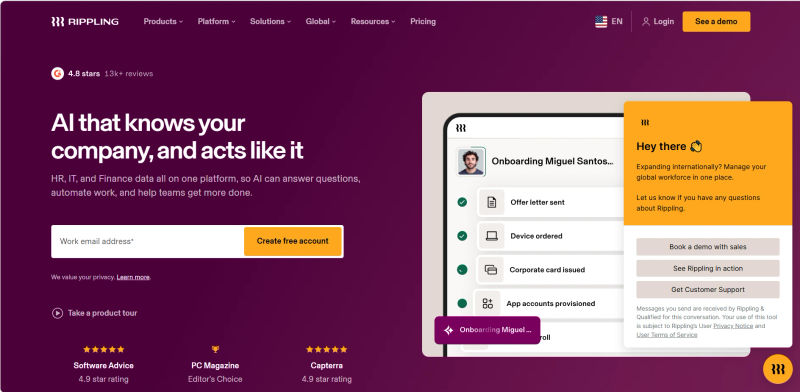
Rippling's core value proposition is its “one system” or “compound system” architecture. This isn't just marketing jargon; it's the engine behind its most powerful capabilities. Consider the onboarding of a new remote software engineer. Once their data is entered, Rippling triggers a seamless, automated cascade of actions:
HR: The offer letter is generated and sent for e-signature. Required I-9 and W-4 forms are assigned, and background checks are initiated.
Payroll: The employee is automatically added to the correct pay group with the right salary, tax withholdings, and bank details.
Benefits: The new hire is prompted to enroll in health insurance and other benefits, with deductions synced directly to payroll, effective on their start date.
IT: A new MacBook Pro is ordered and shipped to their home address. User accounts are created in Google Workspace, Slack, and GitHub, with specific permissions based on their engineering role. Access is granted with a single, secure login.
This level of native integration eliminates the manual handoffs and potential for error that plague businesses relying on a patchwork of tools like QuickBooks for payroll, a separate HRIS, and manual IT provisioning. It transforms employee lifecycle management from a series of disjointed tasks into a unified, automated workflow.
Rippling Key Features & Capabilities (2026)
Rippling's platform is modular, allowing businesses to build a solution tailored to their specific needs. Here’s a breakdown of its core components.Core HR & Employee Management
At its heart, Rippling Unity is a robust HRIS that serves as the central employee database. This is the single source of truth that powers everything else on the platform, making any Rippling HRIS review incomplete without acknowledging its foundational role.
Employee Directory & Org Chart: Maintain a comprehensive record of all employee information, viewable in a dynamic organizational chart.
Onboarding & Offboarding Automation: Create customized, role-based workflows that automate every step of the process, from offer letter to device retrieval.
Document Management: Securely store and manage all employee documents, from I-9s to performance reviews, with easy access controls.
Custom Reporting & Analytics: Build and schedule detailed reports on headcount, turnover, compensation, and DEI metrics to gain actionable insights into workforce trends and potential compensation equity gaps.
Workflow Automator: A powerful, no-code tool that allows you to build custom, trigger-based workflows for almost any HR process, such as promotions, department changes, or compliance alerts.
1. Global Payroll & Tax Compliance
Rippling's payroll system is designed for speed and accuracy, leveraging the unified data model to automate nearly the entire process. The company claims it can automate 95% of payroll admin tasks, allowing for pay runs in as little as 90 seconds.
Full-Service Payroll: Automates calculations for salaries, hourly wages, and bonuses, syncing data in real-time from HR and time tracking modules.
Automatic Tax Filing: Handles federal, state, and local tax filings automatically, ensuring compliance and reducing administrative overhead.
Global Payroll & EOR: Supports payroll in over 50 U.S. states and more than 185 countries. It offers both native payroll processing and an Employer of Record (EOR) service through partners like Deel, enabling companies to hire and pay international employees and contractors while navigating complex local labor laws and tax regulations.
Pay Runs in Multiple Currencies: Manages payments in over 50 currencies within a single, unified workflow.
2. IT Cloud & Device Management (The Differentiator)
This is where Rippling truly separates itself from the pack. While platforms like BambooHR or HiBob are excellent HR-focused systems, they lack native IT management. Rippling integrates Inventory Management and App Management directly into its core platform, bridging the critical gap between HR and IT.
Device Management: Procure, configure, and ship employee laptops (Mac and PC) directly from Rippling. You can enforce security policies, install software, and remotely lock or wipe devices if they are lost, stolen, or when an employee is offboarded.
App Management & Provisioning: Automate the provisioning and deprovisioning of user accounts for hundreds of third-party SaaS applications. When an employee joins, they get access to the right apps instantly. When they leave, access is revoked everywhere with a single click, eliminating major security risks.
Single Sign-On (SSO) & Multi-Factor Authentication (MFA): Rippling acts as an Identity Provider (IdP), offering secure, one-click access to all business applications and enforcing MFA to protect against unauthorized access.
Robust Security & Compliance: For IT Admins, security is paramount. Rippling addresses this with enterprise-grade security features, including SOC 2 Type II and ISO 27001 certifications, data encryption at rest and in transit, and robust incident response protocols to safeguard sensitive employee and company data.
3. Benefits Administration & Health Insurance
Rippling simplifies the complex world of employee benefits by acting as a licensed insurance broker in all 50 states.
Unified Enrollment: Employees can compare and enroll in medical, dental, vision, 401(k), and other benefits directly within the Rippling platform.
Automated Deductions: All benefit deductions are automatically calculated and synced with payroll, eliminating manual entry and reconciliation.
COBRA Administration: Manages COBRA administration for departing employees, ensuring compliance with federal regulations.
Wide Range of Carriers: Works with all major health insurance carriers, allowing businesses to find the best plans for their employees and budget.
4. Talent Management & Onboarding
Rippling offers a suite of tools to help companies attract, hire, and develop top talent, all integrated with the core HR platform.
Applicant Tracking System (ATS): Post jobs to multiple boards, manage candidate pipelines, and collaborate with hiring teams to streamline the recruitment process.
Performance Management: Run customizable performance reviews, set goals, and gather 360-degree feedback to foster employee growth and development.
Learning Management System (LMS): Create and assign training courses, track completion, and manage compliance training for the entire organization.
Compensation Bands: Establish and manage compensation bands to ensure fair and equitable pay practices across the company.
5. Time & Attendance Tracking
For businesses with hourly employees or those needing to track project time, Rippling's time and attendance tools are fully integrated with payroll.
Automated Time Tracking: Employees can clock in and out via web, mobile app, or a dedicated kiosk.
Overtime & Break Compliance: Automatically enforce overtime rules and meal break policies based on state and local labor laws.
Custom Policies: Create custom rules for paid time off (PTO), sick leave, and holidays, with balances that sync directly to payroll.
Geofencing & Kiosk Support: Set up location-based clock-in restrictions and turn any tablet into a secure time clock terminal.
6. Integrations & App Management
Beyond its native capabilities, Rippling boasts an extensive ecosystem of over 650 pre-built integrations. This allows it to serve as the central hub connecting all your business tools.
Deep Integrations: Offers deep, API-level integrations with essential software like Google Workspace, Microsoft 365, Slack, Salesforce, and more.
Accounting Sync: Seamlessly syncs payroll data with accounting software like QuickBooks, Xero, and NetSuite, simplifying bookkeeping.
Rippling App Shop: A marketplace where you can discover, purchase, and manage third-party applications, with billing consolidated through Rippling.
Rippling Pricing Plans & Cost Analysis (2026)
Rippling's pricing is famously modular, which is both a strength and a potential point of confusion. Instead of rigid, all-inclusive tiers, you start with a base platform fee and then add on the specific modules you need. This à la carte approach allows you to pay only for what you use but requires careful planning to understand the total cost of ownership.
1. Understanding Rippling's Modular Pricing Model
The pricing structure consists of two main components:
Rippling Unity Platform: This is the core HRIS and employee database. It's a required base platform that starts at $35 per month. Every customer must subscribe to this.
Per-Employee, Per-Month Fees: On top of the base fee, you pay a per-employee, per-month (PEPM) fee for the Unity platform and for each additional module you select. These fees typically start at $8 PEPM for the core platform, with other modules having their own PEPM costs (e.g., US Payroll is often around $8 PEPM, IT Management can be $8-$10 PEPM).
For example, a 50-person company wanting HR, US Payroll, and IT Management might pay the $35 monthly base fee plus ($8 + $8 + $8) * 50 employees, totaling around $1,235 per month. It is crucial to get a custom quote, as pricing varies.
2. Hidden Costs and Considerations
While the modular pricing offers flexibility, it's crucial to be aware of potential additional costs:
Implementation Fees: Rippling may charge a one-time fee for setup and data migration, especially for more complex implementations.
Add-On Modules: Features like Global Payroll, EOR services, or advanced reporting can add significant costs to your monthly bill.
Third-Party App Costs: While Rippling manages the apps, you still have to pay the subscription fees for the software itself (e.g., your Salesforce or Adobe licenses).
Contract Length: Pricing can be influenced by the length of your contract commitment. Be sure to clarify terms during the procurement process.
Rippling Pros & Cons: An Unbiased Review
No platform is perfect for every organization. A balanced assessment is critical for making an informed decision.
Advantages for Founders, IT Admins & People Ops Leaders
True Unification: The seamless integration of HR, IT, and Payroll is Rippling's biggest strength. The ability to manage app provisioning and device deployment from the same platform that runs payroll is a game-changer for operational efficiency.
Powerful Automation: The Workflow Automator allows for the creation of sophisticated, custom logic to automate nearly any employee-related process, saving countless administrative hours.
Scalability: Rippling is designed to grow with a company, from a 10-person startup to a 1,000+ employee organization with global operations. Its modular nature means you can add capabilities as you need them.
Enhanced Security: Centralizing employee offboarding—revoking app access, wiping devices, and removing payroll access in one click—dramatically reduces the risk of data breaches from former employees.
Modern User Experience: The interface is clean and intuitive for administrators and employees alike, leading to higher adoption rates for self-service tasks.
Potential Drawbacks & Limitations
Complex Pricing: The à la carte pricing model can make it difficult to predict the final cost, and the total expense can escalate quickly as you add more modules.
Customer Support: While generally positive, some users report that customer support can be slow or that they are routed through general support tiers before reaching an expert. Larger clients often have dedicated managers, which improves the experience.
Less Depth in Niche Areas: While Rippling does many things well, a company with highly specialized needs might find a best-of-breed solution more robust. For example, a large enterprise with complex scheduling needs might prefer a dedicated solution like UKG.
Implementation Time: For companies migrating from multiple legacy systems, the implementation process can be complex and time-consuming, requiring significant internal resources to manage data migration and process re-engineering.
🧩 Start on Authencio.com — evaluate all-in-one HR tools and avoid bloated plans with unused features.
How Rippling Compares: Top Alternatives (2026)
Evaluating Rippling requires understanding its position relative to other players in the market. While many platforms offer HR and payroll, few match Rippling's integrated IT capabilities.
1. Rippling vs. BambooHR: HR-Focused Comparison
BambooHR is a highly respected HRIS known for its user-friendly interface and strong focus on the employee experience. It excels at core HR functions like onboarding and performance management. However, it lacks native payroll and the IT device and app management features that define Rippling. Choose BambooHR if your primary need is a best-in-class, HR-centric platform and you have separate, established systems for IT and payroll. Choose Rippling if your goal is to unify HR, IT, and payroll in a single system.

2. Rippling vs. ADP: Payroll & Enterprise Features
ADP is an industry titan, renowned for its robust, scalable payroll and compliance services. It's a trusted choice for large enterprises with complex payroll needs. While ADP has expanded into a full HCM suite, its modules can feel less integrated than Rippling's native platform. Choose ADP if you are a large, established enterprise where payroll complexity and compliance are your absolute top priorities. Choose Rippling for a more modern, integrated user experience that tightly couples HR with IT, which is particularly valuable for mid-market and tech-forward companies.
3. Rippling vs. Gusto: SMB Payroll & Benefits
Gusto is a favorite among small businesses for its simple, intuitive, and affordable payroll and benefits administration. However, its capabilities are primarily focused on the US market and do not extend into IT management or advanced global HR features. Choose Gusto if you are a small US-based business looking for an easy-to-use, payroll-first solution. Choose Rippling when you anticipate scaling, have international employees, or see the immediate value in integrating IT management.

4. Rippling vs. HiBob: Modern HRIS Perspective
HiBob is a modern HRIS that shines in areas of company culture, employee engagement, and performance management. Like BambooHR, it lacks native payroll and IT management. Choose HiBob if your main goal is to foster culture and engagement in a global, remote-first company. Choose Rippling if your primary driver is operational efficiency and security through the unification of HR and IT.
Other Notable Alternatives
For businesses with different priorities, other platforms may be a better fit:
Zoho People: A strong option for companies already invested in the Zoho ecosystem, offering a comprehensive suite of HR tools at a competitive price.
UKG (Ultimate Kronos Group): A powerhouse in workforce management, particularly strong for industries with complex scheduling and time-tracking needs.
Paylocity: Offers a solid suite of payroll and HCM tools, often praised for its customer service and user-friendly mobile app.
QuickBooks Payroll: A basic payroll solution ideal for very small businesses already using QuickBooks for accounting, but it lacks any advanced HR or IT features.
Deel: A leader in global payroll and compliance, specializing in hiring and paying international employees and contractors. It's a strong choice for companies with a distributed global workforce.





Find Perfect Software for Your Business
Is Rippling the Right Choice for Your Business in 2026?
Deciding on a workforce platform is a major strategic decision. Rippling's unique value proposition makes it an ideal fit for some companies and less so for others.
Ideal Use Cases & Company Sizes
Rippling hits a sweet spot for companies with 10 to 1,000+ employees that are technology-driven and experiencing rapid growth. It is particularly well-suited for:
Scaling Startups & Tech Companies: Where the need to quickly and securely onboard employees, provision software, and manage devices is paramount.
Remote-First or Hybrid Companies: The integrated device management and secure app access are critical for managing a distributed workforce.
Businesses with Lean Operations Teams: Companies where a small team manages HR, IT, and payroll will see the most significant efficiency gains from automation.
Companies Expanding Globally: The ability to manage US employees, international hires, and contractors within one system simplifies global expansion.
Key Factors to Consider Before Choosing
Your Biggest Pain Point: Is it fragmented data and manual workflows between HR and IT? If so, Rippling is a top contender. If your primary challenge is purely payroll complexity or employee engagement, a more specialized tool might be a better fit.
Total Cost of Ownership: Go beyond the initial quote. Map out the modules you will need over the next 2-3 years to get a realistic picture of your investment. Use a comparison tool to ensure you're not overbuying.
Implementation Resources: Do you have the internal bandwidth to manage data migration and change management? A successful implementation requires a dedicated project lead and can take several weeks to a few months, depending on complexity.
Future Growth: Consider your five-year plan. Will you be expanding internationally? Will your security and compliance needs become more complex? Choose a platform that can scale with you, not one you will outgrow in a year.
Try AuthenCIO
Move to faster, smarter software evaluation with AI
Conclusion: The Future of Unified HR & IT Management
The era of siloed business functions is ending. The future of workforce management lies in unified platforms that treat the employee lifecycle as a single, interconnected process. Rippling is at the forefront of this evolution, offering a compelling vision of what's possible when HR and IT are managed from one central nervous system.
Its powerful automation, comprehensive feature set, and unique integration of device and app management make it a standout choice for modern, efficiency-focused businesses. While the pricing complexity requires careful consideration and it may not be the perfect fit for every niche, its “one system” advantage presents a powerful solution to the administrative chaos that plagues so many scaling companies.
For Founders, IT Admins, and People Ops Leaders looking to build a scalable, secure, and efficient operational backbone for their organization in 2026, Rippling is not just an option to consider—it's a benchmark against which all other solutions should be measured.