
Introduction
For Heads of Customer Support at mid-sized companies, the helpdesk landscape presents a complex paradox. On one side, legacy giants like Zendesk continue to push upmarket with enterprise-grade complexity. On the other, AI-native challengers like Pylon are redefining the support stack entirely. Sitting squarely in the middle of this battlefield is Freshdesk. If you are conducting a comprehensive Freshdesk helpdesk software review and evaluation for 2025 and 2026, this guide breaks down exactly where the platform stands today.
Streamline your software evaluation process
Long positioned as the "Goldilocks" solution—more robust than a shared inbox but less administratively heavy than Salesforce Service Cloud—Freshdesk faces a critical test. Following Freshworks' significant price adjustments in January 2026 and the aggressive rollout of Freddy AI, the platform is pivoting from a traditional ticketing system to an automated CX suite. The market data reflects this shift: Freshworks stock rose 4.8% in early 2026 following strategic pricing updates, signaling investor confidence in their upmarket trajectory.
However, for a support leader managing a team of 50 to 100 agents, market confidence doesn't automatically translate to operational efficiency. The primary anxiety at this stage isn't just feature parity; it is the cost of switching. Migrating a support stack is operationally expensive. It involves retraining agents, re-mapping data, and a potential dip in CSAT during the transition. You need to verify if the ROI on Freshdesk's AI features justifies the increasing cost per seat and the effort of migration.
This deep dive serves as a complete Freshdesk review for 2025 and 2026 helpdesk software planning, analyzing the platform through the lens of operational scalability. We will bypass marketing narratives to examine resolution rates, API extensibility, and the reality of migrating from legacy systems. We will also weigh it against key competitors—Help Scout, Zendesk, Gorgias, Intercom, and Pylon—to determine if Freshdesk remains the strategic middle ground for your support team.
Key Takeaways: Freshdesk Pricing, Features, Pros & Cons
For teams evaluating helpdesk software, understanding freshdesk features pricing pros cons 2026 is critical before committing to a migration. Freshdesk remains a strong mid-market contender, balancing robust omnichannel capabilities with accessible entry-level costs.
Pros and Cons: A Mid-Market Perspective
When evaluating Freshdesk pros and cons in 2025 or 2026, a balanced view requires examining its current limitations alongside its robust mid-market strengths.
Pros
Rapid Agent Onboarding: One of the strongest ROI drivers for Freshdesk is the speed of agent proficiency. The UI is intuitive and "consumer-grade," meaning new hires (especially Gen Z) can navigate it with minimal training. This reduces the ramp time from weeks to days compared to legacy enterprise tools.
Gamification: The "Freshdesk Arcade" gamification system—which awards points and badges for speed and satisfaction—helps maintain morale and engagement among support agents, directly combating burnout in high-volume queues.
Robust Marketplace: With over 1,000 apps, the ecosystem allows for easy integration with Jira, Slack, Salesforce, and Shopify. This extensibility ensures Freshdesk fits into your existing tech stack rather than forcing you to rebuild it.
Cons
Product Fragmentation: Freshworks has grown through acquisition and product expansion. Occasionally, the integration between Freshdesk (ticketing) and Freshchat (messaging) can feel disjointed, requiring agents to toggle between different modules that don't always share state perfectly.
Reporting Complexity: While the analytics are powerful, building complex custom reports in the underlying "Freshworks Analytics" layer can be non-intuitive. It often has a steeper learning curve than the rest of the platform.
Support Quality & User Sentiment: The Freshdesk G2 rating in 2026 sits at 4.4 out of 5. While overall sentiment remains positive, recent G2 reviews validate a common complaint: Freshworks' own Tier 1 support can be slow to resolve complex technical bugs, particularly for customers on lower-tier plans.
Best for: Mid‑sized companies seeking affordable omnichannel support with automation.
Verdict: Solid balance of features and pricing; best fit for teams needing growth‑ready service workflows.
Ultimately, if you are analyzing freshdesk pricing features pros cons 2026 against competitors like Help Scout or Intercom, Freshdesk hits the sweet spot for growing businesses that need powerful ticketing without overwhelming complexity.

Freshdesk & Leading Customer Support Alternatives
While this guide focuses on Freshdesk, it’s helpful to compare it against the most recognized Customer Support solutions.





Core Features Deep Dive: Beyond Basic Ticketing
At its core, Freshdesk excels at bringing order to high-volume environments. For mid-sized teams graduating from email distribution lists or rigid legacy tools, the platform's architecture offers a balance of structure and flexibility. However, the value in 2026 lies not in basic ticket creation, but in the orchestration of complex support workflows.
1. Omnichannel Orchestration and Unified Agent Workspace
True omnichannel support is rarely delivered effectively. Freshdesk’s unified agent workspace aggregates inputs from email, phone (Freshcaller), chat (Freshchat), and social widgets to minimize context switching.
In our freshdesk live chat software features review 2025 2026, the standout capability is how agents can convert a chat into a ticket with a single click, preserving the transcript history. This ensures that when a customer follows up later, the next agent has full visibility into the previous live chat interaction. This continuity reduces Average Handle Time (AHT) and stops customers from repeating themselves. The workspace keeps agents in a single tab, with CRM data (Salesforce, HubSpot) visible in sidebar widgets.
From a freshdesk live chat software review features pricing 2026 perspective, note that advanced chat tools—like proactive messaging and bot routing—require upgrading to the Omnichannel pricing tiers rather than the basic Support Desk plans, increasing the per-agent cost.
Explore Freshdesk’s automation in action — book a guided demo.
2. Advanced SLA and OLA Management
As you scale from 20 to 50+ agents, Service Level Agreements (SLAs) become your primary governance tool. Freshdesk’s SLA engine is robust enough for most mid-market needs. It allows for multiple policies based on ticket source, customer tier (e.g., VIP vs. Free), or product group.
Crucially, it supports Operational Level Agreements (OLAs). While an SLA measures the time to resolve a ticket for the customer, an OLA measures the internal time taken by different teams (e.g., Engineering or Finance) to assist support. By tracking these internal metrics, a Head of Support can identify bottlenecks that are artificially inflating resolution times. If your resolution time is 48 hours, but 40 of those hours are spent waiting on the engineering team to fix a bug, OLA reporting provides the data-backed evidence you need to demand better internal resources.
3. Collision Detection and Incident Management
In high-volume environments, "agent collision"—where two agents unknowingly work on the same ticket—is a silent killer of productivity. Freshdesk’s "Traffic Cop" feature provides real-time visual indicators when another agent is viewing or typing in a ticket. This prevents duplicate replies and wasted effort.
Furthermore, the "Parent-Child" ticketing feature is vital for incident management. If a server outage triggers 500 inbound tickets, a senior agent can link them all to a master "Parent" ticket. Once the engineering team resolves the root cause, closing the Parent ticket automatically resolves all 500 Child tickets, triggering a standardized notification to every affected customer. This mass-action capability is a requisite for maintaining sanity during service disruptions.
4. Technical Constraints and API Extensibility
While the UI is friendly, scaling teams must look under the hood. Freshdesk’s API rate limits are a critical consideration for mid-sized companies with heavy custom integrations.
On the Growth and Pro plans, API limits are capped (typically around 400-700 calls per minute depending on the specific endpoint configuration). For a company syncing thousands of records per hour between a custom backend and Freshdesk, you may hit these ceilings, causing sync failures. The Enterprise plan offers significantly higher limits, but it is a cost jump.
Additionally, while the marketplace is vast, reliance on third-party apps can introduce latency. A ticket with five different sidebar apps loading data from external servers will load slower than a native ticket. Auditing your "app weight" is necessary to ensure the agent workspace remains snappy under load.
Automation & AI: Evaluating 'Freddy AI'
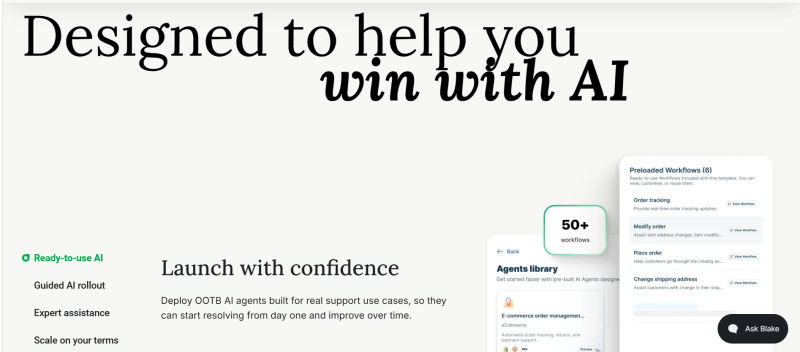
As demand for helpdesk automation software accelerates, a proper freshdesk ai help desk features review 2025 2026 must center on its flagship engine. For teams conducting a freshdesk ai capabilities review 2025 2026, the evaluation hinges on practical utility. Ultimately, a definitive freshdesk freddy ai review 2025 2026 answers one question: does it actually deflect tickets, or just annoy customers before routing them to a human?
1. Freddy Copilot vs. Freddy Insights
Freshdesk segments its AI into agent-facing and admin-facing tools.
Freddy Copilot acts as an agent assist tool. It suggests canned responses based on historical ticket data, summarizes long email threads into bullet points, and can even rephrase agent replies to match a specific tone (e.g., more empathetic or more formal). For onboarding new agents, this reduces the learning curve significantly, as the AI prompts them with the "best" answer based on how senior agents have resolved similar issues in the past.
Freddy Insights, on the other hand, is for the leadership team. It analyzes ticket clusters to identify rising trends—such as a sudden spike in tickets regarding a specific bug—before they breach SLA thresholds. It offers proactive quality management by scoring tickets based on sentiment analysis, allowing managers to audit negative interactions without manually reading thousands of logs.
2. The Reality of Deflection and Benchmarks
In any Freshdesk AI chatbot for websites features review 2025 2026, Freddy Self Service stands out for handling Tier 1 queries (e.g., "Where is my order?") directly on-site. These automated chatbots use natural language processing to resolve basic issues instantly.
However, a realistic Freshdesk chatbot solutions features review 2025 2026 must address actual deflection capabilities. For a mid-sized B2B company, a successful deflection rate for an AI agent in 2026 is typically between 20% and 30%. Expecting 80% of tickets to vanish overnight will lead to disappointment.
The chatbot's overall effectiveness depends entirely on your documentation. If your help center is outdated, the AI serves irrelevant answers. Successful Freddy implementation requires a dedicated knowledge manager to keep the AI's "brain" accurate; without human-in-the-loop maintenance, utility degrades rapidly.
Freshdesk Pricing and Costs 2026: A Detailed TCO Analysis
Evaluating Freshdesk pricing features reviews 2026 requires looking beyond the sticker price. Following the price hikes in early 2026, Freshdesk has moved slightly upmarket, but it retains a competitive edge against Zendesk’s premium tiers.
For early-stage companies, Freshdesk free plan features 2026 include basic email and social ticketing, knowledge base management, and ticket trend reports for up to 10 agents. Additionally, Freshdesk pricing for startups 2026 often includes promotional credits (up to $10,000) through the Freshworks for Startups program, making the initial scaling phase highly cost-effective.
When assessing Freshdesk pricing ai features 2026, the Total Cost of Ownership (TCO) must include add-ons. Freshdesk freddy ai pricing 2026 is now officially structured around usage. Whether you are researching freshdesk pricing freddy ai 2026 or freshdesk pricing 2026 freddy ai, the standard Freshdesk freddy ai agent pricing 2026 costs $29 per agent per month as an add-on for Freddy Copilot. For customer-facing bots, the Freshdesk freddy ai pricing official 2026 charges for "Bot Sessions." The Enterprise plan includes 5,000 sessions per month; exceeding this requires purchasing additional packs ($75 per 1,000 sessions), which can inflate your monthly bill by 15-20% during peak seasons.
Below is a breakdown of the core licensing tiers for 2026. Note that these prices refer to the annual commitment per agent per month.
Plan | Price | Best For | Features |
Free | $0 | Startups (<10 agents) | • Email & Social Ticketing |
Growth | ≈$21.6(1,799 INR) | Growing Teams | • Automation Rules |
Pro | ≈ $64.8 (5,399 INR) | Mid-Sized Support Orgs | • Round-robin Routing |
Enterprise | ≈ $102.2 (8,509 INR) | Scaling & Large Teams | • Sandbox Environment |
Note: Prices are estimated based on 2026 market adjustments and standard annual billing cycles. Always verify final quotes with a sales representative.
.webp?tr=w-800%2Cq-80%2Cf-auto%2Cc-at_max)
Based on Freshdesk pricing features 2026 analyses, the "Pro" plan is typically the sweet spot for the mid-market persona. It unlocks the round-robin routing and custom roles necessary for managing a 50-person team. The "Enterprise" plan is required if you need a Sandbox environment to test workflows before deploying them—a critical requirement for companies with strict compliance or change management protocols.
Find Perfect Software For Your Business
Freshdesk Alternatives & Competitor Comparison 2026
Evaluating Intercom vs Zendesk vs Help Scout vs Freshdesk ROI for B2B depends on your operational complexity. Freshdesk yields high ROI for quick mid-market omnichannel setups. Zendesk suits complex enterprise workflows. Intercom maximizes ROI for AI-driven conversational SaaS support, while Help Scout excels for simple, email-centric teams. Compare these alternatives below based on your specific size and industry.
1. Freshdesk vs. Zendesk: Scalability and Complexity
Zendesk remains the heavyweight champion for enterprise scalability. If your organization requires highly complex routing logic involving custom objects, hundreds of departments, and enterprise-grade security compliance immediately, Zendesk is the stronger candidate. However, for a mid-sized company, Zendesk often represents "feature bloat." The implementation timeline is longer, the administration is more complex, and the price point is significantly higher (often 30-50% more per seat for comparable features). Freshdesk wins on TCO and ease of use for teams that don't need the absolute ceiling of configurability.
2. Freshdesk vs. Help Scout: Balancing Power and Simplicity
Help Scout is a favorite for customer-centric brands that want every email to feel personal, stripping away the "ticket number" aesthetic. It excels at shared inbox management and simplicity. However, Help Scout struggles as you scale past 20-30 agents. It lacks the deep automation, round-robin routing, and granular SLA capabilities of Freshdesk. If you are a Head of Support looking to automate workflows and report on detailed metrics, Freshdesk is the necessary upgrade.
3. Freshdesk vs. Gorgias: Specialized Support Needs
If you are a pure-play e-commerce Direct-to-Consumer (DTC) brand running on Shopify, Gorgias is likely the better choice. Gorgias is built specifically for e-commerce, with deep integrations allowing agents to edit orders and refund payments directly from the helpdesk sidebar. Freshdesk connects to Shopify, but as a "horizontal" solution, its integration is less feature-rich.
Scaling DTC brands often outgrow these limitations. A Freshdesk to Gorgias migration becomes necessary when teams require deeper Shopify syncs and automated order management. This migration process typically involves exporting Freshdesk ticket histories via API and mapping customer profiles into Gorgias to maintain service continuity.
4. Freshdesk vs. Pylon: The AI-Native Challenger
Pylon represents the new wave of support tools. Unlike Freshdesk, which is a legacy ticketing system that has added AI features, Pylon is AI-native and often integrates deeply with platforms like Slack and Microsoft Teams to blur the lines between internal and external support. For B2B companies supporting customers via shared Slack channels, Pylon offers a superior experience. Freshdesk creates a ticket; Pylon manages the conversation where it happens. If your support model is heavily chat/Slack-based, Pylon is a formidable modern alternative.
5. Freshdesk vs. Intercom: The AI-First Approach
Intercom has aggressively pivoted to being an AI-first customer service platform in 2026. While Freshdesk separates ticketing and chat, Intercom blends them seamlessly. Intercom's "Fin" AI bot is often cited as easier to deploy than Freshdesk's Freddy for pure chat deflection. However, Intercom's pricing is notoriously usage-based and can become unpredictable as you scale. Freshdesk offers more predictable per-seat pricing, which is often preferred by CFOs at mid-sized companies.

Security and Compliance Considerations
For mid-market companies, especially those in fintech, healthcare, or SaaS, security is not an optional add-on; it is a procurement gatekeeper. Freshdesk meets the standard requirements for this tier, but nuances exist.
Freshdesk is SOC 2 Type II compliant and offers GDPR features like the "right to be forgotten" (data deletion) out of the box. For healthcare companies, Freshdesk can sign a Business Associate Agreement (BAA) for HIPAA compliance, but this is strictly gated to the Enterprise plan. If you are on the Pro plan, you are likely not covered for HIPAA-sensitive data.
Data residency is another critical factor. Freshdesk allows you to choose your data center location (US, EU, India, Australia) at the time of account creation. However, moving data between regions after the fact is complex and often requires paid professional services. It is vital to select the correct region during your initial implementation to avoid compliance headaches later.
The Migration Blueprint: Moving to Freshdesk
Switching helpdesks is akin to performing surgery on a moving patient. You cannot stop support while you migrate. A successful migration for a mid-sized team (50+ agents, 100k+ historical tickets) requires a structured approach.
Phase 1: The Audit and Clean-up
Before you migrate, audit your current tags, macros, and custom fields. Most teams find that 30-40% of their existing macros are obsolete. Do not migrate garbage data. Clean up your current instance to ensure you are only moving relevant workflows.
Phase 2: Data Mapping
Freshdesk’s native importer works well for contacts and companies, but ticket history is trickier. You must map your legacy "Status" fields to Freshdesk’s fields. For example, if your old system had a status called "Waiting on Vendor," you need to create that custom status in Freshdesk before the import, or those tickets will default to "Open" or "Pending," destroying your workflow visibility.
Phase 3: The API Migration
For moving 100k+ tickets, do not rely on CSV uploads. Use the API or a dedicated migration partner (like Help Desk Migration). The API migration will take time due to rate limits. A full historical import can take 3-5 days depending on volume. Plan to run this over a weekend.
Phase 4: The Cutover
On the go-live date, set up email forwarding from your support@ address to your new Freshdesk address. Do not shut down the old system immediately. Keep it in "Read Only" mode for 30 days so agents can reference old tickets if the migration missed any attachments or comments.
Try AuthenCIO
Move to faster, smarter software evaluation with AI
Final Recommendation
Is Freshdesk the right choice for your team in 2026?
Buy Freshdesk if:
You are a mid-sized B2B or B2C company (50-500 employees) needing to professionalize your support operations.
You need strong automation and SLA management but want to avoid the administrative overhead of enterprise tools like Salesforce.
You want a balance of email, chat, and phone support in a single interface.
You value a user interface that agents find easy to adopt, minimizing training costs.
Look elsewhere if:
You are a pure e-commerce brand on Shopify (Look at Gorgias).
You primarily support B2B clients via Slack/Teams channels (Look at Pylon).
You are a massive enterprise requiring highly custom database objects and infinite API rate limits (Look at Zendesk).
Freshdesk remains the pragmatic choice for the mid-market—powerful enough to scale, yet simple enough to manage without a dedicated IT team.
Next Steps for Migration
If you decide to proceed, your immediate next step is to request a sandbox environment (if evaluating Enterprise) or start a trial on the Pro plan. Run a pilot with 3-5 of your best agents for one week. Test your top 10 most common ticket types and measure the click-count to resolution. This data will be your ultimate validator before signing the contract.