
Introduction
In 2026, the concept of managing customer relationships has evolved far beyond digital Rolodexes or color-coded spreadsheets. For Small and Medium-sized Businesses (SMBs), the Customer Relationship Management (CRM) system has become the central nervous system of operations.
Streamline your software evaluation process
With the global CRM market projected to reach over $126 billion this year, the technology driving these platforms is more accessible—and more critical—than ever before.
The days of "data silos"—where your marketing data lives in one app and your sales data in another—are over. Today, success is defined by Customer Lifetime Value (CLV) and seamless omnichannel engagement.
Whether you are a boutique agency or a scaling e-commerce brand, the ability to centralize data, automate mundane tasks, and predict customer behavior is no longer an enterprise luxury; it is a baseline requirement for survival.
However, the sheer volume of options can lead to "subscription fatigue" and decision paralysis. Does a five-person team need the same AI capabilities as a Fortune 500 company? How do you balance Total Cost of Ownership (TCO) with the need for scalability?
Perhaps most importantly in the 2026 landscape, how easy is Data Portability—can you get your data out if you need to switch tools later?
This guide cuts through the marketing noise to evaluate the top CRM contenders for 2026, helping you choose a tool that aligns with your workflow, budget, and growth trajectory.
Key Takeaways
Top Overall Picks: HubSpot remains the premier all-in-one choice for combined sales and marketing, while Zoho CRM offers the best scalability and customization for growing teams. Nutshell is our top recommendation for sales teams needing simplicity paired with powerful automation.
ROI Highlights: Small businesses adopting modern, AI-integrated CRMs in 2026 are seeing an average return of $8.71 for every dollar spent. The fastest ROI comes from consolidating tech stacks and utilizing AI tools to automate lead scoring and pipeline velocity.
Specialized Alternatives: If the top three don't fit your workflow, consider Pipedrive for highly visual sales pipelines, Freshworks for budget-friendly AI insights, Thryv for local service-based businesses, or Capsule for absolute ease of use.
Top Software Picks
Salesforce — best for enterprise‑level CRM scalability
HubSpot — best for integrated marketing and sales automation
Zoho CRM — best for cost‑effective small business management
Pipedrive — best for visual pipeline tracking and deal flow
Close — best for remote sales teams with built‑in calling
Nutshell — best for all‑in‑one CRM with reporting tools
Freshworks CRM — best for AI‑powered customer engagement
Software covered in this article
For learning and reference, this listicle presents a selective overview of best crms for small business:







Why Small Businesses Need a Modern CRM Strategy in 2026
By 2026, the technological landscape for SMBs has shifted dramatically. The barrier to entry for advanced tech has lowered, meaning your competitors are likely already leveraging predictive analytics and workflow automation. Relying on legacy methods like spreadsheets or disparate email threads is a liability.
A modern CRM strategy is not just about organizing contacts; it is about Sales and Marketing Alignment. It bridges the gap between your revenue-generating teams.
For example, when a lead interacts with a marketing email sent via HubSpot, your sales team should see that activity instantly in their pipeline, and your support team should be aware of the context if that lead converts and calls for help.
Furthermore, the definition of "efficiency" has changed. In 2026, efficiency means No-Code automation triggers that handle data entry, allowing your human talent to focus on high-value relationship building.
It means having a "Single Source of Truth" (SSOT) that prevents data fragmentation and ensures that every stakeholder, from the CEO to the field technician, is looking at the same customer reality.
Key Features SMB Owners Should Look For in a CRM
Before diving into specific software, it is crucial to establish the metrics by which we evaluate them. For an SMB owner or General Manager, the glossy feature lists on a vendor's pricing page are less important than the practical application of those features.
1. User Interface (UI) and Adoption Rates
The number one cause of CRM failure is poor user adoption. If the interface is clunky or requires a degree in computer science to navigate, your team will revert to their old habits. We look for intuitive, "consumer-grade" design that minimizes the learning curve.
2. API Integrations and Interoperability
Your CRM must play nice with your existing tech stack. API endpoints allow different software to communicate. In 2026, we expect seamless, native integrations with accounting software (like Xero or QuickBooks), communication platforms (Slack, Microsoft Teams), and e-commerce engines.
3. Scalability and Modular Growth
Buying a CRM is a long-term commitment. You need a platform that handles 100 contacts today but can manage 100,000 contacts five years from now without requiring a painful data migration. We evaluate whether these tools offer modular upgrades—allowing you to pay only for the features you need now.
4. Total Cost of Ownership (TCO)
The sticker price is rarely the final price. We analyze the TCO, which includes implementation fees, mandatory training costs, add-on pricing for premium features, and the cost of potential downtime during setup.
Security and Data Privacy: Protecting Your SMB in 2026
One area often overlooked by small business owners until it is too late is data security. In 2026, SMBs are primary targets for ransomware and data breaches because they often lack the sophisticated defense infrastructure of enterprise corporations. Your CRM holds your most valuable asset: your customer data.
When evaluating these tools, we looked strictly at their compliance with 2026 standards. This includes GDPR and CCPA compliance features that allow you to easily manage "Right to be Forgotten" requests. A modern CRM must offer Role-Based Access Control (RBAC), ensuring that a junior sales rep cannot accidentally download or delete your entire client database.
Furthermore, we considered Data Portability. The fear of "vendor lock-in" is real. A robust CRM should allow you to export your data in a universal format (CSV or SQL) without holding your information hostage.
The platforms listed below have been vetted not just for their ability to ingest data, but for their transparency in keeping that data secure and portable.
Top 7 CRM Platforms for Small Businesses Reviewed
We have selected six platforms that dominate the SMB landscape in 2026: Nutshell, Zoho, HubSpot, Pipedrive, Freshworks, Thryv, and Capsule. Each serves a distinct segment of the market, from generalist scaling teams to niche service providers.
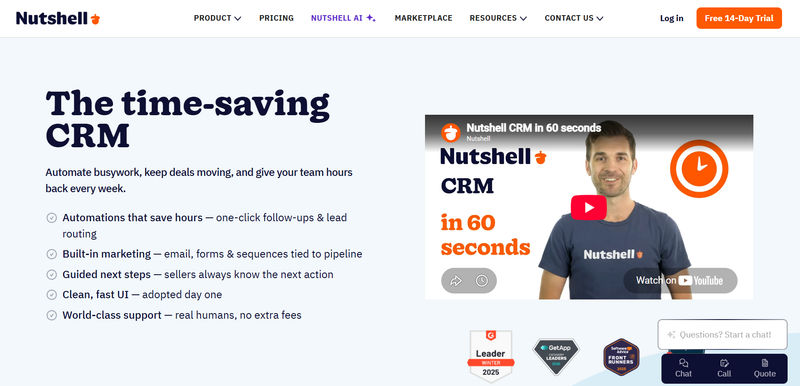
1. Nutshell CRM: Best for Sales Teams That Need Simplicity Without Sacrificing Automation
Nutshell has carved out a strong position in the SMB CRM market by balancing ease of use with practical sales automation. Unlike enterprise-focused platforms that require extensive setup, Nutshell focuses on helping sales teams organize contacts, manage pipelines, and close deals quickly.
The Workflow:
Nutshell is designed around sales productivity. Teams can manage opportunities through customizable pipelines while tracking emails, meetings, notes, and activities from a single workspace. The platform's intuitive design reduces onboarding time and encourages user adoption across growing teams.
The Tech:
Nutshell combines CRM functionality with built-in email marketing, reporting dashboards, sales automation, and activity tracking. Its automation tools help eliminate repetitive administrative work, while reporting features provide visibility into pipeline performance and forecast accuracy.
Customer Support & Human Help:
One of Nutshell's strongest differentiators is its customer support. The company provides live support, onboarding assistance, and extensive educational resources. SMBs frequently cite responsive human support as a major advantage compared with larger CRM vendors.
Contract & Pricing Nuances:
Nutshell follows a transparent per-user pricing model without the hidden costs of many enterprise CRM platforms. Most features are included within standard plans, helping SMBs avoid the complexity of purchasing multiple add-ons.
Pros:
Easy to learn and deploy
Strong pipeline management capabilities
Built-in email marketing and automation
Excellent customer support reputation
Transparent pricing structure
Cons:
Smaller integration ecosystem than HubSpot or Zoho
Less suitable for highly customized enterprise workflows
Advanced analytics features are limited compared to some competitors
Best For:
Small and mid-sized sales organizations seeking a straightforward CRM with strong pipeline management, built-in marketing capabilities, and excellent customer support.
2. Zoho CRM: Best for Scalability and Advanced Customization
Zoho continues to be a powerhouse for businesses that want enterprise-level features at an SMB price point. In 2026, Zoho’s ecosystem has matured significantly, offering a suite of over 50 integrated applications.
The Workflow: Zoho is ideal for organizations that need deep customization. Its "Canvas" builder allows you to redesign the CRM interface to match your specific industry needs, removing the clutter of irrelevant fields.
The Tech: Zoho’s AI assistant, Zia, has evolved to offer real-time sentiment analysis on emails and calls, a feature once reserved for expensive enterprise tools.
Customer Support & Human Help: Zoho offers varying levels of support. While the basic tiers rely heavily on documentation and forums, their "Premium" support ensures faster access to human agents. For SMBs, the extensive knowledge base is often sufficient, but complex implementations may require a paid support plan.
Contract & Pricing Nuances: Zoho is aggressive with pricing, often offering significant discounts (up to 20%) for annual commitments. While month-to-month options exist, the feature set in the "Standard" and "Professional" tiers pushes most serious businesses toward annual contracts.
Pros: Incredible value for money; the "Zoho One" suite offers an operating system for the entire business. Strong automation capabilities through Zoho Flow.
Cons: The learning curve can be steep. The sheer number of settings and options can overwhelm a non-technical administrator.
Best For: SMBs with a dedicated IT person or a manager willing to spend time configuring the system for maximum efficiency.

3. HubSpot: Best All-in-One Solution for Marketing and Sales
HubSpot remains the gold standard for Inbound Marketing alignment. If your business relies heavily on content marketing, SEO, and lead nurturing to generate sales, HubSpot provides the most seamless experience.'
The Workflow: HubSpot’s strength lies in its ability to track a customer’s journey from an anonymous website visitor to a closed deal. The "Smart CRM" features in 2026 automatically populate contact records with public data, reducing manual entry.
The Tech: Their "Operations Hub" solves data syncing issues, ensuring your database remains clean. The UI is arguably the most polished in the industry.
Customer Support & Human Help: HubSpot’s support is legendary but gated. Free users rely on community support. Starter plans get email and chat. Only Professional and Enterprise tiers unlock phone support. However, the chat support is highly responsive and staffed by knowledgeable humans, not just bots.
Contract & Pricing Nuances: HubSpot’s entry price is low, but their contract terms for higher tiers can be rigid. Professional suites often require annual commitments. SMBs must be wary of the steep price jump when moving from "Starter" to "Professional."
Pros: Extremely intuitive; massive ecosystem of integrations; the "Free Forever" CRM is a great starting point for startups.
Cons: The pricing model can be punishing as you scale. Moving from the Starter tier to Professional or Enterprise tiers often results in a massive jump in cost.
Best For: Growth-focused SMBs where marketing and sales teams need to work in perfect lockstep.

4. Pipedrive: Best for Visual Sales Pipeline Management
Pipedrive was built by salespeople, for salespeople, and it shows. It strips away the complexity of marketing automation and support tickets to focus entirely on one thing: moving deals through the funnel.
The Workflow: The kanban-style board is the heart of Pipedrive. It forces users to focus on the actions that drive revenue. In 2026, their "Sales Assistant" uses AI to suggest the next best action for every open deal.
The Tech: Pipedrive has doubled down on activity-based selling. It tracks calls, emails, and meetings, providing visualization on pipeline velocity—how fast a lead turns into a customer.
Customer Support & Human Help: Pipedrive excels here with 24/7 chat support available even on lower tiers. Their support team is quick to respond, making it a safe bet for teams that work odd hours or span multiple time zones.
Contract & Pricing Nuances: Pipedrive offers true flexibility with month-to-month plans that don't penalize you heavily for not signing an annual contract. This makes it excellent for seasonal businesses or startups testing the waters.

Pros: Zero learning curve; highly visual; mobile app is excellent for field sales; setup takes minutes, not weeks.
Cons: Limited marketing and service capabilities. You will likely need to integrate it with other tools (like Mailchimp or Zendesk) as you grow.
Best For: Sales-driven organizations and teams that need a no-nonsense tool to manage deal flow.
Find Perfect Software for Your Business
5. Freshworks (Freshsales): Best for AI-Driven Lead Scoring and Insights
Freshworks (specifically their Freshsales suite) has aggressively integrated AI into the core of their product. Known as "Freddy AI," this engine helps SMBs punch above their weight class by identifying high-value leads automatically.
The Workflow: Freshworks excels at Lead Scoring. By analyzing website behavior and email engagement, the system assigns a score to every contact, telling your sales team exactly who to call first.
The Tech: The interface is modern and airy, designed to reduce cognitive load. Their "Customer 360" view aggregates data from chat, email, and phone into a single timeline.
Customer Support & Human Help: Freshworks provides 24/5 phone, chat, and email support across most paid plans. Having a direct phone line to support on a mid-tier plan is a significant advantage over competitors like HubSpot.
Contract & Pricing Nuances: Like Zoho, they offer incentives for annual billing. However, they are transparent about their pricing structure, with fewer hidden "implementation fees" than enterprise alternatives.
Pros: Freddy AI is genuinely useful, not just a gimmick; built-in phone dialer; excellent integration with Freshdesk for support teams.
Cons: Reporting features can be less flexible than Zoho or HubSpot. Some advanced automation features are locked behind higher tiers.
Best For: Tech-forward SMBs that want to leverage AI to prioritize leads without hiring a data scientist.

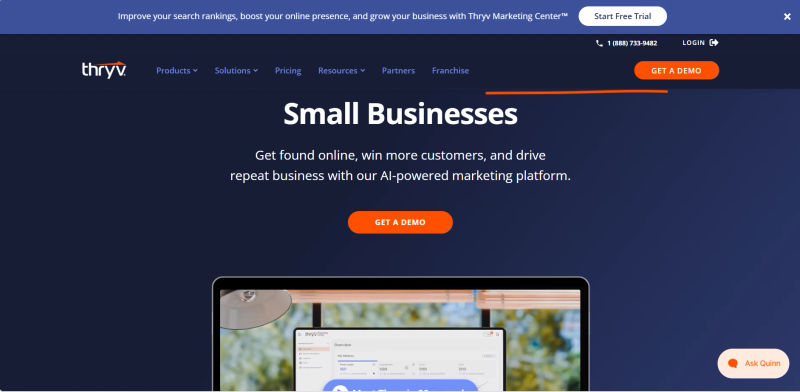
6. Thryv: Best for Local Businesses and End-to-End Management
Thryv is unique on this list because it is designed specifically for service-based small businesses (plumbers, lawyers, contractors) rather than generic B2B sales teams. It combines CRM with business management.
The Workflow: Thryv handles the entire client lifecycle: scheduling appointments, sending estimates, processing payments, and requesting reviews. It is less about "sales pipelines" and more about "job management."
The Tech: Their mobile app allows business owners to run their entire operation from a van or a job site. It includes social media management and reputation management tools.
Customer Support & Human Help: Thryv prides itself on high-touch onboarding. They often provide dedicated success managers to help local business owners set up the platform, acknowledging that their user base may be less tech-savvy.
Contract & Pricing Nuances: Thryv typically operates on a package basis, often requiring a 6-month or annual term. This is because their value comes from long-term SEO and reputation management, which takes time to build.
Pros: All-in-one platform for service businesses; solves the fragmentation problem by handling payments and scheduling; strong focus on local SEO and reviews.
Cons: Not suitable for B2B SaaS companies or complex sales cycles. It lacks the deep funnel analytics of Pipedrive or HubSpot.
Best For: Local service providers who need to manage bookings, payments, and customer history in one place.
7. Capsule: Best for Simplicity and Ease of Use
Capsule proves that a CRM doesn't need to be complicated to be effective. It focuses on the fundamentals of contact management and relationship tracking, making it a favorite for consultancies and relationship-heavy businesses.
The Workflow: Capsule emphasizes the "who" over the "what." It is excellent at tracking the history of interactions and managing tasks associated with contacts. Its "Tracks" feature allows you to define standard processes for sales or projects.
The Tech: It integrates beautifully with Google Workspace and Xero, making it a seamless addition to a standard SMB tech stack.
Customer Support & Human Help: Support is primarily email-based, but the response quality is high. Because the software is so intuitive, the need for urgent support is significantly lower than with complex tools like Zoho.
Contract & Pricing Nuances: Capsule is very friendly to the small business budget, offering simple monthly per-user pricing with no complicated tiers or hidden overage fees. You can cancel anytime without penalty.
Pros: Minimalist interface; very affordable; impossible to get "lost" in the software; great for project management alongside sales.
Cons: Lacks advanced marketing automation or built-in dialers. Not suitable for high-volume lead generation environments.
Best For: Solopreneurs, consultants, and small agencies that value relationships over raw transaction volume.

Feature Analysis: Jargon You Need to Know
When sitting through demos with sales reps from Salesforce or HubSpot, you will hear terms that sound impressive but need translation. Understanding this jargon is key to establishing authority and ensuring you aren't sold features you don't need.
1. Lead Scoring
This is an automated method of ranking prospects against a scale that represents the perceived value of each lead. Freshworks is a prime example of this done right; their system looks at email opens and web visits to tell you who is ready to buy. If you have low lead volume, you don't need this. If you have thousands of leads, it is essential.
2. Pipeline Velocity
This metric measures the speed at which leads move through your sales funnel. Pipedrive is built to optimize this. It helps you identify bottlenecks—for example, if deals are getting stuck in the "Proposal Sent" stage for weeks. Increasing velocity is often more profitable than just increasing lead volume.
3. Workflow Automation
This refers to using software to trigger actions based on rules. In Zoho, this might look like a "Blueprint" where a salesperson cannot move a deal to the next stage until they have entered a phone number. In HubSpot, it might be an email sequence that triggers automatically when a user downloads a PDF. This reduces manual data entry and ensures process compliance.
4. SaaS Churn Reduction
For subscription businesses, retaining customers is vital. CRMs help reduce "churn" (the rate at which customers leave) by flagging inactive accounts. Thryv helps service businesses reduce churn by automating appointment reminders and follow-ups, ensuring clients don't drift away due to neglect.
5. AI Tokens and TCO
You may hear vendors mention "AI Tokens" or "Credits." In 2026, many CRMs charge extra for generative AI features (like writing emails for you). These are often metered. When calculating your Total Cost of Ownership (TCO), ask if the AI features are unlimited or if you will be hit with overage charges once your team generates a certain number of AI summaries or reports.
Matching the Tool to the Workflow
Selecting software is not about finding the "best" tool in a vacuum; it is about finding the tool that fits your specific operational reality. Here is how we map the options to common SMB profiles, helping you find the best CRM for general managers and owners.
1. Solopreneur & Consultant
If you are a one-person army or a small consultancy, you need a tool that organizes your brain without demanding hours of maintenance. Capsule is the winner here. It allows you to track conversation history and manage follow-ups without the bloat of enterprise features. You don't need complex lead scoring; you need to remember to call your client on Tuesday.
2. The Scaling SaaS or B2B Startup
If you are selling a digital product and managing inbound leads, HubSpot or Freshworks are your best bets. You need strong integration between your website forms and your CRM. You need to know which blog post a lead read before they signed up. These tools offer the Tech Stack Interoperability required to connect with tools like Stripe and Intercom.
3. The Service Provider (Plumbers, HVAC, Salons)
If your business runs on appointments and invoices, a traditional sales pipeline like Pipedrive might feel unnatural. Thryv is designed for this workflow. It consolidates the "messy" parts of a service business—scheduling, dispatching, and payments—into one app. The goal here isn't just "sales"; it's operational efficiency.
Ranking Top CRMs by ROI
When evaluating what is the best CRM for ROI, small businesses must weigh the total cost of ownership against the measurable increase in sales efficiency and customer retention. While the best CRM for small business ROI 2025 was largely dominated by budget-friendly entry-level tools, the 2026 landscape shows that AI-driven automation and reduced churn yield the highest long-term returns.
Here is how we rank top CRMs by ROI based on average revenue growth versus software and implementation costs:
HubSpot: Takes the top spot for overall ROI. Despite higher premium tiers, its free foundational tools and seamless marketing-to-sales pipeline consistently generate the highest revenue multiplier for growing SMBs.
Zoho CRM: The undisputed champion for budget-conscious teams. Its massive feature set at a low per-user cost ensures that businesses see a rapid return on investment, especially when scaling operations.
Nutshell CRM: Delivers exceptional ROI for B2B sales teams. By eliminating hidden fees and including unlimited contact storage, Nutshell keeps overhead low while accelerating pipeline velocity.
Pipedrive: Highly efficient for deal-driven teams. The minimal training time required means businesses recoup their software costs in weeks rather than months through faster deal closures.
Comparing CRM Costs: Budgeting for Your SMB
To help you visualize the differences, we have compiled a comparison of these tools based on 2026 standards for a typical 10-user SMB team.
Feature | Nutshell CRM | Zoho CRM | Hubspot | Pipedrive | Freshworks | Thryyv | Capsule |
Primary Strength | Sales Productivity | Customization | Marketing Suite | Sales Pipeline | AI Insights | Service | Simplicity |
Learning Curve | Very Low | High | Low to Medium | Very Low | Low | Medium | Very Low |
Mobile App | Good | Good | Excellent | Excellent | Good | Excellent | Good |
Built-in AI | Sales Automation | Zia (Adv) | Breeze (Content) | Sales Assistant | Freddy (Scoring) | Basic | Basic |
Support Type | Live Human Support | Email/Docs (Phone is Paid) | Chat (Phone is Pro+) | 24/7 Chat | Phone & Chat | Dedicated Onboarding | |
Contract Flex | Monthly & Annual | Annual for Best Price | Annual (Pro/Ent) | Monthly Available | Annual Discounts | 6-Month/Annual | Monthly |
Hidden Costs | Minimal | Paid Support Plans | Price Jump to Pro | Add-ons (LeadBooster) | Implementation Fees | SEO Add-ons | None |
Data Portability | High | High (CSV/API) | High (Ops Hub) | High (JSON/CSV) | Medium | Medium | High (CSV) |
Best for | SMB Sales Team | Scaling Ops | Growth/Marketing | Pure Sales | Tech/SaaS | Local Services | Consultants |
Pricing Model | Per User | Per User | Per User (Tiered) | Per User | Per User | Package Based | Per User |
Implementation Tips: Transitioning Your Team to a New CRM
Migrating to a new CRM is often compared to changing the engine of a car while driving it. To avoid disaster, follow this 5-step checklist. A typical migration for a 10-20 person team should take approximately 4-6 weeks if done correctly.
Weeks 1-2: Clean Your Data First: Do not import dirty data into a new system. Spend time deduping contacts and verifying email addresses before you even sign the contract with Zoho or HubSpot. If you import junk, you will get junk analytics.
Week 3: Map Your Processes: Before setting up the software, draw your sales process on a whiteboard. If you can't define your stages (e.g., Lead > Qualified > Proposal > Closed), no software can help you. Map these stages to the CRM's pipeline fields.
Week 4: Appoint a Champion: Designate one person on your team to be the "Super User." They will learn the system inside out and train the rest of the team. This person does not need to be an IT expert, just process-oriented.
Week 5: Phased Rollout: Don't turn on every feature at once. Start with contact management and email logging. Introduce automation and advanced reporting in month two or three to prevent overwhelming the team.
Week 6+: Mandate Usage: The rule must be: "If it isn't in the CRM, it didn't happen." This ensures that your team commits to the Single Source of Truth.
Future-Proofing: CRM Trends for 2026 and Beyond
As we look toward the latter half of the decade, CRM technology is moving toward the "Invisible CRM"—systems that eliminate manual data entry by passively capturing emails, calls, and calendar events. When evaluating invisiblecrm pricing, expect these zero-data-entry capabilities to carry a premium. Standalone invisible CRM tools typically cost $40 to $80 per user per month, while major platforms often restrict these automated capture features to higher-tier plans ($50+ per user/month) to cover the associated AI processing costs.
Predictive Analytics are becoming standard. Tools now tell you not just what happened, but what will happen. For instance, Freshworks predicts which deals are likely to stall based on historical patterns, allowing early intervention.
Data Privacy and Compliance remain center stage. With evolving regulations, platforms like Zoho and HubSpot are heavily investing in consent management and data sovereignty features to act as your compliance shield.
Finally, the Mobile-First Experience is non-negotiable. Apps like Thryv and Pipedrive push the boundaries of smartphone capabilities, allowing full pipeline management without ever opening a laptop.
Try AuthenCIO
Move to faster, smarter software evaluation with AI
Conclusion: Which 2026 CRM is Right for Your Business?
The "best" CRM for your small business in 2026 is the one your team will actually use. Whether you choose the simplicity of Nutshell, the customization of Zoho, the marketing strength of HubSpot, the visual pipeline management of Pipedrive, the AI capabilities of Freshworks, the service-focused approach of Thryv, or the lightweight experience of Capsule, the right CRM is ultimately the one your team will consistently use.
Don't get distracted by flashy features you won't use. Focus on solving your specific pain points—whether that is lead leakage, lack of visibility, or administrative overhead. By selecting a tool that fits your current workflow while offering a path to scale, you turn your CRM from a monthly expense into your most valuable asset for growth.
Ready to take the next step? Start by auditing your current contact list and scheduling a demo with the two vendors that matched your workflow above. Ask them specifically about data portability and support response times.