
Introduction
Switcher Studio remains the premier iOS multi-cam production suite in 2027, offering unmatched ease of use for creators already invested in the Apple ecosystem. But is it worth the true cost? If you own multiple iPhones and iPads, Switcher Studio's $49/month Pro plan delivers exceptional value by turning your existing devices into a wireless, broadcast-quality studio. However, if you require complex audio routing, rely on Android/Windows, or lack dedicated iOS hardware, the hidden costs of purchasing new Apple devices can quickly outweigh the app's benefits.
Streamline your software evaluation process
Evaluating this streaming software requires looking beyond the monthly subscription and examining the Total Cost of Ownership (TCO). For content creators and broadcasters, the decision hinges on whether you are shifting from traditional hardware CAPEX (Capital Expenditure) to software OPEX (Operational Expenditure), or if you are unknowingly committing to expensive iOS hardware upgrades to make the software viable.
This review breaks down Switcher Studio pricing 2027 tiers, uncovers the hidden hardware costs of mobile broadcasting, and compares its overall value directly against leading alternatives like StreamYard, OBS Studio, and vMix. Our goal is to help you evaluate these mobile streaming software plans quickly to maximize your production ROI.
Key Takeaways
Switcher Studio's biggest advantage is professional multi-camera production without investing in traditional broadcasting infrastructure.
Its Starter plan suits smaller productions, while Pro offers advanced capabilities such as 4K recording, remote guests, and AI-assisted switching.
Businesses should calculate total ownership costs rather than evaluating the subscription price alone.
Existing iPhones and iPads can significantly improve its value proposition by reducing initial hardware investment.
StreamYard is more suitable for browser-based interviews, Restream for multi-platform distribution, and OBS Studio for technically capable teams seeking free desktop broadcasting software.
Overall, Switcher Studio is worth the investment for teams that regularly produce professional mobile broadcasts, but less attractive for businesses with occasional streaming requirements.
Switcher Studio vs. Alternatives: Pricing at a Glance
Before diving into individual plans and hidden costs, here’s a quick comparison of Switcher Studio with the leading live-streaming and multi-cam production tools. This overview highlights where each platform fits best, its primary ecosystem, typical pricing, and key limitations—so you can identify the strongest options for your workflow at a glance.
Tool | Best For | Primary Ecosystem | Pricing | Limitations |
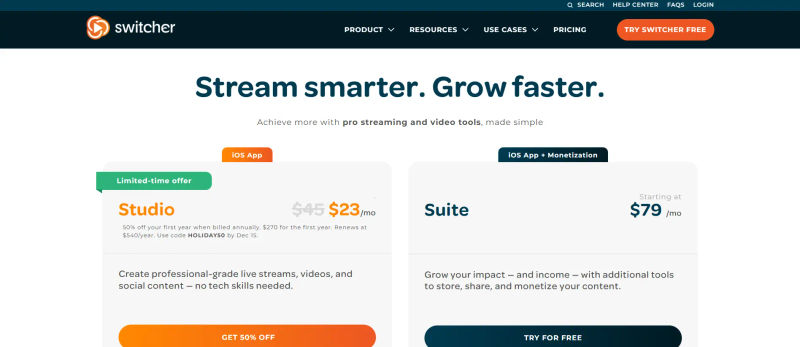
Switcher Studio | iOS multi-cam production teams | iOS | Starts from $45/mo | Strictly iOS only; requires robust Wi-Fi 7 or 5G network for stability |
Restream | Multi-destination streamers | Browser / Cloud | Starts from $19.99/mo | Limited local recording capabilities; highly reliant on browser performance |
StreamYard | Browser-based remote interviews | Browser / Cloud | Starts from $18.99/mo | Capped at 1080p resolution; limited custom graphics and audio routing |
OBS Studio | Budget tinkerers & technical solo creators | Windows / macOS / Linux | $0 (Free) | Steep learning curve; no native cloud integration; requires high-end PC |
vMix | High-end Windows broadcast studios | Windows | Starts from $60 (Lifetime) | Windows only; requires expensive SDI/HDMI capture cards and high-end GPUs |
ManyCam | Virtual camera presenters & educators | Windows / macOS | Starts from $59/yr (Billed Annually) | Basic multi-cam features; limited professional audio routing capabilities |
Wirecast | Professional traditional studios | Windows / macOS | Starts from $59/mo | High CPU usage; expensive upgrade cycles; steep learning curve |
*Note: All prices shown reflect typical monthly billing. Vendors often offer lower pricing for annual commitments, but those discounts are excluded here for easier comparison. Actual costs may vary depending on your requirements, usage volumes, and negotiated terms.
Software Covered in this Article
To help you understand Switcher Studio in the right context, this article refers to a carefully curated set of leading alternatives:







Switcher Studio Pricing Breakdown: Is It Worth It?
Switcher Studio delivers strong value for mobile-first creators by turning existing iOS devices into a multi-cam production suite, bypassing expensive desktop hardware and capture cards. Its 2027 pricing reflects this premium positioning. However, determining if the subscription cost is justified requires evaluating its core features, usability, and tier limitations. While the software excels in intuitive touch-based switching and rapid setup, users must weigh these workflow benefits against the recurring monthly expense and strict reliance on the Apple ecosystem.
1. Switcher Studio Starter vs. Pro: Key Differences
For smaller creator teams, the decision usually comes down to the Starter and Pro plans.
The Starter Plan ($45 per month) is designed for solo creators or small businesses dipping their toes into multi-cam production.
Performance & Ease of Use: Setup is frictionless for basic environments. Connecting two or three iOS devices over a stable local Wi-Fi network takes under five minutes, making it highly practical for single-room podcasts, simple vlogs, or basic live sales.
Limitations: The primary drawback is the restriction on remote guests and lower-tier cloud storage limits. If your strategy relies heavily on bringing in remote experts or co-hosts, this tier will immediately bottleneck your production.
The Pro Plan ($99 per month) is where Switcher Studio unlocks its true potential for professional teams.
Performance & Ease of Use: This tier introduces 4K local recording, expanded remote guest limits (up to 5 simultaneous guests), and AI-driven automated switching. In practice, the AI auto-switching reliably tracks active speakers with minimal latency, effectively replacing a dedicated technical director during panel discussions or multi-angle product demonstrations. Managing multiple remote feeds remains intuitive within the iOS interface.
Limitations: The Pro plan still operates strictly within the Apple ecosystem. If your team uses a mix of Android devices or professional cinema cameras, you must rely on expensive iOS capture adapters, which introduces workflow friction and potential sync issues.
2. Enterprise Solutions for Large-Scale Broadcasters
For mid-sized production houses and corporate teams, Switcher Studio offers custom Business and Enterprise tiers (often starting at $120+ per month).
Who is this best for? Large-scale broadcasters who need centralized billing, dedicated account management, and massive cloud storage allocations for 4K video assets.
Value for Money: When evaluating professional mobile broadcasting pricing, the value here lies in workflow consolidation. By replacing separate tools for switching, graphic overlays, and multistreaming, enterprise teams can reduce operational complexity.
Limitations: The primary limitation is platform dependence. While the software is powerful, enterprise teams must ensure their network infrastructure (Wi-Fi 7 or enterprise-grade 5G) can handle 8+ simultaneous wireless camera feeds without latency spikes or dropped frames.
3. NDI Support and REMI Workflows
A critical factor for professional broadcasters is how mobile software integrates into a larger studio ecosystem. Switcher Studio supports NDI (Network Device Interface) output, allowing teams to send their mobile multi-cam feed directly into desktop software like vMix or OBS over a local network.
This makes it an excellent tool for REMI (Remote Integration Model) workflows, where field reporters use iPhones to capture footage while a central studio handles the final broadcast. However, utilizing NDI requires an impeccably stable network, and any bottleneck in your Wi-Fi router will result in dropped frames on the main studio feed.
Find Perfect Software For Your Business
Restream and StreamYard: Browser-Based Alternatives
If your production workflow relies more on remote guests than physical multi-camera setups, cloud-based competitors like Restream and StreamYard offer compelling pricing models. In 2027, the divide between native apps (like Switcher) and browser-based tools is clearer than ever.
1. StreamYard: Browser Interviews
StreamYard's pricing is straightforward, with a Basic plan at $18.99/month and a Professional plan at $44.99/month.
Who is this best for? StreamYard is best for podcast hosts, webinar creators, and teams whose primary format is the "talking head" remote interview.
Pricing Differences: At $49/month, StreamYard's Professional plan matches Switcher Studio's Pro plan in price, but the feature sets are entirely different. StreamYard focuses on ease of use, allowing guests to join via a simple browser link without downloading an app.
Limitations: StreamYard is severely limited when it comes to physical multi-cam production. You are capped at 1080p resolution, and you cannot easily route multiple local wireless cameras into the browser without third-party workarounds. Furthermore, you are entirely dependent on your browser's stability and cloud processing.
2. Restream: Multi-Platform Reach
Restream offers a Standard plan at $19/month and a Professional plan at $49/month, focusing heavily on multistreaming capabilities.
Who is this best for? Restream is best for marketers and creators who need to broadcast a single feed to dozens of platforms (YouTube, LinkedIn, TikTok, Twitch) simultaneously to maximize audience reach.
Value for Money: If your goal is syndication, Restream offers unmatched value. Their 2027 infrastructure handles the heavy lifting of transcoding video for different platforms in the cloud.
Limitations: Like StreamYard, Restream's Studio is browser-based and lacks the granular local camera control, advanced audio mixing, and 4K local recording capabilities that Switcher Studio provides for physical setups.
OBS Studio and vMix: Desktop Power vs Mobile Agility
When evaluating multi-cam production costs, you must compare the OPEX of mobile subscriptions against the CAPEX of traditional desktop software.
3. OBS Studio: Open Source
OBS (Open Broadcaster Software) Studio is famously free and open-source.
Who is this best for? OBS Studio is best for budget-conscious tinkerers, solo PC gamers, and highly technical creators who want absolute control over every pixel and audio channel without paying a monthly fee.
Pricing Differences: While the software costs $0, the hidden hardware costs are substantial. To run a stable multi-cam OBS setup in 2027, you need a high-end PC (costing $1,500 to $3,000), external capture cards ($150+ each), and dedicated USB hubs to prevent bandwidth bottlenecks.
Limitations: OBS has a notoriously steep learning curve and lacks native cloud integration. For a business, the time spent configuring OBS and managing local hardware often outweighs the savings of the free software.
4. vMix: Broadcast Power
vMix operates on a different pricing paradigm, offering lifetime licenses ranging from Basic HD ($60) to 4K ($700) and Pro ($1,200), alongside a $50/month subscription option.
Who is this best for? vMix is best for professional, high-end Windows broadcast studios that require complex NDI workflows, instant replay features, and massive multi-layered graphics.
Value for Money: For a professional studio, a $1,200 lifetime vMix license is incredibly cost-effective compared to traditional hardware switchers from brands like Blackmagic Design or Roland.
Limitations: vMix is strictly Windows-only. Furthermore, to utilize its 4K and instant replay features, you must invest in enterprise-grade PC hardware with top-tier GPUs and expensive SDI/HDMI PCIe capture cards. Compared to Switcher Studio's mobile agility, vMix is entirely stationary.
ManyCam and Wirecast: Studio Production Costs
Bridging the gap between simple browser tools and complex broadcast suites are ManyCam and Wirecast, each serving distinct segments of the market.
5. ManyCam: Virtual Cameras
ManyCam utilizes an annual subscription model, typically ranging from $59 to $99 per year depending on the tier.
Who is this best for? ManyCam is best for educators, virtual presenters, and sales professionals who want to enhance their Zoom, Teams, or Google Meet calls with multiple camera angles and basic graphic overlays.
Pricing Differences: At roughly $4 to $10 per month (billed annually), ManyCam is significantly cheaper than Switcher Studio.
Limitations: ManyCam is primarily a virtual camera driver rather than a dedicated live broadcasting suite. It lacks the robust streaming integrations, remote guest management, and high-end 4K recording features necessary for professional content creators.
6. Wirecast: Traditional Studio
Wirecast by Telestream is a veteran in the streaming space, offering Studio ($59) and Pro ($79) lifetime licenses, though they heavily push an annual support subscription.
Who is this best for? Wirecast is best for traditional Mac and PC-based production studios, houses of worship, and local sports broadcasters who need deep integration with professional audio interfaces and PTZ (Pan-Tilt-Zoom) cameras.
Value for Money: Wirecast offers a polished, professional interface that is more user-friendly than OBS, but it comes at a premium price.
Limitations: Wirecast is infamous for its high CPU usage. Even on top-tier 2027 Apple Silicon or Intel hardware, rendering multiple 4K streams can cause thermal throttling. Additionally, the upfront cost is prohibitive for lean creator teams compared to Switcher Studio's monthly model.
Hidden Costs of iOS Multi-Cam Production
While Switcher Studio's $45/month Pro plan appears highly affordable on paper, decision-makers must account for the hidden costs of iOS multi-cam production to calculate an accurate Total Cost of Ownership (TCO). Mobile production does not eliminate the need for production standards; it simply shifts the budget to different categories.
1. iOS Hardware Budgeting
Switcher Studio is exclusively available on iOS. If your team does not already own a fleet of modern Apple devices, the initial hardware investment can be staggering.
To ensure 4K multicam stability and avoid latency issues in 2027, you need recent hardware. While older iPhones can act as secondary camera angles, the main switching device (usually an iPad Pro) must have an M2, M3, or M4 chip to handle the processing load of multiple incoming wireless feeds, graphic overlays, and simultaneous streaming/recording. Purchasing a dedicated iPad Pro and three iPhone 17 or 18 models purely for production can easily push your initial hardware budget past $4,000.
2. Thermal Throttling and Battery Degradation
One of the most significant hidden costs of mobile broadcasting is thermal management. Live streaming 4K video over Wi-Fi while simultaneously recording locally generates massive amounts of heat. In 2027, even the most advanced iOS devices are susceptible to thermal throttling during long-form broadcasts (over 60 minutes), which can lead to dropped frames or unexpected shutdowns.
To combat this, teams must invest in active cooling solutions, such as MagSafe-compatible cooling fans. Furthermore, the constant cycle of charging and heavy processing degrades iOS batteries faster than normal consumer use. Teams should budget for battery replacements every 12 to 18 months for their primary production devices.
3. Mobile Streaming Accessory Costs
Mobile production requires specialized accessories to meet professional broadcast standards. Smartphone sensors, even in 2027, require excellent lighting to produce professional images without digital noise. Budgeting for portable LED key lights and softboxes is non-negotiable.
Furthermore, Switcher Studio relies entirely on your local network to sync camera feeds. A standard home router will not suffice. You must invest in a high-end Wi-Fi 7 mesh system or dedicated 5G/6G mobile hotspots for field reporting to ensure low-latency communication between devices.
4. The Dongle-Life and Professional Rigging
A major hidden cost for professional mobile broadcasters is the 'dongle-life' and physical rigging. Handheld iPhones are not stable enough for professional, multi-hour broadcasts. You must budget for mobile camera cages (such as those from Beastgrip or SmallRig), heavy-duty tripods, and mounting hardware.
Additionally, the main switching iPad will require a premium USB-C hub to simultaneously connect to hardwired Ethernet (for stream stability), an external audio interface, and continuous power. These hubs and rigs can easily add $300 to $600 to your overall setup cost.
5. Audio Latency and Multi-Cam Sync
One of the most complex technical hurdles in wireless iOS production is audio latency management. Syncing wireless audio with multiple wireless video feeds often results in a slight delay, causing lip-sync issues on the final broadcast. You cannot rely on built-in iPhone microphones.
You must budget for iOS-compatible audio interfaces or premium wireless microphone systems (like the DJI Mic 3 or Rode Wireless PRO). More importantly, your team will need to spend time running latency benchmarks and manually adjusting audio delays within the Switcher Studio app to ensure perfectly synchronized audio, which adds an operational time cost to every production.
Quick Recommendation Guide
If you are struggling to make a final decision, use this quick reference guide based on your team's size and technical expertise:
Best for Solo Creators on a Budget: OBS Studio (Requires technical patience and PC hardware).
Best for Remote Interview Podcasters: StreamYard (Frictionless browser-based guest management).
Best for Multi-Platform Marketers: Restream (Unmatched cloud syndication).
Best for Traditional Broadcast Studios: vMix (Unparalleled power for Windows/SDI setups).
Best for Mobile-First Creator Teams: Switcher Studio (The ultimate balance of multi-cam agility and professional features).
Try AuthenCIO
Move to faster, smarter software evaluation with AI
Final Verdict: Choosing Your 2027 Streaming Software
Switcher Studio stands out in 2027 as the premier mobile-first streaming solution for creators and businesses leveraging the iOS ecosystem. Based on this software review, Switcher Studio's ability to transform everyday iPhones and iPads into a cohesive, multi-camera production studio justifies its subscription cost for mobile-centric broadcasters.
Alternative tools serve different workflows better. If your production relies on remote guests joining via browsers, StreamYard or Restream provide a more cost-effective, friction-free experience. For technical solo creators with powerful PCs, OBS Studio remains the top budget-friendly, open-source choice. For traditional studios running complex Windows workflows, vMix offers unparalleled broadcast power.
However, for mobile journalists, e-commerce brands, and agile creator teams, Switcher Studio delivers exceptional overall performance. Its robust feature set—including 4K recording, seamless multi-cam switching, and built-in graphics—allows you to execute professional broadcasts from a backpack without a dedicated technical director. While strict iOS lock-in and hardware accessories must be budgeted, Switcher Studio is our top recommendation for teams requiring high-quality, on-the-go video production.