
Introduction
Evaluating video and design software pricing alongside content repurposing costs in 2027 requires more than just glancing at a pricing page. For video producers and media designers evaluating their AI software stack, subscription fatigue is a very real threat to bottom-line profitability.
Streamline your software evaluation process
As AI-assisted production becomes the industry standard across visual and audio media, the challenge is no longer finding a tool that can transcribe or clip assets—it is finding the platform that delivers the highest return on investment (ROI) without hidden overage fees or workflow bottlenecks.
You need to know if Castmagic's Pro plan justifies its cost or if alternatives like Descript, Async, Capsho, Riverside.fm, Otter.ai, or Munch make more financial sense for your specific video production and design operational needs.
Key Takeaways:
Unit Economics Matter: Evaluating AI video and design software pricing in 2027 requires calculating the cost-per-minute and cost-per-asset, not just looking at the monthly subscription fee.
The 2027 AI Credit Shift: High-volume video creators and designers must account for the difference between raw media processing minutes and the "AI Credits" consumed by advanced text-generation models like GPT-5.
Hidden Costs Eat Margins: Data security compliance, API maintenance, and human quality control are the true differentiators in total cost of ownership (TCO) for media design teams.
Tool Specialization: Castmagic excels in text repurposing, Descript in video editing, and Munch in social clipping. Choose based on your primary video production or media design bottleneck.
Compare Pricing, Features, and Best-Fit Use Cases
To help you navigate these options, the following comparison evaluates each platform based on cost-per-minute, output diversity, and integration depth within a modern media design stack.
Tool | Best For | Pricing | Limitations |
Castmagic Pro | High-volume content repurposing | $69/month | 1,500 minutes/month; limited saved prompt templates |
Descript Pro | Video-first editing workflows | $35/month | 30 transcription hours; 4K export limits |
Async Pro | All-in-one studio recording & editing | $39.99/month | 20 hours transcription; 5 AI voice clones |
Capsho Pro | Marketing-specific copywriting | $379 (one-time) | 4 episodes/month; strict overage fees |
Riverside.fm Pro | High-fidelity remote recording | $29/month | 15 hours of separate track recording |
Otter.ai Business | Meeting notes and real-time transcripts | $20/month/user | 1,000 minutes/month; no media repurposing |
Munch Pro | Automated social media clipping | $85/month | 200 input upload minutes; limited render time |
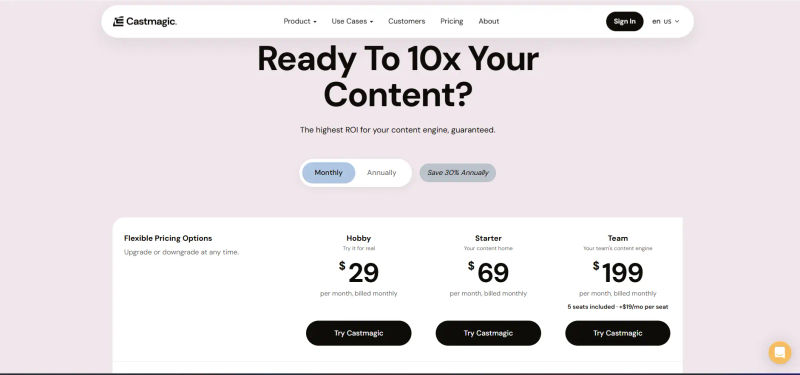
*Note: All prices shown reflect typical monthly billing. Vendors often offer lower pricing for annual commitments, but those discounts are excluded here for easier comparison. Actual costs may vary depending on your requirements, usage volumes, and negotiated terms.
Software Covered in this Article
To help you understand Castmagic in the right context, this article refers to a carefully curated set of leading alternatives:







Top Questions Answered: Video and Design Software Pricing
In 2027, professional video and design software pricing has largely shifted to usage-based AI credit models, averaging $25 to $50 per user per month for standard tiers. While tools like Castmagic handle the heavy lifting for audio transcription and text repurposing, creators still need dedicated video and design platforms to finalize visual assets.
Here is what you can expect to pay for visual media tools that integrate with your audio workflows:
Video Editing Suites: Standard AI-integrated video editors cost between $20 and $35 monthly. When paired with Castmagic's exported SRT files, these tools drastically reduce editing time, though 4K cloud rendering often incurs extra compute fees.
Graphic Design Platforms: Cloud-based design software averages $15 to $20 monthly. These subscriptions are essential for turning Castmagic's AI-generated quotes and show notes into social media carousels and YouTube thumbnails.
All-in-One AI Media Bundles: Emerging 2027 platforms that combine automated video clipping and graphic generation typically start at $40 to $60 per month, often capping monthly export minutes.
To maximize ROI, media teams should budget approximately $80 to $120 monthly for a complete tech stack. Combining Castmagic's text generation with an affordable video editor and design tool creates a fully automated, cost-effective content engine without the need for bloated enterprise bundles.
2027 Audio Repurposing Pricing: Castmagic vs. Top Alternatives
The 2027 creator economy landscape is defined by workflow fragmentation across visual media and design. Recent industry data indicates that over 60% of professional creators and media ops teams use multiple AI tools—spanning video editors, graphic design suites, and audio-to-text engines like Castmagic—to execute their content strategies.
Because no single platform perfectly handles remote recording, multitrack video editing, graphic design, and text-based repurposing simultaneously, decision-makers must evaluate pricing through the lens of unit economics across the entire visual media workflow.
When comparing Castmagic pricing 2027 against top video and design software alternatives, you must calculate the cost per source hour, cost per generated visual or text asset, and the human labor required for quality control. Furthermore, ops managers must factor in the "cost of switching" and integration friction when connecting Castmagic's text outputs to visual tools like Premiere Pro, Canva, or Figma.
A cheaper monthly subscription is not cost-effective if it requires your team to spend five hours manually rewriting generic AI show notes to match your video graphics or fixing broken API webhooks between your design software and transcription tool. Conversely, a premium plan is only worth the investment if your visual production volume consistently hits the tier's upper limits without triggering punitive overage fees.
To make an informed decision, media ops managers must move beyond marketing claims and analyze the specific use cases, hard limitations, and actual workflow integrations of each platform within their broader video and design software ecosystem.
Find Perfect Software For Your Business
Castmagic Pricing Breakdown: Plans, Limits, and Value
Who is this best for? Castmagic is best for high-volume podcast producers, media operations managers, and content agencies who need to automatically transform long-form audio into dozens of contextually accurate written assets (show notes, newsletters, LinkedIn posts, and blog articles) without manual prompting.
In 2027, Castmagic's pricing structure is heavily tiered based on processing minutes, AI credit consumption, and workspace management.
1. The Starter Plan: Best for Solo Podcasters
While the Starter plan (around $29/month for 200 minutes) is adequate for hobbyists, it lacks the volume and multi-show architecture required by professional media teams, who almost exclusively evaluate the Pro plan and the Agency/Enterprise tiers.
2. The Pro Plan: The High-Volume Creator's Sweet Spot?
At approximately $69 per month, the Castmagic Pro plan offers 1,500 minutes of processing time. This equates to 25 hours of audio or video per month.
Cost Per Minute: $0.059 per minute.
Cost Per Episode: Assuming a standard 60-minute podcast, the processing cost is roughly $3.56 per episode.
Key Features: Multi-show management, custom prompts, API access for CMS integration, and distinct brand workspaces.
For high-volume creators, the Pro plan is often the sweet spot. If your media operation produces four 60-minute podcasts a week (roughly 960 minutes a month), the Pro plan leaves you with a 540-minute buffer for client meetings, webinars, or bonus content.
The true ROI of the Pro plan lies in its multi-show management capabilities. In 2027, media ops teams usually manage multiple brands or client accounts. The ability to separate custom prompts and brand voices into distinct workspaces prevents the AI from cross-contaminating tone and style.
It is important to clarify the limitation regarding "limited custom prompts." This restriction generally refers to the number of saved prompt templates allowed per workspace, rather than the token complexity or length of the individual prompts you write.
3. AI Credits vs. Minutes: The 2027 Shift
A critical factor in 2027 pricing evaluation is the industry shift from pure "minutes" to "AI Credits." While Castmagic Pro grants 1,500 minutes of audio transcription, generating complex, multi-layered text assets using advanced foundational models (like GPT-5) consumes computational resources at a different rate.
Media ops managers must monitor their AI credit burn rate. If you are generating 50 distinct assets per episode, you may exhaust your text-generation credits before you run out of audio upload minutes.
4. Agency & Enterprise: Scaling Media Operations in 2027
If you exceed 1,500 minutes, you are subject to overage charges or forced to upgrade to the Agency plan (often priced around $199/month).
Furthermore, while Castmagic excels at text generation, it is not a video editor. If your workflow requires high-end video clipping or multitrack audio engineering, Castmagic must be paired with another tool, increasing your total software stack cost.
Quick Verdict: Castmagic Pro is the undisputed leader for text-based content repurposing, provided your team maximizes the 1,500-minute limit and utilizes distinct brand workspaces.
Castmagic Alternatives: 2027 Pricing & Use Case Analysis
While Castmagic excels at text-based repurposing, teams requiring robust video editing and design software capabilities often need visual-first platforms. The following alternatives—particularly tools like Descript and Munch—offer pricing models tailored to video post-production, automated social clipping, and visual asset creation.
1. Descript: Best for Video-First Editing Workflows
Who is this best for? Descript is the premier choice for video-first editing workflows, visual designers, and producers who prefer to edit multitrack audio and video directly through a text transcript.
In 2027, Descript's Pro plan is priced at $30 per user per month, providing 30 hours of transcription alongside comprehensive video design tools.
Cost Per Hour: $1.00 per hour of transcription.
Value Proposition: Descript functions as a full-stack video design software. It combines transcription with a powerful non-linear video editor (NLE), automated dynamic captions, stock b-roll libraries, visual templates, and Studio Sound audio enhancement. It replaces traditional, complex video software for creators focused on visual storytelling and social media clips.
Limitations: While Descript excels at video design and offers basic AI features to generate show notes, its text-repurposing engine remains rudimentary compared to Castmagic. It lacks the advanced custom prompting and multi-platform asset generation required to scale written content. Additionally, 4K video exports and remote recording hours are strictly capped on lower tiers.
Quick Verdict: Choose Descript if your primary bottleneck is video editing and visual design, but expect to manage your own copywriting and text-based marketing assets.
2. Async: Best for All-in-One Studio Recording
Who is this best for? Async is best for all-in-one studio recording and solo creators who want a web-based Digital Audio Workstation (DAW) with built-in AI enhancement.
Async's Pro plan typically costs $29 per month and includes 20 hours of transcription.
Cost Per Hour: $1.45 per hour of transcription.
Value Proposition: Async shines in its simplicity, offering high-quality remote recording, intuitive timeline editing, and AI voice cloning (up to 5 voices on the Pro plan).
Limitations: Async is an audio-first platform. Its transcription is accurate, but its ability to generate diverse, platform-specific marketing copy is highly limited. If you are a high-volume creator looking to turn one podcast into a week's worth of LinkedIn posts and a comprehensive newsletter, Async will create a workflow bottleneck requiring heavy human intervention.
Quick Verdict: Ideal for audio purists needing a reliable web DAW, but insufficient for high-volume content marketers.
3. Capsho: Best for Marketing-Specific Copywriting
Who is this best for? Capsho is best for marketing-specific copywriting and entrepreneurs who require aggressive, conversion-focused promotional assets for their episodes.
Capsho's pricing model differs significantly from its competitors. Instead of billing by the minute, Capsho typically bills by the episode. Their Pro plan, priced around $79 per month, usually allows for 4 episodes per month.
Cost Per Episode: $19.75 per episode.
Value Proposition: Capsho is deeply specialized in marketing frameworks. It doesn't just summarize; it writes promotional emails, social media captions, and blog posts designed to drive clicks and conversions.
Limitations: The episode-based billing model is highly restrictive for high-volume creators. If you produce daily podcasts, short daily updates, or manage multiple client shows, Capsho's pricing quickly becomes prohibitively expensive. Overage fees per episode are steep, making it difficult to predict monthly billing if your content volume fluctuates.
Quick Verdict: Best for marketers with low episode volume but high direct-response conversion targets.
4. Riverside.fm: Best for High-Fidelity Remote Recording
Who is this best for? Riverside.fm is best for high-fidelity remote recording and shows with remote guests that require uncompressed 4K video and lossless WAV audio tracks.
Riverside's Pro plan costs approximately $24 per month.
Value Proposition: Riverside's core competency is local recording. It bypasses internet connection issues to record studio-quality files directly on the user's device before uploading them to the cloud. It includes 15 hours of separate track recording.
Limitations: While Riverside introduced AI transcriptions and basic show notes to compete in the 2027 market, its repurposing engine is a secondary feature. The AI outputs are generic summaries rather than platform-optimized marketing copy. High-volume creators use Riverside to capture the content, but they export the audio to tools like Castmagic for actual repurposing.
Quick Verdict: Essential for capturing high-quality source files, but requires pairing with a dedicated AI repurposing tool for marketing scale.
5. Otter.ai: Best for Meeting Notes and Real-Time Transcripts
Who is this best for? Otter.ai is best for meeting notes, real-time transcripts, and internal corporate communications.
Otter's Business plan is priced at $20 per user, per month, offering 1,000 minutes of transcription.
Cost Per Minute: $0.02 per minute.
Value Proposition: Otter is deeply integrated into corporate workflows, joining Zoom, Teams, and Google Meet calls automatically to provide real-time transcription, highlight extraction, and action-item summaries.
Limitations: Otter.ai is not a media production tool. It lacks the ability to generate social media posts, format blog articles, or maintain distinct brand voices for public-facing content. Using Otter for podcast automation ROI is a mismatch of tool and intent; it will result in high labor costs as your team manually rewrites the corporate-style summaries into engaging media copy.
Quick Verdict: Perfect for internal corporate meetings; a poor fit for public-facing media production and marketing.
6. Munch: Best for Automated Social Media Clipping
Who is this best for? Munch is best for video editors, social media managers, and design teams who need automated visual editing to extract viral TikToks, Reels, and Shorts from long-form video content within a broader video and design software ecosystem.
Munch's Pro plan is priced around $49 per month and provides 200 upload minutes.
Cost Per Minute: $0.245 per upload minute.
Value Proposition: As a specialized video and design tool, Munch analyzes video content for trending keywords and emotional peaks. It features automated visual editing that automatically crops landscape video into vertical formats, tracks active speakers, and burns in dynamic, stylized captions tailored for social media algorithms.
Limitations: It is critical to clarify that Munch's 200-minute limit applies to input raw footage, not output rendered clips. If you upload four unedited 60-minute podcasts, you will exceed your monthly limit immediately. Furthermore, Munch is almost entirely useless for text-based repurposing. It does not generate comprehensive show notes, newsletters, or blog posts.
Quick Verdict: The top choice for short-form video extraction and automated visual design, but prohibitively expensive if uploading long, unedited source files.
Hidden Costs and ROI: What Media Ops Managers Must Consider
When evaluating Castmagic vs Descript pricing, or comparing any of these 2027 AI tools, the monthly subscription fee is only the baseline. Media Ops Managers must account for the hidden costs that dictate the true total cost of ownership (TCO).
1. Overage Penalties and Hard Limits
Almost no AI tool offers truly "unlimited" processing in 2027. Fair use policies are strictly enforced. If a high-volume creator exceeds Castmagic’s 1,500 minutes or Capsho’s 4-episode limit, the resulting overage fees can instantly double the monthly software spend. Decision-makers must map their peak-period usage (e.g., during a new season launch or a virtual summit) against these hard limits to avoid billing surprises.
2. Seat Licenses and Team Collaboration
Many platforms utilize per-user billing models. While a $20/month plan sounds cheap, it becomes a $100/month expense if you need to grant access to an audio engineer, a showrunner, a social media manager, and a client. Tools that offer workspace billing—where you pay for the processing volume rather than the number of user seats—are generally more cost-effective for distributed media teams.
3. Quality Control and Labor Costs
The most expensive hidden cost of AI audio processing is human review time. If a cheaper tool produces transcripts with a high error rate for technical jargon, or generates generic, robotic-sounding LinkedIn posts, your team will spend hours editing the output. In 2027, AI adoption is mainstream, but unreliable output quality remains a primary barrier. Paying $89/month for Castmagic Pro is a massive cost-saver if its custom prompts eliminate 10 hours of manual copywriting per week.
4. Data Security and Compliance
In 2027, enterprise clients demand strict data processing agreements. If a $30/month AI tool uses your proprietary audio to train its public models, the compliance violation could cost your agency thousands. Upgrading to an Enterprise tier simply to secure a "zero data retention" clause or SOC2 compliance is a frequent, unbudgeted expense that ops managers must anticipate.
5. API Maintenance and Integration Friction
Workflow automation is critical for high-volume creators, but API stability is not guaranteed. When a platform updates its endpoints, your Zapier or Make.com automations break. The labor cost of an ops manager spending four hours troubleshooting a broken webhook must be factored into the TCO. Premium plans often gatekeep API access, making seamless integration with your CMS a luxury feature.
Try AuthenCIO
Move to faster, smarter software evaluation with AI
Final Verdict: Optimizing AI Transcription Costs 2027
Determining if the Castmagic Pro plan is worth the investment depends entirely on your production volume and how it integrates with your broader video and design software stack.
For high-volume creators and media ops managers who produce hours of audio weekly, Castmagic's $89/month Pro plan offers exceptional unit economics for text generation. However, to fully optimize your 2027 budget, you must evaluate this alongside the pricing of your visual production tools.
To make your final decision, use this 3-Question Decision Checklist:
What is my primary production bottleneck? If it is text generation and copywriting, choose Castmagic. If it is multitrack video editing, pair it with Descript ($15-$30/month). If you need comprehensive visual assets, factor in design software pricing like Canva Pro ($15/month) or Adobe Express ($10/month).
What is my true monthly input volume? Calculate your raw, unedited audio minutes. If you consistently process over 1,000 minutes a month, episode-based billing (Capsho) or low-minute video limits (Munch at $49/month) will destroy your budget.
Do I need multi-brand workspaces? If you manage multiple clients, you must choose a tool that prevents tone cross-contamination, making Castmagic's workspace architecture a non-negotiable requirement alongside your enterprise video and design software tiers.
The key to optimizing your 2027 media budget is to stop paying for overlapping features. Identify your primary use case, understand your monthly minute requirements, and build a stack where Castmagic handles the audio-to-text pipeline while your chosen video and design software handles the visual output—all at a sustainable price point.