

Introduction
In this comprehensive video editing software review, we evaluate if Descript remains the top choice for creators and marketing teams. For high-volume influencers in 2027, the primary bottleneck in content production is time-to-publish. Traditional timeline-based video editing, while powerful, often slows down the rapid deployment required for multi-channel campaigns. Descript pioneered text-based video editing and fundamentally changed how non-editors approach post-production. But with AI capabilities now standard across the industry, is it still the undisputed king of workflow efficiency?
Streamline your software evaluation process
This Descript review 2027 cuts through the hype to evaluate the platform strictly from a decision-making perspective. If you are a video editor or a marketing manager tired of complex workflows, you need to know if Descript can handle professional-grade tasks without buckling under heavy files or requiring a traditional non-linear editor (NLE) as a crutch.
Descript remains an absolute powerhouse for talking-head content, podcast production, and collaborative marketing workflows. Its ability to edit video by editing text drastically reduces rough-cut times. However, for teams requiring advanced color grading, complex visual effects, or granular audio mixing, Descript will likely serve as the first step in your pipeline rather than the final destination.
Key Takeaways
Descript's biggest advantage is editing video by editing text, making rough cuts faster and easier for non-editors.
AI transcription, voice correction, and audio enhancement help streamline podcast and video production.
Its collaborative workspace makes it useful for marketing teams involving writers, editors, and content managers.
Descript works particularly well for repurposing long recordings into shorter content for multiple platforms.
Editors requiring advanced color grading, motion graphics, and precise audio control will still need traditional editing software.
Premiere Pro and DaVinci Resolve are stronger choices for professional finishing, while CapCut is more suitable for quick, short-form social media videos.
Overall, Descript delivers the most value when used as a fast editing and production tool for dialogue-heavy content, rather than as an all-purpose professional video editor.
Descript Review — AI-Powered Audio and Video Editing Made Simple
What Makes Descript Stand Out
Text-based video editing: Lets users edit audio and video by modifying the transcript, making editing more intuitive and accessible.
Automatic transcription: Converts recordings into editable transcripts with speaker identification, helping creators manage lengthy recordings.
AI-powered voice tools: Features such as Studio Sound and voice enhancement help improve audio quality and reduce background noise.
Filler word removal: Automatically detects and removes unnecessary words such as “um” and “uh,” making recordings cleaner.
AI video generation and editing: Offers tools for creating clips, generating captions, and streamlining repetitive editing tasks.
Screen recording: Allows users to record their screens and webcams, making it useful for tutorials, demonstrations, and presentations.
Multitrack editing: Supports editing multiple audio and video tracks within a single project.
Collaboration features: Shared projects and commenting tools make it easier for teams to review and work on content together.
Where Descript Falls Short
Limited finishing capabilities: Lacks the advanced color grading, visual effects, and detailed audio mixing available in professional editing software.
Not a complete replacement for traditional editors: Professional teams may still need Adobe Premiere Pro or DaVinci Resolve for final production.
Cloud and hardware considerations: Working with large, high-resolution media files can make performance and processing requirements important considerations.
Version-control challenges: Teams need clear editing protocols to avoid confusion when multiple people work on the same project.
Less suitable for cinematic production: Its workflow is better suited to talking-head videos, podcasts, and marketing content than complex visual productions.
Verdict: Descript is an excellent choice for fast, transcript-based editing and content repurposing, but it cannot fully replace professional video-editing suites.
Best For: Podcasters, YouTubers, marketing teams, and creators producing talking-head videos, interviews, webinars, and social media content.

Software Covered in this Article
To help you understand Descript in the right context, this overview highlights its key features, capabilities, and use cases.








Descript vs. Top Video Editing Tools: Best Fit, Pricing, and Features
Use this comparison to identify the video editor that best matches your content type, team workflow, and production needs.
Tool | Best For | Pricing | Key Features | Use Cases |
Descript | Text-based editing & podcasts | Starts from $24 /mo | AI transcription, Overdub/Underdub, Studio Sound | Marketing videos, podcasts, social clips |
Adobe Premiere | Professional-grade workflows | Starts from $22.99 /mo | Advanced timeline, robust color grading, ecosystem integration | High-end commercials, films, complex YouTube content |
DaVinci Resolve | Color grading & VFX | At $236(Studio) | Node-based editing, Fairlight audio, industry-leading color | Feature films, cinematic content, professional finishing |
CapCut | Fast social media content | Starts from $9.99 /mo | Trending templates, auto-captions, mobile-first design | TikToks, Reels, YouTube Shorts, influencer content |
Riverside.fm | High-quality remote recording | Starts from $29/mo | Local 4K recording, multitrack audio, basic text-editing | Remote podcast interviews, webinars, virtual panels |
Camtasia | Screen recording & tutorials | Starts from $39 /yr | Screen capture, cursor highlighting, interactive quizzes | Corporate training, software demos, educational content |
VEED.io | Browser-based quick edits | Starts from $25/mo | One-click subtitles, brand kits, browser rendering | Quick social ads, internal comms, localized content |
Wondershare Filmora | Beginner-friendly timeline editing | Starts from $9.99/mo | Drag-and-drop effects, AI copilot, simplified interface | Vlogs, amateur YouTube videos, basic corporate videos |
*Note: All prices shown reflect typical monthly billing. Vendors often offer lower pricing for annual commitments, but those discounts are excluded here for easier comparison. Actual costs may vary depending on your requirements, usage volumes, and negotiated terms.
What is Descript? 2027 Workflow Evaluation
To understand if Descript is worth it in 2027, we must evaluate how its core text-based video editing software functions in a modern production environment. Descript operates on a simple premise: you upload your video or audio, the AI transcribes it, and you edit the media by deleting or rearranging the text document.
In 2027, this text-based paradigm has matured significantly. The AI transcription accuracy 2027 update ensures the engine now effortlessly handles diverse accents, technical marketing jargon, and multi-speaker environments with heavy background noise—areas where earlier versions struggled.
But the true value for marketing teams lies in the advanced AI features built on top of this transcript.
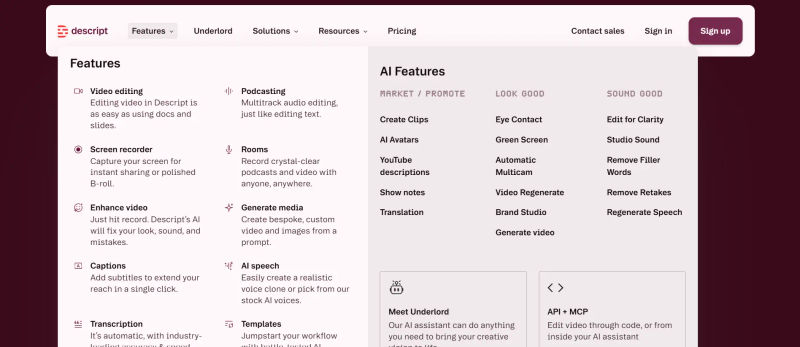
Key 2027 Capabilities:
Generative B-Roll and Brand Safety: Descript now analyzes the context of your transcript and automatically suggests and inserts relevant b-roll from premium stock libraries. For a marketing team producing daily content, this eliminates hours of searching through stock footage sites. Crucially for enterprise users, Descript has prioritized brand safety; all AI-suggested B-roll is sourced from fully licensed, commercially indemnified libraries, ensuring marketing teams avoid copyright strikes or legal complications.
Advanced Eye-Contact Correction: While this feature existed previously, the 2027 iteration no longer looks uncanny. It subtly adjusts the subject's gaze to the camera lens without warping the surrounding facial features, saving takes where the presenter was clearly reading off a monitor.
The Evolution of Voice Cloning (Underdub): Moving beyond the original Overdub feature, Underdub allows editors to seamlessly fix audio errors or misspoken words by typing the correction. The AI synthesizes the speaker's voice, matching the exact room tone and emotional inflection of the surrounding clip. This eliminates the need for costly studio re-recording sessions.
Performance and 8K Handling: A major concern for professional video editors has been cloud dependency. In 2027, Descript utilizes hybrid local-cloud processing. If you are running modern hardware (like M-series Mac chips or equivalent Snapdragon processors), Descript handles high-bitrate 4K and 8K footage by instantly generating lightweight proxies, ensuring zero lag during the text-editing phase.
Key Takeaways for Descript's Workflow:
Edits video as easily as editing a text document.
Generates commercially safe B-roll based on script context.
Fixes audio mistakes seamlessly with Underdub voice cloning.
Processes high-resolution footage efficiently via hybrid proxy generation.
Find Perfect Software For Your Business
Descript Pricing in 2027: Is It Worth the Investment?
Yes, Descript is worth the investment in 2027 for marketing teams and high-volume creators because the time saved on rough cuts and transcriptions quickly offsets the monthly subscription cost.
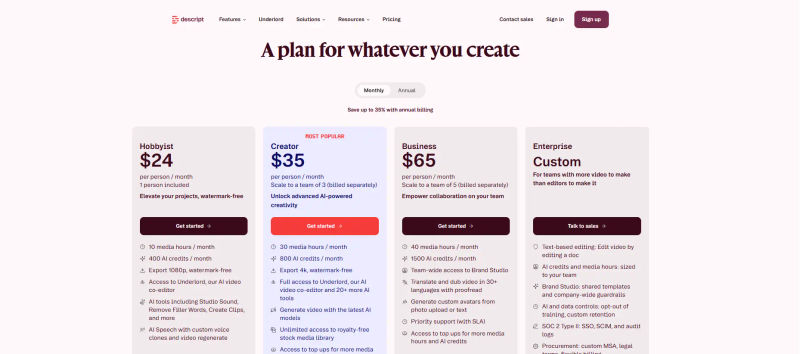
Descript pricing is structured across four main tiers to accommodate different user needs:
Free: A robust trial tier. It allows users to test text-based editing and Studio Sound on a limited number of monthly hours, but exports include watermarks.
Creator ($25/user/month): Suitable for solo podcasters or beginner creators. It removes watermarks but restricts advanced AI features (like generative B-roll or Underdub vocabulary) and caps transcription hours.
Business ($65/user/month): The sweet spot for professional video editors and marketing teams. It unlocks 4K exports, full access to Overdub/Underdub, premium stock libraries, and expanded AI limits.
Enterprise (Custom pricing): Built for large organizations requiring SSO, enhanced security, and dedicated account management.
A crucial feature for marketing teams is pooled transcription hours. On Pro and Enterprise plans, a team of five with an allotment of 30 hours each shares a combined pool of 150 hours. This prevents bottlenecks for high-volume editors while accommodating lighter users.
Cost-Benefit Analysis: When evaluating if Descript is worth the investment, compare the annual software cost against outsourcing basic rough cuts. Outfitting a five-person marketing team with Descript Pro licenses costs roughly $2,400 annually. If the platform saves each team member just two hours of editing time per week, the ROI is realized within the first month.
Top Descript Alternatives for Influencers and Teams
No review is complete without a direct comparison to the competition. Depending on your specific needs, one of these alternatives might be a better fit for your 2027 workflow.
1. Descript vs Premiere Pro
Adobe Premiere Pro remains the industry standard for professional-grade workflows. If your marketing team produces high-end commercials, complex narrative content, or requires heavy integration with After Effects for motion graphics, Premiere Pro is the better choice.
Descript is best used as a companion tool here. As mentioned, the "round-trip" workflow involves generating a lightning-fast rough cut via text in Descript, and then exporting an XML file to Premiere Pro for final color grading, sound design, and VFX. If you only need to edit talking heads, Premiere Pro's steep learning curve and traditional timeline will slow you down compared to Descript.
2. Descript vs DaVinci Resolve
DaVinci Resolve is the undisputed king of color grading and professional finishing. Like Premiere, it utilizes a traditional timeline (and node-based compositing). Resolve has introduced its own AI transcription and text-based editing features in recent years, closing the gap with Descript.
If your team has the technical expertise and requires cinematic color quality, DaVinci Resolve (which offers a massive amount of features for free) might render Descript unnecessary. However, Descript's collaborative, document-style workspace is still far more accessible for non-editors and marketing managers than Resolve's complex interface.
3. Descript vs CapCut and VEED.io
For fast social media content, CapCut and VEED.io are fierce competitors. When looking for the best Descript alternatives for influencers, CapCut dominates the space with its mobile-first design, trending TikTok templates, and aggressive AI feature rollouts.
VEED.io offers a highly capable browser-based experience, perfect for quick localized ads or internal corporate comms without downloading software.
If your sole goal is creating 15-second vertical videos with flashy captions, CapCut is faster and cheaper. Descript wins when you need to manage long-form content (like a one-hour podcast) and repurpose it, or when you need advanced voice cloning and audio repair.
4. Descript vs Riverside.fm
This is a comparison of recording vs. post-production. Riverside.fm is the best AI video editor for marketing teams focused on capturing high-quality remote interviews. It records lossless 4K video and multitrack audio locally on each participant's machine, bypassing internet lag.
While Riverside has added text-based editing features, Descript's post-production suite is far more robust. The ideal 2027 workflow often involves recording the remote interview in Riverside.fm and importing those high-quality tracks into Descript for heavy editing, B-roll addition, and final polishing.
5. Descript vs Camtasia and Wondershare Filmora
Camtasia is the legacy champion of screen recording and corporate tutorials, offering specialized tools like cursor highlighting and interactive quizzes that Descript lacks. If you are building software demos, Camtasia is superior.
Wondershare Filmora targets the beginner NLE market, offering a traditional timeline with drag-and-drop effects and an AI copilot to guide novice editors. If you want to learn traditional timeline editing without the complexity of Premiere Pro, Filmora is a great stepping stone. However, for purely text-driven workflows, Descript remains faster than both.
Try AuthenCIO
Move to faster, smarter software evaluation with AI
Final Verdict: Choosing Your 2027 Video Editor
Choosing the right video editing software in 2027 comes down to identifying your primary bottleneck. If your marketing team is paralyzed by the time it takes to cut down long webinars, edit multi-track podcasts, or generate daily social media clips, Descript is an invaluable asset.
Its text-based interface democratizes video editing, allowing copywriters, marketers, and producers to execute rough cuts with zero technical training.
However, if your brand relies on cinematic visuals, complex motion graphics, or broadcast-quality audio mixing, Descript cannot replace a traditional NLE like Adobe Premiere Pro or DaVinci Resolve.
In professional environments, Descript is best utilized as a powerful pre-production and rough-cut tool that feeds into a traditional finishing workflow.
2027 Workflow Audit Checklist
Before committing to a Descript subscription, audit your team's needs with these questions:
Is our bottleneck rough-cutting or finishing? (If rough-cutting, choose Descript. If finishing, choose Premiere/Resolve).
Do non-editors need to review and alter the timeline? (If yes, Descript's collaborative workspace is essential).
Are we primarily producing talking-head and podcast content? (If yes, Descript will maximize your ROI).
Does our team struggle with version control when multiple people touch a project? (If yes, establish clear editing protocols before migrating to Descript).
Do not base your decision on marketing buzzwords. Evaluate your team's technical skill level, your typical video formats, and your collaboration needs to build a workflow that scales seamlessly.