

Introduction
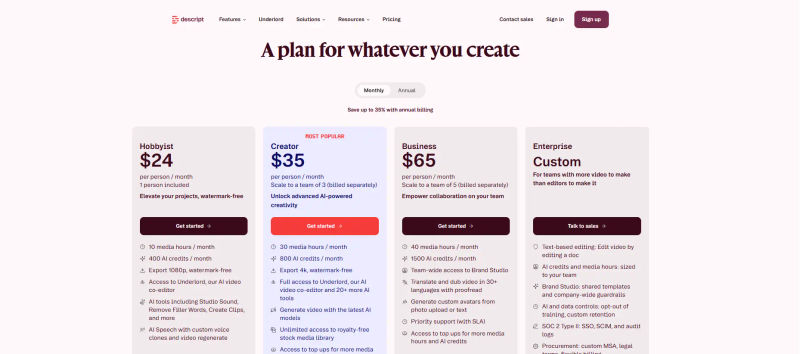
When evaluating video and design software pricing in 2027, the true cost extends far beyond the advertised monthly subscription fee. For Descript, the Business Plan costs $65 per user per month, while the Creator Plan is $35 per user per month. Is the Business Plan worth the upgrade? For Video Production Leads managing remote teams, the answer is yes—provided you require 1TB of cloud storage, team workspaces, Single Sign-On (SSO), and higher transcription limits.
Streamline your software evaluation process
The shift toward hybrid pricing models across video and design software—where base subscriptions are combined with usage-based billing for AI features—has made budgeting increasingly complex. If you are comparing tiered editing subscriptions, you must understand the exact limitations of each plan to avoid budget-breaking overage charges.
Before diving into the granular details, it is crucial to understand Descript's primary billing mechanism. In 2027, Descript relies heavily on "Underlord," its proprietary AI engine. Underlord uses a credit system for generative tasks like removing filler words, enhancing audio, or generating B-roll. Understanding this system is key to evaluating the true cost of the platform.
This article is designed to help you evaluate pricing quickly and make a definitive choice for your remote production team. We will break down the true cost of Descript's Creator and Business plans, expose the hidden costs lurking in modern video editing subscriptions, and compare Descript against six top alternatives.
Key Takeaways: Video and Design Software Pricing
Descript's 2027 Business Plan ($40/user/month) is optimized for teams, offering 40 hours of transcription and unlimited 4K exports, making it a highly cost-effective alternative to traditional video and design software pricing models.
Transcription and AI Limits: Creator plans strictly cap AI features (like Overdub and Studio Sound) and transcription hours. If your team exceeds 10 hours of video processing monthly, upgrading to the Business tier is required to prevent costly overage fees.
Consolidated Software Costs: Unlike traditional creative suites that require separate, expensive subscriptions for audio, video, and design assets, Descript bundles these tools into a single workspace, significantly reducing your overall software stack expenses.
Best Use Case: Remote teams relying on text-based editing, screen recording, and rapid social media publishing will see the highest ROI on the Business plan compared to paying for heavy-duty, traditional timeline editors.
Video & Design Software Pricing at a Glance
Below is a high-level overview of the 2027 video and design software pricing landscape, comparing base costs, primary use cases, cloud storage limits, and critical limitations.
Plan | Best For | Pricing | Cloud Storage | Limitations |
Descript Business | Remote production leads | $65 / user / month | 1TB per user | 30 hours of transcription per user; AI features capped by 'Underlord' credits. |
Descript Creator | Solo influencers | $35 / user / month | 100GB | 10 hours of transcription; 4K exports limited; no SSO or team workspaces. |
Adobe Premiere Pro | High-end cinematic production | $22.99 / month | 100GB | Requires Frame.io add-on for team review; steep learning curve. |
CapCut Pro | Rapid social media creators | $9.99 / month | 100GB | Lacks enterprise security; commercial licensing restrictions apply. |
Riverside.fm Pro | High-quality remote recording | $29 / month | Unlimited (Temporary) | Editing features are basic compared to dedicated NLEs. |
Camtasia Essential | Corporate training & screen recording | $179.88 / year | N/A (Local) | Annual maintenance fees required for updates; limited advanced color grading. |
VEED.io Studio | Browser-based marketing teams | $79 / user / month | 200GB | High per-seat cost; performance relies heavily on internet bandwidth. |
*Note: All prices shown reflect typical monthly billing. Vendors often offer lower pricing for annual commitments, but those discounts are excluded here for easier comparison. Actual costs may vary depending on your requirements, usage volumes, and negotiated terms.
Software covered in this Article
To help you understand Descript in the right context, this article refers to a carefully curated set of leading alternatives:







Descript Creator vs. Business Plans: What is the True Cost?
Descript has revolutionized text-based video editing, but its 2027 pricing structure heavily monetizes AI processing and team collaboration. Choosing between the Creator and Business tiers requires a granular understanding of your team's monthly output and a thorough Descript subscription comparison.
The Descript Creator Plan At $35 per user, per month, the Creator plan appears to be a highly affordable entry point. However, it is strictly designed for low-volume production.
Pricing Differences: The $16/month fee is billed annually. Month-to-month billing increases this cost significantly, making it less ideal for short-term projects.
Plan Limitations: The most severe bottleneck is the 10-hour monthly transcription limit. Furthermore, AI-driven Underlord features (like Studio Sound and AI eye contact) are heavily capped. Exporting in 4K is also restricted, which is a dealbreaker for modern YouTube or commercial workflows.
Value for Money: Excellent for a solo operator producing one or two short videos a week, but entirely inadequate for a daily publishing schedule.
The Descript Business Plan At $65 per user, per month, the Business plan is the gold standard for video editing software for remote teams. It removes the friction of the Creator tier while introducing essential team management features.
Pricing Differences: Double the cost of the Creator plan, but it pools resources. If you have five editors, your workspace shares 150 hours of transcription collectively.
Plan Limitations: While generous, transcription is not unlimited (capped at 30 hours per user). Overages will still apply if your team processes massive amounts of raw footage, such as multi-hour podcast recordings.
Value for Money: The true value lies in operational efficiency. Centralized billing, shared team folders, project sharing permissions, and Single Sign-On (SSO) integration reduce administrative labor, easily justifying the $30/month price tag for professional teams.
Seat Flexibility: Downgrading Editors to Viewers A critical feature of the Business plan is seat flexibility. Remote production often experiences lulls between major campaigns. Descript allows workspace administrators to instantly downgrade a paid "Editor" seat to a free "Viewer" seat.
This flexibility prevents you from paying for unused licenses during downtime, a cost-saving measure that is unavailable on the rigid Creator plan.
Hidden Costs in Video Editing Subscriptions
In 2027, the SaaS market has aggressively adopted usage-based pricing. The advertised monthly fee is rarely your total cost of ownership. Video Production Leads must audit their workflows against the following Descript hidden costs to prevent budget overruns.
The "Surprise Bill" Syndrome: AI and Transcription Quotas Generative AI requires immense computing power, and software companies pass these costs to the user. Descript's AI features are governed by the Underlord credit system. If your team relies heavily on AI script generation, automatic B-roll selection, or bulk audio enhancement, you will burn through your monthly allowance rapidly.
For context, removing filler words from a standard 10-minute video costs approximately 10 Underlord credits. If a team of three editors processes twenty videos a week, the base credit allowance will vanish in days. Once depleted, you must purchase additional top-up credits—which often cost around $10 per 100 credits—or wait for the next billing cycle, effectively halting production.
Descript transcription limits 2027: The transcription caps are equally rigid. The Creator plan limits you to 10 hours, while the Business plan offers 30 hours per user. If your team exceeds this pooled limit, you will incur overage charges, typically billed at $2.50 per additional transcribed hour. For documentary filmmakers or long-form podcasters, these overages can easily double the monthly software bill.
Feature Gating and Security Enterprise-grade security features are frequently used to gatekeep the most expensive tiers. If your remote team requires SSO to comply with internal IT policies or client data protection agreements, you are forced into the Business or Enterprise tiers, regardless of whether you actually need the extra transcription hours or cloud storage.
Managing Freelance Seats A major pain point for remote teams is managing a rotating roster of freelance contributors. Descript requires a paid seat for anyone who needs to edit a project. If you hire a freelance colorist or audio engineer for a single week, you must provision a full monthly license for them.
Understanding the difference between a free "Guest" reviewer—who can only leave time-stamped comments—and a paid "Editor" seat is critical to keeping your 2027 software budget intact.
Find Perfect Software For Your Business
AI Video Editor Pricing Comparison: Descript vs. The Competition
If navigating these seat management complexities and AI credit limits feels overwhelming, it may be time to look at alternative platforms. Every tool on the market serves a specific primary use case. Matching the tool to your team's specific output is the most effective way to maximize your production ROI.
1. Adobe Premiere Pro and DaVinci Resolve: The Heavyweights
If Descript's text-based workflow does not fit your complex post-production needs, traditional Non-Linear Editors (NLEs) remain the industry standard. However, their pricing models and hardware requirements are vastly different.
Adobe Premiere Pro
Who is this best for? High-end cinematic production teams requiring deep integration with motion graphics (After Effects) and professional audio mixing.
Pricing Differences: When evaluating video and design software pricing, Adobe offers two main paths. The standalone Premiere Pro app costs $22.99/month. However, most remote teams require the full Creative Cloud suite ($34.99/month) to access essential design software (Photoshop, Illustrator) alongside supporting video tools (After Effects).
Value for Money: Adobe provides unparalleled control and industry-standard tools. If your team produces broadcast-quality commercial work, Premiere Pro offers the highest ceiling for creative execution.
Hidden Costs: Remote collaboration requires Frame.io. While a basic version is included, professional team review workflows require a separate Frame.io subscription (starting at $15/user/month). Additionally, Adobe's shift toward generative AI features in 2027 utilizes a "Generative Credit" system, which can lead to overages similar to Descript's Underlord system.
Plan Limitations: Premiere Pro relies heavily on local hardware processing. Unlike cloud-native tools, your team will need expensive, high-spec workstations to run the software efficiently.
The Descript-to-Premiere XML Workflow Many professional teams opt for a hybrid approach. They purchase a few Descript Creator seats for producers to generate fast, text-based rough cuts. Once the narrative is locked, they use the Descript-to-Premiere XML export feature.
This sends the timeline directly into Adobe Premiere Pro, where senior editors handle the final color grading, sound design, and high-resolution rendering. This workflow optimizes the strengths of both platforms while controlling costs.
DaVinci Resolve (Studio)
Who is this best for? Advanced color grading specialists and production leads seeking a one-time fee model to escape subscription fatigue.
Pricing Differences: DaVinci Resolve offers a robust free version. The Studio version, which unlocks advanced AI tools, noise reduction, and higher resolutions, costs a flat, one-time fee of $236.
Value for Money: Unbeatable long-term ROI. By eliminating the monthly subscription, DaVinci Resolve Studio pays for itself in less than a year compared to Adobe Premiere Pro.
Hidden Costs: The hidden costs are entirely hardware and cloud-based. Resolve is notoriously demanding on GPUs. Furthermore, to collaborate remotely in 2027, you must use Blackmagic Cloud, which charges $5 per project, per month for shared project libraries, plus additional fees for cloud media storage.
Plan Limitations: The learning curve is exceptionally steep. However, unlike cloud-dependent platforms, Resolve offers a robust offline mode, ensuring your remote team can continue working seamlessly without requiring high-speed fiber internet.
2. CapCut and VEED.io: The Agile Social Media Editors
For teams focused exclusively on short-form, high-volume social media content, traditional NLEs are often overkill, and Descript's document-style interface may slow down rapid visual editing. CapCut and VEED.io offer specialized solutions for this vertical.
CapCut (Pro)
Who is this best for? Rapid social media creators and influencer teams churning out daily TikTok, Instagram Reels, and YouTube Shorts.
Pricing Differences: CapCut Pro is highly aggressive in its pricing, coming in at just $9.99/month.
Value for Money: For sheer speed, CapCut is unmatched. Its built-in library of trending effects, transitions, and auto-captions allows editors to produce engaging short-form content in a fraction of the time it takes in Premiere Pro.
Hidden Costs: The primary hidden cost is commercial licensing. Many of CapCut's built-in audio tracks, stickers, and fonts are restricted to personal use. Brands using these assets for paid advertising face potential copyright strikes and legal fees.
Plan Limitations: CapCut lacks robust remote collaboration tools. It is designed for individual editors rather than a synchronized remote team. Furthermore, it lacks the enterprise-grade security and SSO features required by larger organizations.
VEED.io
Who is this best for? Browser-based, quick-turnaround marketing teams who need to edit, subtitle, and repurpose content without installing heavy desktop software.
Pricing Differences: VEED.io's Business plan is expensive, costing $79 per user, per month.
Value for Money: The value lies in accessibility and brand consistency. VEED allows marketing teams to store brand kits (colors, fonts, logos) in the cloud, ensuring any team member can generate on-brand video content from any web browser.
Hidden Costs: VEED monetizes storage and export quality heavily. If your team works with large 4K video files, you will quickly hit the 200GB storage limits of the lower tiers, forcing an upgrade to the costly Enterprise plans.
Plan Limitations: Because it is entirely browser-based, VEED's performance is entirely dependent on internet bandwidth. Cloud storage reliability and sync speeds are critical here; editing multi-track, heavy video files on a slow connection will result in severe lag and slow render times compared to local software.
3. Riverside.fm and Camtasia: Specialized Remote Production
Not all remote video production involves editing raw camera files. Many teams focus on remote interviews, podcasts, or internal corporate training. For these specific use cases, Riverside.fm and Camtasia offer targeted solutions that Descript attempts to bundle, but often cannot match in pure quality.
Riverside.fm
Who is this best for? High-quality remote podcast and video interview producers who require uncompressed, local-quality recording regardless of internet stability.
Pricing Differences: The Pro plan costs $29/month, positioning it between Descript's Creator and Business tiers.
Value for Money: Riverside's core value is its local recording engine. It records up to 4K video and 48kHz WAV audio directly on the guest's local device, uploading it progressively to the cloud. This completely eliminates the internet lag and compression artifacts common in Zoom or Google Meet recordings.
Hidden Costs: Riverside is primarily a recording tool. While it has introduced text-based AI editing in 2027, its editing suite is rudimentary compared to Descript. The hidden cost is that you will likely need to pay for a separate editing subscription (like Premiere or CapCut) to finalize your high-end productions.
Plan Limitations: The platform limits the number of remote guests you can have in a single studio, and high-resolution multi-track exports are gated behind the Pro tier.
Camtasia
Who is this best for? Corporate training departments, instructional designers, and software companies producing highly detailed screen recordings and tutorials.
Pricing Differences: Camtasia utilizes an annual billing model, costing $179.88 per year for an individual license.
Value for Money: For screen recording, Camtasia is unmatched. It captures cursor data, keystrokes, and screen interactions perfectly, allowing editors to zoom in on specific UI elements smoothly. It drastically reduces the time required to build software tutorials.
Hidden Costs: Camtasia's pricing model requires an active "Maintenance" subscription to receive the next year's software updates and premium support. If you let this lapse, you are stuck with an outdated version of the software.
Plan Limitations: Camtasia is not built for cinematic video editing or heavy color grading. Its audio tools are basic, and it struggles with complex, multi-camera timelines. It is a specialized tool that serves one purpose exceptionally well, but fails as a general-purpose NLE.
API and Automation for Advanced Workflows For enterprise teams looking to scale, manual file transfers are a massive hidden labor cost. When evaluating specialized tools like Riverside.fm or VEED.io against Descript, Video Production Leads must check for API access.
Robust APIs allow development teams to automate the ingest of raw recordings directly into cloud storage or trigger automatic transcription workflows. Descript and Riverside both offer API endpoints in their higher tiers, making them highly valuable for teams aiming to build automated, high-volume production pipelines.
Try AuthenCIO
Move to faster, smarter software evaluation with AI
Final Verdict: Choosing the Right Tool for Your Remote Team
Selecting the right video editing software in 2027 is an exercise in matching your team's primary output with the vendor's pricing model. Overpaying for software usually happens when a team buys a comprehensive, enterprise-grade suite for a workflow that only requires a specialized, agile tool.
If your remote team produces dialogue-heavy content—such as podcasts, talking-head YouTube videos, or webinars—Descript is highly efficient. For solo influencers, the Descript Creator ($15/mo) plan is sufficient, provided you carefully monitor your 10-hour transcription limit.
However, for a team of remote editors, the Descript Business ($30/mo) plan is mandatory. The centralized billing, SSO, and pooled transcription hours will save your administrative team hours of frustration, easily offsetting the higher subscription cost.
Quick Decision Matrix:
Choose Descript Business if you manage a remote team editing dialogue-heavy content and need pooled transcription limits and SSO.
Choose Adobe Premiere Pro if you are producing high-end, cinematic commercial work that requires advanced color grading and motion graphics.
Choose DaVinci Resolve if you want to avoid monthly subscriptions entirely and have the hardware to support a heavy, offline-capable NLE.
Choose CapCut Pro if your sole focus is rapid, high-volume social media content (TikTok/Reels) and you don't need enterprise security.
Choose VEED.io if you need a browser-based editor that strictly enforces brand kits across a distributed marketing team.
Choose Riverside.fm if your primary bottleneck is capturing high-quality, uncompressed remote interviews.
Choose Camtasia if your production is entirely focused on software tutorials and screen recordings.
Audit your team's actual usage from the past 90 days. Calculate your average monthly transcription hours, your required export resolutions, and the number of freelance seats you truly need. By aligning your historical data with the 2027 pricing limitations and hidden AI costs outlined above, you can confidently secure the best video editing subscription for your budget and maximize your production ROI.