
Introduction
The digital content creation landscape in 2027 is relentless. With U.S. podcast consumption reaching record highs—over 73% of Americans now consume podcasts in either audio or video format—the demand for high-quality, multi-platform content has never been greater.
If you are searching for the best podcast repurposing software 2027 has to offer, you already know that the "content treadmill" is a real threat to production teams. Creators and agencies are burning out trying to manually transcribe, edit, and repurpose a single 60-minute interview into newsletters, LinkedIn carousels, TikTok scripts, and SEO-optimized show notes.
Streamline your software evaluation process
Enter the era of advanced AI audio-to-content tools. While 85% of marketers report using generative AI, only a fraction have successfully integrated it into a seamless, automated workflow that actually saves time without sacrificing brand voice.
Castmagic has positioned itself as the premier solution to this exact bottleneck, promising to turn raw audio into a month's worth of content in minutes, leveraging the latest shifts in large language model (LLM) technology and personalized social feed algorithms.
But as the AI software market becomes increasingly saturated, decision-makers must ask a critical question: Is Castmagic still the undisputed king of automated content repurposing for creators, or has it been outpaced by specialized video clippers and all-in-one recording suites?
This comprehensive Castmagic review 2027 breaks down the platform's features, pricing, and real-world ROI, comparing it directly against top alternatives to help you make an informed purchasing decision.
Key Takeaways
Best For Text Repurposing: Castmagic excels at turning audio into blogs, newsletters, and social posts, but is not a video editor.
High ROI for Agencies: The ability to save custom prompts and brand voices drastically reduces manual copywriting costs.
Integrates Well: It works best alongside recording tools like Riverside.fm rather than replacing them.
Secure for B2B: SOC2 compliance ensures your proprietary audio isn't used to train public AI models.
Human-in-the-Loop: It is an advanced assistant that requires a human editor for final polish, not an autonomous replacement.
Castmagic Review — AI-Powered Content Repurposing for Creators
The Pros
Automated transcription: Converts audio and video recordings into searchable transcripts with speaker identification and timestamps.
Multiple content formats: Transforms a single recording into show notes, blog drafts, newsletters, social media posts, and other marketing assets.
AI-powered content generation: Uses AI to extract key points, summaries, quotes, and highlights from recorded conversations.
Custom prompts: Allows users to tailor generated content to their preferred tone, writing style, and brand voice.
Video clips and audiograms: Helps creators turn important recording moments into short-form promotional content.
Multilingual transcription: Supports transcription in more than 60 languages, making it useful for creators working with international audiences.
The Cons
No free plan: Creators must commit to a paid subscription to access the platform.
Transcription limits: Plans have limits on the total number of transcription hours stored in the library.
AI outputs need editing: Generated articles, captions, and summaries require human review for accuracy, quality, and originality.
Not a complete editing suite: It focuses on repurposing existing recordings rather than providing comprehensive audio and video editing capabilities.
Not ideal for occasional creators: Users who only need occasional transcription may find the subscription difficult to justify.
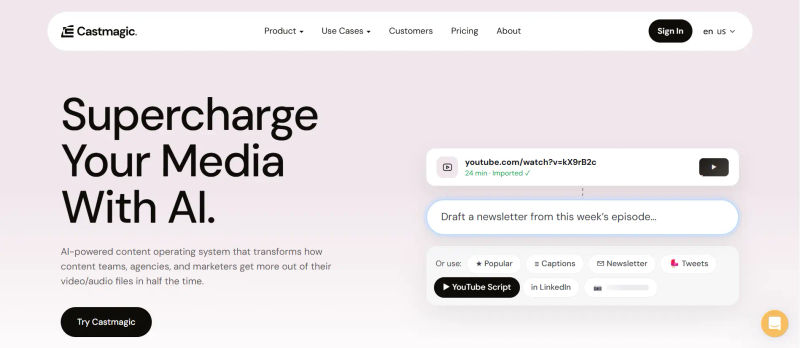
Verdict: Castmagic is a powerful AI content repurposing platform that helps creators turn long-form recordings into multiple content assets with less manual effort.
Best For: Podcasters, YouTubers, content creators, marketing agencies, and teams that regularly repurpose audio and video recordings.
Software Covered in this Article
To help you understand Animoto in the right context, this overview highlights its key features, capabilities, and use cases:






Castmagic vs. Top Alternatives: Which AI Content Tool Fits Your Workflow?
Compare Castmagic with leading AI tools for podcast repurposing, video editing, viral clips, and meeting notes to find the best fit for your content workflow.
Tool | Best For | Pricing | Key Features | Use Cases |
Castmagic | Comprehensive text/audio repurposing | Starts at $29/mo | Magic Chat, custom prompt recipes, multi-format generation | B2B podcasts, coaching summaries, agency scaling |
Descript | Timeline audio/video editing | Starts at $24/mo | Overdub, studio sound, text-based video editing | Deep podcast editing, removing filler words, mastering |
Capsho | Guided marketing funnels | At $379 (one time fee) | Funnel-specific templates, automated social captions | Entrepreneurs needing structured marketing assets |
Opus Clip | Viral short-form video | Starts at $9/mo | AI virality scoring, auto-captions, face tracking | TikTok/Reels generation from long-form video |
Munch | Trend-driven video clipping | Starts at $68/mo | Keyword trend analysis, auto-cropping, social scheduling | YouTube Shorts creation, trend-jacking |
Riverside.fm | High-quality remote recording | Starts at $29/mo | Local 4K recording, multitrack audio, basic AI clips | Remote interviews, studio-quality capture |
Async | All-in-one creation suite | Starts at $39.99/mo | Web-based recording, AI voice cloning, basic editing | Solo creators needing a single recording/editing hub |
Otter.ai | Internal meeting notes | Starts at $8.49/mo | Live transcription, action item extraction, Zoom integration | Corporate meetings, internal team alignment |
*Note: All prices shown reflect typical monthly billing. Vendors often offer lower pricing for annual commitments, but those discounts are excluded here for easier comparison. Actual costs may vary depending on your requirements, usage volumes, and negotiated terms.
What is Castmagic and Who is it Actually For?
To make a confident software decision in 2027, you must understand exactly what Castmagic is—and what it isn't.
Castmagic is not a timeline-based audio editor, nor is it a dedicated remote recording studio. Instead, it is a highly specialized post-production AI content engine designed specifically for repurposing.
At its core, Castmagic ingests your raw audio or video files, generates a highly accurate transcript, and utilizes advanced LLMs to extract, summarize, and reformat that transcript into dozens of distinct written assets. It operates as a sophisticated AI show notes generator and copywriting assistant.
1. The Ideal Castmagic User
The platform is tailor-made for decision-makers who view their podcast or coaching calls as "source material" rather than the final product. If you are a B2B podcast producer, a content marketing manager, or an agency owner looking to scale client deliverables, Castmagic is designed for you.
It solves the specific pain point of paying freelance writers or junior editors thousands of dollars a month to draft social media posts and blog articles from existing audio.
2. Who Should Look Elsewhere
If your primary bottleneck is cutting out "ums" and "ahs," mixing multitrack audio, or generating viral vertical video clips with dynamic captions, Castmagic will not serve as your all-in-one solution. Video-first creators will find themselves needing supplementary tools, as Castmagic's primary output remains text-based, despite recent updates to its interface.
3. Multi-Language Support for Global Teams
In 2027, global reach is paramount. A major update to Castmagic is its robust multi-language support, accurately processing non-English audio and heavy regional accents.
For international production agencies, this means you can upload a Spanish-language interview and automatically generate English show notes, or vice versa, without relying on third-party translation tools that often lose contextual nuance.
Deep Dive: Castmagic Key Features and 2027 Updates
Evaluating Castmagic requires looking past generic AI claims and examining how its specific features integrate into a high-volume production environment. In 2027, the standard for AI has shifted from "can it write?" to "can it write in my exact brand voice without hallucinating?"
1. Transcription Accuracy and Niche Jargon Handling
The foundation of any AI audio-to-content tool is its transcription engine. In 2027, Castmagic utilizes an upgraded, context-aware transcription model that excels at handling technical, medical, and niche industry jargon.
While earlier AI models struggled with overlapping speakers, Castmagic's current iteration boasts a 98% accuracy rate in optimal recording environments. More importantly, it allows users to upload custom glossaries, ensuring that proprietary brand names or specific acronyms are never misspelled in the final assets.
2. Magic Chat and Custom Prompt Engineering
The standout feature that separates Castmagic from basic summarization tools is "Magic Chat." This is not a standard chatbot; it is a specialized workspace where producers can apply custom prompt recipes to their transcripts.
In 2027, Castmagic allows you to save complex, multi-step prompts as repeatable templates.
For example, a producer can create a "LinkedIn Thought Leadership" recipe that instructs the AI to:
Identify the most controversial statement in the 60-minute audio.
Draft a hook based on that statement.
Expand the point into a 5-slide carousel script.
Apply the specific tone, pacing, and vocabulary of the podcast host.
This level of granular prompt engineering is where the true ROI lies, allowing for a "human-in-the-loop" workflow that prevents the content from feeling robotic or generic.
Find Perfect Software For Your Business
3. Multi-Speaker Dynamics and Voice Cloning
A major 2027 update is Castmagic's improved handling of multi-speaker dynamics. The tool now accurately maps speaker attribution and can be trained to recognize the distinct communication styles of different hosts.
If your podcast features a highly analytical host and a highly energetic co-host, Castmagic can generate social posts that mimic the specific rhetorical style of the individual who spoke the highlighted quote.
4. Autonomous AI Agents and Integrations
To combat the friction of moving data between tools, Castmagic has introduced autonomous AI agents that connect directly to 2027-era project management tools like Notion, Slack, and automated social schedulers.
You can now set up a "30-minute workflow blueprint" where an uploaded audio file automatically triggers the generation of 15 assets, which are then pushed directly to a Notion database for final human approval before being scheduled.
5. Enterprise-Grade Security and Data Privacy
For B2B producers handling sensitive corporate interviews, data security is non-negotiable. Castmagic's 2027 enterprise architecture includes SOC2 compliance and strict data privacy protocols.
Your proprietary audio and custom prompt recipes are siloed and never used to train public LLMs. This ensures that internal coaching calls or unreleased product discussions remain strictly confidential, a critical requirement for corporate decision-makers.

Castmagic Pricing: Is the ROI Worth the Cost?
Software subscriptions can quickly bloat a production budget, making a strict cost-benefit analysis essential. Castmagic pricing in 2027 is tiered based on minutes of audio processed, user seats, and access to advanced API features.
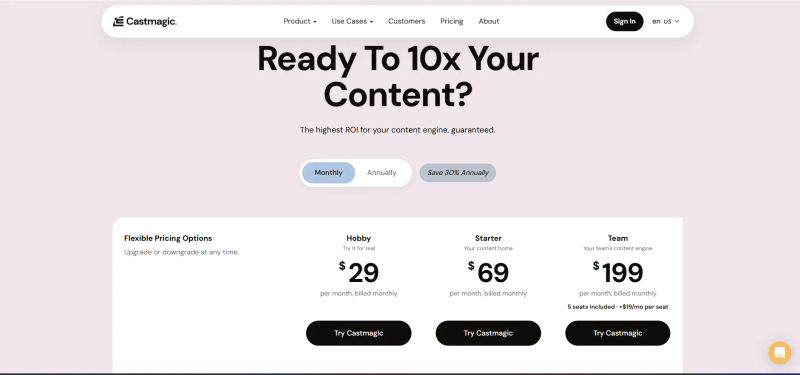
The 2027 Pricing Tiers
Hobbyist/Solo ($29/month): Ideal for independent creators publishing one weekly episode. Includes standard templates and basic Magic Chat access.
Pro/Creator ($69/month): The sweet spot for most serious producers. Offers expanded minutes, custom prompt saving, and advanced integrations.
Agency/Enterprise (Starting at $199/month): Designed for high-volume production houses. Includes API access, unlimited custom workspaces for different clients, and prioritized processing speeds.
Per-Seat Costs and Minute Rollovers
Crucially for agencies with fluctuating client loads, Castmagic has updated its billing structure. The Agency tier includes three user seats, with additional seats available at $20/month.
Furthermore, unused transcription minutes now roll over for up to 90 days. This prevents wasted budget during slow production months and provides much-needed flexibility for seasonal podcast networks.
Cost-Benefit Analysis
To evaluate the ROI, compare the $99/month Pro tier to the cost of manual labor. Hiring a part-time junior content editor to listen to four podcast episodes a month and draft accompanying social assets, newsletters, and blogs typically costs between $1,000 and $2,500 monthly.
Castmagic reduces the time required to generate these assets from 10 hours per episode to roughly 30 minutes of human-in-the-loop review. The ROI is immediately positive for any creator monetizing their time or any agency scaling their client roster.
However, if you only publish once a month, or if your content relies purely on visual gags rather than spoken word, the subscription may be difficult to justify.
The 2027 Comparison: How Castmagic Stacks Up
No software exists in a vacuum. To make an informed decision, you must evaluate Castmagic against its top market rivals. Here is how it stacks up in the 2027 landscape when looking for Castmagic alternatives 2027.
1. Castmagic vs Descript: Repurposing vs. Editing
Descript is a powerhouse for timeline-based audio and video editing. It allows you to edit media by deleting text in a transcript and offers studio-quality sound mastering.
Choose Descript if: Your primary goal is to edit the actual audio/video file, remove filler words, and publish a polished media file.
Choose Castmagic if: Your media is already edited (or you outsource editing), and your primary goal is to generate high-quality written marketing assets from that media.
2. Castmagic vs Capsho: Customization vs. Guided Funnels
Capsho is Castmagic's most direct competitor in the audio-repurposing space. Capsho is highly structured, guiding users through a specific marketing funnel to create titles, descriptions, and emails.
Choose Capsho if: You are a beginner marketer who wants a rigid, step-by-step system that tells you exactly what to post and when.
Choose Castmagic if: You are an experienced producer who wants the flexibility of custom prompt engineering. Castmagic's Magic Chat is vastly superior for creators who need to train the AI on a highly specific, established brand voice.
3. Castmagic vs Munch and Opus Clip: Text vs. Viral Video
When evaluating Munch vs Opus Clip for podcasting, both are phenomenal AI video clippers. They scan long-form video to find "viral" moments, automatically crop the video to vertical formats, and add dynamic captions.
Choose Munch or Opus Clip if: Your entire growth strategy relies on YouTube Shorts, TikTok, and Instagram Reels.
Choose Castmagic if: Your strategy relies on LinkedIn, newsletters, SEO blogs, and Twitter/X. Castmagic does not crop or edit vertical video; it is a text-repurposing engine.
4. Castmagic vs Riverside: The Workflow Integration
Riverside.fm is a premier remote recording studio designed to capture lossless, multitrack audio and 4K video over the internet. Instead of viewing them as strict competitors, modern producers use them as an integrated stack.
The Integration: Riverside captures the high-fidelity audio, and through native 2027 API integrations, that audio is pushed directly into Castmagic for text repurposing. Choose Riverside for the capture, and Castmagic for the content generation.
5. Castmagic vs Async: Post-Production vs. Recording
Async is an all-in-one web-based recording and basic editing suite.
Choose Async if: You are a solo creator who needs a single, affordable hub to record, apply basic voice cloning, and do light editing without leaving the browser.
Choose Castmagic if: You already have a dedicated recording solution and need a deep-learning tool specifically engineered to handle high-volume post-production content writing.
6. Castmagic vs Otter.ai: Content Creation vs. Internal Meetings
Otter.ai is a transcription tool optimized for live corporate meetings, Zoom calls, and internal team alignment.
Choose Otter.ai if: You need live transcription during a meeting to generate internal action items and corporate summaries.
Choose Castmagic if: You are creating external-facing content for an audience. Castmagic's LLMs are tuned for copywriting, marketing, and audience engagement, whereas Otter is tuned for administrative note-taking.
Top Use Cases: Where Castmagic Shines
To move from theory to decision-making, it helps to see exactly where Castmagic provides the most leverage in a daily workflow.
1. The B2B Podcaster
B2B podcasting relies heavily on LinkedIn distribution. A B2B creator can upload a 45-minute interview with an industry CEO into Castmagic.
Using custom saved prompts, they can instantly extract the three most actionable business frameworks discussed, format them into a 1,500-word SEO-optimized blog post, and generate five distinct LinkedIn text posts tailored to the platform's 2027 algorithm (which heavily favors deep, narrative-driven text over external links).
This workflow turns one audio asset into a month of B2B social presence.
Metric Spotlight: Creators utilizing Castmagic’s custom LinkedIn prompt recipes report a 40% increase in organic reach compared to using generic AI summaries. This is largely due to the platform's ability to mimic human-like hooks and native platform formatting, preventing the algorithm from suppressing the content as low-effort AI spam.
2. Production Agencies Scaling Deliverables
For agencies managing multiple podcasts, margin is everything. Castmagic allows an agency to create separate "Workspaces" for each client.
The agency can train the AI in Workspace A on the aggressive, fast-paced tone of a crypto client, and train Workspace B on the empathetic, measured tone of a mental health client. When junior staff upload raw audio, the AI automatically applies the correct brand voice.
Metric Spotlight: Agencies report an 80% reduction in drafting time per episode, allowing them to increase their client roster by up to 3x without hiring additional full-time copywriters, drastically improving profit margins.
3. Coaches and Consultants
Beyond public content, Castmagic is highly effective for high-ticket coaches. After a 60-minute Zoom consulting call, the coach can upload the audio and use a custom prompt to generate a "Client Action Plan."
The AI extracts the specific hurdles discussed, the agreed-upon solutions, and formats a professional follow-up email.
Metric Spotlight: Consultants integrating this workflow save an average of 4.5 hours per week on administrative follow-ups, directly increasing their available billable hours and elevating the premium feel of their client experience.
Try AuthenCIO
Move to faster, smarter software evaluation with AI
Final Verdict: Should You Buy Castmagic in 2027?
Castmagic remains one of the most powerful, flexible, and accurate AI audio-to-content tools on the market in 2027. It successfully navigates the line between automated efficiency and necessary human editorial control.
You should buy Castmagic if you are a decision-maker, agency, or serious creator whose primary bottleneck is writing marketing copy, show notes, and social posts from long-form audio.
The ROI on the Pro tier is undeniable when compared to the cost of manual labor, and its custom prompt capabilities ensure your content won't get shadow-banned as low-effort AI spam.
You should skip Castmagic if you are looking for a tool to physically edit your video files, cut vertical TikToks, or record remote guests. In those cases, specialized tools like Opus Clip or Descript are necessary investments.
Ultimately, the best way to ensure Castmagic fits your specific operational workflow is to benchmark it against your current processes and alternative software.