
Introduction
In the fast-paced 2027 digital landscape, video is no longer just an option for marketing teams; it is the absolute baseline. According to recent industry data, 91% of businesses now use video as a core marketing tool.
However, for Social Media Managers, this mandate creates a significant operational bottleneck. The demand for high-volume, platform-specific content—spanning TikTok, Instagram Reels, LinkedIn, and YouTube Shorts—requires rapid video creation tools for marketers that do not rely on a steep learning curve.
Streamline your software evaluation process
Today's social specialists face the immense pressure of real-time trend response. When an audio track or meme format goes viral, you have hours, not days, to capitalize on it.
Most social media teams do not have the budget for a full-time content creator, nor do they have the hours required to master complex, timeline-based editing software like Adobe Premiere Pro. You need to produce high-converting video ads quickly, maintain strict brand consistency, and navigate the nuances of cross-channel publishing. This is where no-code video editing software steps in. Animoto has long been a recognized name in this space, promising a frictionless, drag-and-drop experience for non-editors.
But as generative AI and automated video ad makers flood the market, is this platform still the premier choice? This comprehensive Animoto review 2027 will evaluate the software's current capabilities, its true return on investment for small-to-medium marketing teams, and how it stacks up against an increasingly aggressive competitive field.
Our goal is to help you decide whether Animoto is the best video editor for social media managers 2027, or if your team should migrate to an alternative solution.
Key Takeaways
Animoto's biggest strength is speed and simplicity, making it suitable for teams producing videos in high volumes.
AI storyboarding and URL-to-video capabilities help reduce the time required to turn existing content into promotional videos.
Licensed music and Getty Images integration provide useful creative resources for professional marketing content.
Saved brand kits and templates help maintain visual consistency across teams and campaigns.
Its limited timeline controls make it less suitable for creators who need advanced editing and animation capabilities.
Businesses prioritizing deeper AI video generation may prefer InVideo, while teams needing more editing flexibility can consider WeVideo or CapCut.
Overall, Animoto is a practical choice for teams that value quick production, consistent branding, and ease of use over advanced creative control.
Animoto Review — Fast and Simple Video Creation for Social Media Teams
The Pros
Easy block-based editing: Its drag-and-drop interface makes video creation accessible to beginners without requiring advanced editing skills.
AI-powered storyboarding: Helps transform blog posts and product pages into video drafts, speeding up content production.
Ready-made templates: Offers customizable templates that help teams create promotional videos and social media content quickly.
Licensed music library: Provides commercially licensed music, helping businesses avoid common copyright complications in marketing videos.
Getty Images integration: Gives users access to professional stock photos and video clips for creating polished content.
Brand consistency tools: Saved brand kits allow teams to maintain consistent logos, colors, and typography across videos.
The Cons
Limited editing flexibility: The block-based system lacks advanced timeline controls, precise keyframe animations, and complex audio mixing.
Repetitive templates: Videos can look similar when teams rely too heavily on default templates and stock assets.
Limited mobile functionality: The mobile app does not offer the complete editing experience available through the desktop browser.
Not ideal for advanced creators: Professionals needing detailed color grading, motion graphics, or sophisticated editing workflows may find it restrictive.
AI output needs refinement: Automatically generated storyboards and video drafts may require manual adjustments to match the intended message and brand style.
Verdict: Animoto is a beginner-friendly video creation platform that helps marketing teams produce branded social media videos quickly without complicated editing workflows.
Best For: Social media managers, small businesses, marketing teams, and agencies that need fast, template-based video production.
Software Covered in this Article
To help you understand Animoto in the right context, this overview highlights its key features, capabilities, and use cases.





Animoto Pricing at a Glance
Animoto’s pricing ranges from a free plan for basic video creation to team-focused plans with advanced branding, collaboration, and premium stock-media features. The comparison below breaks down each plan’s cost, included features, and ideal use case.
Plan | Pricing | Key Features | Best For |
Free | $0/month | Unlimited videos, 720p export, Animoto watermark, screen and webcam recording, 50 licensed music tracks | Testing Animoto and creating simple watermarked videos |
Basic | $19/month | Watermark-free 1080p videos, unlimited downloads, customizable video landing pages, all Free-plan features | Solo creators who need clean, watermark-free HD videos |
Professional | $29/month | 4K exports, logo and brand colors, 3,000 music tracks, 1M+ Getty Images assets, voice-over, screen and webcam recording, video analytics, 3 saved templates, 70+ fonts, 1 brand kit. Social media managers creating branded marketing | Marketers and small businesses needing branding, 4K, and stock assets |
Professional Plus | $79/month | Everything in Professional, 100M+ premium Getty Images assets, 10 brand kits, 25 saved templates, custom fonts, time-stamped comments, user and role management, dedicated onboarding and account manager | Small teams that need collaboration, brand controls, and advanced assets |
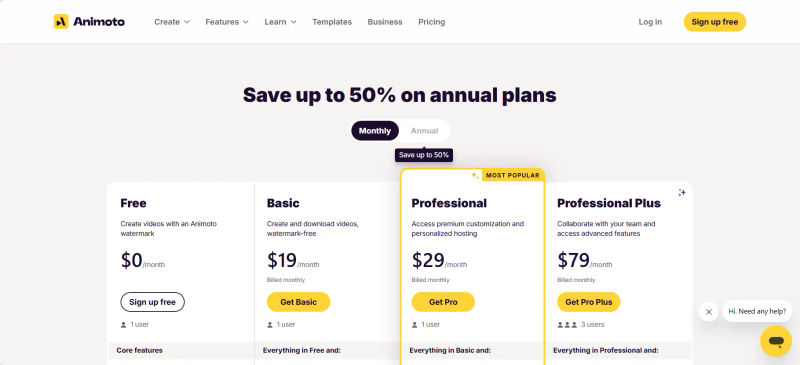
*Note: All prices shown reflect typical monthly billing. Vendors often offer lower pricing for annual commitments, but those discounts are excluded here for easier comparison. Actual costs may vary depending on your requirements, usage volumes, and negotiated terms.
Key Features of Animoto for Social Media Managers
To determine if Animoto is the right fit for your social media marketing team, we must look beyond basic video assembly and evaluate how the platform handles the specific friction points of a 2027 content workflow. The modern social media manager needs tools that accelerate production without sacrificing creative quality or brand authenticity.
1. AI-Powered Storyboarding and URL-to-Video Efficiency
AI-assisted video production is now the industry standard. Recent surveys indicate that 63% of video marketers use AI to create or edit marketing videos, a significant jump from previous years.
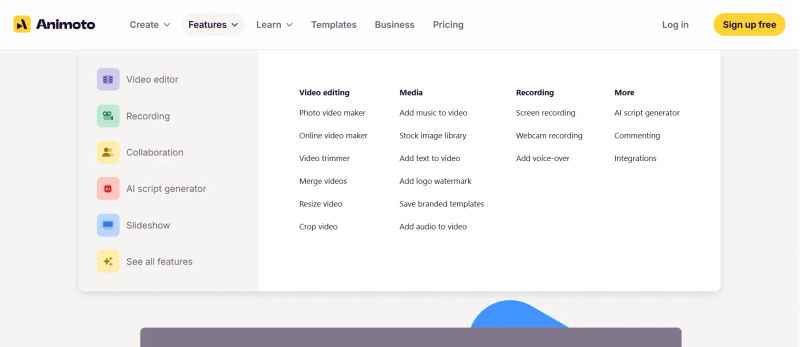
Animoto has adapted to this shift by integrating robust AI-powered storyboarding. What truly stands out for content teams is the URL-to-Video capability. Instead of staring at a blank timeline, social media managers can simply paste a link to a recent company blog post or product page. Animoto’s AI instantly extracts the key sentences, summarizes the core message, and maps this text to relevant B-roll footage to generate a baseline video draft in seconds.
What makes Animoto ideal for non-editors is its block-based interface. Traditional editing software relies on a multi-track timeline where audio, video, and text layers must be meticulously synced. Animoto removes this complexity. You manage distinct visual "blocks" that automatically snap into place and sync to the beat of your chosen audio track.
For a social media manager tasked with creating a week's worth of social video content in under two hours, this template efficiency is a massive time-saver.
2. AI-Generated Captions and Multi-Language Support
In 2027, publishing a social video without captions is a guaranteed way to kill your engagement metrics, as the vast majority of mobile users watch videos on mute. Manual captioning is a deal-breaker for high-volume teams. Animoto addresses this with highly accurate, AI-generated captions that automatically transcribe your voiceovers or uploaded dialogue.
Crucially, Animoto has updated its typography engine to support the dynamic, word-by-word highlighting styles (often referred to as "Hormozi-style" captions) that dominate short-form algorithms today. Furthermore, the platform now offers seamless multi-language support, allowing global social teams to automatically translate and generate localized captions for international ad campaigns with a single click.
Find Perfect Software For Your Business
3. Asset Management, Trending Audio, and Cross-Channel Formatting
Cross-channel publishing is central to video operations today. A video asset that performs well on LinkedIn (often requiring a square or landscape format with heavy text overlays) will not translate natively to TikTok or Instagram Reels (which demand 9:16 vertical formats and fast-paced visual hooks).
Animoto excels in cross-channel formatting. With a single click, you can resize a master video into multiple aspect ratios. The platform automatically adjusts text safe zones and repositions central focal points, drastically reducing the technical anxiety associated with platform-specific export requirements.
Furthermore, Animoto provides deep integration with Getty Images, offering millions of high-quality stock photos and video clips. This is critical because 92% of consumers report skipping sponsored video content if it looks cheap or inauthentic.
Animoto also includes a curated library of trending audio hooks and seamlessly integrates with major social media scheduling tools like Buffer and Hootsuite, allowing you to push finalized assets directly to your content calendar without downloading massive files to your local drive.
4. Brand Consistency and Governance
For agencies managing multiple client accounts, or in-house teams distributing content across various departments, brand consistency is paramount. Animoto’s Saved Brands feature allows decision-makers to lock in specific hex codes, typography, and logo placements.
When a junior social media specialist opens a template to create a quick promotional update, the brand kit is automatically applied. This governance ensures that the high volume of video content required by 2027 social algorithms does not dilute your brand's visual identity or result in off-brand rogue creatives.
Animoto Pricing: Analyzing ROI for Busy Decision-Makers
When evaluating Animoto pricing for agencies and in-house teams, decision-makers must look at the total workflow cost rather than just the monthly subscription fee. The true cost of video production includes the hours spent editing, the friction of review cycles, and the expenses of localized asset management.
Animoto currently offers a tiered pricing structure designed to scale with your output volume:
Free Plan: Best for testing the interface, but it includes an Animoto watermark and limits video quality to 720p. It is not viable for professional social media ad campaigns.
Basic Plan (approx. $8-$15/month): Removes the watermark and offers high-quality downloads, but lacks the premium stock library and advanced brand kit features.
Professional Plan (approx. $29/month): This is the sweet spot for most solo social media managers. It includes custom branding, access to the full Getty Images library, and voiceover capabilities.
Teams Plan (approx. $79/month flat fee for up to 3 seats): Designed for collaborative environments. This is a flat fee model rather than a per-user model for the first three seats, making budget forecasting easier for managers. It includes advanced licensing rights for third-party resale and streamlined review workflows.
Is the ROI worth it? Industry benchmarks show that 85% of marketers say video has generated leads, and 83% say it has directly increased sales.
If your marketing team is currently outsourcing video production to an agency at a cost of $500 to $2,000 per video, bringing that capability in-house with a $79/month Animoto Teams subscription yields an immediate and massive return on investment. The platform pays for itself the moment you produce your first successful retargeting ad.
However, if your team requires highly customized 3D animations, the ROI diminishes because Animoto's rigid templates will force you to use supplementary software anyway.
Top Animoto Alternatives 2027
No single tool is perfect for every marketing department. Depending on your specific workflow, you may find that an alternative platform better serves your needs. Here is how Animoto compares to the top competitors in the 2027 market.
1. InVideo vs Animoto Comparison
InVideo has positioned itself as a powerhouse for AI-driven video creation. While Animoto uses AI to arrange blocks and suggest layouts, InVideo offers deeper text-to-video generative capabilities, allowing users to create highly customized scenes from scratch using advanced AI prompts. InVideo also offers a more traditional timeline for users who want to tweak the AI's output.
If your team wants maximum AI generation capabilities, InVideo is superior. If your team prioritizes absolute ease of use and foolproof brand guardrails for junior staff, Animoto remains the safer choice.
2. Animoto vs Canva for Video Ads
Canva is the undisputed heavyweight of the all-in-one design ecosystem. When evaluating Animoto vs Canva for video ads, the decision comes down to focus. Canva offers a robust video editor alongside its static graphic, presentation, and document tools. If your team already lives inside Canva for daily social media posts, consolidating your video workflow into Canva makes financial and operational sense.
However, Canva’s video timeline can sometimes feel clunky when dealing with heavy, multi-layered video files. Animoto, being a dedicated video-first platform, generally offers faster rendering speeds and a more intuitive workflow specifically for pacing video clips to music.
3. Adobe Express vs Animoto for Social Media
Adobe Express bridges the gap between professional design and rapid creation. Powered by Adobe's Firefly AI, Express offers incredible generative fill and text-effect capabilities that Animoto simply cannot match.
Furthermore, Adobe Express integrates seamlessly with the broader Adobe Creative Cloud. If your company already employs professional designers using Photoshop and Premiere Pro, Adobe Express allows non-technical social media managers to easily access and modify those professional assets. Animoto operates in a silo, making it better for standalone teams that do not interact with traditional Adobe workflows.
4. Vimeo Create
Vimeo Create is an excellent alternative if your primary goal is video hosting and analytics combined with creation. Vimeo Create offers a very similar template-driven, rapid-creation experience to Animoto. The differentiator is the ecosystem: Vimeo provides deep, professional-grade analytics, embed controls, and ad-free hosting.
If your video strategy relies heavily on embedding mid-funnel educational videos on your website rather than just running top-of-funnel social ads, Vimeo Create offers a more holistic infrastructure.
5. WeVideo
WeVideo caters to the social media manager who has outgrown block-based editing but isn't quite ready for Premiere Pro. It offers a true multi-track, cloud-based timeline. You can layer multiple audio tracks, apply green screen effects (chroma key), and execute precise cuts.
If your social media strategy involves a lot of talking-head videos, interviews, or podcast cutdowns where audio syncing and precise trimming are critical, WeVideo is a much more capable tool than Animoto.
6. Clipchamp
Acquired by Microsoft, Clipchamp has become the default rapid video editor for many Windows-based enterprise teams. It offers a highly intuitive timeline interface and excellent built-in screen recording and text-to-speech features. Clipchamp is particularly strong for internal corporate communications, product demonstrations, and quick YouTube uploads.
While Animoto arguably has more stylish templates tailored specifically for highly visual platforms like Instagram and TikTok, Clipchamp offers a slightly more flexible editing timeline for general-purpose business video.
7. Biteable vs Animoto 2027
Biteable takes a different approach to rapid video creation, focusing heavily on vector animations, infographics, and corporate messaging. If your brand identity relies on 2D animations, animated charts, or explainer videos, Biteable’s library of animated scenes is vastly superior to Animoto’s live-action stock focus.
Animoto is the better tool for lifestyle brands, e-commerce products, and real-world footage, whereas Biteable dominates the B2B SaaS, internal HR communications, and data-visualization spaces.
8. CapCut Desktop
In 2027, CapCut Desktop is the primary prosumer rival for social media managers. Built by ByteDance, it is inherently optimized for TikTok and short-form video trends. CapCut offers advanced keyframing, trending auto-velocity templates, and direct access to viral TikTok audio libraries that Animoto lacks.
If your brand relies entirely on aggressive, trend-hopping short-form content, CapCut Desktop is unmatched. However, it lacks the enterprise-level brand governance and locked templates that make Animoto safer for large, decentralized marketing teams.
Try AuthenCIO
Move to faster, smarter software evaluation with AI
Final Verdict: Should Your Team Choose Animoto?
In 2027, the success of a social media marketing team is largely dictated by their ability to test, iterate, and deploy content rapidly. Short attention spans require strong openings, concise messaging, and platform-native formatting.
3-Step Decision Checklist
To determine if Animoto is the right fit for your tech stack, follow this quick checklist:
Assess your weekly video volume: Do you need to produce 5+ variations of an ad per week? If yes, Animoto’s speed is a massive advantage.
Evaluate your team's technical skills: Does your team lack traditional timeline editing experience? Animoto’s block-based system will eliminate the learning curve.
Define your creative requirements: Do you need highly custom animations or just clean, professional stock-footage assembly? If the latter, Animoto is perfectly suited for your needs.
If you are a Social Media Manager or decision-maker at a small-to-medium business, and your primary pain point is the bottleneck of video production, Animoto remains one of the most effective tools on the market.
It successfully removes technical anxiety, ensures brand consistency through locked templates, and allows a single non-technical marketer to output the volume of a small agency. It is the perfect engine for high-volume social ad campaigns, quick promotional updates, and top-of-funnel awareness content.
However, you should skip Animoto if your strategy relies heavily on complex motion graphics, precise audio mixing, or highly customized generative AI scenes. In those cases, migrating to Adobe Express, InVideo, or a timeline-based editor like WeVideo will serve you better.
Ultimately, choosing the right tool comes down to mapping your specific team skills against your content volume requirements. Don't let complex software slow down your marketing engine, but don't settle for a tool that restricts your brand's creative potential either.
When weighing all factors, is Animoto worth it 2027? For teams prioritizing speed, brand governance, and ease of use over deep technical customization, the answer is a resounding yes.