
Introduction
For any small to medium-sized business (SMB), keeping payroll and accounting in separate silos is a direct threat to efficiency and financial accuracy. Manual general ledger (GL) entries, tedious data mapping, and delayed reconciliations don't just waste time—they open the door to costly compliance errors. In 2026, finding the best payroll software with accounting integration isn't a luxury; it's a foundational requirement for fiscal health and scalability. Intuit's QuickBooks, a titan holding a commanding 62.23% market share, makes its native Payroll solution a default consideration for its vast user base.
Streamline your software evaluation process
This guide provides a comprehensive, finance-first analysis of the QuickBooks Payroll and Accounting suite for 2026. We will dissect its feature set, pricing tiers, and inherent advantages while also critically evaluating its limitations. Furthermore, we will benchmark its capabilities against formidable alternatives—including Gusto, ADP, Rippling, Paylocity, and Workpay—to equip you with the intelligence needed to select the right small business payroll software for your company's financial infrastructure.
Pros & Cons of QuickBooks Payroll & Accounting
No software solution is a panacea. An objective evaluation requires a balanced look at both the strengths and weaknesses of the QuickBooks ecosystem.
Advantages for Integrated Financial Management
Unparalleled Accounting Integration: The primary advantage is the seamless, native flow of data between payroll and the general ledger. This eliminates manual journal entries, ensures data accuracy, and streamlines financial reporting and reconciliation.
Single Ecosystem: Managing payroll and accounting within one platform simplifies vendor management, user training, and technical support. It creates a single source of truth for all financial data.
Strong Compliance Automation: The automated calculation, filing, and payment of federal and state payroll taxes is a powerful feature that significantly reduces the compliance burden on small businesses.
Scalable Plans: The tiered pricing structure allows businesses to start with a basic plan and upgrade to access more advanced features like time tracking, HR support, and workers' comp administration as they grow.
Potential Drawbacks and Considerations
Limited HR Functionality: Compared to comprehensive HCM platforms like Rippling or Paylocity, QuickBooks' HR features are basic. It lacks robust modules for performance management, recruiting, and learning management. Businesses seeking an all-in-one HR, IT, and finance platform may find it lacking.
Customer Support Concerns: User reviews can be mixed. Some report long hold times and difficulty reaching agents with deep expertise on complex tax or state-specific issues. To mitigate this, businesses can leverage the extensive community forums or consider hiring a certified QuickBooks ProAdvisor for dedicated, expert support.
Cost Creep: The total cost can escalate. The price is a combination of the accounting plan and the payroll plan (base fee + per-employee fee). Additional services like workers' comp or benefits administration can add to the monthly expense.
Dependency on the QuickBooks Ecosystem: The platform works best for businesses fully committed to QuickBooks Online. For companies using other accounting software (e.g., Xero, Sage), the value proposition is significantly diminished, and a more platform-agnostic payroll solution would be a better fit.
Best for: Small businesses already using QuickBooks Online seeking unified payroll and accounting management.
Verdict: A reliable, all‑in‑one payroll solution for QuickBooks‑centric teams; less ideal for mixed‑software environments.

Software Covered in this Article
To help you understand Core HR Software in the right context, this article refers to a carefully curated set of players:

.webp?tr=w-112%2Cq-80%2Cf-auto%2Cc-at_max)




Understanding QuickBooks Payroll & Accounting for Small Businesses
At its core, the value proposition of QuickBooks Payroll & Accounting is its unified ecosystem. The platform is designed to eliminate the friction between processing employee compensation and recording those transactions in the company's books. For businesses already leveraging QuickBooks for their accounting, the allure of a native payroll module is strong, promising a single source of truth for all financial data.
1. The Importance of Integrated Payroll and Accounting
The synergy between payroll and accounting cannot be overstated. When these systems operate in concert, every payroll run automatically generates the corresponding journal entries, correctly debiting expense accounts and crediting liability accounts. This automation is critical for several reasons:
Data Integrity: It drastically reduces the risk of manual entry errors that can skew financial statements and complicate tax filings.
Operational Efficiency: It liberates finance teams from the time-consuming task of manual reconciliation, allowing them to focus on higher-value activities like financial planning and analysis (FP&A).
Real-Time Visibility: Integrated systems provide an up-to-the-minute view of labor costs and tax liabilities, enabling more agile and informed decision-making.
Without this integration, businesses are left managing disparate data sets, a process prone to errors that can lead to inaccurate financial reporting and potential penalties from tax authorities.
💡 Want to see which payroll tools actually integrate cleanly with your accounting stack? Discover your best-fit options with AuthenCIO’s AI.
2. Who is QuickBooks Payroll & Accounting For?
QuickBooks has built its empire by catering to the small business sector. As of 2025, over 1,458 verified companies utilize its payroll services. The platform is ideally suited for:
Existing QuickBooks Accounting Users: The primary audience is the 62% of SMBs already using QuickBooks for their bookkeeping. The seamless integration is the most compelling reason to adopt the payroll module.
Sole Proprietors and Small Businesses (1-50 Employees): The tiered structure of QuickBooks Payroll (Core, Premium, Elite) is designed to scale with a growing business, offering foundational features at the low end and more complex HR and compliance tools at the high end.
Businesses in Standard Industries: Companies in sectors like professional services, retail, and construction, which represent a significant portion of QuickBooks' user base, will find the feature set robust enough for their needs.
Finance Teams Prioritizing a Single Vendor: For organizations looking to simplify their software stack and vendor management, the all-in-one QuickBooks solution is highly attractive.
However, businesses with highly complex, multi-state payroll, specialized union requirements, or a need for a comprehensive Human Capital Management (HCM) suite may find the platform's capabilities stretched, prompting a look at more specialized alternatives.
QuickBooks Payroll & Accounting Features Deep Dive
A granular examination of the platform's features reveals a system built around a strong accounting core, with payroll functionalities designed to complement it. For 2026, the focus remains on automation, compliance, and deeper data integration.
1. Core Payroll Functionality
QuickBooks Payroll handles the essential mechanics of employee and contractor compensation with proficiency.
Unlimited Payroll Runs: All plans offer the flexibility to run payroll as often as needed, accommodating various pay schedules (weekly, bi-weekly, semi-monthly, monthly) without additional charges.
Direct Deposit & Checks: Provides next-day or same-day direct deposit options (depending on the plan) and the ability to print physical checks.
Employee Self-Service Portal: The QuickBooks Workforce portal allows employees to access their pay stubs, W-2s, and other payroll documents, reducing the administrative burden on finance and HR teams.
Garnishments and Deductions: The system can manage standard deductions for benefits (health insurance, retirement plans) as well as wage garnishments, ensuring compliance with court orders.
W-2 and 1099 Handling: The platform capably manages both W-2 employees and 1099 contractors, allowing businesses to pay both types of workers and automating the generation of year-end tax forms for each.
2. Advanced Accounting Integration Capabilities
This is where QuickBooks distinguishes itself from non-integrated payroll providers. The depth of its GL integration is the platform's primary strength.
Automated Journal Entries: Upon completion of a payroll run, the software automatically posts a detailed journal entry to the general ledger. This entry correctly allocates funds to wage expenses, employer tax expenses, and various liability accounts (e.g., federal income tax payable, FICA payable, 401(k) payable).
Job Costing and Project Tracking: A critical feature for service-based businesses, contractors, and consulting firms. Payroll costs, including wages, taxes, and workers' compensation, can be allocated directly to specific projects or jobs. This allows businesses to see profitability by client or project in real-time, aiding in more accurate future bidding and resource allocation.
Class and Location Tracking: Businesses can segment payroll expenses by department (class) or business location. This granular tracking is invaluable for budgeting, performance analysis, and creating segmented Profit & Loss (P&L) statements.
Seamless Bank Reconciliation: Because payroll transactions (direct deposits, tax payments) are already recorded within the accounting system, the bank reconciliation process is significantly streamlined. Transactions are easily matched, reducing the time and effort required to close the books each month.
3. Payroll Automation and Compliance Features
QuickBooks automates many of the most complex and risk-prone aspects of payroll administration, a crucial function in a market projected to reach $11.1 billion by 2029.
Automated Tax Calculations: The software automatically calculates federal and state payroll taxes for each employee based on their W-4 information and earnings.
Automated Tax Filing and Payments: QuickBooks handles the filing of federal and state payroll tax forms (e.g., Form 941, 940, state unemployment) and makes the corresponding tax payments on behalf of the business. This is a cornerstone of their full-service payroll offering.
Year-End Reporting: The platform automates the generation and filing of W-2s for employees and 1099s for contractors, ensuring timely compliance with IRS deadlines.
Tax Penalty Protection: The Premium and Elite plans offer a tax penalty protection guarantee. If an error is made by QuickBooks that results in a penalty, they will cover the cost up to a certain limit, providing a layer of financial assurance.
👉 Compliance risk keeping you up at night? Compare QuickBooks with other full-service payroll tools tuned to your tax and compliance profile.
4. Reporting and Analytics for Finance Teams
Access to timely and accurate data is paramount for strategic financial management. QuickBooks provides a suite of standard and customizable reports that are invaluable finance team payroll solutions.
Payroll Summary Reports: Provides a high-level overview of total wages, taxes, deductions, and company contributions for a specific pay period or date range.
Employee Detail Reports: Offers a granular look at individual employee earnings, taxes, and deductions over time.
Tax and Liability Reports: Helps finance teams track upcoming tax payment obligations and reconcile tax accounts.
Job Costing Reports: For businesses utilizing this feature, these reports detail labor costs by project, allowing for precise profitability analysis.
Integration with Financial Statements: The most powerful aspect is how payroll data seamlessly flows into the core financial statements. Labor costs are accurately reflected on the P&L, and liabilities are correctly stated on the Balance Sheet, providing a holistic and accurate view of the company's financial position.
QuickBooks Payroll & Accounting Pricing & Plans (2026)
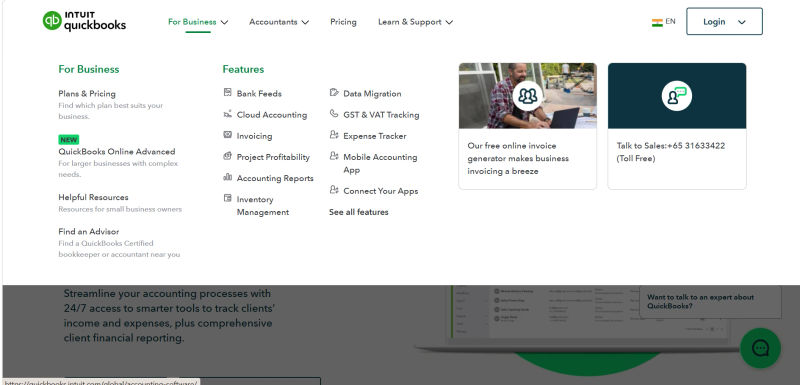
Understanding the total cost of ownership (TCO) is critical for any software investment. QuickBooks structures its pricing in tiers, with costs comprising a monthly base fee plus a per-employee monthly fee. It's important to note that these payroll plans are add-ons to a required QuickBooks Online accounting subscription. The table below outlines the combined monthly costs for common pairings. Be aware that QuickBooks frequently offers promotional pricing for the first few months, which can reduce the initial investment, but always plan for the full price.
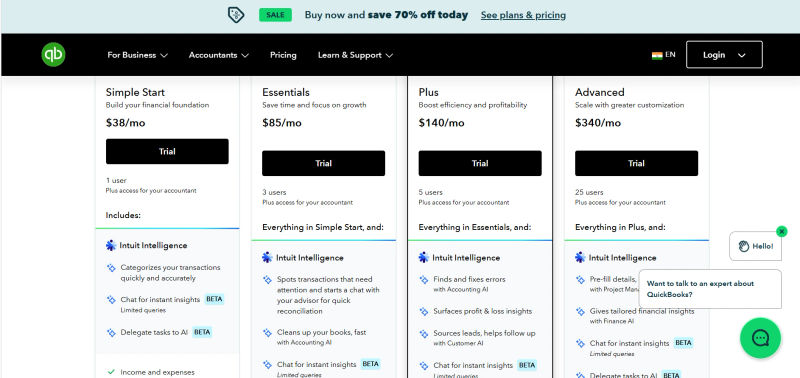
Plan | Price | Best for | Key features (top 5–7) |
Simple Start | $38/month | Solopreneurs and freelancers that need core bookkeeping and invoicing in a simple, affordable package. | - Smart expense organization |
Essentials | $85/month | Small businesses that want faster accounting workflows, AI agents, and stronger invoicing and payment collection. | - Simple Start features, plus Intuit Assist |
Plus | $140/month | Small service and product businesses needing inventory, project management, budgeting, and AI-powered insights. | - Essentials features, plus AI-powered reconciliation |
Advanced | $340/month | Growing businesses needing custom KPIs, dashboards, forecasting, workflow automation, and priority support. | - Plus features, plus Finance Agent (P&L, financial planning, KPI analysis) |
*All prices listed are per month on annual commitment. Free 30-day trial available with all plans; most plans include 1–25 users depending on tier.
Understanding QuickBooks Accounting Software Tiers
Before selecting a payroll plan, a business must have a QuickBooks Online subscription. The common tiers for SMBs are:
Simple Start: Basic income and expense tracking, invoicing, and reporting. Suitable for solopreneurs.
Essentials: Adds bill management and time tracking for up to 3 users.
Plus: The most popular plan, adding project profitability and inventory management for up to 5 users.
Advanced: Offers deeper analytics, batch invoicing, and enhanced user permissions for growing businesses.
The choice of accounting tier depends on the complexity of the business's financial operations, and its cost must be factored into the overall TCO alongside the payroll subscription.
Cost-Benefit Analysis for Small Business Owners
When evaluating the cost, finance leaders must look beyond the subscription fees. The true value lies in risk mitigation and efficiency gains. Consider the following:
Time Savings: Calculate the hours your team currently spends on manual payroll processing, tax filing, and GL reconciliation. Assign a dollar value to this time. The automation provided by a platform like QuickBooks often yields a significant return on investment.
Penalty Avoidance: A single payroll tax filing error can result in substantial penalties. The cost of a full-service payroll plan with tax penalty protection can be viewed as an insurance policy against these risks.
Improved Decision-Making: Real-time visibility into labor costs allows for better budgeting, forecasting, and strategic planning. While harder to quantify, the value of accurate, timely data is immense, especially in a challenging economic climate where average small business revenues have seen declines.
Hidden Costs: Be mindful of potential extra fees. While core payroll is included, services like benefits administration or workers' compensation management may come at an additional cost. There are typically no major setup fees, but complex implementations may benefit from paid support from a certified ProAdvisor.
Weighing trade-offs between Quickbooks and competitors?
Top QuickBooks Payroll & Accounting Alternatives (2026)
The payroll software market is highly competitive. While QuickBooks holds a dominant position, several alternatives offer compelling features, particularly for businesses with specific needs that extend beyond core accounting integration.
1. Gusto: A Strong Contender for Payroll Automation
Gusto has built its reputation on a user-friendly interface and strong automation capabilities. It is often seen as the most direct competitor to QuickBooks Payroll for tech-savvy small businesses.
Strengths: Excellent user experience for both administrators and employees, solid benefits administration integration, and stronger employee onboarding features than QuickBooks.
Accounting Integration: Gusto provides robust, API-driven integrations with QuickBooks Online, Xero, and other accounting platforms, making it a viable option even for businesses not using QuickBooks for their books.
Pricing Model: Offers a transparent, tiered pricing structure similar to QuickBooks, with a base monthly fee plus a per-employee charge.
2. ADP: Enterprise-Grade Solutions for Growing Businesses
ADP is a legacy powerhouse in the payroll space, leading the market with a 9.9% share. Their RUN platform is tailored for small businesses.
Strengths: Unmatched expertise in tax compliance, especially for businesses operating in multiple states with complex nexus issues. They offer extensive HR support, legal resources, and a dedicated support model that many businesses value.
Accounting Integration: ADP integrates with QuickBooks and other systems, but it may not be as deep or seamless as QuickBooks' native payroll module. It often requires more initial setup and data mapping.
Pricing Model: Typically requires a custom quote based on services needed, which can be less transparent than competitors.
3. Rippling: The All-in-One HR, IT, & Payroll Platform
Rippling takes a different approach, positioning itself as a unified workforce platform where HR, IT, and Finance converge.
Strengths: Its core strength is automating processes across departments. For example, onboarding a new employee can automatically trigger payroll setup, laptop provisioning, and app access. This is ideal for businesses looking to automate all aspects of employee management.
Accounting Integration: Rippling offers a powerful, customizable integration with QuickBooks that can map payroll data to the GL with a high degree of granularity, often rivaling QuickBooks' own native integration.
Pricing Model: Starts with a base platform fee and then adds modules (like Payroll) on a per-employee, per-month basis, offering high customizability.
4. Paylocity: Comprehensive Workforce Management
Paylocity is a full-suite HCM provider that competes more with ADP and offers solutions for larger SMBs and mid-market companies.
Strengths: Offers a comprehensive suite of tools including payroll, benefits, talent management, and workforce analytics. Their platform is known for its communication and employee engagement features.
Accounting Integration: Like ADP, Paylocity provides standard integrations with major accounting systems, but it is fundamentally a separate ecosystem.
Pricing Model: Based on a per-employee, per-month fee, often requiring a custom quote.
5. Workpay: Emerging Solutions for Specific Needs
Workpay is a notable player, particularly for businesses with a global or remote workforce, offering tools to manage payroll, HR, and compliance across different countries.
Strengths: Specializes in handling the complexities of international payroll and contractor payments. It's a strong choice for modern, distributed teams.
Accounting Integration: Provides integrations designed to sync global payroll data with platforms like QuickBooks, simplifying the consolidation of international financial data.
Pricing Model: Offers tiered plans with a clear per-employee, per-month cost structure.
Choosing the Right Payroll & Accounting Solution for Your Business
Selecting a payroll and accounting solution is a strategic decision that will impact your business's financial operations for years to come. The choice extends beyond a simple feature comparison.
Key Factors for Small Business Owners
Current Accounting System: If you are deeply embedded in the QuickBooks Online ecosystem, its native payroll solution offers the path of least resistance and deepest integration. If you use another system or are open to migrating, the field of alternatives opens up.
Business Complexity: How many states do you operate in? Do you have complex deductions, job costing needs, or union agreements? The more complex your requirements, the more you should scrutinize the capabilities of each platform. An ADP might be better for multi-state tax complexity, for example.
HR and IT Needs: Do you just need to run payroll, or are you looking for a unified platform to manage the entire employee lifecycle? If the latter, a solution like Rippling becomes a very strong contender.
Scalability: Consider your five-year growth plan. Will your chosen solution grow with you? Evaluate the platform's ability to handle more employees, more complex reporting, and potential international expansion.
Data Migration: Switching payroll systems is a significant undertaking. Evaluate the ease of data migration. Does the new provider offer support for importing historical payroll data? Factor the time and potential cost of this transition into your decision.
Mobility: As a business owner, you may need to manage tasks on the go. Assess the mobile app functionality of each platform. Can you approve payroll runs or access key reports from your phone?
Future-Proofing Your Financial Operations
The trend towards cloud-based, integrated solutions is undeniable, with 80% of QuickBooks users now on the Online platform. Future-proofing your financial stack means choosing solutions that are built on open APIs, allowing for flexible integrations with other best-in-class tools. While an all-in-one solution like QuickBooks offers simplicity, a best-of-breed approach (e.g., QuickBooks for accounting, Gusto for payroll, another tool for expense management) can offer more power and flexibility, provided the integrations are seamless.
Try AuthenCIO
Move to faster, smarter software evaluation with AI
Conclusion: Is QuickBooks Payroll & Accounting Right for You in 2026?
For the majority of small businesses already using QuickBooks Online for their accounting, the QuickBooks Payroll module remains the most logical and efficient choice in 2026. Its unparalleled, native integration with the general ledger creates a frictionless workflow that saves time, ensures data integrity, and provides real-time financial visibility. The platform's robust tax automation and compliance features offer significant peace of mind for business owners and finance teams.
However, the decision is not automatic. If your business requires sophisticated, all-in-one HR and IT automation, a platform like Rippling warrants serious consideration. If you face complex multi-state tax compliance challenges, the specialized expertise of ADP may be a better fit. For those who prioritize user experience and benefits administration above all else, Gusto presents a compelling, modern alternative that still integrates cleanly with QuickBooks.
The critical takeaway for 2026 is that payroll is no longer a siloed administrative task; it is a core component of a strategic financial technology stack. The right solution will not only pay your people accurately and on time but will also provide the data and efficiency needed to drive informed business decisions and support sustainable growth. Finding the right small business payroll software in 2026 is about investing in a platform that provides the best accounting integration for your unique operational needs.