

Introduction
As marketing budgets tighten in 2027, justifying every software subscription is a critical responsibility for Marketing Directors. Video content remains a non-negotiable asset, but the landscape has evolved. With AI-generated content and 4K resolution now baseline expectations, the challenge is finding a platform that balances ease of use with the robust features needed to produce on-brand, high-converting campaigns at scale.
Streamline your software evaluation process
You are no longer just buying a tool; you are investing in a comprehensive workflow.
This guide provides a decision-focused breakdown of Animoto's 2027 pricing plans, analyzing how it stacks up against top alternatives—InVideo, Canva, Adobe Express, Vimeo, WeVideo, and Clipchamp.
We will bypass marketing jargon and focus strictly on pricing differences, hidden fees, plan limitations, and total cost of ownership to help you choose the most cost-effective solution for your team.
Key Takeaways
Animoto's strongest value proposition is combining accessible video creation with team collaboration and brand consistency.
The Professional plan is better suited to individual marketers, while the Teams plan offers additional collaboration and approval capabilities.
Its three-seat Teams allowance can be restrictive for growing departments and should be considered when calculating total ownership costs.
Commercial media licensing and branding tools help businesses create professional marketing videos without sourcing every asset independently.
Overall, Animoto delivers the most value to smaller teams that prioritize simple production, consistent branding, and streamlined approvals over advanced editing capabilities.
2027 Video Creation Software: Quick Pricing Comparison Table
To help you evaluate your options quickly, here is a side-by-side comparison of the best video creation software for marketing teams in 2027.
Plan | Best For | Pricing | Limitation |
Animoto | Collaborative in-house production | Starts from $19/month | Capped at 3 seats; limited premium 4K stock assets |
InVideo | High-volume social media content | Starts from $15/month (billed annually) | 60 HD video exports per month; AI generation limits |
Canva | Integrated design workflows | Starts from $18/month per user | Video editing is secondary; timeline limits; per-seat pricing adds up |
Adobe Express | Brand-compliant quick edits | Starts from $9.99/month | Steeper learning curve; limited multi-track audio capabilities |
Vimeo | Advanced hosting and long-form | Starts from $16/month | Creation tools are basic compared to robust hosting features |
WeVideo | Education and team collaboration | Starts from $46/month | User interface feels slightly dated; export speeds can vary |
Clipchamp | Quick internal communications | Starts from $9.99/month | Tied heavily to Microsoft ecosystem; basic transition effects |
*Note: All prices shown reflect typical monthly billing. Vendors often offer lower pricing for annual commitments, but those discounts are excluded here for easier comparison. Actual costs may vary depending on your requirements, usage volumes, and negotiated terms.
Software Covered in this Article
To help you understand Video and Design Software in the right context, this article refers to a carefully curated set of leading alternatives:





Deep Dive into Animoto’s 2027 Pricing Tiers
When evaluating Animoto for a marketing department, understanding how features scale across its pricing tiers is crucial.
In 2027, the value proposition shifts dramatically depending on your team's size, security needs, and monthly video output volume.
1. The Professional Plan: Balancing Cost and Features for Small Teams
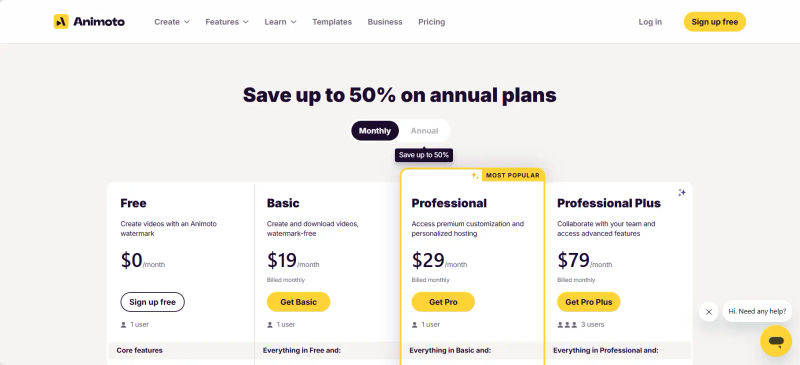
The Professional plan, at $19 per month (billed annually), is where Animoto begins to offer legitimate business value. It removes watermarks, unlocks custom branding (logos, fonts, colors), and provides access to a large library of commercially licensed music and stock footage.
This plan is essential for maintaining brand consistency.
Who is this best for? The Professional plan is ideal for solo marketers or small businesses where only one person is responsible for video creation.
Its primary limitation is the single-seat license. For teams, sharing a single login creates security risks and workflow bottlenecks, making this plan a non-starter.
2. The Teams Plan: Best for Collaborative In-House Production
For most marketing departments, the Teams plan is the primary focus. At $39 per month (billed annually), this tier includes three user seats and introduces essential collaborative features like time-stamped commenting and internal approval workflows.
These tools are critical for streamlining in-house production and reducing feedback loops.
The plan also includes a license to resell to businesses, which is valuable if your marketing team operates as an internal agency for different corporate branches.
Enterprise-Ready Security Features: Recognizing the needs of larger organizations, the Teams plan now includes options for Single Sign-On (SSO) and is SOC2 compliant.
This addresses a major security requirement for directors at mid-to-large companies, ensuring that user access is managed through centralized, secure corporate protocols.
Projected ROI Model: Consider a mid-sized marketing department paying $39/month for the Teams plan. If the collaborative features and intuitive interface save three employees just two hours of editing and approval time per week, that's 24 hours saved monthly.
At an average internal hourly rate of $40, the software delivers nearly $960 in monthly workflow savings.
Furthermore, by leveraging templates and AI-assisted features, teams can reduce their 'time-to-market' for new campaigns by an estimated 30%, a critical metric in 2027's fast-paced digital environment.
This makes the $39 investment highly justifiable to a CFO.
Beyond the Price Tag: Hidden Costs and Plan Limitations in 2027
The sticker price on a pricing page rarely tells the whole story. When auditing your current video production costs to compare against a subscription, Marketing Directors must look for hidden fees and plan limitations that can inflate the budget.
These are the primary factors that contribute to enterprise video creation costs.
1. Seat Licensing Scalability
The most common hidden cost is seat licensing. Animoto's Teams plan includes three seats.
If your department grows to four or five people, you must either negotiate custom enterprise pricing or purchase additional standalone Professional licenses.
Managing multiple individual licenses instead of a unified team account is a major pain point that complicates billing, user management, and collaboration.
2. Stock Media Rights and Licensing
While Animoto boasts a massive Getty Images stock library, not all assets are available on every tier.
More importantly, licensing rights for multi-platform social campaigns can be complex.
You must ensure the music and footage you use are cleared for paid advertising, not just organic posts.
Some platforms charge premium overage fees for broadcast-level commercial rights, so it is vital to audit these terms to avoid legal issues.
3. Cloud Storage and Bandwidth Limits
With 4K video becoming standard, storage consumption is a significant concern.
A single minute of 4K footage can be several gigabytes.
Many cloud-based editors impose limits on the amount of brand assets or raw footage you can upload and store.
Exceeding these limits can result in hefty overage fees or force you into a premature and costly plan upgrade.
4. API and DAM Integration Costs
For streamlined workflows, your video tool must connect to your existing tech stack.
Does the platform offer an API to integrate with your Digital Asset Management (DAM) system or project management software like Asana or Jira?
Often, these integrations are only available at the highest enterprise tiers or require custom development, adding a significant, unlisted cost to the total investment.
Questions to Ask a Sales Rep:
Are there any bandwidth or storage limits on our uploaded brand assets?
What is the exact cost per additional seat beyond the initial three?
Do we own the final rendered videos in perpetuity, even if we cancel our subscription?
Are there additional fees for accessing the newest AI-driven automation features or API access?
Find Perfect Software For Your Business
Animoto Alternatives: Positioning and Cost-Effectiveness
Animoto is a powerful dedicated video tool, but it faces fierce competition from platforms that bundle video editing into broader design suites or offer different core strengths.
1. InVideo: Best for High-Volume Social Media Content
InVideo has positioned itself as an AI-first platform in 2027. Its higher tiers bundle advanced AI-driven automation features, such as text-to-video generation and automated scriptwriting, which are highly effective for scaling output.
However, InVideo often enforces export limits (e.g., 60 HD exports per month on its Business plan), which can hinder a high-output marketing team.
Who is this best for? InVideo is best for high-volume social media content.
If your strategy relies on publishing dozens of short-form, trend-driven videos weekly, InVideo's AI automation provides the fastest time-to-market and a clear ROI on content velocity.
2. Canva & Adobe Express: Best for Integrated Design Workflows
Canva for Teams ($18/month per user): Canva has aggressively expanded its video capabilities.
Its primary advantage is its seamless integration between static graphics and video content.
However, the pricing model is strictly per-user, making it more expensive than Animoto for teams.
Adobe Express Premium ($9.99/month): As the accessible alternative to Premiere Pro, Adobe Express leverages powerful AI engines and offers deep integration with Creative Cloud libraries.
However, its interface has a slightly steeper learning curve for non-video professionals.
AI-Driven Brand Governance: A key 2027 feature in both Canva and Adobe Express is AI-driven brand governance.
These platforms can automatically enforce brand guidelines, suggesting only on-brand colors and fonts while flagging or blocking the use of off-brand assets.
This is a critical feature for Marketing Directors managing brand consistency across large, decentralized teams.
Who are these best for? Canva and Adobe Express are best for integrated design workflows.
If your team already uses these platforms for presentations, social media graphics, and print materials, keeping video creation within the same ecosystem reduces the learning curve and ensures strict brand consistency.
3. Vimeo & WeVideo: Best for Advanced Hosting and Long-Form Content
Vimeo Core ($40/month): Vimeo is a premium hosting platform that includes creation tools.
The higher price is for ad-free hosting, advanced analytics, webinar capabilities, and lead capture forms embedded in the player.
The creation interface itself is less robust than Animoto's.
WeVideo Business ($46/month): WeVideo offers a more traditional multi-track editing timeline, giving users more granular control over audio mixing and precise cuts.
This makes it a strong choice for longer, more complex projects.
Who are these best for? Vimeo is best for advanced hosting and lead generation with long-form content.
WeVideo is best for teams that require granular, multi-track editing for training materials or corporate communications.
4. Clipchamp: Best for Quick Internal Communications
Acquired by Microsoft, Clipchamp is deeply integrated into the Windows ecosystem.
The Premium tier ($9.99/month) is highly affordable but lacks the robust stock library and custom branding options of its competitors, making it less suitable for polished, external-facing advertisements.
Who is this best for? Clipchamp is best for quick internal communications.
For creating fast updates, executive messages, or screen recordings for the wider company, it offers a cost-effective, frictionless solution.
Decision Matrix: Which Tool Fits Your 2027 Marketing Budget?
Choosing the right video creation software requires aligning your team's core need with the tool's primary strength.
Over-buying a plan with features your team will never use is as detrimental to your budget as under-buying and creating workflow bottlenecks.
The Plan Selection Matrix:
For High-Volume Social Media: Choose InVideo. The AI automation will save countless hours on short-form content.
For Ecosystem Integration & Brand Governance: Choose Canva or Adobe Express. If your team is entrenched in these platforms, the consolidated billing and AI-powered brand kits offer the best value.
For Internal Comms: Choose Clipchamp. It is affordable and seamlessly integrates with existing Microsoft infrastructure.
For Premium Hosting & Lead Gen: Choose Vimeo. The creation tools are secondary, but the marketing analytics are unparalleled.
For Collaborative In-House Production: Choose Animoto Teams. At $39/month for three seats with SSO capabilities, it offers the best price-to-performance ratio for marketing departments that need to produce polished, brand-compliant videos without a steep learning curve.
Total Cost of Ownership (TCO) Projection (10-User Team, 12 Months):
Animoto: Requires a custom Enterprise plan. Estimated TCO: $2,500 - $4,000/year. Offers a unified, predictable cost structure.
Canva for Teams: 10 users x $14.99/mo x 12 mo = $1,798.80/year. Highly cost-effective if the team uses the full design suite.
Adobe Express for Teams: Requires an enterprise plan. Estimated TCO: $2,000 - $3,500/year. Best value if already in the Adobe ecosystem.
InVideo (Business): Requires multiple subscriptions. Estimated TCO: $1,800/year (10 users x $15/mo x 12 mo), but with export limits.
Try AuthenCIO
Move to faster, smarter software evaluation with AI
Final Verdict: Maximizing Your Team's Video Production ROI
By carefully auditing your current video production costs and mapping them against this matrix and TCO projection, you can confidently justify your software spend to your CFO.
In 2027, the best video creation software for marketing teams is not just about features—it's about predictable costs, security compliance, and seamless integration.
Animoto's Teams plan, with its balance of collaborative tools, ease of use, and enterprise-ready security, presents a compelling case for in-house teams focused on producing high-quality, on-brand video efficiently.