
Introduction
Bottom Line Up Front: WestFax is a highly capable, HIPAA-compliant cloud fax solution purpose-built for healthcare enterprises. It excels in high-volume environments requiring deep EHR/EMR integrations (such as Epic and Cerner) and robust API capabilities. However, smaller practices might find its enterprise focus and custom pricing less accessible than modern, budget-friendly alternatives.
Streamline your software evaluation process
This WestFax Review 2027 provides Healthcare Administrators and IT Directors with an objective, data-driven evaluation of one of the market's leading enterprise digital faxing solutions. In 2027, the healthcare sector remains heavily reliant on faxing as a critical interoperability layer, but the underlying infrastructure has fundamentally shifted.
With the Trusted Exchange Framework and Common Agreement (TEFCA) interoperability mandates forcing organizations away from legacy analog systems, maintaining physical fax machines, analog telco lines, and on-premise servers is no longer a viable option for security-conscious facilities. According to recent healthcare data breach statistics, hacking and IT incidents account for over 99% of affected individuals, with the average healthcare breach costing $7.42 million.
Despite the push for advanced health information exchanges, a recent healthcare fax workflow survey highlighted that more than one-third of documents sent to healthcare facilities are still transmitted by fax. Furthermore, 88% of practitioners report that fax-related delays negatively affect patient care, and 52% of administrators still manually process incoming faxes.
The solution is workflow-enabled cloud faxing. In this comprehensive review, we evaluate WestFax's technical specifications, compliance frameworks, pricing, and overall enterprise value. We also compare it directly against leading alternatives like mFax, eFax, Concord Fax, Weave, RingCentral Fax, Fax.plus, and SRFax to help you make an informed purchasing decision.
Tool | Best For | Pricing (USD $) | Key Features | Use Cases |
WestFax | Healthcare Enterprise | Starts at $14.99/mo | Native EHR integrations, HIPAA BAA, Advanced API | High-volume hospital networks, Epic/Cerner integration |
mFax | Scalability & Modern UI | Starts at $15/mo | Advanced routing, user permissions, high reliability | Mid-to-large clinics needing quick deployment |
eFax Corporate | Legacy Enterprise | Custom pricing | Global network, legacy system support | Multinational healthcare organizations |
Concord Fax | Maximum Reliability | Custom pricing | Active-active network, intelligent routing | Mission-critical patient document delivery |
SRFax | Budget-Friendly Healthcare | Starts at $11.40/mo | HIPAA compliant, basic API, simple UI | Small to mid-sized private practices |
RingCentral Fax | Unified Communications | Starts at $20/mo | UCaaS bundle, mobile app, secure fax | Facilities wanting voice, video, and fax in one app |
Fax.plus | Sleek UI & Data Residency | Starts at $8.99/mo | Strict data residency, SOC2 Type II, API | Security-focused clinics needing modern interfaces |
Weave | Patient Communication | Custom pricing | Integrated VoIP, SMS, and fax | Dental and optometry practices focused on patient experience |
*Note: All prices shown reflect typical monthly billing. Vendors often offer lower pricing for annual commitments, but those discounts are excluded here for easier comparison. Actual costs may vary depending on your requirements, usage volumes, and negotiated terms.
Key Takeaways
WestFax stands out in 2027 as a premier, HIPAA-compliant cloud fax solution purpose-built for healthcare enterprises. Its deep EHR/EMR integrations (HL7/FHIR) and AI-powered OCR make it highly efficient for hospitals looking to automate document workflows and eliminate legacy fax servers.
Pros: Exceptional EHR connector capabilities, robust AI document processing, ironclad HIPAA compliance with standard BAAs, and excellent geo-redundant disaster recovery.
Cons: Premium pricing model compared to basic alternatives, and a steeper learning curve for advanced API and Active Directory configurations.
Pricing: Enterprise pricing is custom-quoted based on page volume, professional services, and integration complexity. Expect a higher initial Total Cost of Ownership (TCO) that is largely offset by reduced manual data entry and hardware savings.
For IT decision-makers, WestFax is best suited for mid-to-large healthcare networks prioritizing security, TEFCA readiness, and workflow automation over budget-basement pricing.
Pros and Cons: Objective Enterprise Evaluation
Here is an objective breakdown of WestFax's advantages and limitations for healthcare enterprises in 2027.
Pros:
Native EHR Integration: Supports HL7/FHIR and major EMRs (Epic, Cerner) to significantly reduce manual data entry.
Advanced Security Posture: Ensures strict HIPAA compliance via TLS 1.3, AES-256 encryption, HITRUST certification, and comprehensive BAAs.
Intelligent Document Processing: Uses AI-powered OCR to extract patient demographics and automate inbound document routing.
Comprehensive Audit Trails: Simplifies compliance audits and document lifecycle tracking with granular role-based access control (RBAC) and detailed logging.
Cons:
Interface Complexity: Presents a steeper learning curve in the administrative portal compared to modern alternatives like mFax or Fax.plus.
Professional Services Costs: Increases initial deployment costs due to the custom implementation fees and IT resources required for deep EHR integrations.
Cost at Scale: Becomes expensive for high-volume enterprises if overage fees are triggered or premium support tiers are required.

Software Covered in this Article
The following articles break down the key aspects of Cloud Communications Software, featuring a carefully curated set of key players:







WestFax Core Features: Built for Healthcare IT?
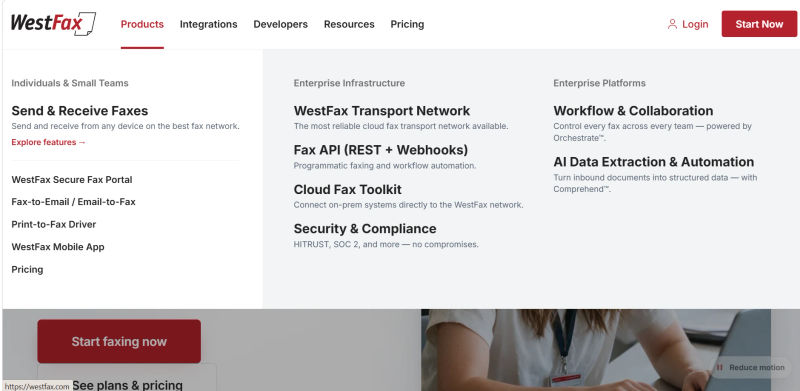
When evaluating a cloud fax solution for a healthcare environment, basic transmission capabilities are insufficient. IT Directors must look for centralized inbound routing, intelligent document processing, and native interoperability. WestFax distinguishes itself by offering a suite of features designed specifically for clinical workflows.
1. EHR/EMR Integration Capabilities (HL7/FHIR)
The most significant hurdle in modernizing healthcare communications is bridging the gap between digital data and faxable formats without losing data integrity. WestFax provides robust API and native connector support for major electronic health record systems like Epic, Cerner, and Meditech.
By leveraging HL7 and FHIR standards, WestFax allows healthcare professionals to send and receive faxes directly within the patient chart. This eliminates the need for nurses and physicians to switch between applications, significantly reducing the risk of misrouting documents.
Furthermore, WestFax handles failed faxes with sophisticated automated retry logic, which can be configured based on document priority, ensuring that critical patient data reaches its destination despite busy signals.
2. AI-Powered OCR and Intelligent Document Processing
A major pain point for healthcare administrators is the manual data entry required for inbound faxes. WestFax addresses this through AI-powered Optical Character Recognition (OCR) and intelligent document processing.
The system scans incoming faxes to extract key patient demographics, lab results, and referral authorization codes, converting unstructured image data into searchable, structured text. This capability allows documents to be automatically routed to the correct department or patient record, reducing manual handling and lowering the risk of unattended fax-machine exposure.
3. User Management and Robust Audit Trails
For enterprise deployments processing over 50,000 pages per month, administrative control is paramount. WestFax provides a comprehensive administrative portal that allows IT teams to manage user permissions through granular, role-based access controls (RBAC).
During a compliance review, the ability to search and audit historical fax records is critical. WestFax's audit logging tracks every interaction with a document, including who viewed, printed, or forwarded a fax.
This level of visibility replaces the historical liability of paper faxes with a secure, trackable digital workflow.
Cloud Fax Migration: Step-by-Step Guide for IT Teams
Transitioning from legacy on-premise fax servers to a cloud-native solution like WestFax requires careful planning. To ensure a smooth deployment, IT teams should follow this structured migration framework.
Step 1: Network Readiness Assessment
Before deployment, IT must ensure firewall configurations allow traffic to and from WestFax IP ranges. Evaluate bandwidth capabilities to handle high-volume transmission, particularly if your facility processes tens of thousands of pages during peak clinical hours.
Step 2: Number Porting Strategy
Inventory all existing analog and digital fax numbers across the organization. Initiate the porting process with WestFax early. Telecom carrier releases can take anywhere from two to four weeks, and delays here can stall the entire migration project.
Step 3: Active Directory Sync
Integrate WestFax with your existing identity provider, such as Okta or Azure AD. This enables Single Sign-On (SSO) and automated user provisioning, ensuring that access is immediately revoked when an employee leaves the organization, maintaining strict HIPAA compliance.
Step 4: EHR Connector Configuration
Deploy the WestFax API or print-to-fax drivers within your Epic or Cerner testing environment. Ensure that the HL7/FHIR data mapping aligns with your internal document classification standards.
Step 5: Workflow Testing
Simulate peak clinical hours to test inbound routing, OCR accuracy, automated retries, and failed-number handling. Verify that the system accurately triggers alerts for undelivered mission-critical faxes.
Step 6: End-User Training
Utilize internal staff training templates to educate nurses and physicians on how to securely send and receive faxes within the new digital interface. Emphasize the importance of verifying recipient numbers to prevent misdirected Protected Health Information (PHI).
Find Perfect Software for Your Business
Security and HIPAA Compliance: Does WestFax Pass the Test?
A "HIPAA compliant" label on a marketing website does not automatically establish that every customer workflow is secure. Compliance is a shared responsibility, and IT decision-makers must scrutinize the vendor's underlying architecture. WestFax demonstrates a highly secure posture, but understanding the specifics is crucial for your 2027 risk assessment.
1. BAA Agreements and Data Encryption Standards
WestFax signs a comprehensive Business Associate Agreement (BAA), explicitly assuming specific liabilities regarding the safeguarding of PHI while it is stored on or transmitted through their network.
Technically, WestFax utilizes state-of-the-art encryption protocols. Data in transit is secured using TLS 1.3, ensuring that documents cannot be intercepted during transmission across the internet. Data at rest is protected using AES-256 encryption within their secure data centers.
Furthermore, WestFax provides automated retention and deletion controls, allowing organizations to configure data lifecycle policies that align with internal compliance mandates.
2. Disaster Recovery and Geo-Redundancy
Healthcare organizations cannot tolerate communication downtime. WestFax operates on a high-availability architecture featuring active-active geo-redundancy.
If one data center experiences an outage, traffic is automatically routed to a secondary location without interrupting service. Their Service Level Agreements (SLAs) guarantee high uptime, backed by continuous data backup protocols that ensure historical faxes are never lost due to hardware failure.
2027 Regulatory Trends, TEFCA, and Certifications
In 2027, healthcare breach data shows that third-party business associates represent a material risk. To mitigate this, WestFax maintains stringent third-party audits.
Verification of their SOC2 Type II and HITRUST certification status confirms that their security controls are continuously monitored and validated by independent auditors. They also align with TEFCA standards, ensuring secure, standardized data exchange across different healthcare networks.
3. Data Residency Options
For multinational healthcare organizations or facilities operating in states with strict data sovereignty laws, data residency is a critical factor. WestFax offers configurable data residency options, allowing IT Directors to ensure that PHI remains stored exclusively within compliant geographic boundaries, mitigating international regulatory risks.
Make a confident choice for enterprise faxing. Run a WestFax side-by-side comparison on AuthenCIO.
WestFax Pricing and Enterprise Value in 2027
Cost remains a leading barrier to adopting automated workflows, with 44% of organizations citing it as a primary concern. While WestFax offers volume-based pricing for 2027, IT Directors must look beyond the base per-page rate and conduct a comprehensive financial analysis to determine true enterprise value.
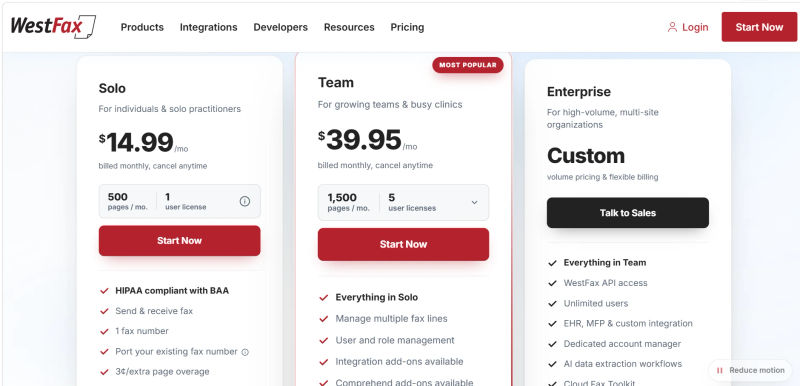
1. Framework for Calculating Total Cost of Ownership (TCO)
To accurately compare WestFax against maintaining traditional analog lines or on-premise servers, consider the following factors:
Hard Costs: Eliminate the monthly fees for dedicated telco lines, PRI circuits, fax machine hardware, toner, and paper.
Maintenance Overhead: Factor in the IT labor hours spent troubleshooting paper jams, maintaining legacy software updates, and managing server patches.
Compliance Risk Mitigation: Assign a financial value to the reduced risk of HIPAA violations and the associated fines from misrouted or unattended faxes.
Operational Efficiency: Calculate the time saved by clinical staff who no longer have to manually scan, upload, and attach paper faxes to patient records.
2. Hidden Costs and Professional Services Analysis
While WestFax offers competitive volume pricing for enterprise environments, buyers should be aware of potential hidden costs. Overage fees can accumulate quickly if your organization exceeds its monthly page allowance.
Additionally, deep EHR integrations often require Professional Services. IT Directors should estimate anywhere from $2,500 to $15,000+ in professional services fees for complex, custom Epic or Cerner integrations.
Premium support tiers, which offer dedicated account managers and faster SLA response times, also come at an additional monthly premium.
Top WestFax Alternatives for Healthcare Providers
While WestFax is a high-performing contender, the 2027 cloud fax market is highly competitive. Depending on your organization's specific use case, existing tech stack, and budget, one of these alternatives might be a more suitable choice.
1. WestFax vs. mFax: Scalability and UI Comparison
mFax is a direct competitor that frequently goes head-to-head with WestFax. mFax is renowned for its modern, intuitive user interface and exceptional scalability. While WestFax offers deep, legacy EHR integrations, mFax provides a highly developer-friendly API that makes custom integrations incredibly fast.
Furthermore, mFax offers some of the best print-to-fax drivers in the industry, making end-user adoption seamless. For mid-to-large clinics looking for rapid deployment and a user experience that requires almost zero training, mFax is often the preferred choice.
2. WestFax vs. Concord Fax: Reliability Benchmarks
Concord Fax is the industry standard for mission-critical reliability. Built specifically for healthcare, Concord boasts a highly resilient active-active network architecture that guarantees near 100% uptime. It also offers excellent print-to-fax capabilities and robust intelligent routing.
If your facility processes hundreds of thousands of pages monthly and requires absolute maximum reliability for patient document delivery, Concord Fax is the premium alternative to WestFax.
3. WestFax vs. eFax Corporate: Legacy Ecosystems
eFax Corporate remains the legacy giant in the cloud fax space. While it offers a massive global network and supports complex multinational deployments, its interface and API capabilities can feel dated compared to WestFax's modernized approach.
eFax is best suited for organizations that already have deep ties to the OpenText ecosystem and require extensive global numbering coverage.
4. WestFax vs. SRFax: Budget-Friendly Healthcare
For small to mid-sized private practices, SRFax is the budget-friendly champion. It offers rock-solid HIPAA compliance and a BAA at a fraction of the cost of enterprise solutions.
While it lacks the advanced AI-powered OCR and deep EHR integration of WestFax, it is perfectly suited for clinics with lower fax volumes that simply need a secure, reliable way to send and receive documents.
5. WestFax vs. RingCentral Fax: Unified Communications
If your IT strategy involves consolidating vendors, RingCentral Fax is an excellent choice. Bundled within their Unified Communications as a Service (UCaaS) platform, it allows facilities to manage voice, video, SMS, and secure faxing from a single application.
While it may not offer the deep healthcare-specific workflows of WestFax, its unified approach simplifies IT management and billing.
6. WestFax vs. Fax.plus: Data Residency and Modern UI
Known for its sleek interface and strict data residency controls, Fax.plus is ideal for security-focused clinics. With SOC2 Type II compliance, advanced encryption, and a highly rated mobile app, it is a strong, modern alternative to WestFax for organizations that prioritize a seamless web experience and strict geographic data storage requirements.
7. WestFax vs. Weave: Patient Communication Focus
Designed primarily for dental, optometry, and veterinary practices, Weave focuses heavily on patient communication. It integrates VoIP, two-way SMS, and digital faxing to streamline front-desk operations.
Weave is a better fit for patient-facing clinics looking to improve appointment reminders and billing communications, rather than backend hospital IT departments requiring complex EHR integrations.
Try AuthenCIO
Move to faster, smarter software evaluation with AI
Final Verdict: Should Your Hospital Choose WestFax?
In 2027, WestFax stands out as a highly capable, HIPAA-compliant cloud fax solution specifically engineered for the complexities of the healthcare enterprise.
If you are an IT Director at a large hospital network utilizing Epic or Cerner, and you need a platform capable of handling high-volume, automated document routing with uncompromising security, WestFax is a sound investment.
However, it is not a one-size-fits-all solution. Small to mid-sized clinics may find SRFax more cost-effective, while organizations prioritizing rapid deployment, excellent print-to-fax drivers, and a modern UI might prefer mFax. Facilities requiring absolute, mission-critical uptime might lean toward Concord Fax.
Implementation Next Steps Checklist
If you are preparing to present a cloud fax recommendation to your board, utilize this checklist:
Define Volume Requirements: Calculate average monthly inbound and outbound page volumes to accurately forecast pricing and avoid overages.
Assess EHR Compatibility: Confirm whether your current EMR version supports native API integration or if you will rely on print-to-fax drivers.
Request Professional Services Estimates: Obtain a clear quote for any custom integration work required during deployment.
Review BAA Terms: Ensure the vendor's Business Associate Agreement aligns with your organization's specific liability requirements.
Conduct a Side-by-Side Trial: Pilot your top two choices in a sandbox environment to test OCR accuracy and user experience.