

Introduction
Restream remains the industry standard for cloud-based multi-streaming in 2027, but its value depends heavily on your production scale and bandwidth limitations. As a software solution designed to eliminate local encoding strain, Restream allows producers to send a single video feed to its servers for simultaneous distribution to over 30 destinations, including Twitch, YouTube, LinkedIn Live, and TikTok.
Streamline your software evaluation process
However, as local hardware encoders become more powerful and competing platforms upgrade their native tools, professional broadcasters must ask critical questions before investing: Does Restream's pricing justify its feature set? How reliably does its architecture handle SRT ingest and 4K resolution? And does the browser-based Restream Studio hold up against dedicated production software?
This software review evaluates Restream’s 2027 capabilities, focusing on its core features, API stability, pricing ROI, and how it compares to top competitors. Whether you are a corporate event producer, a mobile-first creator, or a technical director managing complex hybrid workflows, this guide will help you determine if Restream is the right multi-streaming software for your tech stack.
Key Takeaways
For decision-makers evaluating software performance, design, and overall value, here are the critical insights:
Software Performance & Cloud Offloading: Restream's core value remains its ability to save local bandwidth and CPU processing power by handling heavy multi-destination distribution entirely in the cloud.
Protocol Upgrades for Lower Latency: The integration of SRT (Secure Reliable Transport) significantly reduces ingest latency and improves stream stability over legacy RTMP, which is crucial for professional workflows.
Design & Modern Workflows: The interface now seamlessly integrates AI-driven automated highlight clipping and dynamic 9:16 mobile formatting, aligning perfectly with modern vertical video strategies.
Overall Value & Integration: For high-end broadcasts, Restream delivers the best ROI when used as a distribution hub paired with local encoders (like vMix or OBS Studio) rather than relying solely on its built-in web studio.
Technical Trade-offs and Limitations
Evaluating Restream in 2027 requires balancing its cloud-based distribution benefits against specific architectural and usability constraints.
The Pros:
Massive Bandwidth and Hardware Efficiency: Sending a single feed to the cloud reduces local CPU/GPU load by up to 40% compared to local multi-streaming. This prevents thermal throttling and local network saturation during complex broadcasts.
Unified Audience Management: The cross-platform chat aggregation handles high-velocity chat streams with minimal UI lag, making it indispensable for live community moderation.
Innovative 2027 Features: AI-driven highlight clipping and real-time multi-language translation save hours of post-production work and immediately expand global reach.
Platform Agnosticism: Diversifying your audience across multiple networks protects your brand from sudden algorithm changes or platform-specific bans.
The Cons:
Latency Overhead: Even with SRT protocols, Restream's ingest-to-delivery pipeline adds approximately 0.8 to 1.5 seconds of latency compared to a direct-to-platform feed. This delay can impact highly interactive events like live auctions or rapid-fire Q&As.
Design and Layout Limitations: Restream Studio's web interface prioritizes ease of use over deep customization. It lacks the advanced custom layout controls, granular audio routing, and complex scene switching found in dedicated local software like OBS or vMix.
Platform-Specific Feature Limits: Due to third-party API restrictions, managing native platform features (like LinkedIn polls, YouTube Super Chats, or Facebook stars) through the aggregator is often unsupported. Producers must still keep native platform tabs open to monitor these interactions.
Added Point of Failure: Introducing a cloud intermediary means if Restream's ingest server drops or an API token expires mid-stream, the broadcast fails across all destinations simultaneously.
Tiered Support Bottlenecks: Usability feedback indicates that while Enterprise users get dedicated, real-time support, Standard and Professional tier users often face slower response times during live, critical stream desync issues.
Verdict: Restream is a powerful cloud-based multi-streaming platform that helps broadcasters distribute live content across multiple channels while reducing local production demands.
Best For: Professional broadcasters, content creators, marketing teams, and event producers managing live streams across multiple platforms.
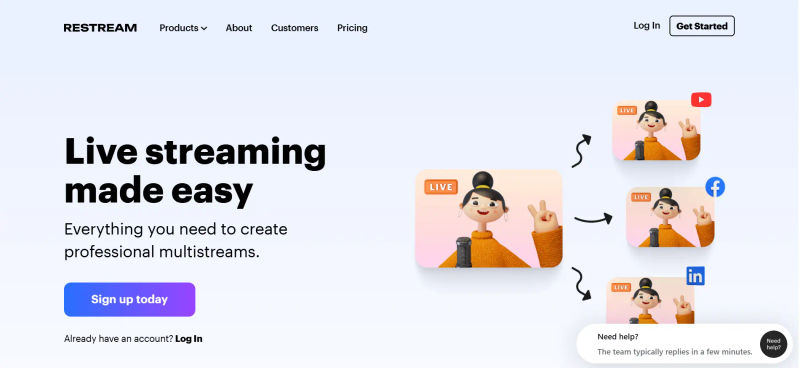
Software Covered in this Article
To help you understand this Restream in the right context, this overview highlights its key features, capabilities, and use cases.








Restream at a Glance: Top Alternatives Compared
Restream is a strong choice for cloud-based multi-streaming, but the right platform depends on your production style, budget, and distribution needs. This quick comparison shows how it stacks up against popular alternatives for live broadcasting, mobile production, advanced encoding, and scheduled streaming
Tool | Best For | Pricing | Key Features | Use Cases |
Restream | Hybrid cloud multi-streaming | Starts from $19.99/mo | RTMP/SRT ingest, Studio, Unified Chat, AI Clipping | Broadcasters needing massive reach without local bandwidth strain |
StreamYard | Browser-based interviews | Starts from $18.99/mo | Guest management, branding, local recordings | Podcasts, webinars, corporate town halls |
OBS Studio | Free local encoding | Free | Scene building, custom plugins, total control | Solo creators, budget productions, technical users |
Switcher Studio | iOS mobile production | Starts from $45/mo | Multi-cam via iPhones, direct integrations | On-location events, mobile-first creators |
vMix | Advanced Windows production | Starts from $60/mo | NDI support, instant replay, 8K support | High-end corporate, sports, esports broadcasts |
Wirecast | Mac/PC professional switching | Starts from $59/mo | Stock media library, advanced audio routing | House of worship, news broadcasting, live events |
Castr | 24/7 linear streaming | Starts from $19.99/mo | Cloud recording, IP camera streaming | Continuous broadcasting, OTT platforms |
OneStream | Pre-recorded scheduling | Custom Pricing | Playlist management, cloud storage | Evergreen content, automated webinars |
*Note: All prices shown reflect typical monthly billing. Vendors often offer lower pricing for annual commitments, but those discounts are excluded here for easier comparison. Actual costs may vary depending on your requirements, usage volumes, and negotiated terms.
Restream Core Features: What Makes It Stand Out in 2027?
Restream operates on a dual-front approach: Restream Studio (a browser-based production environment) and Restream RTMP/SRT (a cloud distribution hub for external encoders).
In 2027, the platform has rolled out several critical updates aimed at professional workflows, addressing previous limitations regarding latency and mobile formatting.
1. AI-Driven Automated Highlight Clipping
One of the most significant additions to the 2027 Restream ecosystem is its AI-driven clipping engine.
For producers managing hours of live content, manually scrubbing for VOD (Video on Demand) assets is a massive time sink.
Restream now utilizes audio-visual analysis to detect peak engagement moments—such as volume spikes, rapid chat velocity, or specific spoken keywords—and automatically generates downloadable, platform-optimized clips.
This allows social media managers to push highlights to TikTok or YouTube Shorts within minutes of the event occurring on the live broadcast.
2. Real-Time Multi-Language Translation and SRT Support
As global reach expands, localization is paramount.
Restream's 2027 architecture includes real-time closed captioning and multi-language translation capabilities.
By analyzing the primary audio feed, the platform can output localized subtitles to specific destinations.
Crucially, Restream now fully supports SRT (Secure Reliable Transport) ingest.
While legacy RTMP is prone to packet loss over unstable networks, SRT ensures pristine quality and significantly lower latency.
This means a corporate product launch can be streamed to a primary YouTube channel in English via SRT ingest, while simultaneously pushing a Spanish-subtitled feed to a secondary regional channel, all with sub-second delay from the local encoder.
3. Vertical Video and Mobile-First Workflows
Historically, multi-streaming platforms struggled with the aspect ratio divide between traditional 16:9 platforms (YouTube, Twitch) and 9:16 mobile platforms (TikTok, Instagram Reels).
Restream's updated Studio interface and cloud processing now allow for dual-format outputs.
Producers can send a standard 16:9 feed, and Restream's cloud engine will dynamically crop, scale, or stack the video to fit vertical requirements without requiring the producer to run two separate local encoders.
4. Unified Chat and High-Velocity Moderation
Managing audience engagement across five different platforms in real-time is a logistical nightmare.
Restream's unified chat aggregates comments from all supported destinations into a single feed.
In 2027, this includes advanced moderation tools capable of handling high-velocity "raid" scenarios common on Twitch or Kick.
The system automatically filters spam and allows producers to ban users across all platforms simultaneously or highlight specific comments on-screen regardless of where they originated.
5. Recommended 2027 Encoder Settings for Restream Architecture
To maximize the stability of your ingest to Restream's servers, professional broadcasters should adhere to the following optimized settings:
Codec: AV1 (if supported by hardware for superior compression) or H.264 (NVENC/x264) for maximum compatibility.
Resolution & Framerate: 1080p at 60fps or 1440p at 30fps (4K is supported on enterprise tiers but requires rigorous bandwidth checks).
Bitrate: 8,500 kbps to 12,000 kbps (Restream's cloud will transcode this down for platforms with lower limits, like X/Twitter).
Keyframe Interval: 2 seconds.
B-Frames: Set to 0 or 2 maximum to prevent playback stuttering on mobile devices, which account for over 55% of viewership.
Profile: Main or High (avoid Baseline in 2027).
Rate Control: CBR (Constant Bitrate) to prevent ingest buffering during high-motion scenes.
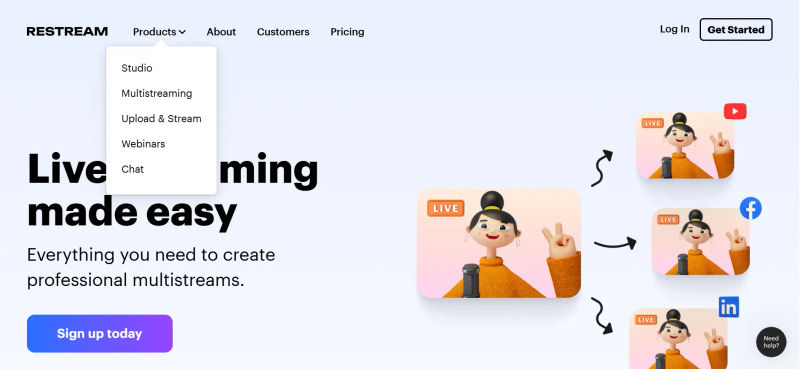
Ease of Use and Interface Design
Restream remains one of the most accessible multi-streaming platforms on the market in 2027, striking an excellent balance between beginner-friendly design and advanced routing capabilities. The browser-based Restream Studio allows new users to go live across multiple platforms in under five minutes, requiring zero technical knowledge of bitrates or stream keys.
The dashboard features a clean, dark-mode-optimized interface that logically separates the Studio (for browser-based streaming) from the RTMP/SRT dashboard (for OBS and vMix users). In recent updates leading into 2027, the channel toggle system has been significantly streamlined. Producers can now add, authenticate, and toggle destinations on or off with a single click without interrupting an active broadcast.
Key design elements that speed up the setup process include:
Drag-and-drop assets: Customizing the stream with logos, lower thirds, and background graphics requires no graphic design experience.
Docked Unified Chat: The chat interface anchors cleanly to the right side of the screen, aggregating messages from YouTube, Twitch, and LinkedIn into a single, color-coded feed.
Workspace management: For agencies and freelance producers, the workspace switcher seamlessly isolates different clients' assets and channel configurations to prevent accidental cross-posting.
Find Perfect Software For Your Business
Restream Pricing 2027: Is the ROI There?
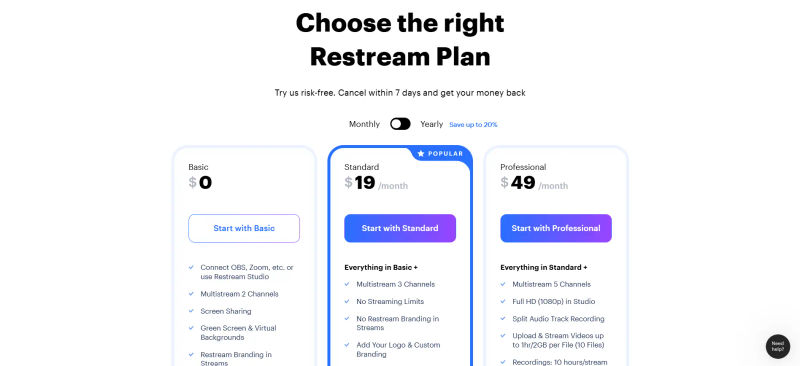
Evaluating Restream's 2027 pricing requires looking beyond the monthly fee to factor in hardware and bandwidth savings. By offloading the encoding workload to the cloud, broadcasters avoid expensive local hardware upgrades and massive internet bandwidth requirements.
Basic (Free): Limited to two platforms with a Restream watermark. Best for testing workflows.
Standard (~$19/month): Removes watermarks, allows up to 5 destinations, and supports custom RTMP. Ideal for solo creators.
Professional (~$49/month): The sweet spot for mid-sized producers. Supports 8 destinations, Full HD (1080p) streaming, split-track audio recording, and custom graphics.
Premium (~$99/month): Designed for small production houses. Supports 15 destinations, 10 on-screen guests in Studio, and increased cloud storage.
Business/Enterprise (~$239+/month): Built for corporate events. Offers 4K streaming, failover protection, dedicated support, API access, and a white-label player.
The ROI Verdict: For anyone streaming to three or more platforms, the Professional tier ($49/month) immediately pays for itself by eliminating the need for secondary hardware encoders and reducing local upload bandwidth consumption by up to 70%.
Calculating the ROI
For a mid-sized production house, the $49 or $99 monthly fee is easily justified.
Attempting to stream to five platforms locally at 1080p requires a high-end dedicated encoding PC (often costing upwards of $3,000) and a commercial-grade internet connection with at least 50 Mbps of sustained upload speed.
Restream offloads this processing and bandwidth requirement to the cloud.
By sending only one 10 Mbps feed to Restream, producers save significantly on hardware depreciation and infrastructure costs, making the subscription highly cost-effective.
Restream Use Cases: Who Should Actually Use It?
Restream is not a one-size-fits-all solution.
Its value proposition shifts dramatically depending on the scale and nature of your production.
1. Corporate Event Producers and Large-Scale Broadcasters
For high-stakes corporate town halls, product launches, or trade shows, reliability is the primary concern.
These decision-makers should utilize Restream primarily as a distribution hub.
By producing the show locally in vMix or a hardware switcher, and sending the final program feed to Restream via SRT, producers ensure maximum quality control while leveraging Restream's cloud infrastructure to hit YouTube, LinkedIn Live, and corporate intranets simultaneously.
2. The 2027 Stability Checklist for 4K Multi-Streaming
If you are utilizing Restream's higher tiers for 4K delivery, ensure your pre-live checks include:
Dedicated Upload Bandwidth: Minimum 35 Mbps sustained upload speed per 4K feed (recommend 50 Mbps to account for overhead).
Primary and Backup ISP: Utilize a bonded cellular router (e.g., Peplink) combining local fiber with 5G or satellite internet to prevent stream drops.
DNS and Routing Checks: Ping Restream's ingest servers locally to ensure latency is under 50ms before going live.
Platform-Specific Limits: Verify that your target destinations actually support 4K ingest in 2027 (e.g., YouTube supports it, but many social platforms still cap at 1080p).
3. Mobile-First Creators and On-Location Teams
For teams streaming from trade show floors or red carpets, Restream Studio is a viable, lightweight option.
However, if the production relies heavily on multiple mobile camera angles, tools like Switcher Studio might offer a more native iOS experience, using Restream only as the final delivery pipeline.
4. Decision Matrix: Restream Studio vs. Restream RTMP/SRT
Use Restream Studio if: You need a browser-based setup, have remote guests, require quick on-screen branding, and lack a dedicated technical director.
Use Restream RTMP/SRT if: You have complex audio routing, multiple local cameras, require instant replay, or are streaming high-bitrate 4K content.
Restream vs. The Competition: 2027 Head-to-Head
When evaluating Restream against its direct cloud-based competitors, the nuances of your workflow dictate the winner.
1. Restream vs. StreamYard 2027
StreamYard and Restream Studio are frequently compared, as both offer browser-based production environments.
In 2027, StreamYard still holds a slight edge in pure ease-of-use and guest management.
Its interface is incredibly intuitive for non-technical hosts.
However, Restream is the superior multi-streaming engine.
While StreamYard caps multi-streaming destinations on its lower tiers, Restream's core identity is built around massive distribution.
Furthermore, Restream's SRT ingest capabilities are far more robust for professional encoders than StreamYard's, making Restream the better choice for hybrid workflows.
2. Restream vs. Castr
Castr is a formidable alternative, particularly for 24/7 linear streaming and OTT (Over-The-Top) platform delivery.
Castr often provides better pricing for continuous, round-the-clock broadcasting and IP camera pull streams.
However, Restream's unified chat, AI clipping, and social media integrations are vastly superior.
If your goal is audience engagement on social platforms, Restream wins.
If your goal is building a 24/7 continuous television-style channel, Castr is the better investment.
3. Restream vs. OneStream
OneStream specializes in scheduling pre-recorded videos to go live at specific times.
While Restream offers an "Upload and Stream" feature, OneStream's playlist management and cloud storage capabilities for evergreen content are more advanced.
Producers focused heavily on automated webinars or re-broadcasting past events should look closely at OneStream, whereas Restream is the undeniable champion for true, real-time live events.
Pro-Level Workflows: Cloud vs. Local Production
A common misconception is that Restream replaces tools like OBS Studio or vMix.
In reality, for professional workflows, they are highly complementary.
1. The Local Encoding Challenge
Software like OBS Studio, vMix, and Wirecast are local production powerhouses.
They handle scene building, chroma keying, audio mixing, and NDI network inputs.
However, if you want to use vMix to stream to YouTube, Twitch, and LinkedIn simultaneously, your local machine must encode three separate video streams and push them out using three times the upload bandwidth.
Even with the proliferation of 5G and satellite internet in 2027, relying on local bandwidth for multiple high-bitrate streams during a high-value corporate event is a massive, unnecessary risk.
2. The Hybrid Workflow Solution
This is where Restream proves its worth to decision-makers.
By using OBS Studio, vMix, or Wirecast to build the broadcast locally, you maintain total creative control.
You then configure your local software to send a single, high-quality master feed to Restream's ingest server.
Restream's cloud infrastructure takes over the heavy lifting, duplicating and distributing the feed to all your target platforms.
3. Hardware Encoder Integration and Stream Monitoring
For the highest tier of production, Restream integrates seamlessly with hardware encoders like Teradek or LiveU.
Producers can push a bonded cellular feed directly from a Teradek unit into Restream's cloud.
Furthermore, Restream's 2027 dashboard includes a robust stream monitoring multiviewer, allowing technical directors to view the health, bitrate, and frame drops of all outgoing destination feeds in one unified dashboard, ensuring failover redundancy if a specific platform API drops.
4. Step-by-Step Migration Guide to Multi-Channel Workflows
For producers moving from single-platform setups to a multi-channel Restream workflow, follow this transition path:
Step 1: Audit Your Destinations
Identify the 3-5 platforms where your audience actually lives.
Do not stream to 15 platforms just because you can; it dilutes your chat engagement and fragments your community.
Step 2: Configure API Connections
Link your YouTube, Twitch, and social accounts within the Restream dashboard.
Ensure permissions are updated, especially for platforms with strict API rules like LinkedIn Live.
Step 3: Set Up Local Encoders
In OBS or vMix, change your stream destination from your specific platform (e.g., YouTube) to "Restream.io - SRT" or RTMP.
Input your unique stream key.
Step 4: Optimize Bitrate
Set your local encoder to the highest bitrate accepted by your most demanding platform (usually YouTube).
Restream will transcode the feed down for platforms with lower limits.
Step 5: Integrate Unified Chat
Dock the Restream chat window directly into your OBS interface or output it to a dedicated monitor for your talent to ensure they can interact with viewers across all platforms.
Step 6: Run a Private Test
Utilize Restream's toggle switches to turn off public destinations and run a test stream to an unlisted YouTube channel to verify audio sync, B-frame compatibility, and stream health.
Try AuthenCIO
Move to faster, smarter software evaluation with AI
Final Verdict: Should You Invest in Restream This Year?
In 2027, Restream remains the most robust, reliable, and feature-rich multi-streaming distribution hub on the market.
For professional live broadcasters, corporate event producers, and marketing teams looking to maximize their reach across a fragmented social ecosystem, the ROI is undeniable.
The bandwidth and hardware savings alone justify the monthly cost, while the addition of AI clipping, SRT support, and vertical video formatting keeps the platform highly relevant for modern content strategies.
However, it is crucial to view Restream as a distribution engine rather than a complete production replacement.
For the highest quality broadcasts, pairing Restream's cloud distribution with the local production power of OBS Studio, vMix, or Wirecast is the ultimate professional workflow.
If your primary goal is simple browser-based interviews, StreamYard might be a gentler starting point, but for true multi-platform dominance, Restream is well worth the investment.