
Introduction
Is Looka the best AI logo maker for 2027? For non-designers and bootstrapped founders who need a complete, scalable brand identity in minutes, the answer is yes. While it lacks the granular manual control of professional design software like Adobe Illustrator or the blank-canvas flexibility of Canva, Looka excels at generating cohesive, vector-ready brand kits through an intuitive AI-driven interface.
Streamline your software evaluation process
As we approach 2027, launching a new company brand no longer requires a $5,000 boutique agency retainer or frustrating feedback loops with cheap freelance marketplaces. AI design software has matured, and Looka has positioned itself as the leading solution for entrepreneurs suffering from "blank page" syndrome, offering a way to visualize brand values instantly without requiring a degree in graphic design.
But as the design software ecosystem evolves, business owners must ask: does Looka actually deliver a unique, scalable, and legally protectable brand identity, or is it just a glorified template generator?
This comprehensive Looka review evaluates the platform specifically for software decision-makers. We will break down its true cost over time, its feature set, and how its AI creative output compares to human-led agencies. Most importantly, we will benchmark Looka against top industry alternatives to help you make an informed software purchase.
Key Takeaways
Answer-First Verdict: Looka is still a top-tier AI logo maker in 2027, providing the fastest route from a blank screen to a fully deployable brand identity for non-designers.
The Brand Kit Advantage: While standalone logos are affordable, Looka's true value is the Brand Kit subscription, which instantly generates hundreds of customized assets like social media templates, invoices, and business cards.
AI Performance: The 2027 AI excels at pairing typography, color psychology, and layout rules. However, it relies on a vast library of premium vector icons rather than purely generative, custom-drawn artwork.
Pricing Structure: Generating and previewing logos is 100% free. You only pay a one-time fee or annual subscription when you are ready to download high-resolution, commercial-use files.
Who Should Use It: It remains the best choice for startups, freelancers, and small business owners needing professional, scalable branding on a tight budget without having to learn complex design software.
Pros and Cons of Using Looka for Your Startup
When evaluating Looka for your startup, you must balance its rapid deployment capabilities against the limitations of template-based AI design. Here is a factual breakdown of its benefits and drawbacks to answer the most common software questions.
The Pros:
Rapid Time-to-Market: Generate a fully deployable brand identity in under an hour, eliminating weeks of traditional design feedback loops.
High ROI for Startups: The $96/year Brand Kit subscription delivers professional-grade assets at a fraction of agency or freelancer costs.
Automated Brand Cohesion: Looka instantly applies your chosen colors and fonts across social media templates, business cards, and websites, ensuring strict consistency.
Zero Learning Curve: The intuitive UX is built for non-designers, requiring no technical software skills to adjust layouts.
Scalable Vector Exports: Premium packages include print-ready EPS and SVG files, ensuring your logo scales perfectly for physical merchandise and large-format printing.
The Cons:
Limited Customization (No Node Editing): You cannot draw custom shapes, upload your own vectors, or manipulate individual vector nodes. You are strictly bound to Looka's layout parameters.
Risk of Generic Designs: Because the AI pulls from a shared database of icons and fonts, your logo might share visual similarities with other brands in your industry.
Trademarking Challenges: Securing exclusive trademark rights can be legally complex when your logo incorporates stock elements generated by AI.
No Strategic Intuition: The AI cannot perform audience research or understand nuanced market positioning; the strategic weight relies entirely on your initial prompts.
Verdict: Looka is a convenient AI logo maker that helps entrepreneurs create logos and matching brand assets without hiring a professional designer.
Best For: Startups, freelancers, entrepreneurs, and small businesses looking for affordable logo creation and consistent branding materials.
Software Covered in this Article
To help you understand Looka in the right context, this article refers to a carefully curated set of leading alternatives:







Looka vs. Top AI Logo Maker Alternatives
Looka is a strong all-in-one choice for startups that need a fast, cohesive, and affordable brand identity. However, the best logo maker depends on your priorities—whether that is deeper customization, one-time pricing, website integration, human design support, or merchandise mockups. Use this comparison to quickly identify the tool that best matches your business needs.
Tool | Best For | Pricing | Key Features | Use Cases |
Looka | Rapid, automated brand kits | Starts from $96/yr | AI logo generation, 300+ branded assets, vector exports | Solopreneurs, startups needing a fast, cohesive identity |
Logome.ai | Niche, highly stylized AI logos | $29 - $99 (One-time) | Advanced AI prompt understanding, unique icon generation | Creative agencies, modern tech startups |
Canva | Complete design flexibility | Starts from $18/mo | Drag-and-drop editor, massive template library, brand hub | Businesses wanting manual control over marketing assets |
Tailor Brands | All-in-one business formation | Starts from $199/yr | LLC formation, logo maker, website builder, digital cards | First-time founders needing legal and branding setup |
Brandmark | Deep color and typography AI | $35 - $195 (One-time) | AI color palette extraction, automated asset resizing | E-commerce brands needing quick, scalable web assets |
Wix Logo Maker | Seamless website integration | Starts from $9/mo | Direct integration with Wix CMS, basic AI generation | Service businesses building their site exclusively on Wix |
Designhill | Human-AI hybrid design | $20 - $125 (One - time) | AI generator plus access to human design contests | Brands requiring a unique, human-touched final polish |
Placeit | Apparel and product mockups | Starts from $1.99/mo | Massive mockup library, gaming logos, merchandise design | Print-on-demand businesses, Twitch streamers, apparel brands |
*Note: All prices shown reflect typical annual billing and one - time fee.
What is Looka and How Does Its AI Work in 2027?
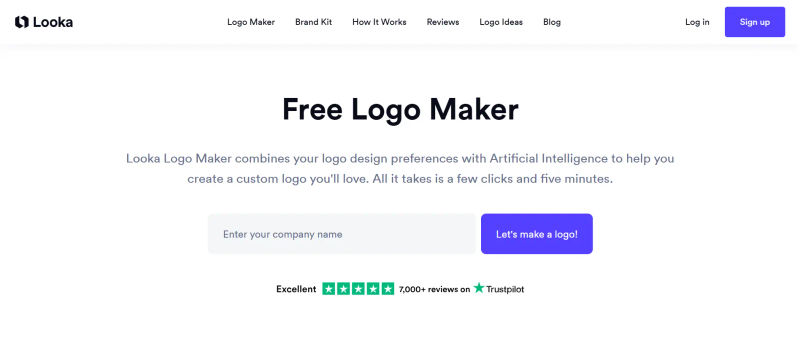
Looka is an artificial intelligence-powered graphic design platform that specializes in creating logos and comprehensive brand kits for small businesses. Originally launched as Logojoy, the platform has evolved significantly.
In 2027, it is no longer just a simple logo generator; it functions as an automated brand kit generator that produces color palettes, typography recommendations, social media assets, website graphics, and automated brand guidelines.
When reading AI brand identity tool reviews, founders often want to know how much technical skill is required. Looka’s AI model works by combining machine learning with established design principles in a strict no-code workflow.
When you begin the process, you are not presented with a blank canvas. Instead, Looka asks you to input your company name, industry, and a few aesthetic preferences, such as preferred colors and inspirational logo styles.
The AI then cross-references your inputs against millions of font pairings, color theories, and vector icon combinations to generate dozens of unique concepts in seconds.
Looka's 2027 engine features enhanced spatial awareness. It understands how to balance an icon's weight against a serif or sans-serif font, ensuring the output looks mathematically sound.
The user interface is strictly designed for non-designers—there are no complex layers, masking tools, or node editors. You simply click on a generated logo and use intuitive sliders to adjust the layout, symbol size, and color palette until it matches your vision.
Looka Pricing 2027: Are the Brand Kits Worth It?
Looka operates on a "free to generate, pay to download" model. You can experiment with the AI logo maker indefinitely, but commercial use and file access require a purchase. Buyers must choose between one-time downloads and ongoing annual subscriptions.
One-Time Logo Downloads:
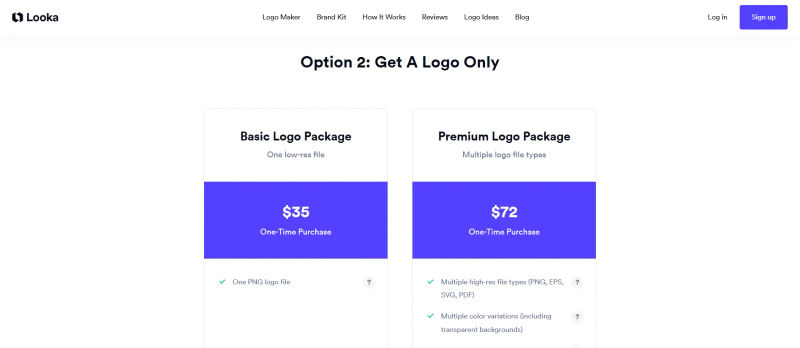
Basic Logo Package ($35 one-time): Includes one low-resolution PNG file with a solid background. Verdict: Only suitable for mockups or internal concepts. It lacks the transparent backgrounds and vector scalability required for real-world business use.
Premium Logo Package ($72 one-time): Includes high-resolution files (PNG, PDF, SVG, EPS), transparent backgrounds, unlimited post-purchase edits, and full commercial ownership. Verdict: The minimum viable option for startups needing scalable assets for print, merchandise, and digital use.
Brand Kit Subscriptions (Billed Annually):
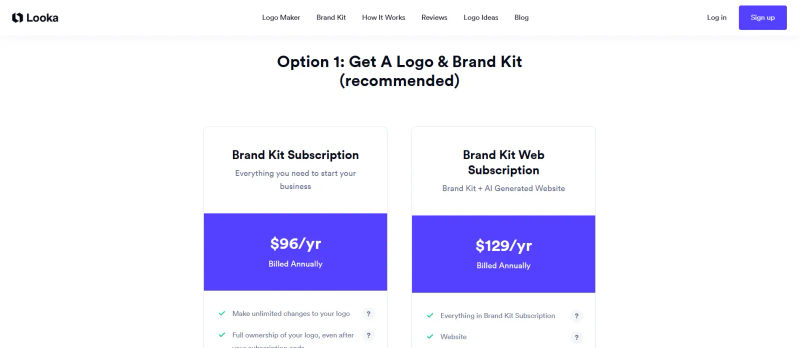
Brand Kit ($96/year): Includes the Premium Logo Package plus ongoing access to Looka's automated Brand Kit. This generates over 300 branded assets, including social media templates, business card designs, email signatures, and invoices. Verdict: High value for solo founders needing instant, cohesive marketing collateral without hiring a graphic designer.
Brand Kit Web ($129/year): Includes everything in the standard Brand Kit plus an AI-generated website. Verdict: Best for users who need a basic, template-driven web presence immediately and want all branding centralized in one platform.
Total Cost of Ownership (TCO) Analysis
To determine if Looka is worth the investment, let’s project the costs over a three-year period. If you hire a boutique agency for professional logo design without agency costs, you will likely pay a one-time fee of $3,000 to $5,000. This includes strategy, logo design, and a static PDF brand guideline.
If you choose Looka’s Brand Kit subscription at $96 per year, your three-year total cost of ownership is $288. At $96/year, Looka currently locks in this rate for the lifetime of your active subscription, shielding early-stage founders from ongoing 2027 software inflation.
For this price, you not only get the scalable vector files necessary for large physical applications, but you also get a dynamic, living brand guideline that automatically updates your templates whenever you tweak your brand colors.
For a small business owner, the $4,700+ in savings is substantial. However, you are trading human intuition and bespoke market positioning for speed and cost-efficiency.
If your business is in a highly regulated, trademark-sensitive category, the upfront agency cost might be a necessary legal safeguard. For most local services, e-commerce stores, and bootstrapped tech startups, Looka’s subscription offers an undeniable return on investment.
Find Perfect Software For Your Business
Key Features and Real-World Use Cases
Looka’s value proposition extends far beyond the initial logo generation. To truly evaluate the software, we must analyze how it handles the operational realities of launching a business.
1. The 2027 Brand Kit and Social Media Assets
Brand consistency matters more than the initial logo itself. Looka’s Brand Kit automatically applies your finalized logo, color palette, and typography to over 300 templates. This includes Instagram stories, LinkedIn banners, business cards, letterheads, and invoices.
For a solo founder, this eliminates the need to manually resize assets in secondary software. When you change your primary brand color in Looka, that change cascades across all 300+ assets instantly—a feature Looka calls "Brand Evolution," which makes updating your identity as your company grows entirely frictionless.
2. Vector Scalability and Physical Applications
One of the biggest pain points for founders using cheap freelance marketplaces is receiving non-scalable files. Looka’s Premium and Subscription tiers provide true vector files (SVG and EPS).
This is a critical technical specification. Vector files use mathematical equations rather than pixels, meaning you can scale your Looka-generated logo to the size of a billboard or a commercial vehicle wrap without any loss of quality or pixelation.
3. Mobile and Global Accessibility
Founders often ask about mobile experience and multi-language support. Looka operates smoothly on mobile browsers, allowing you to tweak color palettes and download assets directly from your smartphone while commuting.
Furthermore, the 2027 engine supports a wide array of non-Latin characters, making it highly accessible for international brands. If you encounter billing issues or need technical help, Looka's customer support response times average under two hours via live chat during standard business hours.
4. Legal Ownership and Trademarking in 2027
A major source of anxiety for entrepreneurs is whether an AI-generated logo can be legally protected. When you purchase a Looka Premium package or Brand Kit, Looka grants you full commercial rights to use the design for any commercial or non-commercial purpose.
However, because the AI uses a finite repository of symbols and fonts, there is a risk that another business could generate a highly similar logo.
If the AI generates a mark that looks too similar to a competitor, use the "History" tab to revert to a previous iteration and adjust the core symbol using specific prompt engineering.
In the 2027 legal landscape, you can trademark the composite of your Looka logo (the specific combination of your name, colors, layout, and symbol), but you generally cannot claim exclusive rights to the individual, unmodified icon itself.
5. Step-by-Step Implementation Guide
Exporting and implementing Looka assets into common website builders is straightforward:
Finalize your design in the Looka editor.
Navigate to the Brand Kit dashboard and select "Download Logo Files."
Extract the ZIP file. You will find folders categorized by color variants (Black, White, Transparent, Full Color).
Upload the transparent PNG file to your website builder’s navigation bar settings.
Upload the provided SVG file if your builder supports it for sharper mobile rendering.
Copy the exact HEX codes provided in your Looka Brand Guidelines to set your website's global CSS color scheme.
6. Prompt Engineering for Unique Results
To avoid generic results, you must guide the AI effectively. Instead of just entering your industry (e.g., "Real Estate"), use the keyword tool to add abstract concepts related to your brand values (e.g., "Trust," "Growth," "Modern," "Geometric").
By forcing the AI to combine concrete industry terms with abstract emotional keywords, you significantly increase the uniqueness factor of the generated concepts.
Looka vs Top Alternatives in 2027
While Looka is a powerful tool, buyers increasingly expect control over fonts, color schemes, and integrations. Depending on your specific business model, one of Looka's competitors might be a better fit. Let's evaluate the top software options head-to-head.
1. Looka vs Logome.ai
Choose Logome.ai if: You are launching a modern tech startup, gaming company, or creative agency that requires a highly stylized, avant-garde visual identity. Logome.ai leverages aggressive generative AI models to create complex, illustrative icons.
Choose Looka if: You need a clean, universally acceptable corporate design and prioritize the breadth of automated social media templates.
2. Looka vs Canva for Logos
Choose Canva if: You want complete manual control over every pixel, layer, and marketing asset. Canva provides thousands of logo templates that you must manually edit using their drag-and-drop interface.
Choose Looka if: You lack an eye for design and want an AI to make the aesthetic decisions for you, ensuring perfect alignment and color theory automatically.
3. Tailor Brands vs Looka 2027
Choose Tailor Brands if: You are starting from absolute scratch and need legal formation alongside your logo. Tailor Brands allows you to form your LLC, get an EIN, and design a logo all in one workflow.
Choose Looka if: You have already incorporated your business and just need high-quality branding. Looka's design outputs and vector files are generally of higher quality.
4. Brandmark vs Looka Comparison
Choose Brandmark if: You strictly despise recurring subscriptions and want lifetime access to an AI-generated brand guideline for a flat, one-time fee. Brandmark excels in deep AI color palette extraction.
Choose Looka if: You prefer a highly intuitive user interface for editing and refining the logo post-generation, which is significantly more beginner-friendly.
5. Wix Logo Maker vs Looka
Choose Wix Logo Maker if: You have already decided to build your company website on the Wix CMS. Using their native logo maker allows you to instantly apply your new brand identity directly to your website template with a single click.
Choose Looka if: You are using Shopify, WordPress, or Webflow. Looka is the far superior standalone design tool with better AI generation capabilities.
7. Designhill vs Looka
Choose Designhill if: You are concerned about the uniqueness of AI and want a bespoke, human-touched final polish. Designhill is primarily known for its crowdsourced design contests.
Choose Looka if: You prioritize immediate speed, lower costs, and automated marketing assets over human illustration.
8. Placeit Logo Maker Review
Choose Placeit if: Your business relies heavily on selling physical merchandise. Placeit is a massive mockup library perfect for apparel brands, print-on-demand businesses, and Twitch streamers.
Choose Looka if: You are a B2B service, SaaS company, or local brick-and-mortar store needing a professional corporate identity.
Try AuthenCIO
Move to faster, smarter software evaluation with AI
Final Verdict: Is Looka the Best AI Logo Maker 2027?
Yes, Looka remains the best overall AI logo maker in 2027 for solopreneurs, bootstrapped startups, and local service businesses needing a professional, cohesive brand identity launched immediately.
The $96/year Brand Kit subscription offers exceptional ROI. It provides high-quality vector files and hundreds of automated marketing assets that would typically cost thousands of dollars through an agency. Looka effectively eliminates "blank page" syndrome and empowers non-designers to maintain strict brand consistency across all channels.
You should pass on Looka—and hire a professional agency—if you operate in a highly trademark-sensitive industry, require complex custom illustrations, or need deep strategic market positioning. Additionally, if you want complete manual control over your design layers, Canva is a better fit. If you need LLC formation alongside your logo, Tailor Brands is the logical choice.
Pro-Tip: As your business scales and hits the Series A revenue milestone, you can hand off your Looka SVG files to a professional designer. They can use these vector files as a foundational framework to evolve your brand identity, ensuring you maintain brand recognition while upgrading to a fully bespoke, human-crafted design.
For the vast majority of new business owners in 2027, Looka represents the most efficient, cost-effective software to transform a business idea into a visually credible brand.