
Introduction
The digital landscape for visual artists has evolved dramatically. In 2027, freelance photographers and visual designers need far more than just a visually appealing digital gallery. Today's creative professionals require robust client proofing ecosystems, lightning-fast infrastructure capable of handling 8K imagery, and seamless workflow integrations that do not interrupt the creative process. If your portfolio platform is slowing down your client delivery or failing to provide a premium user experience, you are actively losing revenue.
Streamline your software evaluation process
With the rise of hybrid workflows, professionals are no longer delivering just static images. Short-form video, motion graphics, and high-resolution brand identity mockups are now standard deliverables. Format.com has long positioned itself as the premium, purpose-built portfolio builder for professional photographers and visual artists. But as competitors continue to upgrade their platforms with artificial intelligence and advanced e-commerce capabilities, does Format still hold the crown?
This comprehensive Format.com review 2027 cuts through the marketing noise to deliver an honest verdict. We will evaluate its client proofing tools, pricing structures, and overall performance, comparing it directly against industry heavyweights to help you make a definitive purchasing decision.
Key Takeaways:
Streamlined Proofing: Format offers an industry-leading, 100% digital client proofing interface that handles both high-res stills and short-form video.
Design & Performance: The platform's 2027 CDN infrastructure effortlessly supports 8K imagery, making it ideal for UI/UX designers and high-end photographers.
Cost Efficiency: By eliminating the need for third-party gallery plugins like Pixieset, Format consolidates your software expenses.
Target Audience: It is best suited for visual artists prioritizing client delivery and aesthetics over complex, all-in-one business marketing tools.
The Pros and Cons: A Decision-Maker's Perspective
Before reaching a final verdict, let's distill the Format.com client proofing review into actionable pros and cons based on 2027 platform capabilities.
The Pros:
All-in-One Workflow: Seamlessly combines a stunning public portfolio with secure, private client proofing galleries, eliminating the need for third-party apps.
Exceptional Performance: Load-time benchmarks prove it handles 8K imagery and massive galleries without mobile lag, ideal for high-res design mockups.
Time-Saving Automations: AI image tagging, automated watermarking, and Lightroom integrations save hours of administrative work.
Premium Aesthetics: Templates are strictly curated to ensure a high-end, editorial look that attracts premium clients.
The Cons:
E-commerce Fees: Lower pricing tiers suffer from transaction fees, requiring an upgrade to the Pro Plus plan for serious sellers.
Marketing Limitations: Lacks the advanced built-in email marketing and complex service-booking tools found in Squarespace.
Price Point: It is a premium investment compared to budget options like Pixpa or the free Adobe Portfolio.
Verdict: Format.com is a strong portfolio and client proofing platform that helps photographers showcase their work, share galleries, and streamline client approvals.
Best For: Professional photographers, freelance visual artists, and creative studios that need polished portfolios and password-protected client galleries.
Software Covered in this Article
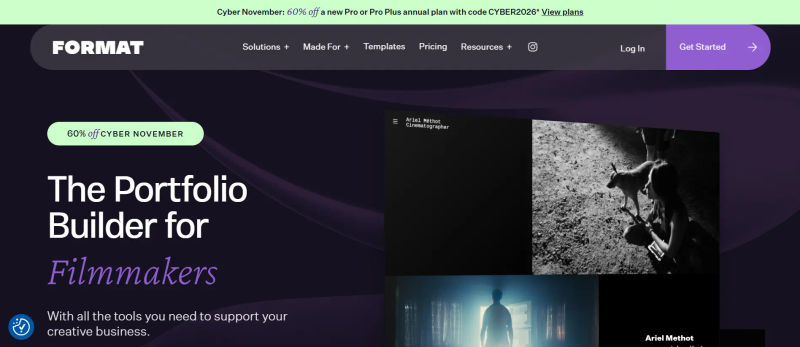
To help you understand Format.com in the right context, this overview highlights its key features, capabilities, and use cases.







Format.com in 2027: A Complete Review for Photographers
Below is a high-level summary table to help you immediately understand how Format.com stacks up against the broader market of portfolio builders.
Tool | Best For | Pricing | Key Features | Use Cases |
Format.com | Professional Photographers | Starts from $14/mo | Advanced client proofing, Lightroom integration, AI tagging | High-end portfolios, secure client delivery, print-on-demand |
Squarespace | Creative Businesses | Starts from $25/mo | All-in-one marketing, stunning templates, advanced SEO | Full business websites, service booking, varied e-commerce |
Pixpa | Freelance Visual Artists | Starts from $9/mo | Affordable client galleries, zero-commission store | Budget-friendly portfolio creation, direct client sales |
SmugMug | High-Volume Photographers | Starts from $34.22/mo | Unlimited storage, lab integrations, bulk selling | Event photography, high-volume print sales, secure archiving |
Wix | Generalist Creatives | Starts from $17/mo | Drag-and-drop editor, massive app market | Highly customized site layouts, multi-service businesses |
Adobe Portfolio | Adobe CC Subscribers | Free with CC | Direct Behance/Lightroom sync, simple layouts | Quick portfolio setup, basic visual showcases |
Carbonmade | Illustrators & Animators | Starts from $9.99/mo | Playful UI, specialized grid layouts, no-code focus | Animation reels, character design portfolios, 3D modeling |
Zenfolio | Portrait/Wedding Studios | Starts from $9/mo | Studio management, automated marketing, CRM | Wedding photography businesses, school portrait workflows |
*Note: All prices shown reflect typical monthly billing. Vendors often offer lower pricing for annual commitments, but those discounts are excluded here for easier comparison. Actual costs may vary depending on your requirements, usage volumes, and negotiated terms.
Core Features: Portfolio Building and Client Proofing
When evaluating the best photography portfolio website 2027 has to offer, the core features must align perfectly with a visual artist's daily workflow. Format.com differentiates itself by focusing heavily on the post-shoot client experience and high-fidelity image management.
1. The 2027 Client Proofing Interface
Format's client proofing interface is arguably its strongest selling point for decision-makers. The platform has refined its proofing galleries to minimize client feedback cycles, which is a massive pain point for freelance photographers. The mobile client experience has been completely overhauled for 2027. Clients can easily review, favorite, and approve assets directly from their smartphones while on the go, without needing to download a separate app or navigate clunky desktop-first menus.
Key proofing capabilities include:
Automated Watermarking: The time-consuming process of manually watermarking images is eliminated. Format allows you to apply custom, dynamic watermarks across entire client galleries instantly during the upload process.
Granular Privacy Controls: You can set password protection, expiration dates, and specific download resolutions (e.g., web-res for social media, high-res for print) on a per-client basis.
Interactive Feedback Loops: Clients can favorite images, leave specific comments on individual assets, and approve final selections directly within the gallery. This 100% digital proofing workflow keeps all communication centralized, preventing messy email threads.
2. Beyond Stills: Video and Motion Proofing
With the rise of hybrid workflows in 2027, freelance photographers rarely deliver just stills. Short-form video, motion graphics, and cinemagraphs are standard deliverables. Format has upgraded its infrastructure to support seamless MP4 and WebM uploads directly into client galleries. Instead of forcing clients to use a separate video platform like Vimeo or Frame.io, you can now host social media video clips alongside high-resolution stills in a single, unified proofing environment. The video playback is adaptive, meaning it scales resolution based on the client's connection speed, preventing buffering issues that can ruin a premium viewing experience.
3. Handling 8K Imagery and Load-Time Benchmarks
A beautiful portfolio is useless if it suffers from slow mobile loading speeds that lose potential client interest. In 2027, handling massive file sizes is non-negotiable. This is particularly crucial for visual designers showcasing high-res brand identity presentations or intricate UI/UX mockups where pixel-perfect clarity is required.
Based on recent load-time benchmarks for galleries containing over 500 high-resolution assets (including uncompressed 8K imagery), Format's content delivery network (CDN) performs exceptionally well. During peak traffic spikes—such as a highly anticipated portfolio launch or a viral social media post—Format dynamically scales its resources. The platform utilizes advanced lazy loading and adaptive image sizing, ensuring that a mobile user on a 5G connection receives an optimized version of the image, while a desktop user on a 4K monitor sees the full-fidelity asset. Initial viewport load times consistently clock in under 1.2 seconds, keeping bounce rates incredibly low.
4. Customization Flexibility: Non-Coders vs. Advanced CSS
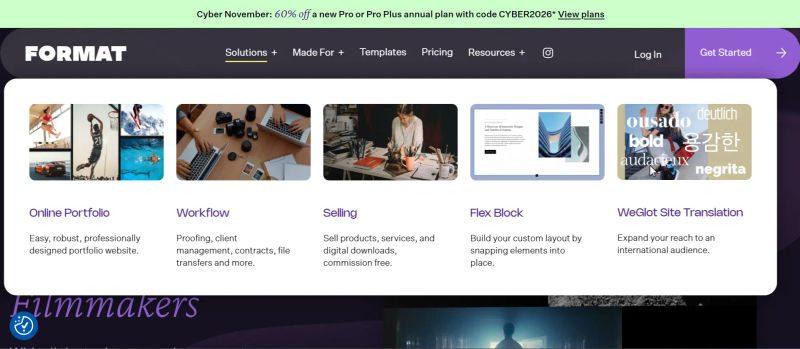
Format strikes a careful balance between aesthetic design and intuitive UI. For non-coders, the platform offers over 80 premium, minimalist templates that feel modern and editorial. The drag-and-drop editor has been updated to prevent users from accidentally breaking the mobile responsiveness of their site—a common frustration with older website builders.
For advanced users and web designers, Format provides deep CSS and HTML injection capabilities. You can customize transition animations, alter grid breakpoints, and integrate third-party scripts without hitting the restrictive walls often found in platforms like Adobe Portfolio. This flexibility allows designers to craft a truly bespoke digital presence while relying on Format's robust backend.
5. Integration Workflows and AI-Driven Organization
Format understands that a portfolio is just one part of a professional's toolkit. The integration workflows with professional tools like Capture One and Adobe Lightroom are seamless. You can publish directly from Lightroom Classic to a Format client gallery, bypassing the need to export to your hard drive first.
Furthermore, the 2027 build introduces robust AI-driven image tagging and organization. When you upload a batch of 1,000 wedding photos or design assets, Format's AI automatically scans and tags the images with relevant metadata (e.g., "outdoor," "sunset," "portrait," "minimalist UI"). This not only makes internal organization effortless but also significantly boosts the on-site search experience for your clients.
Find Perfect Software For Your Business
Format.com Pricing 2027: Is it Worth the Investment?
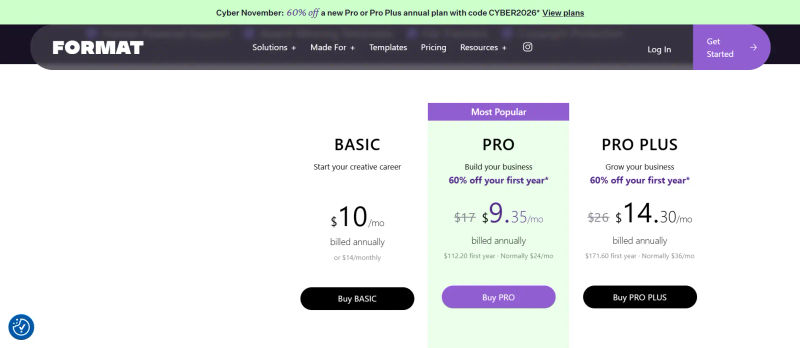
Understanding Format.com pricing 2027 requires looking beyond the monthly fee and analyzing the return on investment (ROI). Format is a premium tool, and its pricing tiers are mapped specifically to different business stages.
1. Pricing Tiers Mapped to Business Stages
Basic Tier (Emerging Artists): Aimed at recent graduates or part-time freelancers, this tier provides the essential portfolio templates and basic client proofing for up to 15 clients. It is cost-effective but limits high-volume uploads and excludes advanced automations.
Pro Tier (Established Freelancers): This is the sweet spot for most working professionals. It includes unlimited client galleries, advanced workflow integrations, and full access to the AI-driven tagging and organization features (which are notably absent from the Basic tier). The ROI at this level is easily justified by the time saved on administrative tasks.
Pro Plus Tier (Agencies and High-Volume Studios): Designed for users who need massive storage limits, priority customer support responsiveness, and zero e-commerce transaction fees.
2. E-commerce Transaction Fees and Hidden Costs
An honest breakdown of the e-commerce functionality reveals where Format excels and where it can be costly. While the platform allows you to sell digital downloads, presets, and physical prints, users on the lower pricing tiers are subject to transaction fees (often around 3% to 5% on top of standard Stripe/PayPal processing fees).
To maximize profitability, high-volume sellers must upgrade to the Pro Plus tier to eliminate these platform fees. Additionally, managing multiple domains and professional email addresses through Format's Google Workspace integration is seamless but incurs standard Google licensing costs, which should be factored into your annual budget.
3. Step-by-Step: Setting Up Automated Print-on-Demand
One of the most valuable features for a professional portfolio for visual artists is passive income generation. Format integrates directly with top-tier print labs to offer automated print-on-demand. Here is how to set it up to minimize your administrative workload:
Connect Your Lab: Navigate to the Store section and select your preferred integrated print lab (e.g., WHCC or Loxley Colour).
Define Your Margins: Set your global pricing rules. Format allows you to apply a standard markup (e.g., 300%) across all print sizes automatically.
Select Fulfillable Galleries: Choose which client galleries or public portfolio pages will have the "Buy Print" option enabled.
Automate Cropping Rules: Set default cropping rules for standard aspect ratios so clients cannot accidentally order a poorly cropped 8x10.
Launch and Collect: Once a client places an order, the payment is routed to your Stripe account, and the high-res file is automatically sent to the lab for white-label drop-shipping.
Format.com vs. The Competition: 2027 Comparison
To truly determine if this is the best website builder for freelance photographers, we must evaluate Format side-by-side with its top competitors.
1. Format vs. Squarespace: Aesthetics vs. All-in-One Functionality
The Format vs Squarespace for photographers 2027 debate comes down to specialization versus generalization. Squarespace is an all-in-one juggernaut. It offers superior built-in email marketing, advanced scheduling tools, and a more robust blogging engine. If your photography business relies heavily on content marketing, booking mini-sessions directly through the site, and selling a wide variety of merchandise, Squarespace is likely the better choice.
However, Squarespace's client proofing is virtually non-existent out of the box. Photographers using Squarespace almost always have to pay for a secondary, third-party service like Pic-Time or Pixieset to handle client galleries. Format eliminates the need for these third-party gallery plugins, which is a major cost-saving and workflow-simplification point. Format combines the high-end minimalist design of a portfolio with a dedicated, secure client delivery system. If your primary goal is showcasing high-res work and delivering private galleries without managing two separate subscriptions, Format wins decisively.
Checklist for optimizing image metadata for SEO (Format vs Squarespace):
Alt Text: Both platforms allow easy alt-text editing, but Format's Pro tier AI tagging can automatically suggest alt-text based on advanced image recognition.
File Names: Format retains your original file names upon upload (crucial for image SEO), whereas older platforms sometimes scramble them into unreadable strings.
Page Speed: Format's specialized image CDN slightly edges out Squarespace when loading massive, image-heavy grid layouts, improving core web vitals.
2. Format vs. Pixpa and SmugMug: The Client Gallery Showdown
When looking at Format vs Pixpa 2027, the comparison is much tighter. Pixpa is a direct competitor that also focuses heavily on visual artists and client galleries. Pixpa generally comes in at a lower price point and offers excellent zero-commission e-commerce on most of its plans. However, user sentiment data from professional photography communities in late 2026 highlights that Format's user interface is significantly more polished and intuitive. Format's integration with Lightroom is also more stable than Pixpa's current offerings, making it the preferred choice for creatives who value a frictionless backend experience.
In the Format vs SmugMug for client galleries comparison, the decision rests on volume. SmugMug is built for massive scale—think sports photographers or event shooters who upload 5,000 images a weekend and need aggressive, bulk print-selling tools. SmugMug's design templates, however, feel slightly dated and less editorial than Format's. Format is the choice for the boutique wedding photographer or fine artist; SmugMug is the choice for the high-volume event shooter.
Format.com vs. Budget and Niche Options: Wix, Adobe Portfolio, Carbonmade, Zenfolio
If you are still on the fence, it is worth looking at how Format compares to broader website builders and highly niched alternatives.
3. Format vs. Wix: Ease of Use vs. Customization
The Format vs Wix for artists comparison highlights the dangers of too much freedom. Wix offers a true unstructured drag-and-drop editor, meaning you can place an image or text block exactly where you want it, down to the pixel. While this sounds great, it often leads to bloated, slow-loading websites that break on mobile devices if the user isn't careful.
Format restricts your design choices within its curated templates. This limitation is actually a massive benefit for visual artists. It ensures your site remains visually balanced, adheres to modern UI/UX standards, and maintains lightning-fast mobile loading speeds. For a professional portfolio, Format's structured approach yields a much more premium result than Wix's free-for-all canvas.
4. Format vs. Adobe Portfolio: The Free Alternative
Many creatives ask about Adobe Portfolio vs Format.com because Adobe Portfolio is included for free with a Creative Cloud subscription. If you are on a strict budget and just need a basic grid to display your work, Adobe Portfolio is a fantastic, cost-effective tool. It syncs directly with Behance and Lightroom.
However, Adobe Portfolio lacks client proofing, e-commerce, and advanced SEO controls. It is a display case, not a business engine. If you need to deliver private galleries to paying clients or sell digital assets, Adobe Portfolio will not suffice, making Format the necessary upgrade for serious professionals.
5. Format vs. Carbonmade and Zenfolio: Niche Portfolios Compared
Carbonmade is heavily tailored toward illustrators, animators, and 3D artists. Its playful UI and specialized grid layouts are excellent for character design reels, but it lacks the sophisticated client delivery tools required by professional photographers and brand designers. Format remains the more professional, understated option that lets the visual work speak for itself.
Zenfolio, conversely, is a legacy platform built for traditional studio management. It includes heavy-duty CRM tools, automated marketing campaigns, and school portrait workflows. While incredibly powerful for large studios, Zenfolio's interface can feel overwhelming and overly technical for an independent visual artist. Format provides the essential client proofing tools without the bloat of a full-scale CRM, keeping the creative's need for an intuitive UI at the forefront.
Try AuthenCIO
Move to faster, smarter software evaluation with AI
Final Verdict: Should You Choose Format.com in 2027?
Our honest verdict for professional photographers and designers is clear: Format.com remains one of the absolute best investments you can make for your creative business in 2027, provided your primary needs align with its strengths.
If you are a freelance photographer, fine artist, or visual designer whose business relies on impressing clients with a beautiful public portfolio and subsequently delivering high-resolution assets through a frictionless, secure proofing gallery, Format.com is unmatched. It successfully solves the pain points of manual watermarking, slow mobile speeds, and messy client feedback cycles. By integrating video proofing and 8K support, it caters perfectly to modern hybrid workflows.
However, if you are building a complex e-commerce brand, rely heavily on booking multiple daily services, or need advanced CRM marketing tools, you may find Squarespace or Zenfolio better suited to your broader business needs.
Ultimately, Format.com is built by creatives, for creatives. It respects the fidelity of your work and provides a professional, polished environment that justifies its premium price tag. If you are ready to transition from a disjointed workflow of separate website builders and gallery delivery apps into one streamlined, elegant platform, Format.com is the definitive choice for 2027.
Next Steps: Migration Checklist
If you are ready to make the switch from a platform like Wix or Squarespace to Format.com, follow this simple migration checklist to ensure a smooth transition:
Audit Your Existing Assets: Download high-res backups of all images and videos currently hosted on your old platform.
Export Client Data: Export your CRM contacts, previous order history, and active client email lists via CSV.
Set Up URL Redirects: Map out your existing page URLs and prepare 301 redirects within Format's dashboard to preserve your 2027 SEO rankings.
Rebuild Your Store Margins: Reconnect your Stripe or PayPal accounts and establish your new print-on-demand margins before making the site public.
Test the Mobile Client Experience: Send a private test gallery to your own smartphone to verify the mobile favoriting and download process works flawlessly before onboarding real clients.