
Introduction
For startup founders in 2027, time is the most expensive resource on the balance sheet. Spending ten hours formatting a pitch deck is no longer a viable option when AI presentation tools can generate a comprehensive first draft in seconds. However, as the presentation software market shifts entirely toward AI-native platforms, pricing models have become increasingly complex and difficult to navigate.
Streamline your software evaluation process
Evaluating Gamma’s 2027 pricing tiers against traditional software and modern AI alternatives requires looking past the monthly subscription fee. You need to understand the hidden limitations, AI credit throttles, and export restrictions that could disrupt your fundraising workflow before you commit your software budget.
Key Takeaways:
Gamma's Free plan is strictly for testing; the 400-credit limit and forced watermarks make it unsuitable for professional VC pitching.
Gamma Plus ($10/month) is the most cost-effective tier for solo founders needing custom branding and traditional PPTX exports.
Gamma Pro ($20/month) replaces external tools like DocSend with native slide-level analytics and guarantees IP data privacy.
Hidden costs like per-user seat expansion and integration friction often double the true cost of presentation software if not managed correctly.
AI Presentation Tools Compared: Gamma vs. Top Alternatives
Below is a comprehensive breakdown of the top AI presentation tools in 2027, designed to help you choose the right platform for your startup's specific needs.
Tool | Best For | Pricing | Limitations | Offline/PPTX Export Quality |
Gamma | High-volume pitching & advanced analytics | Starts from $12/ mo | Steep learning curve for advanced custom branding settings | Excellent; retains layout integrity |
Beautiful.ai | Automated design consistency | Starts from $12 / user / month | Rigid templates; difficult to break out of design guardrails | Good; some custom fonts may default |
Pitch | Real-time team collaboration | Starts from $12/month | AI generation is less advanced than Gamma or Tome | Excellent; native presentation format |
Prezi | Dynamic, non-linear pitching | Starts from $2 / user / month | Can cause visual fatigue; steep learning curve for new users | Moderate; loses dynamic zoom offline |
SlidesAI | Quick Google Slides integration | $12 / user / month | Basic design outputs; lacks standalone analytics capabilities | Excellent; native to Google ecosystem |
Canva | All-in-one marketing design | $18 / user / month | Presentations can look generic without heavy manual customization | Good; large file sizes for offline use |
*Note: All prices shown reflect typical monthly billing. Vendors often offer lower pricing for annual commitments, but those discounts are excluded here for easier comparison. Actual costs may vary depending on your requirements, usage volumes, and negotiated terms.
Software Covered in this Article
To help you understand Gamma in the right context, this article refers to a carefully curated set of leading alternatives:






Gamma Pricing Deep Dive: Free vs. Plus vs. Pro
Gamma has positioned itself as a market leader, but choosing the right tier requires understanding exactly where the platform introduces friction.
1. Gamma Free Plan: Understanding the Credit System and Limits
Gamma’s Free plan is an excellent entry point for founders who want to test the platform’s AI-native capabilities. However, it is fundamentally designed as a product-led growth mechanism, meaning you will inevitably hit friction points when trying to finalize an investor-ready pitch deck.
In 2027, the Gamma Free plan operates on a strict "compute unit" system. Upon signing up, you receive 400 AI credits. To put this in perspective, 40 credits covers one standard 10-slide generation and approximately three rounds of AI-assisted layout revisions. Every subsequent AI-driven edit, layout adjustment, or image generation costs additional credits. For a founder iterating on a deck through multiple co-founder reviews, these 400 credits can easily be exhausted within the first week of drafting.
Beyond the credit limitations, the Free plan imposes two critical restrictions that directly impact fundraising:
The "Made with Gamma" Watermark: Every presentation generated on the Free tier includes a prominent Gamma badge. When sending a deck to a high-tier venture capital firm, this watermark can unintentionally signal a lack of resources or a lack of attention to detail.
Export Limitations: The Free plan restricts export options, primarily limiting you to PDF formats with basic resolution. If an investor requests a PPTX file to add their own notes or share internally with specific formatting, you will be unable to provide it without upgrading.
For seed-stage startups, the Free plan is sufficient for internal brainstorming or very early-stage advisor updates. But the moment you begin formal investor outreach, upgrading to a paid tier becomes a functional necessity.
2. Gamma Plus: Scaling Your Visual Identity
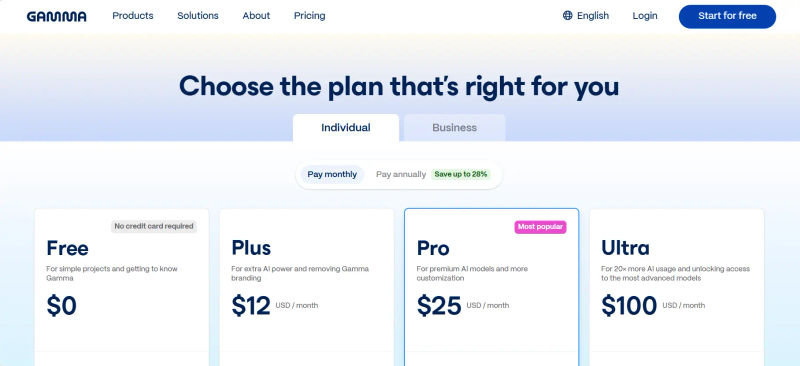
When you hit the limits of the Free tier, Gamma forces a decision between the Plus plan ($12 per user/month) and the Pro plan ($25 per user/month).
The Gamma Plus plan is tailored for bootstrapped founders who need professional outputs without enterprise-level features. At $12 per month, the primary value proposition is the removal of the Gamma watermark, ensuring your pitch deck looks entirely bespoke and investor-ready.
Additionally, the Plus plan provides a refreshed allocation of 400 AI credits every month. It also unlocks high-resolution PDF and PPTX exports, allowing you to seamlessly integrate your Gamma deck into traditional investor workflows. For a solo founder or a two-person team pitching angel investors, the Plus plan offers the highest immediate return on investment by removing the most glaring unprofessional constraints while keeping software overhead low.
3. Gamma Pro: High-Volume Pitching and Advanced Analytics
The Gamma Pro plan, priced at $25 per user/month, is built for Series A companies and startups engaged in aggressive, high-volume fundraising. The most significant upgrade is the introduction of unlimited AI creation. You no longer have to micromanage your compute units, allowing for endless iterations, A/B testing of different narratives, and rapid generation of tailored decks for specific VC firms.
Furthermore, the Pro plan unlocks critical decision-making features that directly impact your ability to close a round:
Native Analytics vs. DocSend Traditional PDFs offer zero visibility once emailed. Historically, founders relied on third-party tools like DocSend to track investor engagement. However, exporting a dynamic AI deck to PDF strips away its interactive elements. Gamma Pro provides granular, native analytics, showing exactly how much time an investor spent on each slide without requiring a secondary platform. If multiple VCs drop off at your financial projections slide, you immediately know where your narrative needs fixing.
Data Security and IP Ownership Founders handling proprietary financial data or unreleased product roadmaps cannot risk their information leaking. Gamma Pro introduces strict data privacy protocols, ensuring your pitch data is not fed back into public LLM training models. This guarantees you retain full IP ownership over your generated assets, providing peace of mind when sharing sensitive metrics.
Custom Fonts and Full White-Labeling Brand consistency is a trust signal. The Pro plan allows you to upload your startup’s custom typography, ensuring your deck perfectly matches your website and product UI. You can also host your interactive pitch deck on a custom subdomain (e.g., pitch.yourstartup.com), elevating your brand's professionalism.
Find Perfect Software For Your Business
Competitive Landscape: Who Offers the Best Value in 2027?
While Gamma is a market leader, it is not the only AI presentation tool available in 2027. Comparing Gamma against Beautiful.ai, Tome, and traditional alternatives reveals different approaches to presentation design, each catering to a specific type of founder.
1. Beautiful.ai: Best for Automated Design Consistency
Beautiful.ai ($12 per user/month for the Pro plan) takes a fundamentally different approach to AI than Gamma. While Gamma focuses on generating content from scratch, Beautiful.ai focuses on strict design guardrails.
Who is this best for? Founders who are not designers and frequently ruin slide layouts by manually dragging text boxes and images.
Beautiful.ai uses a rule-based design engine to automatically adjust layouts as you type. If you add a fourth bullet point, the software instantly resizes the text, realigns the margins, and adjusts the accompanying image to maintain perfect visual balance. The limitation here is rigidity; if you want a highly customized, rule-breaking layout, Beautiful.ai will actively prevent you from making it. However, for startups that prioritize clean, error-free, and consistent investor updates, Beautiful.ai offers exceptional value for money.
2. Pitch: Best for Real-Time Team Collaboration
Pitch ($12/month for the Plus plan) has evolved into the ultimate collaborative workspace for presentations. While it has integrated AI features for drafting in 2027, its core strength remains its multiplayer architecture.
Who is this best for? Multi-founder teams, remote startups, and companies where the CEO, CFO, and CMO all need to co-author the pitch deck simultaneously.
Pitch offers workflow statuses (e.g., "To Do," "In Progress," "Done"), slide assignments, and seamless integrations with data tools to pull live metrics directly into your slides. If your primary pain point is coordinating slide updates across a leadership team without version control issues, Pitch justifies its higher price tag. The limitation is that its AI generation capabilities are less autonomous than Gamma's; it acts more as a drafting assistant than a full-scale creator.
3. Prezi: Best for Dynamic, Non-Linear Pitching
Prezi ($4/month for the Plus plan) continues to dominate the non-linear presentation space. Instead of moving sequentially from slide 1 to slide 20, Prezi uses a zooming canvas that allows you to dive into specific topics based on the flow of the conversation.
Who is this best for? Founders who engage in highly conversational, interactive pitch meetings where investors frequently interrupt with specific questions.
If a VC asks about your go-to-market strategy five minutes into the meeting, Prezi allows you to seamlessly zoom into that specific data cluster without frantically clicking through twenty unrelated slides. This dynamic approach builds a more engaging meeting environment. However, the zooming interface can cause visual fatigue if overused, and the learning curve is significantly steeper than Gamma’s intuitive block-based editor.
4. SlidesAI: Best for Quick Google Slides Integration
SlidesAI ($12 per user / month for the Pro plan) is not a standalone platform; it is an extension that lives directly inside Google Workspace.
Who is this best for? Bootstrapped founders who refuse to leave the Google ecosystem and need a cheap, fast way to convert text documents into slides.
If you have a written business plan in Google Docs, SlidesAI can instantly parse the text and generate a corresponding Google Slides deck. It is incredibly cost-effective and requires zero onboarding time since you are already familiar with the Google interface. The tradeoff is quality. SlidesAI outputs are generally basic, relying on standard Google fonts and layouts. It lacks the polish, advanced analytics, and interactive elements found in Gamma Pro, making it better suited for internal meetings rather than high-stakes VC pitches.
5. Canva: Best for All-in-One Marketing Design
Canva ($18 per user/month for Canva Pro) has aggressively expanded its Magic Studio AI features in 2027, making it a formidable player in the presentation space.
Who is this best for? Early-stage startups that need a single tool for pitch decks, social media graphics, business cards, and website wireframes.
Canva’s massive asset library of stock photos, videos, and graphics is unmatched. Its AI can generate decent presentation layouts, and its brand kit feature ensures your colors and logos are applied consistently across every medium. However, because Canva is a generalist tool, its presentation workflow can feel cluttered compared to a purpose-built tool like Gamma. Pitch decks created in Canva often have a recognizable "Canva look" unless you spend significant time manually customizing the templates, which defeats the purpose of using AI to save time.
Decision Matrix: Value for Money and Hidden Costs
When evaluating AI presentation software, the sticker price on the pricing page rarely tells the whole story. Startup founders frequently experience "sticker shock" due to hidden costs that compound as the team grows and usage increases.
Before committing to Gamma, Beautiful.ai, or any alternative, you must factor in the following decision-making elements to calculate the true Total Cost of Ownership (TCO) over a 12-month period.
1. Per-User Seat Expansion The most common pricing trap in 2027 is per-user billing. A $20/month subscription seems negligible for a solo founder. However, as you bring on a co-founder, a fractional CFO to review the financials, and a marketing lead to polish the copy, that $20 quickly scales to $80 or $100 per month. Tools like Pitch and Beautiful.ai enforce strict seat limits. When evaluating Gamma, consider whether you can consolidate deck creation to one or two "admin" seats, exporting to PDF for broader team review to keep costs down.
2. AI Credit Overages and Metered Compute As AI models become more advanced, software companies are shifting toward usage-based pricing. While Gamma Pro offers unlimited AI, lower tiers on Gamma (and competitors like Tome) utilize credit systems. Founders often underestimate how many credits they will burn through during the iterative editing process. Generating an image might cost 5 credits, while summarizing a document into a slide might cost 15. Always evaluate the exact conversion rate of "credits to slides" before choosing a plan.
3. Premium Templates and Asset Libraries While the software itself may be reasonably priced, accessing the highest-converting layouts can incur extra fees. Some platforms gate their best, investor-tested templates behind enterprise tiers or require one-off marketplace purchases. Furthermore, if the platform's native image generation AI produces subpar results, you may find yourself paying for secondary subscriptions like Midjourney or premium stock photo libraries to supplement the deck's visual quality.
4. Integration and Workflow Costs The true cost of software includes the time spent making it work with your existing tech stack. If your presentation tool does not seamlessly sync with your CRM (like HubSpot or Salesforce) or your preferred virtual data room, your team will waste hours manually updating links, exporting files, and managing version control. Gamma Pro’s native analytics helps mitigate this, but always ensure your chosen tool integrates with your broader operational workflow.
Try AuthenCIO
Move to faster, smarter software evaluation with AI
Final Verdict: Which Tool Should You Buy Today?
Choosing the right AI presentation tool in 2027 comes down to balancing your immediate budget against the specific demands of your fundraising strategy. To eliminate the guesswork, use this Founder's Decision Matrix to guide your final choice:
Are you pitching traditional VCs who demand offline files? Prioritize the Gamma Plus plan or Pitch for high-quality, uncompromised PPTX exports.
Is your team entirely remote and co-authoring simultaneously? Pitch is your best option for real-time multiplayer editing.
Are you a solo founder with zero design skills? Beautiful.ai will prevent you from breaking layouts with its rule-based design engine.
Are you raising a Series A and need slide-level engagement data? Gamma Pro offers the best ROI by replacing third-party analytics tools and securing your IP.
Ultimately, finding the best pitch deck software for startups 2027 requires aligning your software budget with your fundraising workflow. If you are a solo founder at the seed stage, the Gamma Plus plan ($12/month) offers the best immediate value, removing unprofessional watermarks while providing enough AI credits to get the job done. However, if you are managing a multi-person leadership team and relying on data to refine your narrative, the Gamma Pro plan ($25/month) is a necessary investment.
Do not let presentation formatting bottleneck your fundraising efforts. Evaluate your team's size, your required export formats, and your monthly deck volume to make a data-backed decision today.