
Introduction
Evaluating resume builder software requires cutting through aggressive marketing to understand the actual financial commitment. Job seekers and career consultants are often lured in by the promise of a "free" resume, only to find that essential features—like downloading a clean PDF or accessing AI-driven keyword optimization—are locked behind a steep paywall.
Streamline your software evaluation process
If you are targeting the pricing search intent, you are likely in the decision stage, ready to choose a platform but wary of hidden subscription traps and auto-renewals.
This guide breaks down VisualCV pricing, comparing its Pro subscription cost against the free and paid tiers of the market's top alternatives. We will dissect the exact limitations of free plans, evaluate the true value of premium features, and help you determine which tool aligns with your career goals and budget.
Before diving into the detailed feature breakdowns, it is important to understand Applicant Tracking Systems (ATS)—the software used by employers to scan, filter, and rank resumes. ATS compatibility is a primary driver of resume builder costs today.
Key Takeaways:
VisualCV Pro offers robust multi-resume management and advanced AI optimization, making it an ideal investment for career consultants and highly active job seekers.
Free tiers across the resume builder industry are heavily restricted; expect watermarks, single-page limits, or TXT-only exports unless you upgrade to a premium plan.
Always review cancellation policies and trial terms carefully, as auto-renewing subscriptions are the standard billing model for most platforms.
Data privacy is a critical factor; verify whether your personal career data is being used to train third-party AI models before signing up.
Resume Builder Pricing & Features at a Glance
Use the comparison table below to quickly evaluate the landscape of resume builder pricing, primary use cases, AI capabilities, and critical plan limitations.
Plan Name | Best For | Pricing | Limitations | AI Feature Set |
VisualCV Pro | Career Consultants & Multi-Resume Users | At $25.00/month | Free tier includes watermarks; PDF downloads require Pro. | Generative AI drafting & ATS keyword scoring. |
Novoresume Premium | Modern, One-Page Layouts | At $23.99/month | Free tier strictly limited to a single page and basic templates. | Basic keyword suggestions and phrasing. |
Zety Premium | Guided Content Creation | $25.95/month (after $2.70 14-day trial) | No free downloads; heavy reliance on auto-renewal trial model. | Guided AI phrase generation and summaries. |
Resume.io Premium | Fast, Simple Builders | $24.95/month (after $2.95 7-day trial) | Free tier only allows TXT export; premium templates paywalled. | Basic spellcheck and automated summaries. |
Enhancv Pro | High-Impact Visuals & Executives | At $39/month | Steepest monthly price; free tier limited to 2 resumes with branding. | Advanced generative AI for bullet points. |
Canva Pro | Creative Customization (Non-ATS) | At $18/month | Poor ATS parsing; lacks dedicated resume analytics and writing tools. | None (Strictly a visual design platform). |
Cake Advanced | Digital Portfolios & Tech Roles | At $220.00/month | Free tier limited to one basic resume; advanced analytics cost extra. | Basic formatting AI and layout assistance. |
Software Covered in this Article
To help you understand VisualCV in the right context, this article refers to a carefully curated set of leading alternatives:







VisualCV Pricing Deep Dive: Free vs. Pro Plans
When evaluating the VisualCV cost per month, it is essential to look beyond the surface-level marketing. VisualCV operates on a classic freemium model, but the definition of "free" in the resume builder market is highly restrictive. Understanding these limitations is key to making an informed purchasing decision.
1. VisualCV Free Version: What Can You Actually Build?
The free tier of VisualCV is designed as a testing ground rather than a complete solution for serious job seekers. Users can access basic templates and input their career history, education, and skills to get a feel for the interface.
However, the limitations are severe. In the free version, you are restricted to creating a single resume.
More importantly, exporting that resume as a PDF—the standard format required by 99% of Applicant Tracking Systems—results in a document branded with a VisualCV watermark. For a job seeker trying to present a polished, professional image, a watermarked resume is a non-starter.
It signals to recruiters that you used a free tool and could not be bothered to upgrade, which can subtly undermine your professional presentation. Therefore, the free tier is best utilized simply to test the platform's user interface and see if you like the template designs before committing your credit card details.
2. VisualCV Pro Features: Tracking, Templates, and Multi-Resume Management
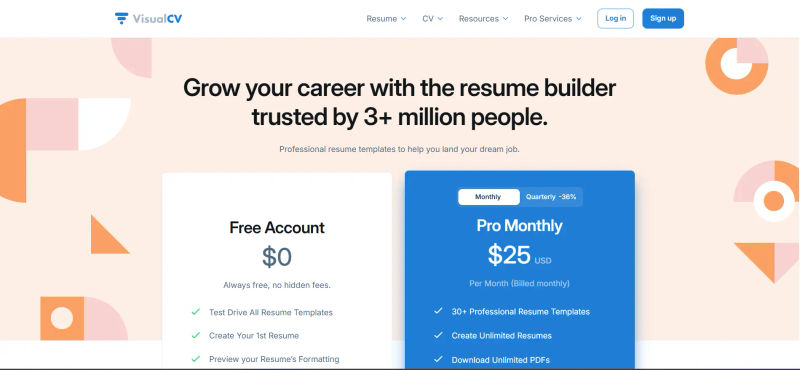
The VisualCV Pro subscription cost is currently positioned at $25.00 per month on a rolling monthly basis, or $15.00 per month if you commit to an annual billing cycle. Upgrading to Pro unlocks the true utility of the platform, transforming it from a basic document formatter into a comprehensive career management tool.
For job seekers, the Pro tier removes all watermarks and unlocks unlimited PDF downloads. It also grants access to the platform's full library of ATS-optimized templates and includes the ability to generate AI-powered cover letters that match your resume's design.
Furthermore, Pro users gain access to advanced resume analytics, allowing you to see when a recruiter or hiring manager has viewed your online resume link, how long they spent reading it, and where they are located. This data is invaluable for understanding which applications are gaining traction.
Who is this best for? VisualCV Pro is best for highly active job seekers who need to manage multiple, highly tailored resume versions and track their application performance.
3. AI-Powered ATS Optimization
A major differentiator for VisualCV Pro is its integrated AI-powered ATS optimization. Unlike basic spellcheckers, this feature acts as a generative assistant.
You can paste a target job description directly into the platform, and the AI will score your current resume against the job requirements.
It highlights missing keywords, suggests phrasing adjustments, and can even generate tailored bullet points to bridge the gap between your experience and the employer's needs. This saves hours of manual editing and significantly increases the likelihood of passing initial automated screenings.
4. Agency & Team Pricing for Career Consultants
For career consultants, coaches, and university career centers, standard individual plans are often insufficient. VisualCV addresses this with specialized Team and Agency pricing structures. While individual Pro accounts are $25.00 per month, consultants can contact sales for bulk seat licensing or white-label solutions.
The ability to create, duplicate, and manage dozens of distinct client profiles under a single master account justifies the expense for professionals. The platform's clean interface allows consultants to rapidly iterate on client documents, utilizing the AI optimization features to align client skills with target job descriptions efficiently, ultimately increasing their placement rates.
Who is this best for? VisualCV's agency features are best for career consultants and coaching firms that need to manage multiple client portfolios securely and efficiently.
Find Perfect Software For Your Business
Novoresume and Zety: The ATS-Optimized Alternatives
If VisualCV's pricing or feature set does not perfectly align with your needs, Novoresume and Zety represent the two most prominent direct competitors in the ATS-optimized resume space. Both platforms have distinctly different pricing models and target audiences.
1. Novoresume: Best for Modern Layouts
Novoresume has built its reputation on highly structured, visually appealing templates that manage to remain ATS-friendly. Their pricing model is straightforward: Premium costs $23.99 per month, with discounts available for quarterly or annual commitments.
The free tier on Novoresume is functional but comes with a hard limitation: you can only build a one-page resume. For entry-level candidates or recent graduates, this might be sufficient.
However, for mid-career professionals, managers, or anyone with more than five years of experience, a one-page limit is often a dealbreaker.
Upgrading to Premium unlocks multi-page resumes, custom layouts, specialized cover letter templates, and the removal of all branding. A significant time-saving feature for mid-career professionals is the ability to import data directly from LinkedIn, which populates the template instantly.
Who is this best for? Novoresume is best for mid-level professionals who want a modern, highly structured layout without sacrificing ATS readability. It forces users into good design habits by restricting overly complex formatting.
2. Zety: Best for Guided Content Creation
Zety takes a different approach, focusing heavily on the writing process rather than just the design. Zety's platform is packed with pre-written phrases, AI-generated summary suggestions, and industry-specific bullet points. Like Novoresume, it also supports seamless LinkedIn data imports to jumpstart the creation process.
However, Zety's pricing model is a frequent point of frustration for users evaluating free vs paid resume builders. Zety does not offer a truly free tier that allows for a clean PDF download. Instead, they utilize a trial model. Users can build their entire resume for free, but hitting the "Download" button triggers a paywall.
The standard offer is a 14-day trial for $2.70. If you do not cancel within exactly 14 days, the subscription auto-renews at a steep $25.95 per month.
While the tool itself is incredibly powerful for users who struggle with writing, the pricing transparency leaves much to be desired. You are essentially paying for the AI writing assistant and the convenience of guided creation.
Who is this best for? Zety is best for job seekers who struggle with writing and need step-by-step guidance, pre-written content suggestions, and AI assistance to articulate their career achievements.
Resume.io and Enhancv: Premium Pricing for Premium Designs?
Moving up the pricing ladder, Resume.io and Enhancv position themselves as premium tools offering superior design aesthetics and advanced features. When comparing these to the VisualCV Pro subscription cost, users must evaluate whether the aesthetic upgrades translate to a higher interview rate.
3. Resume.io: Best for Fast, Simple Builders
Resume.io is engineered for speed. The platform's user interface is arguably the most intuitive on the market, allowing a user to go from a blank page to a completed resume in under 15 minutes.
Like Zety, Resume.io relies heavily on a trial-to-subscription model. You can build your resume for free, but exporting it as a PDF requires payment.
The free tier only allows for a plain TXT file export, which is useless for modern job applications. To get the PDF, you must sign up for a 7-day trial at $2.95, which automatically renews at $49.95 quarterly if not canceled.
For $49.95 quarterly, you get access to a streamlined builder, excellent templates, and a built-in job tracker. However, compared to VisualCV, Resume.io lacks the deep multi-resume management features that career consultants or highly active job seekers might require.
Who is this best for? Resume.io is best for job seekers who are in a rush, need a beautiful resume immediately, and are willing to pay a premium for a frictionless, fast building experience.
4. Enhancv: Best for High-Impact Visuals
Enhancv is the most expensive option among the standard resume builders, coming in at $39 per month (or $16.66/month if billed quarterly). Enhancv differentiates itself by offering highly customizable, visually striking templates that look more like professional marketing documents than traditional resumes.
The free tier allows you to create up to two resumes, but they will include Enhancv branding, and you are locked out of the premium design elements and advanced AI writing tools.
Unlike basic keyword suggesters, Enhancv's AI is fully generative, capable of writing highly specific, metric-driven bullet points based on minimal user input.
For executives, marketing professionals, or those in forward-facing roles, the $39 investment can be justified. The platform allows for deep customization of colors, backgrounds, and section layouts.
However, users must be cautious: overly complex visual resumes can still occasionally trip up older parsing software.
Who is this best for? Enhancv is best for executives, marketers, and public-facing professionals who need a high-impact, visually distinct resume that stands out in a human review.
Canva and Cake: Best Free and Budget-Friendly Options
If the VisualCV cost per month is outside your current budget, or if you refuse to engage with auto-renewing subscription models, Canva and Cake offer alternative paths. These tools cater to entirely different use cases but provide significant value for price-conscious users.
5. Canva: Best for Creative Customization
Canva is not a dedicated resume builder; it is a global graphic design platform. However, it boasts thousands of free resume templates.
The pricing is unbeatable: the vast majority of its resume functionality is completely free, with Canva Pro available for $18 per month if you want access to premium stock assets or brand kits.
The danger of using Canva lies in ATS compatibility. Because Canva is a design tool, it often exports resumes as flattened PDFs or complex, image-heavy files.
When you upload a Canva resume to a corporate career portal, the ATS attempts to read the text. Frequently, the system reads the text out of order, mashes words together, or fails to parse the information entirely, resulting in an automatic rejection.
A practical workaround for Canva users is to create a beautiful visual version for networking and email outreach, while simultaneously maintaining a plain-text, unformatted Word document specifically for uploading into ATS portals.
Who is this best for? Canva is best for creative professionals (designers, artists, videographers) who are handing their resume directly to a human via email or networking, where ATS parsing is not a factor.
6. Cake: Best for Digital Portfolios
Cake (earlier as CakeResume) bridges the gap between a traditional resume and a personal website. It allows users to drag and drop multimedia elements—like videos, code snippets, PDF portfolios, and image galleries—directly into their career profile.
The free tier is generous, allowing you to build and publish one highly customized digital resume profile. If you need more features, the Advanced plan is highly budget-friendly at just $12.00 per month, while the Standard plan (which removes all branding and adds custom domain support) is $220.00 per month.
Compared to VisualCV, Cake is less focused on traditional document formatting and more focused on digital presentation. It is an excellent choice for modern tech workers who need to show their work, not just describe it.
Who is this best for? Cake is best for software engineers, data scientists, and multimedia professionals who need to embed portfolios, GitHub links, and project examples directly into their resume.
Hidden Costs and Cancellation Policies to Watch For
When searching for the best value resume builder, the monthly sticker price is only half the story. The resume builder industry is notorious for utilizing subscription economics that rely on user forgetfulness. To make an informed decision, you must understand the hidden costs associated with these platforms.
1. The Trial Trap and Auto-Renewals
As highlighted with Zety and Resume.io, the most common hidden cost is the introductory trial. A platform will advertise a "$2.00 Resume" or a "14-Day Trial for $3.00." Job seekers, desperate to download the document they just spent three hours building, will pay the small fee.
Buried in the terms and conditions is the stipulation that if the account is not manually canceled within the trial window, it will automatically convert to a full-priced monthly subscription, often charging $24 to $30 immediately.
2. The Download Tax
Another deceptive practice is the "Download Tax." A platform will advertise itself as a "Free Resume Builder." You can create an account, choose a template, and input all your data for free.
However, the platform restricts the export functionality. You may only be allowed to download a plain text file, or a highly watermarked PDF. To get the clean, usable version of your own data, you are forced to upgrade to a premium tier at the very end of the process.
3. Cancellation UX and Data Portability
User experience (UX) around cancellation remains a critical factor. Reputable platforms like VisualCV and Novoresume allow you to cancel your subscription with a simple click in your account settings.
However, lesser-known builders often employ "dark patterns," requiring users to navigate confusing menus, complete lengthy exit surveys, or even send an email to customer support to stop the billing cycle.
Furthermore, consider data portability. If you cancel your VisualCV Pro subscription, your data remains saved on the platform, but you lose access to premium templates and PDF downloads.
Ensure that whichever platform you choose, you download a final, clean PDF and a plain-text version of your resume before hitting the cancel button, ensuring you retain access to your hard work.
4. Data Sovereignty and Privacy
An emerging hidden cost is the use of your personal data. Many job seekers are increasingly concerned about how their work history, contact information, and professional metrics are utilized by software companies.
Before subscribing to any platform, review their privacy policy to see if your resume data is being anonymized and sold to recruiters, or worse, being used to train third-party generative AI models without your explicit consent. Platforms that prioritize data sovereignty offer clear opt-out toggles for AI training.
Try AuthenCIO
Move to faster, smarter software evaluation with AI
Verdict: Is VisualCV the Best Value Resume Builder 2027?
Deciding whether the VisualCV pricing structure is worth the investment comes down to your specific career stage and application strategy. If you are a career consultant managing multiple clients, or an active job seeker who aggressively tailors their resume for dozens of different roles, VisualCV Pro at $25.00/month is a highly justifiable expense.
The multi-resume management, ATS-optimized templates, and generative AI tracking analytics provide a clear return on investment by saving time and increasing interview rates.
However, if you only need a single, modern resume and do not require extensive tailoring, Novoresume offers a slightly cheaper alternative with excellent design constraints. If you are applying for creative roles where ATS is irrelevant, Canva’s free tier is unbeatable. And if you need heavy writing assistance, Zety’s guided builder is best-in-class, provided you remember to cancel the trial.
Ultimately, upgrading to a paid plan is an investment in your career presentation. Balance the cost against your expected ROI, avoid the hidden subscription traps, and choose the tool that best fits your specific industry requirements.
Quick Recap: Best For...
VisualCV: Career consultants and active job seekers needing multiple tailored resumes.
Novoresume: Mid-career professionals wanting strict, modern, one-page designs.
Zety: Users who struggle with writing and need heavy AI content generation.
Resume.io: Job seekers who need a beautiful resume built as fast as possible.
Enhancv: Executives and marketers needing highly visual, customized layouts.
Canva: Creative professionals bypassing ATS to hand resumes directly to humans.
Cake: Tech workers needing to embed digital portfolios and code snippets.