
Introduction
When evaluating video and design software pricing for 2027, Format.com stands out as a top-tier value for commercial photographers and designers. At $24/month for its Pro plan, it balances high-quality image rendering with predictable, budget-friendly pricing. However, finding affordable portfolio hosting requires looking past the base subscription fees to understand the total cost of ownership.
Streamline your software evaluation process
As a decision-maker, you must account for hidden costs, storage limits for high-resolution RAW and TIFF files, and client proofing capabilities. Video hosting is a major factor in video and design software pricing; while some platforms charge a premium for native video hosting, Format includes up to 60 minutes natively on its Pro tier. Choosing the wrong platform can eat into your profit margins through unexpected transaction fees or expensive add-ons.
This comprehensive review breaks down the true cost of portfolio hosting, comparing Format.com against the industry's top website alternatives to help you choose the most cost-effective platform for your creative business.
Key Takeaways
Format's Pro Plans Hit the Sweet Spot: For photographers in 2027, Format's mid-tier plans offer the best value, balancing essential client proofing and copyright protection without the steep learning curve of Wix Studio.
Adobe Portfolio is the Best Value for Creatives: If you already pay for Adobe Creative Cloud for your video or design software, Adobe Portfolio is included for free, making it the most cost-effective option on the market.
Budget Alternatives Deliver on Basics: Pixpa and SmugMug remain the top budget-friendly alternatives, offering lower entry prices than Squarespace while still supporting high-resolution image galleries.
Watch for Hidden Costs: Base pricing rarely tells the whole story. When comparing platforms, factor in e-commerce transaction fees, domain renewal rates, and storage overages, which can significantly increase your annual spend.
Portfolio Platform Pricing at a Glance
The table below compares Format.com with leading portfolio platforms across pricing, core use cases, video hosting, and key limitations. Use it to quickly identify the option that best matches your creative workflow and budget before reviewing the detailed breakdowns.
Plan Name | Best For | Pricing | Limitations | Video Hosting |
Format.com | Commercial photographers needing integrated client proofing | Starts from $14/month | Limited to 15 client galleries; 100,000 image limit | Up to 60 minutes hosted natively |
Squarespace | High-end designers prioritizing brand customization | Starts from $25/month | 3% transaction fee on e-commerce; steeper learning curve | 30 minutes natively; unlimited via YouTube/Vimeo |
Pixpa Creator | Budget-conscious all-in-one portfolios | Starts from $9/month | Basic marketing tools; fewer third-party integrations | Embedded only (YouTube/Vimeo) |
SmugMug | High-volume photo storage and client sales | Starts from $34.22/month | 15% commission on print sales; rigid templates | Unlimited up to 20 minutes per clip |
Wix Studio | Total drag-and-drop creative control for agencies | Starts from $17/month | Bandwidth throttled on lower tiers; template lock-in | 5 hours of native video hosting |
Adobe Portfolio | Existing Creative Cloud subscribers | Starts from $9.99/mo | No e-commerce features; limited to 5 websites | Embedded only |
Carbonmade Pro | Minimalist visual storytelling | Starts from $9.99/month | No custom code injection; limited SEO capabilities | Embedded only |
*Note: All prices shown reflect typical monthly billing. Vendors often offer lower pricing for annual commitments, but those discounts are excluded here for easier comparison. Actual costs may vary depending on your requirements, usage volumes, and negotiated terms.
Software Covered in this Article
To help you understand Format.com in the right context, this article refers to a carefully curated set of leading alternatives:







Format.com Pricing Breakdown: Are the Pro Plans Worth It?
Format.com's Pro plans are worth the investment for commercial photographers and designers who need integrated client proofing and portfolio hosting, offering strong value when compared to the fragmented costs of standalone video and design software subscriptions.
In the broader landscape of video and design software pricing—where creatives routinely juggle $55/month Adobe Creative Cloud subscriptions, $15/month Figma plans, and $20/month video hosting fees—Format consolidates portfolio presentation and client delivery into a single, predictable monthly cost.
Who is this best for? Professional commercial photographers and designers who require a seamless blend of high-quality portfolio presentation and integrated client proofing workflows without needing advanced web development skills.
Format's pricing is divided into three main tiers:
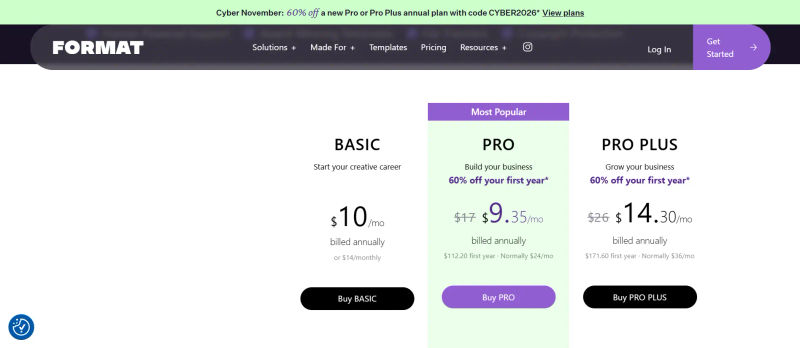
Basic ($14/month): Highly restrictive, serving primarily as an entry-level static showcase.
Pro ($24/month): The sweet spot for most freelance designers and mid-level photographers. It includes 15 client proofing galleries, which is usually sufficient for creatives managing a standard monthly client load. It natively includes password-protected galleries and supports high-resolution image rendering via an updated Content Delivery Network (CDN) for fast page load speeds.
Pro Plus ($36/month): Designed for high-volume commercial studios. This tier unlocks unlimited client galleries and advanced e-commerce features. If you sell digital downloads or physical prints, the Pro Plus plan eliminates the restrictive commission fees found on lower tiers.
Plan Limitations and Considerations: While Format excels in presentation, its SEO tools lag behind dedicated website builders for targeting highly competitive local commercial photography keywords. Additionally, while storage is generous, creatives uploading massive archives of uncompressed TIFF files or embedding heavy video assets may hit the 100,000 image limit faster than anticipated. This limit spans both your main portfolio and client proofing archives, forcing an upgrade to custom enterprise pricing if you do not regularly purge old client galleries.
Squarespace & Wix Studio: The All-in-One Website Giants
When evaluating portfolio hosting, Format.com is inevitably compared to the industry giants: Squarespace and Wix.
These platforms are not strictly built for photographers, but their massive development budgets mean they offer incredibly powerful, versatile tools for creatives who want their portfolio to function as a comprehensive business hub.
1. Squarespace
Who is this best for? Squarespace is best for high-end designers, art directors, and commercial photographers who prioritize immaculate brand customization, premium typography, and native e-commerce capabilities over specialized client proofing tools.
Squarespace's pricing starts at $25/month for the Personal plan, but commercial creatives will need the Plus plan ($65/month) or the Advanced plan ($139/month).
Squarespace provides unmatched aesthetic control. Their Fluid Engine updates allow for intricate grid manipulations that render flawlessly across modern devices.
Furthermore, Squarespace supports advanced color profiles (including P3), ensuring that your commercial fashion or product photography displays with exact color fidelity.
Format vs Squarespace Pricing
When comparing Format vs Squarespace pricing directly, the true cost difference lies in e-commerce and client delivery. While Format's Pro plan is $24/month, Squarespace's comparable Core plan is $39/month.
However, the most significant drawback for decision-makers is the hidden cost of e-commerce on Squarespace. The Business plan imposes a 3% transaction fee on all sales.
If you license a commercial image for $5,000, that 3% fee is $150—equivalent to ten months of a Format Pro subscription. Additionally, Squarespace lacks native client proofing; you will need to integrate a third-party tool like Pic-Time or ShootProof, adding another $15 to $30 to your monthly overhead.
2. Wix Studio
Who is this best for? Wix Studio is best for freelance graphic designers, visual artists, and creative agencies who demand total drag-and-drop creative control to build a highly unique, non-traditional portfolio experience without writing a single line of code.
Moving beyond the basic Wix editor, Wix Studio has become the industry standard for professionals. Wix Studio offers the Light plan at $17/month and the Core plan at $29/month.
Its primary value proposition is its AI-driven design tools and advanced responsive behaviors. The platform features AI for automated image tagging and gallery sorting, drastically reducing the time-consuming process of manually organizing extensive portfolios.
Limitations: Wix Studio's absolute freedom comes at a cost to performance. Real-world page load speed tests consistently show that image-heavy Wix portfolios load 2 to 3 seconds slower than those on Format or Squarespace due to heavy backend code—a delay that can increase bounce rates among impatient art directors.
Furthermore, Wix throttles bandwidth on its lower tiers. Lastly, once you choose a Wix template infrastructure, you are locked in; you cannot switch core frameworks without rebuilding the entire site from scratch.
Pixpa & SmugMug: Budget-Friendly Alternatives
For commercial photographers who find Squarespace too expensive or Format too restrictive regarding e-commerce, Pixpa and SmugMug offer highly specialized, budget-friendly alternatives designed specifically around the photographic workflow.
1. Pixpa
Who is this best for? Pixpa is best for budget-conscious commercial photographers and designers who want an all-in-one platform featuring a portfolio, client galleries, and a zero-commission e-commerce store at a lower price point than Format.com.
Pixpa remains a highly competitive option for portfolio pricing. With plans like the Creator ($15/month) and Professional ($20/month), Pixpa undercuts Format and Squarespace while offering a comparable feature set.
The standout value is its zero-commission structure on all e-commerce sales, regardless of the tier. For a photographer selling digital downloads or physical prints, this directly protects profit margins.
Pixpa also includes robust client proofing natively, eliminating the need for third-party subscriptions.
Limitations: While cost-effective, Pixpa's template designs lack the high-end polish and premium typography options of Squarespace or Format.
Additionally, surveys of creative professionals indicate that Pixpa's customer support response times can be slower during peak hours, and their native SEO tools are relatively basic, requiring more manual effort to rank for local commercial keywords.
4. SmugMug
Who is this best for? SmugMug is best for high-volume event, sports, and commercial photographers who prioritize unlimited storage for high-resolution files and require a robust, automated system for direct client print sales.
SmugMug operates on a different model, focusing heavily on storage and fulfillment. The Portfolio plan ($41.89/month) and Pro plan ($61.362/month) are more expensive upfront than Format's base tiers.
However, SmugMug offers truly unlimited storage for full-resolution JPEGs and robust support for RAW file archiving. Their global CDN is exceptionally fast, ensuring clients worldwide can view and download massive galleries without lag.
Limitations: SmugMug is a specialized tool, and its limitations reflect that. It is not a great fit for graphic designers or illustrators, as its templates are rigidly designed around photo grids.
The most significant financial limitation is their commission structure: SmugMug takes a 15% cut of your profit on all print sales. While they handle the printing and shipping through partner labs, this steep commission requires you to price your work significantly higher to maintain your desired profit margin.
Find Perfect Software For Your Business
Adobe Portfolio & Carbonmade: Niche Solutions
Not every creative professional needs a massive, multi-page website with client portals and e-commerce. For those seeking streamlined, niche solutions, Adobe Portfolio and Carbonmade offer compelling, highly specific alternatives to Format.com.
1. Adobe Portfolio
Who is this best for? Adobe Portfolio is best for existing Adobe Creative Cloud subscribers—such as retouchers, video editors, illustrators, and agency art directors—who want a fast, free, and deeply integrated way to showcase their work without additional monthly overhead.
When evaluating video and design software pricing, Adobe Portfolio offers unbeatable value because it is included for free with any Adobe Creative Cloud subscription. Whether you pay for the $9.99/month Photography plan or the full suite, you get a portfolio builder at no extra cost, making it highly cost-effective for existing users.
Adobe Portfolio remains the most frictionless way to get work online. It syncs directly with Lightroom and Behance, allowing you to update your portfolio with a single click from your editing software.
You can build up to five separate websites under one account, making it ideal for creatives who want to separate their commercial fashion work from their personal documentary projects.
Limitations: The free price tag comes with severe functional limitations. Adobe Portfolio offers absolutely zero e-commerce capabilities and no client proofing tools.
It is strictly a display mechanism. Furthermore, the design options are highly rigid.
2. Carbonmade
Who is this best for? Carbonmade is best for illustrators, 3D animators, and freelance graphic designers who seek minimalist visual storytelling and want a fun, personality-driven portfolio with zero setup hassle or technical configuration.
Carbonmade offers the Beginner plan at $9.99/month and the Pro plan at $14.99/month. Carbonmade has doubled down on its block-based, anti-code philosophy.
It is incredibly fast to set up. The platform automatically resizes images for different screen resolutions, eliminating the time-consuming process of manual formatting. It is designed to let the creative work speak for itself without the distraction of complex navigation menus.
Limitations: Carbonmade is intentionally limited. It does not allow for custom code injection, meaning you cannot add third-party analytics trackers, custom booking widgets, or advanced SEO metadata.
Furthermore, the platform lacks integrated e-commerce and client proofing.
The Reality of Asset Migration
A critical pain point for established commercial studios is the difficulty of migrating assets between platforms. If you are moving 500GB of high-resolution TIFFs from Format to Pixpa, or from Squarespace to SmugMug, you must factor in the operational downtime.
Modern website builders rarely offer direct FTP access, meaning bulk exports are often convoluted. Moving away from highly integrated platforms like Adobe Portfolio creates a strong locked-in effect, as metadata, SEO tags, and client gallery structures are frequently lost during the transition, requiring hours of manual re-uploading and re-formatting.
Hidden Costs to Watch Out For
When comparing Format.com to its alternatives, the monthly subscription fee is only the baseline.
To accurately calculate the 5-year Total Cost of Ownership (TCO), decision-makers must factor in the hidden costs that platforms use to subsidize their low introductory rates.
1. E-commerce Transaction Fees
As noted with Squarespace and SmugMug, transaction fees can destroy profit margins. A 3% fee on a $5,000 commercial licensing contract is $150.
Always check if the platform charges a percentage on top of standard Stripe or PayPal processing fees.
2. Domain Renewals and Privacy Protection
Most platforms, including Format and Wix, offer a free custom domain for the first year. However, renewal rates can range from $20 to $40 annually.
Furthermore, Domain Privacy Protection is often an upsell, adding another $15 per year. Professional email hosting (e.g., Google Workspace) is rarely included and will add an additional $6 to $12 per month per user to your overhead.
3. Client Proofing Add-ons
If you choose a platform like Squarespace or Wix Studio that lacks native client galleries, you must factor in the cost of third-party software.
Managing professional client galleries and feedback loops within a basic website builder is frustrating and unprofessional. Dedicated tools like ShootProof cost around $15/month, which immediately doubles the effective cost of your base website subscription.
4. Storage Overages and Site Backups
Many "unlimited" portfolio plans throttle bandwidth or cap storage after a specific threshold. Video hosting limits are a major hidden cost; platforms often restrict native video uploads to 15-30 minutes total or charge premium rates for 4K file storage. Exceeding these caps triggers storage overages, forcing unexpected plan upgrades. Additionally, some builders charge extra (typically $14/month) for automated site backups and version history—essential features for commercial studios protecting heavy digital assets.
5. Yearly vs. Monthly Billing
Almost all platforms advertise their monthly rate based on an annual, upfront commitment. Month-to-month billing is typically 20% to 30% more expensive.
You must determine if the yearly discount outweighs the flexibility of monthly billing, especially if you anticipate needing to switch platforms as your business scales.
Try AuthenCIO
Move to faster, smarter software evaluation with AI
Final Verdict: Choosing Your Portfolio Builder
Choosing the right portfolio platform requires aligning design software capabilities and video hosting needs with your specific business model and budget. There is no single best platform, only the best platform for your specific workflow.
Quick Decision Guide:
Best for Video & Client Proofing Balance: Format.com (Ideal for balancing video storage and client galleries without steep pricing)
Best for Print Sales & Budget: Pixpa
Best for High-End Branding & E-commerce: Squarespace
Best for Agency-Level Design Control: Wix Studio
Best for High-Volume Archiving: SmugMug
Best for Design Software Bundling: Adobe Portfolio (Included free with Creative Cloud subscriptions)
Best for Minimalist Storytelling: Carbonmade
If you are a creative professional who relies heavily on client proofing, video portfolios, and wants a tailored presentation without excessive setup time, Format.com remains one of the most balanced and cost-effective choices on the market. Its Pro plan offers the right mix of design features and video storage for a growing studio.
Evaluate your need for video hosting, design software integrations, client galleries, and custom design, and choose the platform that protects both your brand image and your bottom line.