
Introduction
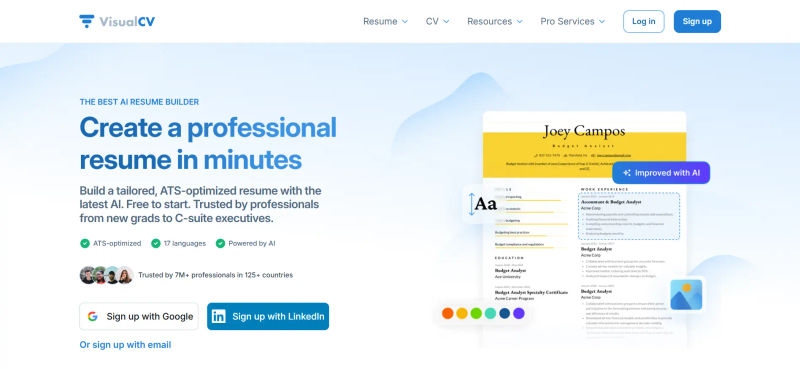
Yes, VisualCV is a leading executive portfolio builder in 2027, specifically for professionals who need to combine high-end design and video capabilities with strict Applicant Tracking System (ATS) compliance. Unlike standard text-based resume generators, VisualCV functions as a hybrid design software and multimedia platform. It allows C-suite leaders and creative professionals to build interactive web portfolios, embed video introductions, and apply premium aesthetic layouts without the risk of unreadable text layers failing automated HR filters.
Streamline your software evaluation process
Choosing the wrong portfolio builder—or a purely visual design tool—often results in hours of wasted formatting time and automatic ATS rejection. This comprehensive review evaluates VisualCV’s 2027 feature set, focusing on its design flexibility, video portfolio integration, pricing, and overall business value for executives upgrading their personal brand.
Key Takeaways
Best for Executives: VisualCV stands out in 2027 as the premier portfolio builder for senior leaders, offering board-ready templates and advanced LinkedIn integration.
Multimedia Capabilities: It goes beyond traditional resumes by allowing creative professionals to embed videos, PDFs, and external portfolios directly into a digital CV.
ATS and AI Tools: The platform features robust ATS optimization and AI-assisted tailoring, ensuring your resume passes automated screening while targeting specific 2027 job descriptions.
Premium Pricing: While more expensive than entry-level alternatives like Zety or Resume.io, the advanced tracking analytics and professional polish justify the cost for mid-to-late career professionals.
Pros and Cons of VisualCV
To aid in quick decision-making, here is an objective breakdown of the platform's strengths and weaknesses based on its 2027 iteration.
Pros:
Executive-Grade Aesthetics: Templates are clean, professional, and avoid the cluttered look of cheaper builders.
Dual Output: Generating both an ATS-optimized PDF and a live, mobile-responsive web portfolio from the same data set saves immense time.
Actionable Analytics: Real-time tracking of portfolio views provides a strategic advantage during the interview process.
Data Privacy: GDPR/CCPA compliance and strong controls over search engine indexing protect sensitive executive histories.
AI-Assisted Tailoring: Advanced AI helps map existing experience to specific 2027 job descriptions.
Cons:
Template Rigidity: Users cannot drag and drop elements freely; you must work within established grid systems to ensure ATS compliance.
Legacy Mode Limitations: Canceling the subscription immediately takes your custom web portfolio offline.
Limited Free Tier: The free version functions solely as a demo; a premium upgrade is mandatory for professional use.
Verdict: VisualCV is a polished resume and portfolio builder that combines ATS-friendly documents, multimedia presentation, and career branding tools for experienced professionals.
Best For: Executives, senior professionals, consultants, and creative specialists who need polished resumes alongside interactive online portfolios.
Software Covered in this Article
To help you understand VisualCV in the right context, this article refers to a carefully curated set of leading alternatives:








VisualCV vs. Top Resume & Portfolio Builders
Before diving into the granular details of VisualCV's design and multimedia capabilities, review this scannable decision matrix comparing VisualCV with the top resume and portfolio builders available this year.
Tool | Best For | Pricing | Key Features | Use Cases |
VisualCV | Executives & Dual Portfolios | Starts from $24/mo | Web portfolios, ATS templates, Analytics | C-suite applications, consulting, leadership roles |
Novoresume | Traditional Professionals | Starts from $23.99/mo | Strict 1-page limits, clean UI, guided tips | Mid-level management, traditional corporate roles |
Zety | Speed & Content Generation | Starts from $25.95/mo | AI text generator, cover letter builder | Career pivoters, professionals needing writing help |
Resume.io | Quick, Standard Resumes | Starts from $49.95/quarterly | Pre-written phrases, simple export | Entry to mid-level professionals, rapid applications |
Canva | Highly Creative Portfolios | Starts from $18/mo | Infinite design freedom, vast graphics library | Graphic designers, artists, visual creatives (Non-ATS) |
Enhancv | Modern, Culture-Focused | Starts from $39/mo | Personality sections, bold colors, culture fit | Tech industry, startups, modern marketing roles |
Cake | Tech & Engineering | Starts from $150/mo | Snippet-based builder, multimedia embeds | Developers, IT professionals, digital portfolios |
Resume Genius | Fast, Guided Creation | Starts from $23.95/mo | Step-by-step wizard, standard corporate formats | General corporate, administrative, entry-level |
*Note: All prices shown reflect typical monthly billing. Vendors often offer lower pricing for annual commitments, but those discounts are excluded here for easier comparison. Actual costs may vary depending on your requirements, usage volumes, and negotiated terms.
VisualCV Key Features and Usability Evaluated
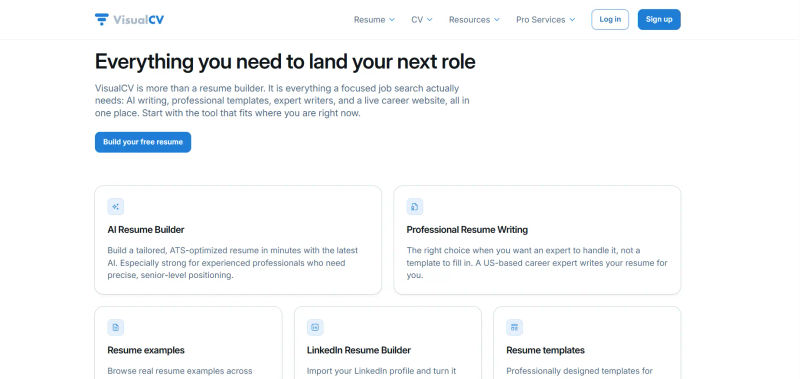
Evaluating VisualCV means assessing a personal branding engine rather than a simple document formatter. The platform focuses on delivering professional, clean, and trackable career documents. Here is a deep dive into the features that matter most to decision-makers in 2027.
1. Executive-Tier Templates and Design Flexibility
The primary draw of VisualCV is its template library, which leans heavily toward professional, board-ready aesthetics. Unlike tools offering overly flashy or cluttered designs, VisualCV’s executive templates prioritize white space, modern typography, and clear informational hierarchy. For a Vice President or Director, this professional restraint is critical. The design engine allows you to customize margins, fonts, and color palettes to match your personal brand without breaking the underlying structure. If you seek absolute pixel-perfect freedom to drag and drop elements anywhere, you will find the interface slightly restrictive compared to a blank canvas tool, but this rigidity serves a vital technical purpose.
2. 2027 ATS Optimization and Readability
A significant anxiety for senior professionals is whether a visually stunning resume will fail automated HR software screening. VisualCV ensures the underlying architecture of its PDF exports remains readable to modern ATS platforms like Workday, Greenhouse, and Lever. The platform uses clean text layers rather than flattening text into images. You can utilize a two-column layout or a modern header design while maintaining high ATS pass rates. The software effectively balances human-appealing design with machine-readable formatting, eliminating the risk of algorithmic rejection.
3. AI-Assisted Tailoring for 2027 Job Markets
By 2027, generic resumes are immediately flagged by recruitment AI. VisualCV has integrated AI-assisted tailoring to combat this. Instead of merely generating generic bullet points, the platform’s AI analyzes specific job descriptions you paste into the system and suggests quantifiable metric framing for your existing experience. It helps executives map their leadership history directly to the keywords and core competencies demanded by the target role. The AI acts as a strategic sounding board rather than a basic text spinner, ensuring your executive summary maintains an authoritative, human voice.
4. Multimedia Portfolio Integration for Creative Leaders
Beyond the traditional PDF, VisualCV allows users to publish their resume as a live, mobile-responsive web portfolio. This is invaluable for creative directors and consultants needing a permanent home for their professional brand. You can set up a custom URL, manage SEO, and embed multimedia elements smoothly.
To support modern video and design workflows, VisualCV enables direct iframe embedding from YouTube, Vimeo, and Wistia. This allows leaders to feature high-resolution video introductions, sizzle reels, or motion graphics natively within their profile without redirecting viewers. Users can also integrate interactive case studies by linking Figma prototypes or Adobe Creative Cloud galleries. For those researching the best portfolio websites for creatives 2027, VisualCV offers a compelling hybrid solution that bypasses the limitations of a static document by functioning as an interactive multimedia canvas.
5. Advanced Tracking, Collaboration, and LinkedIn Integration
Sending a resume into a void is frustrating for data-driven leaders. VisualCV’s analytics dashboard tracks recruiter engagement, showing how many times a web portfolio link was viewed, viewer location, and time spent on the page. This intelligence gauges application strategy effectiveness.
Furthermore, the platform offers robust LinkedIn integration. You can sync your LinkedIn profile directly into the builder via API, pulling your work history to establish a baseline draft, though manual formatting cleanup is required to optimize the layout. For executives working with executive assistants or professional resume writers, VisualCV supports account sharing and collaborative editing features. Crucially, the platform is fully GDPR and CCPA compliant, offering data encryption at rest and strict privacy controls, ensuring sensitive corporate histories remain secure.
Stand out with professional visual resumes. Join 10,000+ users who evaluate career and design software on AuthenCIO without sales pressure.
VisualCV Pricing and Value for Money in 2027
Understanding the pricing model is essential for determining the long-term return on investment (ROI). For design and video professionals, the key question is whether the premium cost justifies the presentation quality and multimedia capabilities gained.
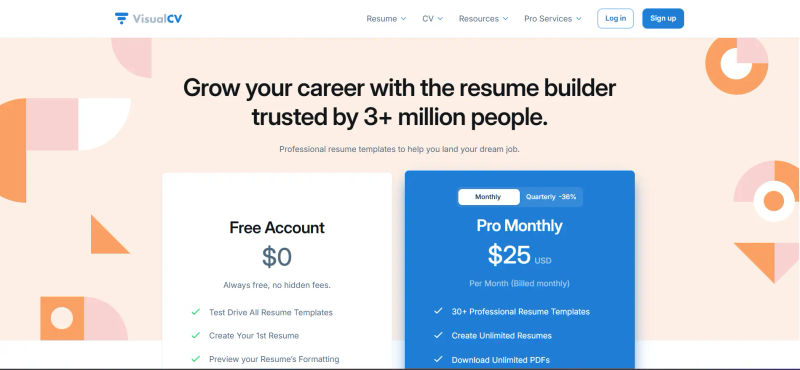
VisualCV operates on a freemium model, but the free tier is highly restrictive. It limits you to basic templates and applies branding watermarks on your final export, making it unsuitable for a polished creative portfolio. Upgrading to the Pro plan is mandatory for professional use.
In 2027, the Pro plan costs $25 per month on a rolling monthly basis, or $15 per month if billed quarterly ($45 upfront). This tier unlocks all premium templates, watermark-free PDF downloads, web portfolio hosting, custom domain capabilities, and advanced analytics.
Is the cost justified for creatives?
For video editors, animators, and graphic designers, the value lies in multimedia integration. Spending $45 for a three-month subscription allows you to embed Vimeo or YouTube demo reels directly into your digital resume and host high-resolution design samples without worrying about strict file size limits. For freelance designers or video producers using the web portfolio as a continuous lead-generation tool, the $15/month quarterly cost is a standard, tax-deductible business expense that effectively replaces separate web hosting (like Squarespace or Wix) and development time.
Understanding Legacy Mode
A common concern is what happens when you cancel the subscription after landing a contract or full-time role. When you pause or cancel your Pro plan, VisualCV enters a "Legacy Mode." Your custom web portfolio URL goes offline, but your data, embedded videos, and document layouts are securely retained on their servers. You can reactivate your account months or years later to immediately restore your live links and update your latest reel.
VisualCV for Executives vs. Creative Professionals
To make a smart tooling choice, evaluate how VisualCV handles the specific nuances of your career path. The platform serves two primary audiences, catering to them in distinct ways.
1. The Executive Use Case: Board-Ready Branding
For C-suite executives, Vice Presidents, and senior directors, the resume must convey authority, leadership philosophy, and quantifiable business impact. VisualCV excels here.
Consider this checklist of Executive Branding Essentials and how VisualCV delivers:
Data Security and Privacy: Executives handling sensitive corporate information need assurance their data is protected. VisualCV’s GDPR/CCPA compliance and privacy toggles allow you to keep web portfolios unindexed by search engines, preventing unauthorized AI scraping.
Handling Non-Linear Paths: The platform allows easy reordering of sections, making it simple to highlight board memberships, fractional roles, or consulting engagements above chronological work history.
Professional Restraint: The templates enforce a level of professional restraint, preventing users from over-designing. The output looks appropriate for a corporate boardroom.
2. The Creative Professional Use Case: Showcasing Vision
For video editors, motion designers, and UX/UI professionals, the resume must demonstrate design sensibility and technical capability. VisualCV provides a strong foundation for this through its web portfolio feature, which handles multimedia embeds beautifully. Video professionals can embed YouTube or Vimeo showreels directly into their digital resumes, while design professionals can integrate interactive elements and high-resolution image galleries.
However, creatives often struggle with template rigidity. If your personal brand relies on bespoke typography, custom vector graphics, or unconventional layouts, VisualCV’s PDF exporter will feel restrictive because it prioritizes ATS readability over pixel-perfect design freedom.
3. The Recommended Creative Workflow:
Do not force VisualCV to be a blank canvas like Adobe Premiere or Illustrator. Instead, use VisualCV to generate the clean, modern, ATS-compliant PDF required for the initial application gateway. Within that document, include a prominent link to your custom-coded site, Behance profile, or dedicated video portfolio for the deep-dive visual exploration. This strategy ensures you pass algorithmic filters while still showcasing your unrestricted creative vision to the hiring manager.
Find Perfect Software For Your Business
Top VisualCV Alternatives to Consider in 2027
No software exists in a vacuum. To ensure you make the best decision for your career presentation, compare VisualCV against its top competitors in the 2027 landscape.
1. VisualCV vs. Novoresume
[Best for Traditional Professionals]
Novoresume is a powerhouse for traditional professionals needing strict guidance. It forces users into optimized, highly structured layouts and enforces strict length limits. If you are an executive with a 15-year career, Novoresume’s rigid spacing feels claustrophobic. VisualCV is far superior for senior leaders requiring multi-page flexibility and a companion web portfolio, whereas Novoresume suits mid-level managers needing help condensing their history.
2. VisualCV vs. Zety
[Best for Speed & Content Generation]
Zety focuses heavily on speed. Its primary selling point is an AI-driven text generator suggesting bullet points based on job titles. While helpful for mid-career professionals, Zety’s suggested content often reads as too generic for a C-suite executive. VisualCV assumes you know how to articulate high-level achievements and provides a premium wrapper and tailored AI mapping for that content. Choose VisualCV for design and tracking; choose Zety if you suffer from severe writer's block.
3. VisualCV vs. Resume.io
[Best for Rapid Deployment]
Resume.io offers a streamlined, frictionless onboarding process with standard, clean templates. However, it lacks the depth of VisualCV. Resume.io does not offer robust web portfolio hosting, custom domains, or granular analytics. For a quick, standard application, Resume.io is excellent. For a comprehensive executive branding campaign, VisualCV is the better investment.
4. VisualCV vs. Canva
[Best for Design Freedom]
Canva is the ultimate tool for absolute design freedom. If you want to build a resume with custom illustrations and bespoke branding, Canva wins. However, Canva’s major flaw in 2027 is ATS compatibility. Because Canva frequently exports text as flattened elements or complex layers, its resumes often fail algorithmic screening. VisualCV is the safer choice for corporate applications, while Canva should be reserved for direct-to-hiring-manager emails or offline networking events.
5. VisualCV vs. Enhancv
[Best for Modern Startup Culture]
Enhancv is VisualCV’s closest competitor in the premium space, leaning heavily into modern startup culture. It offers templates with bold colors and unique personality sections. If you are applying for a leadership role at a trendy tech startup, Enhancv’s culture-focused designs provide an edge. However, for traditional finance, healthcare, or enterprise tech executive roles, Enhancv appears too casual. VisualCV maintains a more authoritative corporate aesthetic.
6. VisualCV vs. Cake
[Best for Tech & Engineering]
Cake (earlier known as CakeResume) utilizes a unique snippet-based builder, allowing you to drag and drop specific rows to build a highly customized web profile. It is one of the leading interactive resume builders 2027 has to offer for the tech sector. If you are a CTO wanting to embed GitHub repositories seamlessly, Cake is a fantastic alternative. VisualCV, however, offers superior PDF export quality for traditional corporate applications.
7. VisualCV vs. Resume Genius
[Best for Entry-Level Guidance]
Resume Genius is a fast, guided wizard designed to complete a resume in 15 minutes. It formats answers into standard, conservative templates. It is built for the mass market, not for executives or creative professionals. Decision-makers will find Resume Genius far too basic for their needs, making VisualCV the obvious choice for senior-level branding.
Try AuthenCIO
Move to faster, smarter software evaluation with AI
Final Verdict: Should You Buy VisualCV in 2027?
For Creative Professionals and Executives looking to upgrade their career portfolios in 2027, VisualCV is a highly recommended investment, provided you fall into its ideal use cases.
If you are a C-suite leader, a Vice President, or a senior consultant needing a polished, board-ready document that flawlessly passes through ATS software, VisualCV delivers exceptional value. The integration of web portfolio hosting, engagement analytics, and AI-assisted tailoring elevates it from a simple document formatter to a comprehensive personal branding tool. The $45 quarterly investment is negligible compared to the leverage a premium presentation provides in high-level salary negotiations.
Conversely, if you are a highly visual creative demanding absolute blank-canvas freedom and do not care about ATS algorithms, VisualCV will feel too restrictive. You should look toward Canva or a dedicated website builder. Similarly, entry-level professionals needing heavy content guidance will be better served by Zety or Novoresume.
Ultimately, VisualCV strikes the perfect balance for decision-makers who want their career history impeccably designed without sacrificing the technical readability required in modern hiring.
Next Steps for Decision-Makers:
If you have a board meeting or interview in the next two weeks, start by importing your LinkedIn profile into VisualCV to establish a baseline draft.
Select an executive template with high white space, adjust your privacy settings, and run the AI-tailoring tool against your target job description.
Export your ATS-friendly PDF and publish your web link to begin tracking recruiter engagement immediately.