
Introduction
Welcome to our comprehensive 2027 video and design software review of Webydo. If you are asking whether Webydo is the right white-label website builder to integrate with your agency's existing design software stack and video marketing workflows, the answer is a qualified yes. Webydo excels at translating static layouts from UI/UX design software into live code. While it is not a native video editor, its updated 2027 media modules seamlessly handle high-resolution video embeds and third-party video software integrations required for modern, media-rich web experiences.
Streamline your software evaluation process
The digital agency landscape in 2027 is fundamentally different than it was just a few years ago. According to recent industry data, traditional web development services offered by agencies fell from 75% in 2023 to 69% in 2025, while AI-related services and strategic consulting surged from 10% to 17%. For Agency Creative Directors, this shift signals a clear mandate: the days of relying on bloated, manual coding workflows to deliver standard client websites are over.
The evolution of web technologies throughout 2025 and 2026 has turned AI adoption into a strategic opportunity to reclaim profit margins rather than just a market shift to survive.
Enter Webydo. Positioned as a code-free, white-label visual development platform, Webydo promises to give creative teams total design control while handling the underlying HTML, CSS, and JavaScript automatically. But in a market saturated with powerhouse platforms like Webflow, Framer, and Wix Studio, does Webydo still hold its ground as a premium agency solution?
In this comprehensive 2027 review, we strip away the marketing jargon to evaluate Webydo strictly from an agency decision-maker's perspective. We will analyze its impact on your profit margins, its ability to handle modern performance standards (including heavy video assets), and how it stacks up against the fiercest competition in the visual development space.
Key Takeaways
Webydo combines visual design freedom with comprehensive white-label agency tools.
Figma integration helps reduce the gap between design and website development.
Built-in client billing creates opportunities for recurring hosting and maintenance revenue.
Its design-first approach comes with limitations in backend complexity and migration flexibility.
Duda offers stronger agency scalability, while Webflow provides more advanced CMS and development capabilities.
Webydo Review — White-Label Website Building for Creative Agencies
The Pros
Complete white-labeling: Customize the CMS with your agency's branding and domain.
Flexible design canvas: Create pixel-perfect layouts with extensive creative control.
Figma integration: Streamlines the transition from design prototypes to live websites.
Client billing: Manage hosting charges and recurring revenue directly.
Controlled CMS access: Let clients edit content without disrupting website designs.
Custom code support: Add JavaScript for specialized functionality and integrations.
The Cons
Backend limitations: Less suitable for complex web applications and advanced CMS requirements.
Performance management: Unoptimized layouts and heavy assets can affect loading speeds.
Migration effort: Moving existing websites requires manual rebuilding of content and assets.
Agency-focused pricing: May not be cost-effective for freelancers or smaller projects.
Verdict: Webydo is a design-focused website builder that helps agencies deliver branded client websites while managing billing and handoffs.
Best For: Creative agencies, web design studios, and freelancers managing multiple client websites under their own brand.
Software Covered in this Article
To help you understand Video and Design Software in the right context, this overview highlights its key features, capabilities, and use cases.







At a Glance: 2027 Agency Tool Comparison Table
Tool | Best For | Pricing | Key Features | Use Cases |
Webydo | Design-first agencies | Starts from $39/mo | Full white-labeling, freeform canvas, client billing | Mid-market corporate sites, visual portfolios |
Webflow | Technical designers | Starts from $25/mo | Advanced CMS, complex interactions, custom code | Enterprise marketing sites, complex web apps |
Framer | UI/UX prototypers | Starts from $15/mo | React-based components, advanced animations | SaaS landing pages, highly interactive sites |
Wix Studio | High-volume agencies | Starts from $19/mo (per site) | Native agency dashboard, reusable assets, AI tools | Rapid deployment, SMB client portfolios |
Duda | Scale-focused agencies | Starts from $25/mo | Client management, scalable templates, white-label | High-volume local business websites |
Elementor | WordPress loyalists | Starts from $60/yr | Massive plugin ecosystem, drag-and-drop WP editing | Content-heavy blogs, traditional CMS builds |
Squarespace | Low-budget projects | Starts from $25/mo (per site) | Rigid aesthetic templates, built-in commerce | Solopreneurs, simple e-commerce, basic sites |
Pagecloud | Small creative teams | Starts from $26/mo | Intuitive visual editor, source code access | Quick landing pages, small business sites |
*Note: All prices shown reflect typical monthly billing. Vendors often offer lower pricing for annual commitments, but those discounts are excluded here for easier comparison. Actual costs may vary depending on your requirements, usage volumes, and negotiated terms.
Best White-Label Website Builder 2027: Core Features for Creative Agencies
When evaluating a visual development platform, Creative Directors must look beyond basic page-building. The tool must support scalable design systems, output clean code, and integrate seamlessly into an agency's existing tech stack without causing bottlenecks.
1. Pixel-Perfect Responsive Editors 2027
Webydo's primary selling point has always been its unstructured, freeform canvas. Unlike template-driven builders that force designers into rigid grids, Webydo allows for absolute positioning and fluid layouts. In 2027, the platform has modernized its approach to responsiveness, integrating advanced CSS Grid and Flexbox controls directly into the visual UI.
However, this freedom comes with a caveat. Performance remains an industry-wide challenge. In 2025, only 48% of mobile websites and 56% of desktop websites achieved good Core Web Vitals (CWV). Furthermore, while 77% of mobile websites achieved a good Interaction to Next Paint (INP) score, only 62% achieved a good Largest Contentful Paint (LCP).
Webydo generates semantic HTML5, but giving designers absolute freedom means they can easily bloat a page with unoptimized assets or heavy DOM structures. Agencies using Webydo must enforce strict internal QA processes.
It is also important to acknowledge that while Webydo is 95% visual, professional agencies still need that 5% edge-case flexibility. Webydo allows for custom JavaScript injection to handle those specific, complex client requests that go beyond the visual editor.
2. AI-Assisted Design vs. Manual Creative Control
By 2025, nearly a third of digital agencies had already implemented AI into their workflows, with copywriting and coding leading the maturity curve. Webydo has integrated AI-assisted design features to help accelerate the initial wireframing and layout phases, acting as a powerful catalyst for creative teams.
What makes Webydo valuable for Creative Directors is that these AI tools act as assistants rather than dictators. You can generate a baseline layout using AI, but you retain granular, manual control over every breakpoint, interaction, and CSS property. This ensures that the final product adheres to your agency's strict brand governance rather than looking like a generic, AI-generated template.
3. Figma-to-Webydo: Streamlining the Creative Handoff
For most modern agencies, Figma is the undisputed home of the creative process. A major friction point in web design is translating those Figma files into a live environment. Webydo has significantly improved its Figma-to-Webydo synchronization in 2027. Design tokens, including global typography styles, color palettes, and spacing variables, map over with high fidelity.
Furthermore, Figma's auto-layout structures translate cleanly into Webydo's Flexbox containers. This drastically reduces the time spent recreating the wheel, allowing designers to move from high-fidelity prototype to production-ready staging environment in a fraction of the traditional time.
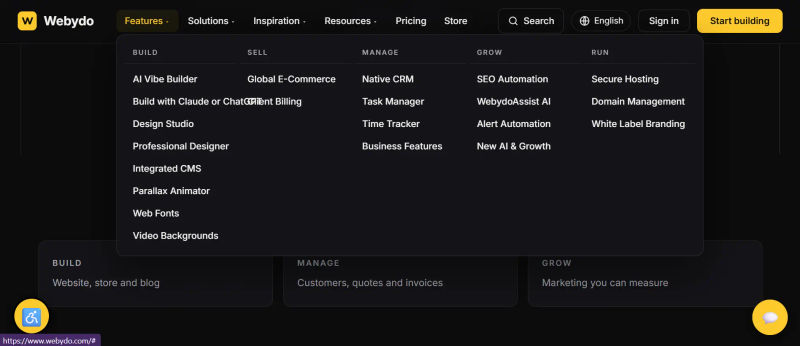
Deliver responsive client websites without coding bottlenecks. Join 10,000+ businesses evaluating design software on AuthenCIO without sales pressure.
Agency Workflow: Margins, White-Labeling, and Client Handoff
Platform features only matter if they positively impact your agency's bottom line. The agency market is bifurcating: shops that package higher-value services (like strategy, SEO, and custom integrations) are growing, while those competing purely on low-cost production are struggling. Recent data shows that agencies that increased their rates grew by an average of 8%, while those that reduced rates declined by 6%.
1. Maximizing Agency Margins
Webydo is uniquely structured to protect and enhance agency margins. By eliminating the need to hand off Figma files to front-end developers for manual coding, Webydo drastically reduces billable hours per project.
A site that previously took 120 hours (60 hours design, 60 hours development) can theoretically be completed in 70 hours by a single hybrid designer. This operational efficiency is the key to scaling a boutique agency without linearly scaling your payroll.
2. White-Label Solutions and Client Billing Tools
Where Webydo truly shines is its commitment to the agency brand. The platform offers comprehensive white-labeling. You can rebrand the entire CMS dashboard with your agency's logo, colors, and domain. When clients log in to make content updates, they see your proprietary software, not Webydo's.
This "walled garden" approach extends to client billing. Webydo allows you to bill clients directly from the dashboard, setting your own margins for hosting and maintenance. This seamless financial integration helps agencies transition from one-off project fees to recurring revenue models, which is critical for long-term stability and maximizing agency margins.
3. The Client-Facing CMS and Accessibility Governance
Client handoff is notoriously difficult. Give clients too much access, and they break the design; give them too little, and your agency is bogged down with endless minor text revisions. Webydo's CMS allows Creative Directors to lock specific design elements while leaving text, images, and CMS collections editable.
This granular permission system is also crucial for maintaining accessibility. The 2025 Web Almanac reported a median Lighthouse accessibility score above 85%, but noted that only about 30% of sites actually met the relevant real-world benchmarks.
By locking down semantic structures, ARIA labels, and contrast ratios, Webydo allows agencies to ensure that sites remain accessible long after the client takes over content management.
4. Security and Compliance: Meeting 2027 B2B Standards
For agencies targeting mid-market and enterprise B2B clients, security is no longer an afterthought—it is a prerequisite for winning the contract. Webydo has upgraded its infrastructure to meet stringent 2027 compliance standards. The platform supports SOC2 Type II compliance frameworks and offers localized data hosting to satisfy GDPR and other regional data residency requirements.
This level of enterprise-grade security within a white-labeled environment gives Creative Directors the confidence to pitch larger accounts without worrying about failing IT security audits.
Find Perfect Software For Your Business
Webydo Pricing 2027: Is the Agency Plan Worth It?
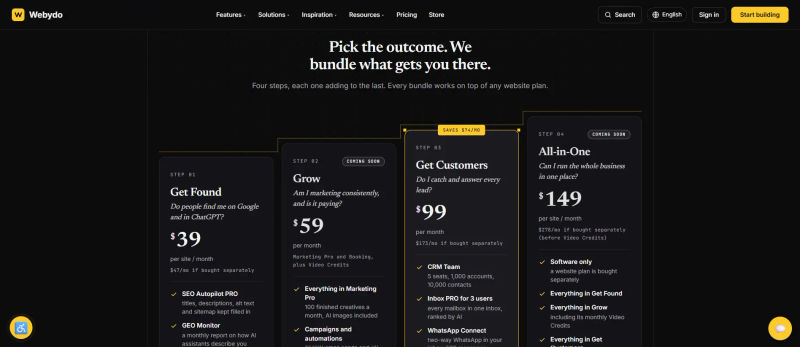
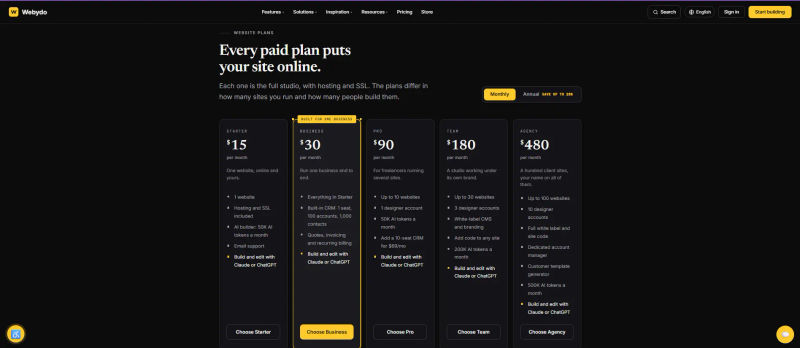
Webydo’s pricing is built around the number of websites an agency manages rather than the number of pages or client logins. For most boutique agencies, the practical choice is between the Team and Agency plans: Team supports up to 30 websites for $180 per month, while Agency supports up to 100 websites for $480 per month. Both include hosting, SSL, white-label CMS and branding, custom-code capability, and AI building tools.
The Agency plan costs $4,800 per year when billed annually, which works out to an effective $400 per month. It includes up to 100 client sites, 10 designer accounts, full white-labeling, a dedicated account manager, a customer template generator, 500K AI tokens per month, and 100 site exports. For an agency managing 50 client websites, that works out to roughly $96 per site per month on monthly billing, or $80 per site per month with annual billing.
That makes the Agency plan materially more economical than a per-site platform model charging $30–$40 per site each month. At those rates, 50 sites would cost $1,500–$2,000 per month, or $18,000–$24,000 per year. Against Webydo’s $4,800 annual Agency cost, the estimated platform saving is $13,200 to $19,200 per year, before optional add-ons, client bundles, or reseller discounts.
The Agency plan is most compelling for agencies that treat hosting, maintenance, and platform access as recurring revenue. Because the agency holds client billing, it can package Webydo hosting, updates, support, and ongoing improvements into its own monthly retainer. Webydo also offers wholesale pricing to resellers, which can further improve margins; the company shares those rates directly with agencies.
For a design-led agency managing 50 or more relatively standard marketing, B2B, portfolio, or corporate websites, the Agency plan is likely worth it. The economics improve sharply once the agency can standardize delivery, use reusable templates and components, and turn hosting and maintenance into recurring revenue. It is less compelling for an agency managing only a handful of sites, or for projects requiring complex e-commerce, advanced CMS structures, custom backend development, or frequent platform migration.
Webydo vs. The Competition: 2027 Market Analysis
To make a confident decision, Creative Directors cannot evaluate Webydo in a vacuum. It must be compared directly against the best design software for agencies 2027 has to offer.
1. Webydo vs. Webflow 2027: The High-End Design Battle
Webflow is the undisputed heavyweight champion of visual coding. It is essentially a visual interface for writing raw HTML, CSS, and JavaScript.
Where Webflow Wins: Webflow offers vastly superior CMS capabilities, complex relational databases, and unparalleled native interaction tools. If your agency is building highly complex, enterprise-level marketing sites or lightweight web apps, Webflow is the better choice. It also boasts a massive ecosystem of third-party integrations and exportable code.
Where Webydo Wins: Webydo is much faster for traditional designers to learn. Webflow requires a deep understanding of the CSS box model; Webydo feels more like Adobe InDesign or Figma. Furthermore, Webydo's built-in white-labeling and client billing are far more agency-centric out of the box than Webflow's current offerings.
The Verdict: Choose Webflow for complex, high-budget technical builds. Choose Webydo for mid-tier corporate sites where design speed and white-labeling are the top priorities.
2. Webydo vs. Framer 2027: Prototyping vs. Production
Framer has taken the design world by storm, evolving from a React-based prototyping tool into a full-fledged website builder.
Where Framer Wins: Framer is unmatched when it comes to high-fidelity animations, scroll effects, and modern, component-driven UI design. It is the darling of SaaS startups and cutting-edge tech companies. Its interface is incredibly intuitive for anyone who uses Figma.
Where Webydo Wins: Framer's CMS is relatively basic, and its client-handoff features lack the robust, white-labeled governance that Webydo provides. Framer is built for speed and aesthetics; Webydo is built for agency operations and client management.
The Verdict: If your agency specializes in highly interactive, single-page sites or SaaS marketing, Framer is superior. If you manage a large portfolio of traditional B2B clients who need backend access, Webydo offers better operational control.
3. Webydo vs. Wix Studio 2027: Efficiency at Scale
Wix Studio is Wix's aggressive play for the professional agency market, offering a completely revamped editor with advanced responsive behaviors.
Where Wix Studio Wins: Wix Studio is an operational powerhouse. It offers incredible multi-user collaboration, reusable asset libraries across different client projects, and a centralized agency dashboard that is arguably the best in the industry. It also has a massive app market for extending functionality (e-commerce, bookings, etc.).
Where Webydo Wins: Wix Studio, despite its advancements, still carries the "Wix" stigma in some enterprise circles, and its code output can sometimes be heavier than Webydo's. Webydo's pure white-labeling ensures clients never know what platform sits underneath their site, protecting the agency's perceived value.
The Verdict: Wix Studio is the better choice for high-volume agencies churning out dozens of sites a month. Webydo is better for boutique agencies that want to maintain a highly customized, proprietary brand image.
Other Notable Contenders: Squarespace, Duda, Elementor, and Pagecloud
While Webflow, Framer, and Wix Studio represent the cutting edge of visual development, several other platforms remain highly relevant depending on your agency's specific business model.
4. Duda: The White-Label King
If Webydo's white-labeling appeals to you, Duda is its most direct competitor. Duda is built explicitly for agencies and SaaS platforms that need to deploy websites at scale. It offers incredible dynamic page capabilities connected to external APIs and robust client management.
However, Duda's design editor is far more rigid and template-driven than Webydo's freeform canvas. If design freedom is your Creative Director's top priority, Webydo wins; if operational scale and API integrations are paramount, Duda takes the crown.
5. Elementor: The WordPress Ecosystem
Elementor remains a juggernaut because it sits on top of WordPress. If your agency requires complex backend architecture, custom PHP, or highly specific SEO plugins, WordPress is often unavoidable. Elementor brings visual editing to that ecosystem.
However, managing an Elementor/WordPress stack requires constant maintenance, plugin updates, and security monitoring—overhead that Webydo completely eliminates with its managed, closed-ecosystem hosting.
6. Squarespace and Pagecloud: Simplicity vs. Power
Squarespace is excellent for low-budget clients, solopreneurs, and basic e-commerce. However, its rigid templates and lack of advanced CSS control make it unsuitable for high-end agency work.
Pagecloud offers a highly intuitive visual editor that rivals Webydo in ease of use, and uniquely allows full access to the source code. However, Pagecloud's ecosystem, template library, and enterprise scalability lag behind the larger players, making it a niche choice for smaller creative teams rather than large-scale agencies.
Migration Framework: Moving to Webydo in 2027
Switching platforms is a significant business decision that carries a tangible migration cost. For Creative Directors, understanding this framework is essential before committing to Webydo.
The Retraining Cost: The learning curve for Webydo depends heavily on your team's background. Traditional WordPress developers may find the visual, absolute-positioning paradigm frustrating at first. However, pure UI/UX designers who spend their days in Figma or Adobe Illustrator will adapt to Webydo within a matter of days.
The platform's interface mirrors traditional graphic design software much more closely than it mirrors a code editor.
Asset and Data Migration: Moving existing client sites to Webydo requires a strategic approach. Webydo does not offer a magic "one-click import" for WordPress or Webflow sites. Static assets (images, vectors) must be exported and re-uploaded.
More importantly, CMS structures (blog posts, team directories) will need to be rebuilt and populated via CSV imports. Agencies should factor in roughly 15 to 25 hours of non-billable migration time per medium-sized legacy site when calculating the ROI of switching platforms.
Try AuthenCIO
Move to faster, smarter software evaluation with AI
The Final Verdict: Should Your Agency Switch to Webydo in 2027?
Yes, if your agency prioritizes visual control and white-label client handoffs over complex backend development. Concluding our video and design software review, Webydo excels in 2027 by eliminating the developer bottleneck for mid-market B2B projects. However, agencies building heavy web applications or requiring advanced native video editing capabilities should look to other platforms.
Webydo stands out as a premier choice for design-first boutique agencies. While it focuses on web layout rather than built-in video production tools, its seamless embedding of third-party video assets and pixel-perfect responsive canvas make it an ideal platform for packaging high-value, media-rich websites. It delivers exceptional ROI when your primary goal is maintaining total brand control through robust white-labeling.
Before migrating your agency's workflow, validate this design software against your specific use cases using our 5-Point Scenario-Based Testing Checklist:
Replicate a High-Fidelity Component: Take a complex Figma component and time how long it takes a designer to build it responsively in Webydo.
Test Media and Video Performance: Publish a staging link with heavy video embeds and image assets, then run it through Google Lighthouse to verify Core Web Vitals.
Audit the Client Experience: Create a dummy client account, lock specific design layers, and test the CMS editing process from a non-technical user's perspective.
Verify Custom Code Injection: Test the 5% edge case by injecting custom JavaScript for a third-party tracking pixel or unique animation.
Calculate Per-Site Margins: Run a 12-month projection comparing Webydo's bulk agency pricing against your current per-site hosting costs.
Make a confident choice for your creative agency. Compare Webydo on AuthenCIO at no cost today.
By carefully aligning your design software choice with your agency's service mix, your creative team can spend less time wrestling with code and more time delivering measurable value to your clients.