

Introduction
Pagecloud is a visual website builder designed for users who want pixel-perfect design control without writing code. Unlike rigid, template-based builders, it operates more like professional design software, offering a true drag-and-drop, layer-based editing experience. For small businesses and creators in 2027, it answers a core question: Can you get professional-grade visual design freedom without a steep learning curve? Yes, though it trades some advanced backend complexity for this frontend flexibility.
Streamline your software evaluation process
While the market is flooded with standard website builders, Pagecloud stands out for its unrestrictive visual canvas. It bridges the gap between basic grid editors and complex development platforms, making it a top contender for design-focused entrepreneurs, agencies, and visual creators who want their sites to look exactly as envisioned.
In this comprehensive 2027 Pagecloud review, we evaluate the platform's visual design capabilities, e-commerce functionality, SEO performance, and pricing. We will also compare it directly against industry leaders to help you make a confident, data-backed software investment.
Key Takeaways
The Final Verdict: Pagecloud remains an exceptional website builder in 2027 for small businesses, agencies, and creatives who want absolute design freedom without touching a single line of code.
Unmatched Visual Editing: Unlike structured builders such as Squarespace, Pagecloud offers a true drag-and-drop canvas. You get Webflow-level layout control with a much gentler learning curve.
E-commerce Capabilities: Its integrated e-commerce features are highly capable for small to medium-sized stores, though enterprise-level retailers with massive inventories should still look toward dedicated platforms like Shopify.
Speed and SEO: Despite the heavy visual customization, Pagecloud sites boast excellent out-of-the-box performance, fast load times, and solid foundational SEO tools.
Value for Money: With competitive 2027 pricing tiers, it bridges the gap perfectly between basic template builders and complex professional development platforms.
Pagecloud Pros and Cons: The Honest Verdict
To provide a balanced review, here is an objective look at where Pagecloud shines and where it falls short.
The Pros:
Unmatched Visual Control: The absolute positioning and Canva-like layers offer a design experience closer to professional graphic design software.
Developer-Friendly Safety Net: Full source code access allows for long-term scalability without platform lock-in.
No Code Bloat: Generates clean, fast-loading code that helps with Core Web Vitals and SEO performance.
Human Support: Accessible live chat and email support without frustrating AI bot loops.
The Cons:
Mobile Editing Requires Effort: Because elements are placed freely on desktop, you must spend 15-30 minutes manually refining the mobile layout.
Limited App Ecosystem: Unlike Wix or WordPress, Pagecloud does not have a massive marketplace of one-click plugins.
Basic E-commerce: Not suitable for large-scale, complex retail operations.
Verdict: Pagecloud is a flexible no-code website builder that gives small businesses greater creative control without requiring advanced web development skills.
Best For: Small businesses, entrepreneurs, creative agencies, and freelancers looking to build visually customized websites without hiring developers.
Software Covered in this Article
To help you understand Pagecloud in the right context, this overview highlights its key features, capabilities, and use cases.








Pagecloud at a Glance: 2027 Summary Table
Tool | Best For | Pricing | Key Features | Use Cases |
Pagecloud | True visual design freedom for non-coders | Starts from $26/mo | Absolute positioning, Layers panel, Source code access | Creative portfolios, local service providers, agency landing pages |
Wix | All-in-one business management | Starts from $17/mo | Massive app market, AI site generation, built-in CRM | Restaurants, event bookings, general SMBs |
Squarespace | Stunning, out-of-the-box aesthetics | Starts from $25/mo | Fluid Engine editor, premium templates, built-in scheduling | Photographers, bloggers, boutique e-commerce |
Webflow | Advanced, scalable custom development | Starts from $25/mo | CMS collections, complex animations, clean code export | Tech startups, enterprise marketing sites, SaaS companies |
Shopify | Dedicated, high-volume e-commerce | Starts from $39/mo | Omnichannel selling, advanced inventory, thousands of integrations | Retail stores, dropshippers, high-volume product sellers |
*Note: All prices shown reflect typical monthly billing. Vendors often offer lower pricing for annual commitments, but those discounts are excluded here for easier comparison. Actual costs may vary depending on your requirements, usage volumes, and negotiated terms.
What is Pagecloud? Overview and Core Philosophy
Pagecloud was built on a singular, powerful philosophy: if you can use presentation software like PowerPoint or design tools like Canva, you should be able to build a professional website. Unlike traditional website builders that force users to operate within strict grids and pre-defined content blocks, Pagecloud operates on an absolute positioning model. This means you can drag an image, text box, or video exactly where you want it on the screen, and it will stay there.
For solo entrepreneurs and SMB decision-makers, this level of control is highly appealing. The frustration of templates that look perfect in a preview but completely break the moment you add your own custom content is a well-documented pain point. Pagecloud eliminates this by giving you a blank canvas or highly adaptable starting points.
However, this freedom comes with a unique set of responsibilities. While no-code tools are now the default route for many small businesses, the key question is whether that initial simplicity remains useful as a business scales. Pagecloud aims to solve this by offering advanced features like a "Layers" panel. If you have never used professional design software, don't be intimidated—this functions almost exactly like the layers feature in Canva, allowing you to easily decide which text or image sits on top of another without touching a single line of code.
Deep Dive: Pagecloud Key Features and Ease of Use
To truly understand if Pagecloud is the best drag and drop website builder for small business needs, we must look past the marketing claims and examine how the core features perform in real-world scenarios.
1. True Drag-and-Drop Visual Editor
The crown jewel of Pagecloud is its visual editor. Most platforms claim to be drag-and-drop, but they actually use a "snap-to-grid" system. Pagecloud offers true free-form design. You can layer elements on top of each other, group them, and align them with pixel-perfect accuracy.
Layers Panel: This allows you to easily manage complex page designs by hiding, locking, or rearranging elements, preventing the technical overwhelm caused by confusing backend menus.
Source Code Access: Unlike many closed-ecosystem builders, Pagecloud allows you to access the HTML, CSS, and JavaScript of your site. For the zero-code audience, think of this as an optional safety net. You never have to use it, but if your business grows and you want to hire a developer to add a highly custom feature, you aren't locked out of your own site.
Copy and Paste Functionality: You can literally copy text, images, or even entire sections from other applications and paste them directly onto your Pagecloud canvas.
2. Mobile Responsiveness and Performance
In 2027, mobile responsiveness is a non-negotiable business requirement. Recent data heading into the year shows that over 60% of mobile websites now pass all three Core Web Vitals thresholds, up significantly from previous years. However, this still leaves a large portion of site-builder users struggling with optimization.
Because Pagecloud uses absolute positioning, mobile design requires manual intervention. When you design a desktop page, Pagecloud automatically generates a mobile version. However, because you have placed elements freely, you must switch to the mobile view to manually adjust, resize, and stack elements to ensure they look right on smaller screens. For a standard small business landing page, this manual adjustment typically takes about 15 to 30 minutes. While this is an extra step, it guarantees that your mobile site looks exactly how you want it to, rather than relying on an algorithm's best guess.
3. SEO and Site Speed
Search visibility increasingly depends on more than just page titles and meta descriptions. Pagecloud provides a robust suite of SEO tools that are accessible to non-techies. You can easily edit meta tags, create custom URLs, generate XML sitemaps, and manage 301 redirects.
More importantly, Pagecloud's underlying code is surprisingly clean for a visual builder. Fast loading speeds are crucial, as recent data shows that bounce rates increase by 32% when page load times go from one to three seconds, and nearly 70% of consumers say page speed impacts their willingness to buy. Pagecloud's global CDN ensures that your site loads quickly, giving local businesses a fighting chance to rank on the first page of local search results.
Find Perfect Software For Your Business
4. Pagecloud E-commerce Features
Pagecloud offers an integrated e-commerce suite, but it is distinctly tailored for specific use cases. It is excellent for service-based businesses, digital downloads, and small physical product inventories. You can manage inventory, set up shipping zones, and integrate with major payment gateways like Stripe and PayPal.
However, it lacks the deep, complex inventory management and omnichannel selling features required by high-volume retailers. If your primary business model is e-commerce, Pagecloud will get you off the ground, but you may eventually outgrow its native capabilities.
5. 2027 Support Infrastructure
Customer support is a high-priority concern for solo entrepreneurs who cannot afford extended downtime. Pagecloud stands out in 2027 by maintaining a strong human-led support infrastructure. While many competitors force users through endless AI chatbot loops, Pagecloud provides direct email support and live chat during business hours. Their extensive knowledge base is also highly visual, offering video tutorials that perfectly match the needs of visual learners.
Pagecloud Pricing 2027: Is It a Good Investment?
Evaluating the cost of ownership requires looking beyond the initial monthly fee. You must consider hidden costs like hosting, domain renewals, and the potential cost of hiring developers for simple layout changes—a cost Pagecloud largely eliminates. Importantly, Pagecloud offers a 14-day free trial, allowing SMBs to manage risk and test the platform before committing.
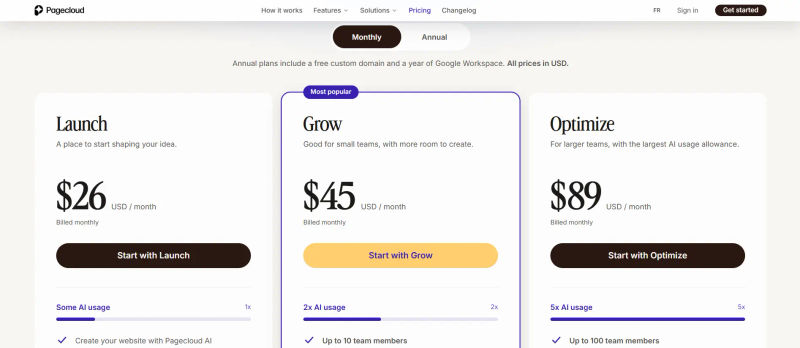
In 2027, Pagecloud has refreshed its pricing tiers to include new AI design capabilities and updated capacity thresholds across two distinct tracks: Website Plans and E-commerce Plans.
Website Plans (Billed Monthly):
Launch ($26/month): Includes 1 site, up to 100 pages, 1,000 form submissions per month, and 2 team members. Perfect for solo entrepreneurs and local services.
Grow ($45/month): Increases limits to 200 pages, 5,000 form submissions, and 10 team members. Ideal for growing agencies needing client handoff tools.
Optimize ($99/month): Offers unlimited pages, 1 TB of bandwidth, unlimited AI design credits, and priority support.
The Value Verdict: Pagecloud is not the cheapest option on the market. However, when you factor in the money saved by not having to hire a web developer to make simple layout changes, the ROI is significant for design-conscious SMBs.
Pagecloud vs. The Competition: Which Should You Choose?
A fair verdict requires comparing Pagecloud with realistic alternatives based on specific use cases. Here is how it stacks up against the heavyweights in 2027.
1. Pagecloud vs Wix 2027 and Pagecloud vs Squarespace
Wix and Squarespace are the undisputed giants of the website builder space, used by a massive portion of the 75% of SMBs that rely on site builders.
Wix offers an incredible array of built-in business tools (CRM, booking systems, restaurant menus) and a massive app market. However, its editor can feel cluttered, and once you choose a template, changing it later is notoriously difficult. In the Pagecloud vs Wix 2027 debate, Pagecloud beats Wix purely on design freedom and a cleaner, less overwhelming interface.
Squarespace is famous for its stunning, out-of-the-box aesthetics. Its Fluid Engine is powerful, but it still forces you into a grid. If you want a beautiful site quickly and don't mind staying within the lines, Squarespace is excellent. In the Pagecloud vs Squarespace matchup, Pagecloud is the superior choice if you find grid constraints frustrating and want to place a button exactly three pixels to the left.
2. Pagecloud vs Webflow for beginners
This is the ultimate "Ease vs. Power" debate. Webflow is an incredibly powerful visual development platform, but it has a notoriously steep learning curve. It requires a fundamental understanding of the CSS box model (margins, padding, flexbox).
If you are a solo entrepreneur with zero coding or web design background, Webflow will likely cause technical overwhelm. When evaluating Pagecloud vs Webflow for beginners, Pagecloud offers 80% of Webflow's visual flexibility with only 20% of the learning curve, making it the better choice for decision-makers who need to launch quickly.
3. Pagecloud vs WordPress for SMBs and Weebly
WordPress powers a massive portion of the internet and offers infinite extensibility. However, evaluating Pagecloud vs WordPress for SMBs comes down to maintenance. WordPress requires managing hosting, updating plugins, and dealing with security vulnerabilities. For an SMB owner who wants a "set it and forget it" SaaS solution, WordPress is often too maintenance-heavy. Pagecloud provides a managed, secure environment out of the box.
Weebly is highly outdated in 2027. Its editor is clunky and lacks modern design features. Pagecloud outperforms Weebly in every conceivable metric, from site speed to visual aesthetics.
4. Shopify and Leadpages vs Pagecloud for landing pages
Shopify is a dedicated e-commerce platform. If your primary goal is to sell hundreds of physical products, Shopify is the undisputed winner. However, if you are a service provider looking for the best Shopify alternatives 2027 because you only sell a few digital downloads or consultation hours, Pagecloud is much easier to manage.
Leadpages is hyper-focused on high-converting landing pages. When comparing Leadpages vs Pagecloud for landing pages, Leadpages offers built-in A/B testing that Pagecloud lacks natively. However, if you need a full, multi-page business website alongside your landing pages, Pagecloud is the more holistic tool.
Migration Ease: Moving to Pagecloud
If you are currently locked into a platform like Wix or WordPress, you might be wondering about migration. As a no-code website builder for entrepreneurs, Pagecloud does not offer a magic "one-click" import button for entire websites due to its unique absolute positioning framework. However, its robust copy-and-paste functionality allows you to highlight text and images from your old live site and paste them directly into the Pagecloud editor, making manual migration significantly faster than traditional rebuilding.
Best Use Cases: When to Choose Pagecloud
Based on our 2027 analysis, Pagecloud is not a one-size-fits-all solution. It is highly specialized for specific types of users.
You should choose Pagecloud if:
You are a creative professional or agency: The absolute positioning allows you to build unique, portfolio-grade websites that stand out from generic, template-driven competitors.
You are a local service provider: Plumbers, consultants, and fitness instructors who need a fast, visually appealing site to capture leads will find Pagecloud incredibly intuitive.
You want to avoid developer costs: If you have a clear vision of what you want your site to look like but lack the coding skills to execute it, Pagecloud empowers you to build it yourself.
Mini Case Studies:
Sarah's Consulting: A local business consultant used Pagecloud to build a custom lead-generation site over a single weekend. By utilizing the Canva-like layers and built-in SEO tools, she avoided a $3,000 agency fee and ranked locally within two months.
Elevate Design Agency: A small creative team uses Pagecloud's absolute positioning to deliver highly custom client portfolios. The source code access provides a safety net, allowing them to deliver premium designs without keeping a full-time frontend developer on payroll.
You should look elsewhere if:
You run a high-volume e-commerce store (choose Shopify).
You need complex, dynamic database content like a real estate listing site (choose Webflow or WordPress).
You want an all-in-one business management suite with built-in CRM and invoicing (choose Wix).
Try AuthenCIO
Move to faster, smarter software evaluation with AI
Final Decision: Should You Build Your Site with Pagecloud?
In 2027, Pagecloud remains one of the most impressive visual website builders on the market for small business owners and solo entrepreneurs. It successfully solves the frustration of rigid templates and technical overwhelm, offering a genuinely enjoyable, creative design experience.
While it requires about 15 to 30 minutes of manual attention for mobile optimization and lacks the deep third-party app ecosystem of Wix or WordPress, its clean code, fast loading speeds, and excellent human support make it a highly scalable choice. If you value design control, brand uniqueness, and independence from expensive web developers, Pagecloud is a phenomenal investment for your business.
Quick-Start Checklist for New Users
If you are ready to make the jump, follow these steps to get started efficiently:
Start the 14-Day Free Trial: Test the waters without entering credit card information.
Pick a Starting Point: Choose a template that closely matches your desired layout, or start from scratch if you have a specific vision.
Migrate Assets: Open your old website (or your branding document) in a separate window and use Pagecloud's copy-and-paste feature to bring over text and images.
Optimize for Mobile: Once your desktop design is complete, spend 20 minutes in the mobile view adjusting the layout for smaller screens.
Connect Your Domain: Use the built-in SEO tools to set up your meta descriptions, connect your custom domain, and hit publish.