
Introduction
Welcome to the high-stakes presentation landscape of the current year. Amidst a tightening 2027 economic climate where every software investment must prove immediate ROI, finding the right interactive presentation software 2027 has become a critical priority for decision-makers.
Streamline your software evaluation process
In a remote-first business and educational environment, audience fatigue—commonly known as "Death by PowerPoint"—remains one of the most significant hurdles. Sales directors are losing high-stakes deals because prospects tune out during linear, static pitch decks. Educators are struggling with student retention in hybrid classrooms where digital distractions are just a click away.
Prezi has long been recognized for breaking the traditional slide format, but the 2027 iteration of the platform introduces advanced AI-driven features, real-time presentation coaching, and seamless virtual integrations that demand a fresh evaluation.
You are no longer just buying a basic design tool; you are investing in a comprehensive communication platform designed to influence buyer psychology, enhance cognitive retention, and seamlessly integrate with your existing tech stack.
Key Takeaways
Dynamic Storytelling: Prezi’s non-linear canvas boosts engagement by allowing presenters to adapt to audience questions in real-time, moving away from rigid slide sequences.
AI Advancements: The 2027 AI features enable rapid conversion of legacy slides into spatial layouts, significantly reducing design time, though minor manual refinement is still required.
Hybrid Optimized: Deep integrations with Zoom and Teams via Prezi Video keep the presenter's face alongside the content, which is crucial for modern sales and teaching.
Enterprise Security: Full GDPR, FERPA, and SOC2 Type II compliance ensures institutional and corporate data remains protected across global networks.
Cost Considerations: While more expensive than basic AI generators, volume discounts and educational grants make the enterprise tiers highly viable for large organizations.
Prezi Review — Dynamic Presentations for Sales and Education
What Makes Prezi Stand Out
Non-linear presentation format: Uses a zoomable canvas that allows presenters to move freely between topics instead of following a traditional slide-by-slide sequence.
Interactive storytelling: Helps presenters connect individual ideas with the bigger picture, making complex subjects easier to explore.
Prezi Video: Combines presentation visuals with the presenter's live video, creating a more engaging experience for virtual meetings and online lessons.
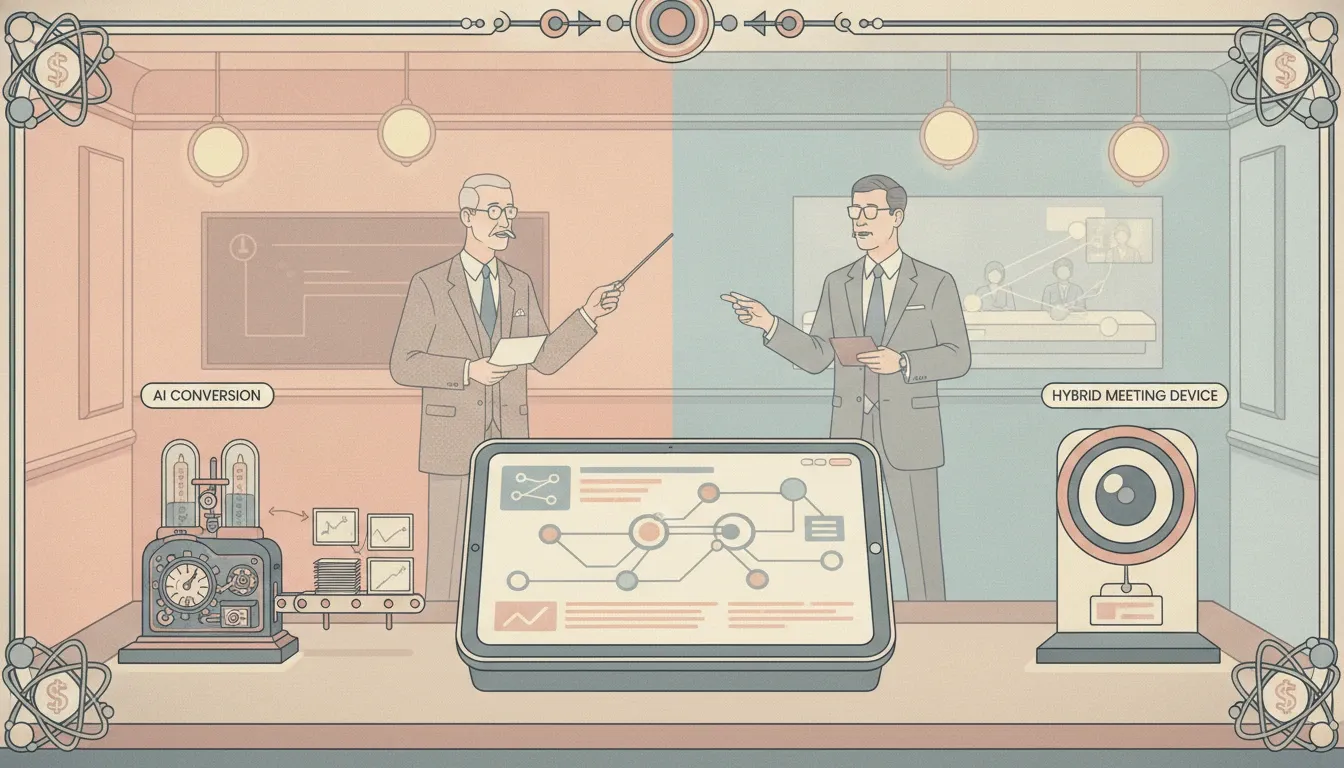
AI-powered slide conversion: Transforms existing PowerPoint and Google Slides presentations into dynamic Prezi layouts, reducing manual design work.
AI presentation coaching: Provides feedback on speaking pace, filler words, and presentation delivery to help users improve their communication.
Audience engagement analytics: Tracks how viewers interact with shared presentations, helping sales teams understand audience interests and improve follow-ups.
Video conferencing integrations: Works with platforms such as Zoom, Microsoft Teams, and Webex to support interactive virtual presentations.
Offline presentation support: Allows users to access downloaded presentations without depending entirely on an active internet connection.
Where It Falls Short
Steep learning curve: Creating and organizing non-linear presentations can take more time than building conventional slide decks.
Motion can become distracting: Excessive zooming and transitions may overwhelm audiences if presentations are not designed carefully.
Limited traditional slide control: Users who prefer precise, slide-by-slide formatting may find the spatial canvas less convenient.
Performance requirements: Complex presentations and live video overlays may require reliable hardware and internet connectivity.
AI output needs refinement: Automatically converted slides and AI-generated layouts may require manual adjustments to achieve the desired presentation quality.
Verdict: Prezi is a distinctive presentation platform that combines interactive storytelling, AI-assisted creation, and live video presentation tools to improve audience engagement.
Best For: Sales teams, educators, trainers, and business professionals who need interactive presentations for virtual meetings, product demonstrations, and classroom teaching.
Software Covered in this Article
To help you understand Prezi in the right context, this overview highlights its key features, capabilities, and use cases.








Prezi vs Leading Presentation Tools
A quick comparison of Prezi’s standout features, pricing, and use cases against popular alternatives.
Tool | Best For | Pricing | Key Features | Use Cases |
Prezi | Non-linear storytelling | Starts from $2/mo | Zooming UI, Prezi Video, AI coaching | Complex sales pitches, virtual classrooms |
Gamma | Rapid AI generation | Starts from $12/mo | Prompt-to-deck AI, modular blocks | Quick internal updates, rapid prototyping |
Beautiful.ai | Enforced design rules | Starts from $12/mo | Smart templates, auto-formatting | Brand-consistent corporate decks |
Pitch | Modern collaboration | Starts from $12/mo | Real-time editing, workflow tracking | Startup pitch decks, team collaboration |
Canva | Versatile graphic design | Starts from $18/mo | Massive asset library, drag-and-drop | Marketing presentations, visual reports |
Microsoft PowerPoint | Enterprise standardization | Starts from $9.99/mo | AI Copilot, deep Office 365 integration | Legacy corporate reporting, offline presenting |
Google Slides | Free cloud collaboration | Free (Workspace) | Seamless G-Suite syncing, web-based | Educational group projects, basic sharing |
Keynote | Apple ecosystem users | Free (Mac/iOS) | Cinematic transitions, sleek UI | High-end keynote speeches, offline use |
*Note: All prices shown reflect typical monthly billing. Vendors often offer lower pricing for annual commitments, but those discounts are excluded here for easier comparison. Actual costs may vary depending on your requirements, usage volumes, and negotiated terms.
Prezi Core Features: What Sets It Apart in 2027?
To understand whether Prezi is worth your budget in 2027, we must first evaluate the core features that differentiate it from standard slide-based platforms. Prezi's architecture is fundamentally built on spatial mapping rather than linear progression, which drastically alters how information is delivered and consumed.
1. The Evolution of the Zooming User Interface (ZUI)
Prezi’s signature Zooming User Interface (ZUI) has matured significantly. In the past, the platform was criticized for excessive spinning and zooming that distracted from the core message.
The 2027 build introduces "Smart Easing," an automated spatial layout engine that ensures transitions are smooth, professional, and cognitively accessible. Instead of clicking from slide 1 to slide 2, presenters map their content on a single, expansive digital canvas. This allows you to zoom into specific data points when requested, or zoom out to show the big picture, creating a highly customized narrative flow.
2. Prezi Video and Hybrid Integration
In 2027, hybrid meetings are the standard, and screen-sharing a deck while your face is relegated to a tiny box in the corner is no longer acceptable.
Prezi Video has evolved to natively overlay your presentation graphics directly alongside your live video feed, without the need for a green screen or complex broadcasting software. This feature integrates flawlessly with Zoom, Microsoft Teams, and Webex, ensuring that the presenter and the content remain unified. This eye-contact retention is critical for building trust during virtual pitches and lectures.
3. Rapid AI Slide Conversion and Coaching
One of the most significant barriers to adopting Prezi has historically been the time-cost of creating visually stunning presentations from scratch. Prezi’s 2027 AI engine directly addresses this pain point.
The automated slide conversion tool allows users to upload legacy PowerPoint or Google Slides files, which the AI then rapidly maps into a dynamic, non-linear Prezi canvas. While not completely "instant"—as it often requires minor manual cleanup to perfect the spatial grouping—it saves hours of design work.
Furthermore, the new real-time presentation coaching feature uses AI to monitor your pacing, track filler words, and suggest engagement pauses during live virtual delivery, acting as an active co-pilot for the presenter.
4. The Learning Curve for Non-Technical Staff
For a non-technical sales hire or educator, the transition from linear slides to a spatial canvas introduces a noticeable learning curve. However, the 2027 interface has streamlined this process.
Basic proficiency—navigating a pre-built template and utilizing Prezi Video—takes approximately two to three hours of dedicated onboarding. Mastering the architectural design of a non-linear canvas from scratch can take up to a week of practice.
To mitigate this, many organizations rely on the rapid AI conversion tool to do the heavy lifting, allowing staff to focus on delivery rather than design mechanics.
Prezi for Sales Directors: Pitching and Closing Deals
For Sales Directors, the primary goal of presentation software is to facilitate a buyer's decision-making process. The "Death by PowerPoint" fatigue directly correlates with lost sales, as prospects disengage during rigid, one-size-fits-all pitches. Prezi's non-linear interface specifically impacts the psychology of a buyer's decision-making by transforming a monologue into a dialogue.
1. The Psychology of Non-Linear Selling
When a prospect asks a specific question about implementation timelines during the middle of a pitch, a linear presentation forces the sales rep to either skip through fifteen slides or awkwardly promise to "get to that later."
Prezi allows the rep to instantly zoom into the implementation section of the canvas, addressing the prospect's immediate concern. This conversational flexibility empowers the buyer to guide the meeting, which psychological studies show significantly increases trust and conversion rates.
2. A 5-Step Implementation Roadmap for Sales Teams
Transitioning a global sales force from traditional slides to Prezi requires a strategic approach. Here is an actionable 5-step roadmap for 2027:
Audit Existing Linear Decks: Evaluate your current PowerPoint assets. Identify the core narrative and the branching paths where prospects typically interrupt to ask questions.
Map the Conversational Flow: Use Prezi’s whiteboard tools to map out a spatial canvas. Group content by topic (e.g., Pricing, Case Studies, Technical Specs) rather than sequential order.
Utilize AI Slide Conversion: Leverage Prezi’s 2027 AI to rapidly convert your audited legacy slides into the new spatial layout, drastically reducing manual design time.
Train on Prezi Video Overlay: Conduct mandatory training for sales reps on how to use Prezi Video. Teach them how to interact with on-screen data while maintaining eye contact with the webcam.
Integrate CRM Analytics: Connect Prezi to Salesforce or HubSpot. Prezi's 2027 analytics suite allows directors to track exactly which parts of the presentation prospects zoomed into and where drop-off points occurred, enabling data-driven deck optimization.
3. Asynchronous Sales Delivery and Analytics
Not every pitch happens live. In 2027, asynchronous sales motions are heavily relied upon to keep momentum between meetings. Prezi addresses this by allowing reps to send secure, trackable links to prospects for self-guided viewing.
Unlike a static PDF, a shared Prezi allows the prospect to explore the canvas at their own pace. More importantly, the integrated analytics dashboard tracks exactly which sections the prospect zoomed into, how much time they spent on pricing versus technical specs, and where they dropped off. This behavioral data is invaluable for tailoring the follow-up conversation.
4. Managing Brand Identity and ROI
Managing a consistent brand identity across a global sales force is effortless with Prezi's enterprise tier, which locks in brand colors, fonts, and approved assets.
Furthermore, the ROI on interactive presentations can be directly measured through integrated analytics, showing higher engagement times and faster deal closures compared to A/B tested linear presentations.
Find Perfect Software For Your Business
Prezi for Educators: Keeping Virtual Classrooms Engaged
Educators face a uniquely challenging environment in 2027. With the normalization of remote and hybrid learning, keeping students engaged requires more than just screen-sharing bullet points. Prezi offers distinct visual learning benefits that directly impact student test scores and information retention.
1. Cognitive Load and Information Retention
The non-linear zoom interface specifically impacts information retention by leveraging spatial memory. When students see how a micro-concept (like a specific historical event) fits into a macro-concept (like a broader historical timeline) on a single canvas, their cognitive load is reduced.
They aren't trying to remember what was on the previous slide; they can visually see the relationship between data points. Case studies from leading universities in 2027 demonstrate that this spatial relationship mapping leads to higher engagement and better test outcomes compared to traditional slides.
2. Accessibility and WCAG 2.3 Compliance
A non-negotiable requirement for educational institutions in 2027 is strict adherence to accessibility standards. Historically, Prezi faced criticism for causing "motion sickness" and lacking screen reader support.
The 2027 build completely overhauls its accessibility engine, achieving full WCAG 2.3 compliance. The platform now supports robust keyboard-only navigation, allowing students with motor disabilities to tab through spatial nodes seamlessly.
Furthermore, AI-generated alt-text for visual elements ensures compatibility with modern screen readers. The automated "Smart Easing" algorithm also strictly limits transition speeds and eliminates jarring rotations, providing a comfortable, accessible viewing experience for all students.
3. Hardware and Bandwidth Requirements Checklist
To ensure lag-free 2027 virtual streaming in a classroom setting, educators and institutions must meet specific technical requirements. Prezi Video is powerful, but it requires adequate infrastructure:
Bandwidth: A minimum of 50 Mbps upload speed is recommended for seamless, real-time video overlay broadcasting.
Processing Power: A dedicated GPU (Graphics Processing Unit) or a modern integrated chip (like Apple Silicon M3/M4 or Intel Core Ultra) is necessary to render spatial transitions without dropping frames.
Display Setup: A dual-monitor setup is highly recommended, allowing the educator to view the Prezi spatial map on one screen while monitoring the student video gallery on the other.
Integration: Ensure your institution's LMS (Learning Management System), such as Canvas or Blackboard, supports LTI (Learning Tools Interoperability) 1.3 for seamless Prezi embedding.
Data Security, Privacy, and Compliance
For enterprise sales directors and university IT administrators, software cannot be adopted without rigorous security future-proofing. Prezi’s 2027 Enterprise architecture is built with strict compliance in mind, addressing the vulnerabilities often found in newer AI-first startups.
Prezi is fully GDPR compliant, ensuring that European user data is handled with the strictest privacy protocols. For educational institutions, the platform adheres to FERPA regulations, meaning student data and asynchronous viewing analytics are securely encrypted and never sold to third parties.
Additionally, Prezi holds SOC2 Type II certification, providing corporate IT departments with the necessary audits to prove that their cloud infrastructure is secure against breaches.
For traveling sales reps or educators operating in low-bandwidth environments, Prezi’s offline performance remains highly reliable. The desktop application allows users to download the full spatial canvas locally, ensuring that a critical pitch or lecture is never derailed by a sudden internet outage.
Once a connection is re-established, any asynchronous tracking data or collaborative edits automatically sync to the cloud.
Prezi Pricing and Value for Money
When evaluating Prezi in 2027, decision-makers must conduct a rigorous cost-benefit analysis. Prezi operates on a freemium model, but the features required for professional sales and educational environments are gated behind paid tiers.
2027 Pricing Breakdown
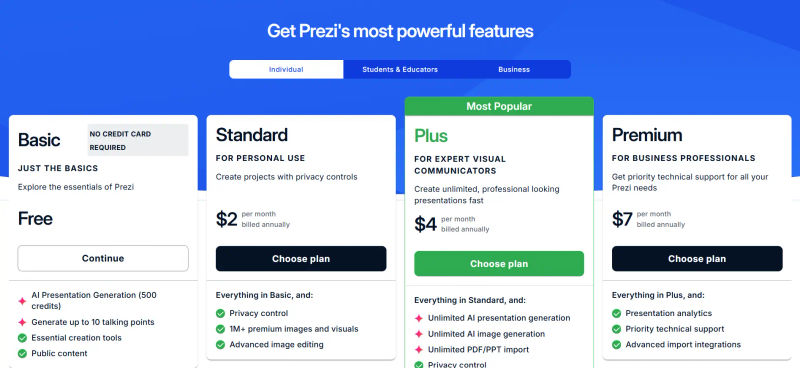
Standard Tier ($2/month): Ideal for individual users. It includes unlimited presentations, basic privacy controls, and access to the core zooming interface. However, it lacks advanced analytics and offline capabilities.
Plus Tier ($4/month): The sweet spot for independent educators and solo sales professionals. It unlocks Prezi Video, offline mode reliability, and presenter notes.
Premium Tier ($7/month): Designed for power users. It includes advanced presentation analytics (crucial for tracking prospect engagement), premium AI generation limits, and comprehensive training resources.
Teams/Enterprise Tier (Custom Pricing): Essential for Sales Directors and university departments. This tier provides centralized billing, advanced CRM/LMS integrations, custom branding locks, and enterprise-grade data security. Importantly, Prezi offers significant volume-based enterprise discounts and substantial educational/non-profit grants, making this tier much more accessible for large deployments than the sticker price suggests.
Is the Investment Justified?
Compared to free tools like Google Slides or lower-cost AI generators like Gamma, Prezi represents a higher upfront investment. However, the ROI is justified when you factor in the time saved in content creation via AI, and the measurable increase in audience engagement.
If your team is delivering high-stakes pitches where a single closed deal pays for the software license tenfold, the Premium or Enterprise tiers are highly cost-effective. Conversely, if your team only needs to deliver internal, low-stakes updates, a free or lower-cost alternative might be more appropriate.
Prezi Alternatives 2027: AI and Traditional Competitors
To make an informed purchasing decision in 2027, you must evaluate Prezi side-by-side with the broader competitive landscape. The market is currently divided into three categories: AI-first generators, design powerhouses, and legacy standards.
1. Prezi vs. Gamma
Gamma has emerged as a dominant force in 2027 for rapid deck creation. Using a prompt-to-deck AI model, Gamma can generate a fully formatted presentation in seconds. It is unparalleled for speed and internal reporting.
However, Gamma relies on a modular, block-based design that is fundamentally linear. It cannot replicate Prezi's spatial storytelling or provide the conversational flexibility required during a live, unpredictable sales pitch.
2. Prezi vs. Beautiful.ai
Beautiful.ai focuses on enforcing strict design rules. It prevents users from making "ugly" slides by automatically formatting content as it is added. It is the perfect tool for ensuring brand consistency across a large, design-illiterate workforce.
Yet, like Gamma, it lacks the dynamic video overlay and non-linear zooming capabilities that make Prezi a powerhouse for hybrid engagement.
3. Prezi vs. Canva
Canva is the undisputed king of versatile graphic design. Its massive asset library and intuitive drag-and-drop interface make it incredibly easy to build visually stunning slides. Canva is ideal for marketing teams and social media managers.
However, its presentation mode is relatively basic compared to Prezi, lacking advanced CRM integrations, asynchronous viewer tracking, and the sophisticated presenter video overlays required for high-end B2B sales.
4. Prezi vs. Pitch
Pitch is designed for modern, asynchronous team collaboration. It excels in startup environments where multiple stakeholders need to edit a deck simultaneously, offering robust workflow tracking and modern templates.
While Pitch is highly collaborative, it still adheres to a traditional slide-by-slide format, missing the cognitive benefits of Prezi's spatial mapping.
5. Prezi vs. Microsoft PowerPoint
Microsoft PowerPoint remains the enterprise standard. In 2027, PowerPoint’s integration with AI Copilot has made it significantly more efficient for generating basic outlines, and its offline reliability is unmatched.
However, PowerPoint is the very definition of linear presenting. If your goal is to break the "Death by PowerPoint" fatigue, using a slightly more efficient version of PowerPoint will not solve the underlying engagement problem.
6. Prezi vs. Google Slides
Google Slides is the ultimate tool for free, frictionless cloud collaboration. It is perfect for student group projects and basic internal sharing.
However, it lacks nearly all the advanced features—AI coaching, video overlays, and non-linear navigation—that professional presenters require to capture attention in a hybrid setting.
7. Prezi vs. Keynote
Keynote offers sleek, cinematic transitions and is deeply integrated into the Apple ecosystem. It is an excellent choice for high-end keynote speeches delivered on a physical stage.
But for virtual, hybrid sales environments that require cross-platform compatibility and CRM tracking, Keynote is too isolated and linear compared to Prezi.
Try AuthenCIO
Move to faster, smarter software evaluation with AI
Final Verdict: Should You Buy Prezi in 2027?
Choosing the right presentation software in 2027 depends entirely on your specific use case, audience, and the stakes of your delivery.
If your primary goal is rapid content generation for internal meetings, or if you simply need to enforce brand consistency across basic slide decks, AI-first tools like Gamma or Beautiful.ai are likely the better, more efficient choice. If you are deeply entrenched in the Microsoft ecosystem and require standardized corporate reporting, PowerPoint remains the logical default.
However, if you are a Sales Director responsible for closing high-value B2B deals, or an Educator tasked with maintaining student retention in a hybrid environment, Prezi is arguably the most powerful tool on the market.
Its 2027 updates—specifically the rapid AI slide conversion, the flawless Prezi Video overlay, and the non-linear conversational interface—directly solve the problem of audience fatigue. By empowering the presenter to navigate seamlessly through complex spatial data, Prezi transforms passive viewers into active participants, making it a highly recommended investment for decision-makers focused on engagement and ROI.
Next Steps: We recommend initiating a 14-day pilot program with a small cohort of your top-performing sales reps or tech-savvy educators. Have them convert one existing linear deck into a Prezi spatial canvas and A/B test the engagement metrics against your current software.