
Introduction
When evaluating cloud communications software pricing in 2027, expect to pay anywhere from $15 to $120+ per user per month. Finding the best CRM-integrated dialer requires moving beyond basic seat licenses to assess total operational value and hidden usage fees.
Streamline your software evaluation process
With average outbound connect rates dropping below 4% and software bloat becoming a major CFO concern, sales directors must prioritize workflow efficiency, AI capabilities, and CRM data integrity over simply finding the lowest monthly subscription.
Furthermore, the 2027 regulatory environment—specifically the strict enforcement of advanced STIR/SHAKEN protocols—and the rise of hybrid AI-SDR agents mean your dialer must be a sophisticated compliance and automation engine.
Kixie has established itself as a premium solution, but justifying its cost to finance departments requires a granular understanding of its features-to-price ratio compared to the broader market.
This guide breaks down Kixie’s pricing tiers and compares them directly against top competitors. By analyzing hidden costs, plan limitations, and specific use cases, you can determine exactly which outbound dialer will maximize your return on investment.
Plan | Best For | Pricing (USD $) | Limitations |
Kixie | High-volume outbound sales teams needing deep CRM automation | Custom Pricing | Advanced bi-directional CRM sync and local presence require premium tiers. |
CloudTalk | International sales teams requiring localized global presence | $25 - $50+ / user / month | Advanced AI routing and sentiment analysis restricted to custom enterprise plans. |
CallHippo | Growth marketers needing rapid deployment for scaling SDRs | $20 - $40+ / user / month | Carrier fees and international rates can inflate costs at high volumes. |
KrispCall | Budget-conscious, lean sales teams needing reliable VoIP | $15 - $40+ / user / month | Lacks the advanced AI coaching and parallel dialing features of premium tools. |
Calilio | Startups requiring basic VoIP and simple CRM logging | $12 - $30+ / user / month | Limited enterprise-grade routing capabilities and complex CRM workflow triggers. |
Dialpad | AI-driven sales teams prioritizing live coaching and insights | $25 - $75+ / user / month | Complex deployment and potential API overhead for legacy CRM systems. |
RingCentral | Enterprise operations needing unified communications (UCaaS) | $30 - $60+ / user / month | Steeper learning curve and a heavier interface not optimized purely for outbound velocity. |
Aircall | Teams balancing outbound sales with heavy inbound helpdesk use | $30 - $50+ / user / month | Power dialing is often treated as a premium add-on, increasing base costs. |
*Note: All prices shown reflect typical monthly billing. Vendors often offer lower pricing for annual commitments, but those discounts are excluded here for easier comparison. Actual costs may vary depending on your requirements, usage volumes, and negotiated terms.
Key Takeaways: Cloud Communications Software Pricing
Tiered structures dominate: Cloud communications software pricing in 2027 typically ranges from $15 to $30 per user per month for basic VoIP, scaling up to $60 to $100+ for advanced CRM-integrated dialers with AI features like Kixie or Dialpad.
Hidden costs add up: Beyond the base subscription, budget for per-minute international calling rates, premium CRM integration fees (such as Salesforce or HubSpot), and mandatory onboarding packages.
Top recommendations by use case: Kixie remains a powerhouse for high-volume local presence dialing; CloudTalk and CallHippo excel for international sales; while KrispCall offers the best entry-level pricing for lean startups.
Justifying the ROI: To get CFO approval, align the software's automation capabilities (like voicemail drop and auto-dialing) directly with projected increases in sales rep connect rates and saved labor hours.
Software Covered in this Article
The following articles break down the key aspects of Cloud Communications Software, featuring a carefully curated set of key players:






Kixie Pricing Tiers 2027: What Do You Actually Get?
Who is this best for? Kixie is best for high-volume outbound sales teams that rely heavily on automated dialing, local presence, and advanced CRM workflows to drive revenue.
When analyzing Kixie’s 2027 pricing structure, decision-makers must evaluate the Total Cost of Ownership (TCO) against the operational time saved.
With cloud-based deployments representing over 78% of sales-engagement software revenue, Kixie’s cloud-native architecture integrates deeply with major CRMs like Salesforce, HubSpot, and Pipedrive.
Find Perfect Software for Your Business
However, the value you extract depends entirely on the tier you select and the technical resources you have available.
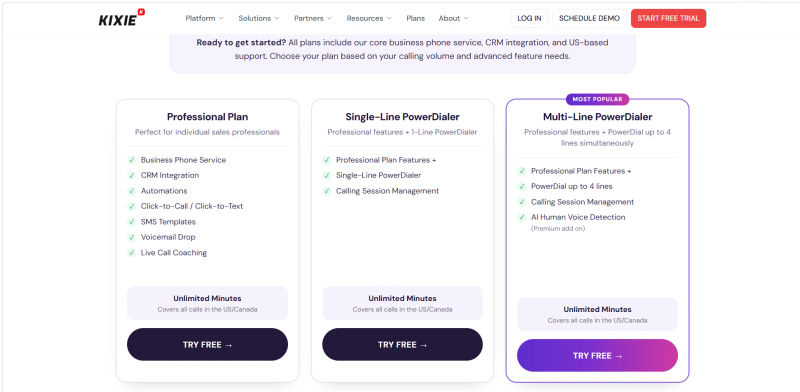
Kixie Cost Per User and Plan Breakdown
To accurately forecast your Kixie cost per user within the broader cloud communications software market, you must look beyond the base subscription and evaluate the specific features unlocked at each tier.
1. The Professional Plan: The Entry-Level Option
The Professional tier serves as Kixie's entry-level offering, providing standard VoIP functionality, click-to-call capabilities, and basic call logging.
While it offers a reliable connection, it lacks some of the advanced automation that modern sales teams may require. For teams of 20+ SDRs, the Professional plan can result in manual data entry, potentially limiting the efficiency gains expected from a modern dialer. A major limitation for growth marketers is its inability to map to custom CRM objects. If your team relies on complex workflow triggers in HubSpot or highly customized data architectures in Salesforce, this tier may feel restrictive and require manual workarounds.
2. The Integrated Plan: The Sweet Spot for ROI
The Integrated plan builds on the Professional tier with advanced capabilities that make Kixie a more comprehensive cloud communications solution. Pricing is available through Kixie's custom pricing structure.
This tier includes two-way CRM synchronization, meaning call outcomes, recordings, and notes are automatically logged into the correct CRM fields without manual intervention. It also introduces Power Dialing and Voicemail Drop. Automating repetitive tasks such as dialing the next number and leaving voicemails allows sales representatives to spend more time on live conversations.
Furthermore, Local Presence—a feature that dynamically matches your caller ID to the prospect's area code—can help improve the likelihood of prospects answering calls. These capabilities make the Integrated plan worth considering for sales teams looking to improve calling efficiency and CRM data management.
3. The Enterprise Plan: Built for Scale and AI Automation
Kixie's Enterprise tier follows a custom pricing model and is designed for large-scale operations requiring Parallel Dialing and advanced AI features.
Parallel dialing allows reps to dial up to 10 numbers simultaneously, connecting them to the first person who answers while dropping the other lines. For high-volume outbound sales teams, this can help increase calling efficiency and connect rates. Additionally, the Enterprise tier offers advanced capabilities such as automated lead routing, real-time sentiment analysis, and next-best-action recommendations.
Integration Friction and Technical Overhead
Regardless of the tier, decision-makers must account for integration friction. While Kixie offers native integrations, mapping custom CRM fields, configuring bidirectional syncs for historical data, and setting up complex routing rules can take time. For enterprise deployments, teams should plan for dedicated sales operations or IT resources during implementation to ensure the data architecture remains intact during high-volume outreach.CloudTalk vs. CallHippo: Best Alternatives for High-Volume Global Sales
While Kixie excels in CRM automation, competitors like CloudTalk and CallHippo offer distinct advantages for teams with specific geographical or deployment needs.
1. CloudTalk: Best for International Sales Teams
Who is this best for? CloudTalk is best for global sales teams that require localized numbers in over 160 countries and highly customizable call routing architectures.
Priced between $25 and $50+ per user per month, CloudTalk is engineered for international reach.
If your sales organization operates across North America, Europe, and APAC, managing telecom regulations and international calling rates becomes a primary financial concern.
CloudTalk simplifies this by offering an expansive inventory of international numbers and transparent per-minute rates.
Compared to Kixie, CloudTalk’s CRM integrations are robust, offering native syncs with tools like Pipedrive and Salesforce.
However, its advanced AI features are often gated behind custom enterprise contracts.
Additionally, when evaluating CloudTalk, factor in the quality of customer support; global teams operating across time zones require 24/7 technical assistance, as the cost of idle SDRs during a localized outage quickly exceeds the monthly software savings.
2. CallHippo: Best for Rapid Deployment and Scaling
Who is this best for? CallHippo is best for growth marketers and sales directors who need rapid deployment, easy onboarding, and immediate analytics for rapidly scaling SDR teams.
CallHippo’s pricing structure ($20 to $40+ per user per month) is highly attractive for mid-market B2B SaaS companies scaling from 10 to 50+ seats.
Its interface is notoriously user-friendly, allowing sales ops leaders to provision numbers, set up ring groups, and integrate with standard CRMs in a matter of hours.
This technical implementation timeline is critical for teams that need to realize ROI immediately after the initial setup.
However, CallHippo’s limitations become apparent at the enterprise level.
High-volume teams may find that carrier fees and usage rates inflate the monthly bill.
Furthermore, while CallHippo offers responsive customer support during onboarding, its bi-directional CRM sync is less sophisticated than Kixie’s Integrated plan, which can lead to data silos if your SDRs are executing highly complex, multi-touch cadences.
3. KrispCall and Calilio: Budget-Friendly Dialers for Growing Teams
Not every sales team requires parallel dialing or AI-driven sentiment analysis.
However, for high-volume outbound decision-makers, these tools serve primarily as stepping stones rather than permanent enterprise solutions.
KrispCall: Best for Budget-Conscious Lean Teams
Who is this best for? KrispCall is best for budget-conscious, lean sales teams that need reliable VoIP, unified callboxes, and basic CRM integrations without enterprise bloat.
KrispCall disrupts the market with aggressive pricing, typically ranging from $15 to $40 per user per month.
It provides a unified workspace where sales reps can manage calls, SMS, and voicemails from a single dashboard.
For teams that use cold calling as a secondary channel, KrispCall offers exceptional value.
The trade-off comes in the form of advanced automation.
KrispCall lacks the sophisticated power dialing algorithms and deep, custom-object CRM syncing found in Kixie.
If your strategy relies on burning through hundreds of numbers a day, the lack of automation will ultimately cost more in wasted labor hours.
Calilio: Best for Startups Needing Core VoIP
Who is this best for? Calilio is best for startups and small businesses looking for core VoIP functionality, basic CRM logging, and modern communication tools at the lowest entry price.
Starting as low as $12 to $30 per user per month, Calilio is designed for simplicity.
It allows new businesses to establish a professional phone presence instantly.
While it supports basic integrations, it is not a dedicated sales engagement platform.
Sales directors analyzing outbound dialing plans will quickly realize that Calilio does not offer the local presence, voicemail drop, or AI analytics required to compete in a high-volume outbound environment.
Join over 10,000+ businesses making smarter tech decisions by using AuthenCIO's free platform.
4. Dialpad vs. RingCentral: Enterprise-Grade AI and Unified Communications
When evaluating dialers for large organizations, the conversation often shifts from pure outbound sales velocity to broader organizational communication and artificial intelligence.
Dialpad: Best for AI-Driven Sales Insights
Who is this best for? Dialpad is best for AI-driven sales teams that prioritize live coaching, real-time sentiment analysis, and automated transcription to improve rep performance.
Dialpad’s pricing ($25 to $75+ per user per month) is heavily tied to its proprietary Voice Intelligence (Vi) technology.
In 2027, AI is a baseline expectation, but Dialpad executes it flawlessly.
During a live call, Dialpad can detect prospect sentiment, pop up battle cards when competitors are mentioned, and automatically transcribe the conversation for the CRM.
For a Sales Director focused on reducing ramp time for new hires, Dialpad’s live coaching features are invaluable.
However, decision-makers must account for API overhead.
Connecting Dialpad's advanced AI transcription and sentiment data to older, legacy CRM setups often requires custom middleware or expensive API calls, which can inflate the TCO.
Furthermore, while Kixie is built to maximize the quantity of connections through power and parallel dialing, Dialpad is built to maximize the quality of the connection once the prospect answers.
RingCentral: Best for Unified Communications
Who is this best for? RingCentral is best for enterprise operations that require a unified communications (UCaaS) platform combining video, messaging, and dialing in one secure ecosystem.
RingCentral ($30 to $60+ per user per month) is a legacy giant that has successfully transitioned into the 2027 cloud era.
It offers unparalleled reliability, massive scalability, and compliance certifications that satisfy the most stringent IT departments.
However, from a pure outbound sales perspective, RingCentral can feel heavy.
Its interface is designed for company-wide communication, not specifically for SDR workflows.
While it integrates with Salesforce and HubSpot, setting up complex sales cadences and power dialing campaigns often requires third-party add-ons or custom API development.
Kixie, by contrast, is purpose-built for the sales floor, offering a much faster time-to-value for outbound campaigns.
5. Aircall: The Best Dialer for Seamless Helpdesk and CRM Syncing
Who is this best for? Aircall is best for teams that balance outbound sales with heavy inbound support, requiring flawless, out-of-the-box integration with platforms like Zendesk, HubSpot, and Salesforce.
Priced between $30 and $50+ per user per month, Aircall is renowned for its app ecosystem.
If your organization relies heavily on a tightly integrated tech stack, Aircall’s API documentation and native integrations are best-in-class.
Aircall logs activities perfectly, ensuring that marketing, sales, and customer success teams all have visibility into the customer’s communication history.
For outbound sales, however, Aircall has limitations.
Power dialing is available, but it is often treated as a premium feature or requires integration with a third-party tool.
Aircall focuses heavily on call quality, routing, and collaborative team features (like shared inboxes and warm transfers).
If your sales strategy requires reps to dial 150+ numbers a day, Kixie’s native parallel dialing and local presence features will yield a higher ROI than Aircall’s standard outbound capabilities.
Hidden Costs to Watch Out For in 2027 Dialer Pricing
When evaluating cloud communications software pricing, the advertised per-user rate rarely reflects the Total Cost of Ownership (TCO). To avoid sticker shock and accurately budget for tools like Kixie or its competitors, sales directors must account for hidden infrastructure, API, and compliance costs.
CRM API Overhead and Premium Editions Deep CRM integration drives sales efficiency, but it often triggers hidden costs on the CRM side. Syncing custom objects or logging massive call volumes can force an upgrade to premium CRM tiers (like Salesforce Enterprise or HubSpot Sales Hub Professional). Additionally, some dialers impose API overhead fees once you exceed monthly call-logging thresholds. Always audit your CRM license limits before committing to a premium dialer tier.
Telecom Compliance Fees and Usage Rates While many plans offer "unlimited" US and Canada calling, international rates vary wildly. If your team dials into Europe or APAC, per-minute charges can quickly double your monthly bill. Furthermore, strict 2027 telecom regulations (like evolved STIR/SHAKEN protocols) require active caller reputation management to prevent numbers from being flagged as "Scam Likely." Many vendors now pass telecom compliance fees onto the customer or charge premium add-on rates for automated number rotation and caller ID management.
Local Presence and Premium Add-ons Local presence boosts connect rates by matching the prospect's area code, which requires maintaining a massive pool of local numbers. While Kixie includes this in its Integrated tier, competitors often treat it as a paid add-on, charging monthly per-number rental fees that quickly inflate overall cloud communications software pricing.
Implementation Fees, Onboarding, and Seat Minimums Pay close attention to contract structures and initial setup requirements. Enterprise deployments for platforms like Dialpad, RingCentral, or Kixie's highest tiers often carry mandatory, one-time implementation and onboarding fees for system configuration, custom field mapping, and staff training. Furthermore, vendors frequently advertise low monthly rates that require annual, upfront commitments with strict seat minimums. If your SDR team experiences high turnover or seasonal shifts, paying annually for seats that sit empty will destroy your ROI.
Decision Matrix: Justifying Your Dialer Choice to the CFO
To secure budget approval, sales directors need a structured way to present the Total Cost of Ownership and projected ROI to their finance departments.
Use this decision matrix checklist to evaluate your final options:
Calculate True Cost Per Seat: Add the base subscription, estimated per-minute overages, local presence number rentals, and required CRM upgrade costs.
Evaluate Integration Friction: Quantify the IT hours required to map custom CRM objects and set up bidirectional syncing.
Assess AI Capabilities vs. Needs: Determine if you are paying for AI transcription and sentiment analysis (Dialpad) when your team only needs high-velocity parallel dialing (Kixie).
Factor in Team Churn: Weigh the discount of an annual contract against the financial risk of unused licenses due to seat minimums.
Review Compliance Infrastructure: Ensure the vendor includes automated STIR/SHAKEN compliance and caller ID reputation management without exorbitant upcharges.
Try AuthenCIO
Move to faster, smarter software evaluation with AI
Final Verdict: Which CRM-Integrated Dialer Should You Choose?
Navigating cloud communications software pricing requires aligning a platform's core strengths with your operational needs, expected ROI, and total cost of ownership (TCO). There is no single "best" tool; there is only the best pricing plan for your specific sales bottlenecks.
If your primary goal is maximizing outbound velocity through power dialing, local presence, and flawless bi-directional CRM syncing, Kixie’s Integrated or Enterprise plans offer the highest ROI. While the Kixie cost per user is a premium investment, it is purpose-built to automate the tedious aspects of prospecting, allowing reps to focus on selling.
For other operational needs, consider these alternatives:
Dialpad: The superior choice if your team struggles with pitch execution and requires real-time AI coaching.
CloudTalk: Provides the necessary infrastructure if you manage a global, distributed workforce needing complex international routing.
KrispCall and Calilio: Offer the most cost-effective cloud communications software pricing plans for lean operations on a strict budget, providing reliable connectivity without the premium price tag.
Ultimately, the most expensive dialer is the one that your team doesn't fully utilize. Audit your CRM data needs, calculate your true TCO including telecom fees and implementation costs, and select the platform that directly reduces your cost-per-qualified-meeting.