
Introduction
Introduction and the 2027 Sales Engagement Landscape
When conducting a cloud communications software review in 2027, Revenue Operations (RevOps) leaders must evaluate tools against unprecedented outbound sales challenges. Between advanced 10DLC (10-Digit Long Code) enforcement, strict global compliance regulations, and aggressive algorithmic carrier spam filtering, standard VoIP systems are no longer viable. The modern cloud communications software landscape requires sophisticated sales engagement platforms that bridge the gap between raw dialing and intelligent, automated CRM workflows.
Streamline your software evaluation process
For Sales Directors and RevOps teams, the primary pain points driving software migration are costly: high "Spam Likely" flagging that destroys outbound connect rates, inaccurate CRM data from manual logging failures, and the steep learning curve for new Sales Development Representatives (SDRs). Decision-makers need platforms offering deep, bi-directional CRM sync, multi-channel attribution, and AI-orchestrated outbound sequences.
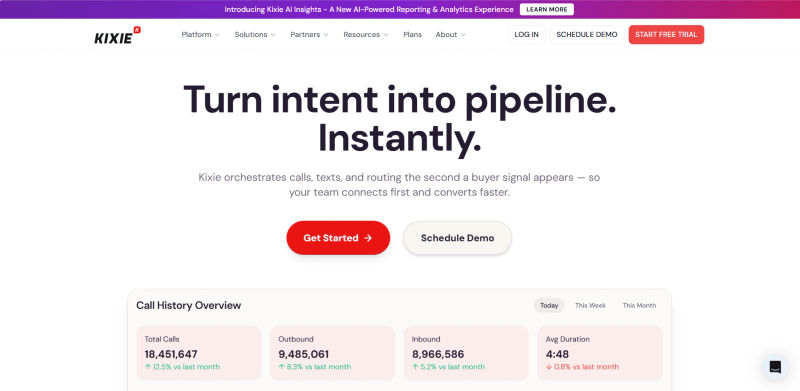
Kixie has established itself as a prominent solution in this space, focusing heavily on its PowerCall dialer and native CRM integrations. But as the market floods with unified communication giants and nimble, AI-first startups, is Kixie still the right choice? This comprehensive Kixie review strips away the marketing jargon to evaluate its technical performance, CRM latency, pricing ROI, and how it stacks up against top competitors. If your goal is to boost outbound calling and texting performance while maintaining absolute data integrity in your CRM, read on to determine if Kixie is the right investment for your tech stack.
Key Takeaways: Kixie Cloud Communications Review
Kixie remains a top-tier sales dialer in 2027, specifically engineered for RevOps teams prioritizing deep CRM integration and high call connection rates. It is not a basic VoIP replacement, but rather a dedicated sales engagement engine built to drive outbound revenue.
The Pros:
Unmatched CRM Sync: Bi-directional integration with HubSpot and Salesforce is near-instantaneous, eliminating manual data entry and ensuring accurate multi-channel attribution.
Connection Boost: Kixie's local presence dialing effectively bypasses 2027's aggressive carrier spam filters, significantly increasing live pickup rates.
Advanced Automation: 2nd-generation AI voice and SMS workflows allow teams to build sophisticated, trigger-based cadences directly within their CRM.
The Cons:
Steep Learning Curve: The sheer volume of features requires dedicated onboarding, making it overwhelming for teams without a structured RevOps process.
Premium Pricing: Kixie is an expensive solution compared to legacy VoIP providers, making it harder to justify for small businesses without high outbound call volumes.
The Bottom Line: If your sales team relies heavily on outbound calling and uses HubSpot or Salesforce, Kixie's ROI easily justifies the premium cost. However, casual users or inbound-only support teams will find better value in simpler alternatives.
Kixie Alternatives and Review Summary Table
Tool | Best For | Typical Mid-Tier Pricing (USD $) | Primary Native CRM | Key Features | Use Cases |
Kixie | High-volume outbound & deep CRM sync | Custom | HubSpot, Salesforce | PowerCall, Connection Boost, AI coaching | Outbound SDR teams, RevOps data automation |
CloudTalk | International calling & ease of use | $40/user/mo | Pipedrive, Zendesk | Global number routing, intelligent call routing | European markets, multi-lingual support teams |
Dialpad | Unified enterprise communications | $25/user/mo | Salesforce | Voice Intelligence (Vi), video meetings | Internal enterprise comms, blended inbound/outbound |
Aircall | Quick setup & app ecosystem | $40/user/mo | HubSpot | 100+ integrations, shared inboxes | Mid-market support and sales, HubSpot users |
RingCentral | Legacy enterprise stability | $30/user/mo | Salesforce | 99.999% uptime, PBX features | Large-scale corporate deployments, compliance |
CallHippo | Budget-friendly scaling | $25/user/mo | Zoho, HubSpot | Global connect, call tracking | Startups, small outbound teams scaling up |
KrispCall | Nimble multi-workspace management | $20/user/mo | HubSpot | Unified callbox, global numbers | Agencies, distributed remote teams |
Calilio | Modern, lightweight VoIP | $15/user/mo | Basic Webhooks | Unified communications, basic SMS | Small businesses needing simple voice/SMS |
*Note: All prices shown reflect typical monthly billing. Vendors often offer lower pricing for annual commitments, but those discounts are excluded here for easier comparison. Actual costs may vary depending on your requirements, usage volumes, and negotiated terms.
Thinking about Kixie for CRM-integrated dialing? Use AuthenCIO to compare it with other sales tools.
Software Covered in this Article
The following articles break down the key aspects of Cloud Communications Software, featuring a carefully curated set of key players:







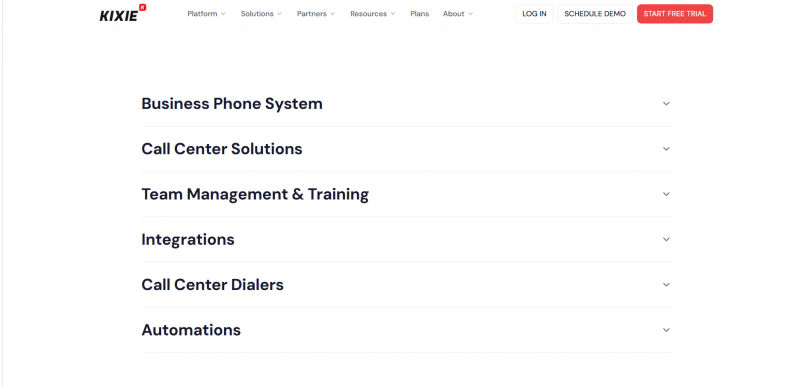
Deep Dive: Kixie Core Features and CRM Integration
To understand Kixie's value proposition in 2027, we must look beyond surface-level feature lists and examine the technical mechanics of its platform, specifically how it interacts with enterprise CRMs and modern telecom infrastructure.
1. Granular Breakdown of Bi-Directional CRM Sync Latency
For high-volume environments, CRM sync latency is a critical metric. When an SDR logs a call, drops a voicemail, or sends an SMS, that activity must reflect in the CRM instantly. If there is a delay of even a few minutes, automated workflows can misfire, or worse, another rep might call the same lead, resulting in a poor customer experience.
Kixie’s architecture in 2027 excels in this area, offering sub-second API webhooks specifically optimized for Salesforce, HubSpot, and Pipedrive. By bypassing standard API bottlenecking and utilizing direct data mapping, Kixie ensures that call activities, recordings, and AI-generated transcripts are pushed to the CRM without delay.
2. Multi-Channel Attribution in Salesforce and HubSpot
One of the most significant upgrades in Kixie's recent iterations is its handling of multi-channel attribution. RevOps leaders need to prove the ROI of multi-threading, which requires granular data logging.
Salesforce Integration: When an SMS is sent or received, Kixie doesn't just log a generic activity. It maps the interaction directly to the active Salesforce Campaign and nests it under the specific Opportunity timeline. If a prospect replies to an automated text, Kixie can trigger a Salesforce Flow to instantly change the lead status and alert the assigned account executive, ensuring no cross-channel context is lost.
HubSpot Integration: The automated power dialer for HubSpot remains one of Kixie's strongest deployments. The bi-directional sync ensures that when a lead's lifecycle stage changes in HubSpot, Kixie instantly updates the lead's status in the dialing queue. This eliminates the manual list-scrubbing that traditionally plagues outbound operations.
3. Defeating 2027 Carrier Filters with Connection Boost
With the evolution of STIR/SHAKEN regulations and aggressive carrier algorithms, standard local presence dialing is no longer enough. Carriers now analyze call volume, duration, and behavioral patterns to flag numbers as "Spam Likely."
Kixie addresses this with its proprietary "Connection Boost" technology. Unlike basic local presence tools that simply spoof an area code, Connection Boost actively manages a pool of thousands of localized, 10DLC-registered numbers, rotating them based on algorithmic health scores. If a number’s connection rate drops below a specific threshold, Kixie automatically quarantines it and cycles in a fresh number. Data indicates that teams utilizing Connection Boost experience a significantly higher pickup rate compared to static VoIP lines.
4. 2nd-Generation AI Voice Features and SMS Automation
The shift from manual dialing to AI-orchestrated outbound sequences is fully realized in Kixie's 2027 PowerCall extension, which now includes 2nd-generation AI voice features designed specifically for live coaching.
Real-Time Sentiment Analysis: As a call progresses, Kixie's AI analyzes the prospect's tone and pacing. Crucially for global teams, this sentiment analysis now supports multi-language environments, including Spanish, French, and German. If the prospect exhibits high friction, the system provides visual cues prompting the rep to slow down or pivot.
Automated Objection Handling Cues: When a prospect mentions a competitor or a pricing concern, Kixie instantly surfaces relevant battle cards within the dialer interface. This context-aware support drastically reduces the ramp time for new SDRs.
Workflow Automation Recipes: Kixie allows RevOps to build complex outbound SMS automation for sales based on CRM lead status changes. A standard recipe involves triggering a personalized SMS sequence if a call disposition is logged as "Left Voicemail" and the HubSpot lead score is above 80.
Kixie Pricing 2027: Is the ROI Justified for Sales Teams?
Evaluating Kixie's 2027 pricing requires moving beyond the sticker price to calculate the Total Cost of Ownership (TCO). Compared to standard cloud communications software benchmarks, Kixie carries a premium. However, decision-makers must weigh this against the sales engagement ROI for revenue ops, factoring in potential hidden costs like premium CRM integrations and advanced AI voice add-ons.
1. Evaluating the 2027 Pricing Tiers and Hidden Costs
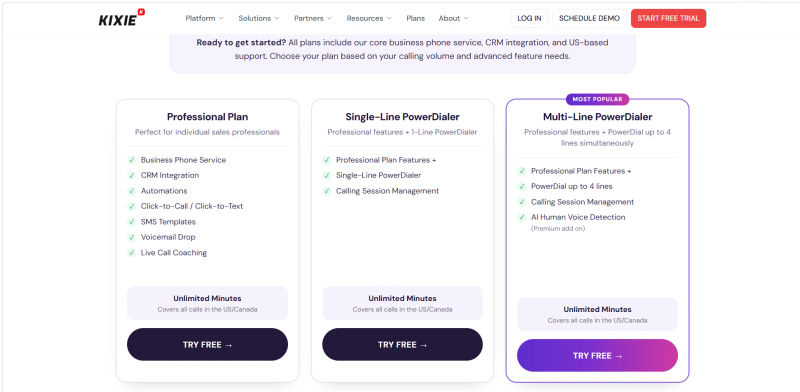
Kixie typically gates its most powerful features behind its higher tiers. While standard Integrated tiers hover around $35 per user/month, unlocking Connection Boost, advanced AI coaching tools, and custom Salesforce workflow automations requires the Professional or Enterprise tiers, which typically land around $65 to over $120 per user/month.
Furthermore, RevOps leaders must account for hidden costs. While Kixie offers robust packages, teams operating heavily outside of unlimited geographical zones will incur per-minute overages. Additionally, maintaining a massive pool of local presence numbers can incur monthly number rental fees, particularly for international dialing.
2. The Cost of Inaction: Legacy VoIP vs. Kixie
To build a business case for the CFO, Sales Directors must calculate the cost of inaction. Staying on a legacy VoIP system in 2027 carries severe financial penalties.
Consider a team of 20 SDRs. If "Spam Likely" flags reduce their connection rate by just 15%, and manual CRM data entry consumes 90 minutes per rep, per week, the organization is bleeding hundreds of hours of productive dialing time monthly. Furthermore, poor CRM sync latency leads to burnt leads—prospects who are called twice in one day because a previous disposition didn't log fast enough. Kixie's premium pricing is often offset entirely by reclaiming these lost hours and protecting the total addressable market (TAM) from being burned by spam flags.
3. Total Cost of Ownership (TCO) Calculator Rubric
To determine if Kixie is worth the investment, use the following TCO rubric:
Base Seat Costs: (Number of SDRs × Monthly Tier Price)
Telecom Usage Overhead: (Estimated monthly minutes/SMS × Overage rates outside unlimited zones + Number rental fees)
Integration Overhead: (Cost of API calls in Salesforce/HubSpot, though Kixie is highly efficient here)
Administrative Labor: (Hours spent managing the system. Kixie's automated logging typically saves 1.5 hours per rep, per week, resulting in a net negative cost here).
Find Perfect Software for Your Business
Kixie vs Competitors 2027: The Competitive Landscape
A complete cloud communications software review must evaluate Kixie directly against other top-tier platforms. The 2027 market segments into enterprise unified communications, specialized outbound dialers, and budget alternatives.
1. Kixie vs. Dialpad and RingCentral: Enterprise Reliability
When comparing Kixie vs Dialpad 2027, the distinction lies in the primary use case. Dialpad and RingCentral are built for unified corporate communications.
Dialpad & RingCentral:
Pros: Exceptional Voice Intelligence (Vi) for internal meetings, unmatched 99.999% uptime (RingCentral), and robust PBX features suitable for the entire company (HR, Support, Execs).
Cons: Lacks aggressive local presence rotation (Connection Boost) and granular, sales-specific workflow automations. Not purpose-built for high-velocity outbound dialing.
The Verdict: If you need a single tool for the entire company, choose Dialpad or RingCentral. If your goal is strictly high-volume outbound sales, Kixie outperforms both.
2. Kixie vs. CloudTalk and Aircall: Ease of Use vs. Power
The Kixie vs Aircall comparison is a classic debate, particularly for HubSpot users. Both Aircall and CloudTalk are beloved for their user-friendly interfaces.
CloudTalk & Aircall:
Pros: Beautiful user interfaces, rapid deployment, extensive app ecosystems, and exceptional international number routing (CloudTalk).
Cons: Power dialers are functional but lack the depth of Kixie's multi-line dialing. Bi-directional CRM sync latency can occasionally lag during peak volume hours compared to Kixie.
The Verdict: Choose Aircall or CloudTalk for mid-market teams with blended inbound/outbound needs or multi-lingual customer support. Choose Kixie for aggressive, outbound-only SDR floors.
3. Kixie vs. Specialized Rivals: CallHippo, KrispCall, and Calilio
For startups or teams with strict budget constraints, CallHippo, KrispCall, and Calilio offer compelling alternatives.
CallHippo, KrispCall, & Calilio:
Pros: Highly budget-friendly, excellent multi-workspace management for distributed remote teams (KrispCall), and lightweight, modern VoIP experiences.
Cons: Lack enterprise-level administration, role-based permissions, and the advanced AI sentiment analysis found in Kixie. Workflow automation limitations become a bottleneck at scale.
The Verdict: These tools are fantastic for scaling a sales team from 1 to 10 reps. However, RevOps leaders scaling beyond 15+ SDRs will likely find Kixie to be the better long-term investment for mature tech stacks.
Join over 10,000+ businesses making smarter tech decisions by using AuthenCIO's free platform.
Best Use Cases: Who Should Actually Buy Kixie?
When evaluating the best outbound calling software for sales teams, decision-makers must look beyond feature lists and examine their specific operational maturity. Understanding exactly who Kixie is built for is crucial to preventing buyer's remorse.
1. The Ideal Kixie Customer
Kixie is purpose-built for high-volume outbound sales teams (15+ reps) utilizing HubSpot, Salesforce, or Pipedrive as their central source of truth. It is the ideal solution for RevOps leaders who are obsessed with data hygiene and need to automate the manual tasks that drain SDR productivity. If your team makes 100+ calls per day per rep and relies heavily on complex SMS sequencing, Kixie is a top-tier choice.
2. A 30-Day Implementation Roadmap for RevOps Teams
Transitioning from a standard VoIP to Kixie requires a structured approach to ensure maximum ROI and compliance:
Week 1: Security, Compliance, and Provisioning. Before mapping data, verify SOC2 compliance documentation and complete your 2027 10DLC registration to ensure carrier trust. Establish role-based permissions and global compliance management rules (TCPA, GDPR) for your multi-country teams.
Week 2: CRM Mapping and Deliverability Audit. Define exact data mapping between Kixie and Salesforce/HubSpot. Port existing numbers and execute a call deliverability audit. Configure Connection Boost and establish baseline health scores.
Week 3: AI Coaching and Workflow Configuration. Build workflow automation recipes for triggering SMS sequences based on CRM lead status changes. Train the AI sentiment analysis tool on your specific battle cards.
Week 4: Go-Live and SDR Training. Roll out the Kixie PowerCall extension to the floor. Utilize the real-time AI objection handling cues to accelerate the onboarding of junior staff.
3. Team Re-Training and Change Management
Transitioning a legacy sales floor to an AI-assisted workflow requires dedicated change management. RevOps leaders should not just focus on the technical setup; they must train reps on how to interpret AI sentiment cues without sounding robotic. Encourage SDRs to view the AI battle cards as a safety net rather than a strict script, ensuring conversations remain natural and engaging.
4. Call Deliverability Audit Checklist
Before launching Kixie, RevOps should audit their current deliverability:
Check STIR/SHAKEN attestation levels and 10DLC registration status with your current carrier.
Analyze current connection rates by area code to identify flagged numbers.
Review SMS opt-out rates to ensure strict TCPA compliance.
Configure Kixie's Connection Boost to automatically cycle out numbers that drop below a 15% connection rate.
5. Who This Is NOT For
Kixie is not for small inbound customer support teams, solopreneurs, or businesses running on niche, unsupported CRMs. If your primary need is internal video conferencing, shared support inboxes, or you have a highly restrictive budget, the pricing tiers and complex setup of Kixie will outweigh the benefits. In these scenarios, Calilio, Aircall, or Dialpad are much better suited to your needs.
Try AuthenCIO
Move to faster, smarter software evaluation with AI
Final Verdict: Should You Invest in Kixie?
We rate Kixie 4.6 out of 5 stars, positioning it as a top-tier solution within the 2027 cloud communications software market for high-volume outbound sales teams. While general-purpose UCaaS platforms focus on internal collaboration, Kixie stands out as a purpose-built revenue engine.
Its commitment to deep, sub-second bi-directional CRM integration sets it apart from standard VoIP providers. For Sales Directors and Heads of Revenue Ops, the platform solves the most critical pain points of outbound sales: it defeats carrier spam filters with Connection Boost, eliminates manual data entry, and accelerates rep onboarding with 2nd-generation AI coaching.
While the pricing may be prohibitive for smaller teams and setup requires dedicated RevOps oversight, the ROI for high-volume outbound operations is undeniable. If you are running Salesforce or HubSpot and need to transform your SDR floor into a data-driven, highly automated machine, Kixie is absolutely worth the investment.