
Introduction
Managing software budgets for a growing design agency in 2027 requires more than just looking at the monthly sticker price of a website builder. Amidst rising inflation and the rapid integration of AI-driven efficiency tools, operations leaders must scrutinize every line item.
Streamline your software evaluation process
For Agency Operations Leads, the true cost of a platform is hidden in multi-user licensing, client handoff friction, and scalable hosting fees. If you are searching for a definitive Webflow agency pricing guide, you must understand that the platform's dual-layered pricing structure—separating Site plans from Workspace plans—continues to be a major source of margin compression for agencies that do not optimize their seat management.
Evaluating platform pricing is no longer about simply comparing features; it is about analyzing the workflow economics of your agency.
When you factor in internal collaboration, client review access, and post-launch hosting, the total cost of ownership (TCO) can multiply rapidly. This guide is designed to help you decode Webflow’s 2027 pricing model, understand exactly where your budget is going, and compare it against six leading alternatives to ensure you are making the most cost-effective software decisions for your team.
Key Takeaways:
Understand the Dual Model: Webflow separates hosting (Site plans) from collaboration (Workspace plans), requiring strict seat management to prevent margin erosion.
Beware of Hidden Costs: Unmanaged freelancer seats, CMS item limits, and bandwidth overages can drastically inflate your monthly software overhead.
Evaluate Total Cost of Ownership: Platforms like WordPress may appear free, but hidden maintenance and security compliance costs often rival premium visual builders.
Match the Tool to the Agency: Framer excels at rapid UI prototyping, Wix Studio streamlines client handoffs, while Webflow remains the gold standard for complex, logic-driven animations.
Platform Pricing and Fit at a Glance
The right platform depends on more than its monthly price. This comparison outlines where each option fits best, its typical pricing structure, and the operational trade-offs agencies should consider before committing.
Tool | Best For | Pricing | Limitations |
Webflow | High-end custom animations and interactions | Starts from $25/mo | Complex multi-tiered billing; strict CMS item caps; costly per-seat licenses. |
WordPress | Total data ownership and custom backend logic | Starts from $9/mo | High maintenance overhead; plugin bloat; security vulnerabilities. |
Framer | UI/UX focused agencies needing rapid deployment | Starts from $15/mo | Limited complex backend logic; restrictive native e-commerce capabilities. |
Wix Studio | Streamlined agency handoff and client management | Starts from $19/mo | Vendor lock-in; rigid data structures for highly complex enterprise builds. |
Pagecloud | Simple visual editing and wireframing | Starts from $26/mo | Lacks advanced CMS capabilities; limited native integrations. |
Webydo | B2B white-labeling for design studios | Starts from $39/mo | Outdated UI elements; smaller third-party ecosystem and community. |
Squarespace | Small local business portfolios and basic commerce | Starts from $25/mo | Rigid template structures; no complex CMS or advanced logic routing. |
*Note: All prices shown reflect typical monthly billing. Vendors often offer lower pricing for annual commitments, but those discounts are excluded here for easier comparison. Actual costs may vary depending on your requirements, usage volumes, and negotiated terms.
Software Covered in this Article
To help you understand Webflow in the right context, this article refers to a carefully curated set of leading alternatives:







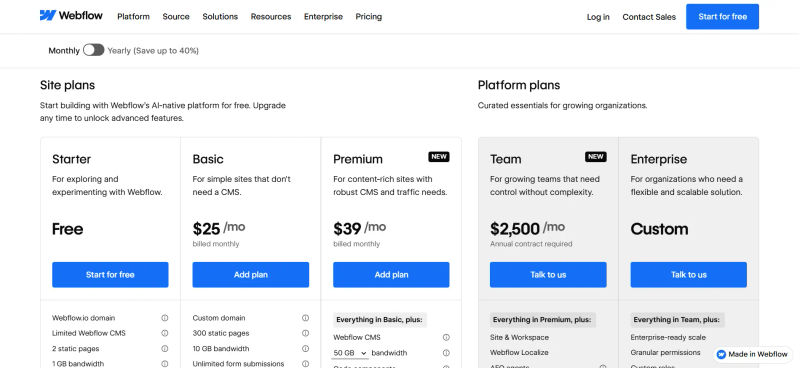
Webflow Pricing Explained: Site Plans vs. Workspace Plans
To optimize your agency’s budget in 2027, you must first understand the fundamental divide in Webflow’s pricing architecture. Webflow separates the cost of hosting a website from the cost of building it collaboratively.
This dual structure is where many operations leads find themselves facing the "double-billing" dilemma, paying for both the infrastructure and the access rights simultaneously.
1. Site Plans: Individual Hosting and Client Billing
Site plans are tied directly to a single custom domain. They dictate the live performance of the website, including monthly visitor bandwidth, the number of CMS items allowed, and form submission limits.
In 2027, the standard non-ecommerce tiers typically range from the Basic plan (ideal for simple static sites) to the CMS plan (essential for blogs and dynamic content) and up to the Business plan (designed for high-traffic marketing sites).
For an agency, Site plans are generally pass-through costs. The most cost-effective workflow involves transferring the Site plan billing directly to the client upon launch. However, while the site is in development, the agency often absorbs this cost.
If your agency is managing 50 active client sites on CMS plans, you are looking at a baseline infrastructure cost that must be carefully baked into your retainer models or project markups to avoid margin erosion.
2. Workspace Plans: Internal Team Collaboration and Permissions
Workspace plans are where agency overhead truly compounds. These plans dictate how many internal team members (seats) can access the Webflow dashboard to design, edit, and manage projects.
While Webflow offers a free Starter workspace for solo designers, growing agencies must upgrade to Core, Growth, or Agency tiers to unlock critical features like custom code export, unbranded staging domains, and granular role-based permissions.
Workspace plans are billed per seat, but the rise of AI-assisted development in 2027 is fundamentally changing the per-seat value proposition.
As AI allows individual developers to handle more sites and iterations, agencies might need fewer overall seats, making predictable workspace governance even more critical.
A major pitfall for operations leads is misunderstanding the seat limits and roles. For example, a Core workspace limits you to 3 seats. The moment you hire a fourth team member, you are forced into a Growth workspace, instantly increasing the cost of all existing seats.
Furthermore, operations leads must be ruthless about role assignment. Does your copywriter need a paid "Editor" or "Admin" seat, or can they utilize a free "Guest" role for simple content review? Mismanaging Workspace seats—specifically failing to distinguish between paid contributors and free guest reviewers—is the number one reason agencies overpay for Webflow.
Webflow vs Framer Pricing 2027: Rapid Visual Prototyping
As the visual development market matures, Framer has aggressively positioned itself as the primary alternative to Webflow, specifically targeting UI/UX-focused agencies.
Framer’s primary use case is clear: it is best for UI/UX focused agencies needing rapid deployment directly from design canvases like Figma.
When evaluating Webflow vs Framer pricing 2027, the structural similarities are apparent—both utilize a combination of site-specific hosting fees and workspace collaboration costs.
However, Framer’s aggressive market capture strategy relies on undercutting Webflow’s total cost of ownership for mid-sized teams. Framer’s workspace seats often come in at a lower monthly per-user rate compared to Webflow’s Growth or Agency tiers.
For an agency focused heavily on interaction design, micro-animations, and rapid prototyping, Framer offers a compelling financial argument.
The platform allows designers to bypass complex CSS grid setups and logic routing, reducing the hours required to push a site live. This reduction in billable hours directly increases project profitability.
However, operations leads must account for two massive hidden costs when migrating to Framer. First is the operational cost of team retraining. If your agency is already deeply entrenched in Webflow, retraining developers to master Framer’s React-based component system requires significant non-billable hours.
Second is the proprietary lock-in risk. Unlike Webflow, which allows agencies on higher-tier workspaces to export clean HTML/CSS/JS code for external hosting, Framer keeps you locked into their ecosystem. If a client demands code ownership or self-hosting down the line, Framer’s lack of export capabilities can become a dealbreaker, forcing a costly rebuild.
Find Perfect Software For Your Business
WordPress & Wix Studio: The High-Customization vs. All-in-One Agency Models
For agencies that find Webflow’s dual-pricing structure too restrictive or complex, WordPress and Wix Studio represent the two opposite ends of the alternative spectrum: total decentralized ownership versus a completely unified agency ecosystem.
1. WordPress: The Best for Low-Cost, High-Customization Ownership
WordPress remains the undeniable champion for agencies that demand total data ownership and custom backend logic. It is best for total data ownership and custom backend logic.
Unlike Webflow, the WordPress core is open-source and technically free. The costs associated with WordPress are entirely infrastructure and maintenance-based.
In 2027, a professional agency utilizing headless WordPress or premium managed hosting (like WP Engine or Kinsta) will pay between $25 and $100+ per month per site. The financial advantage here is the complete elimination of per-seat Workspace fees. Whether you have 2 developers or 20, your hosting cost remains static.
However, it is a dangerous mistake to view WordPress as the "cheap" option. Operations leads must account for the hidden labor costs and the total cost of ownership. When comparing WordPress vs Webflow total cost of ownership, WordPress requires expensive premium plugins for security, SEO, and performance optimization. Furthermore, managing plugin updates, patching security vulnerabilities, and handling server-side optimization requires ongoing maintenance retainers. The TCO of WordPress is lower in initial software licensing but significantly higher in required engineering labor.
2. Wix Studio: Best for Rapid Scaling and Integrated Management
Wix Studio was built specifically to solve the fragmented billing and handoff issues that plague Webflow agencies. It is best for streamlined agency handoff and client management.
Wix Studio operates on a unified pricing model that consolidates hosting, collaboration, and client billing into a single, cohesive dashboard.
When comparing Wix Studio vs Webflow cost 2027, Wix Studio is a breath of fresh air for an operations lead. It eliminates the need to calculate separate seat licenses for every new hire.
Furthermore, their 2027 agency partner program offers aggressive revenue-sharing models, allowing agencies to earn a percentage of the client’s ongoing hosting fees. This transforms the platform from a pure overhead cost into a potential revenue stream.
Additionally, security compliance is a major factor driving agencies toward closed ecosystems. For enterprise clients requiring strict SOC2 or GDPR compliance, maintaining a custom WordPress stack is a massive legal and technical liability. Wix Studio and Webflow handle this compliance natively at the platform level, mitigating agency risk.
The limitation of Wix Studio, however, is vendor lock-in and rigid data structures. Agencies building highly complex, custom-coded enterprise applications may find its database capabilities too restrictive compared to Webflow’s open API.
Pagecloud, Webydo, and Squarespace: Budget-Friendly Alternatives?
Not every agency builds $50,000 custom web applications. For boutique studios, marketing agencies, and freelancers managing high-volume, lower-complexity projects, paying Webflow’s premium workspace fees is an unnecessary drain on profits.
In these scenarios, platforms like Pagecloud, Webydo, and Squarespace offer streamlined, budget-friendly alternatives.
3. Pagecloud: The Best for Simple Visual Editing
When evaluating Pagecloud vs Webflow for designers, Pagecloud is best for simple visual editing and wireframing. It offers a highly intuitive, drag-and-drop interface that requires zero coding knowledge.
For an agency, this means you do not need to hire expensive front-end developers to manage the platform; junior designers and marketing staff can easily build and update sites. Pricing is straightforward, typically ranging from $24 to $65 per month, with no convoluted seat-licensing math. The trade-off is a lack of advanced CMS capabilities. If your client needs conditional logic or complex database relationships, Pagecloud will hit a hard ceiling rapidly.
4. Webydo: The Best for B2B White-Labeling
Webydo is uniquely positioned as a B2B-centric platform. It is best for B2B white-labeling for design studios. Webydo pricing for agencies (ranging from $75 to $400 per month) is designed to let you brand the entire CMS and editor as your own proprietary software.
For operations leads focused on brand equity and client retention, this is a massive value-add. You can charge clients a premium for access to "your" custom dashboard. However, in 2027, Webydo’s third-party ecosystem and community support lag significantly behind Webflow, meaning troubleshooting and integrations can consume more billable hours.
5. Squarespace: The Best for Low-Complexity Client Handoffs
Squarespace is best for small local business portfolios and basic commerce. At $16 to $49 per month, it is highly cost-effective. For agencies, the Squarespace Circle program offers extended trial periods and bulk discounts.
The operational benefit of Squarespace is the frictionless client handoff. Clients rarely need training to use the backend, reducing your post-launch support overhead to near zero. The limitation is strict rigidity. You are confined to their template structures, and attempting to build highly custom, logic-driven applications will result in frustrating workarounds that ultimately cost more in labor than you saved in software licensing.
Hidden Costs and Scalability Limits in Webflow’s 2027 Model
When evaluating platform pricing, the monthly sticker price is only the starting point. For an Agency Operations Lead, the true financial risk lies in the hidden costs and scalability limits embedded within the platform’s terms of service.
In 2027, Webflow hidden costs for agencies contain several critical thresholds that can instantly derail a project’s profitability if not carefully monitored.
1. The Compounding Cost of Per-Seat Licensing
As mentioned earlier, Webflow’s Workspace plans charge per seat. But the hidden cost lies in how those seats are managed during agency growth. If you hire three freelance contractors for a massive three-month project, you must provision them with paid seats on your Workspace to allow them to collaborate effectively.
If you forget to de-provision those seats when the project ends, you will continue paying monthly premiums for inactive users. An agency with 15 team members and a rotating cast of freelancers can easily waste thousands of dollars annually on unmanaged seat licenses. To combat this, operations leads must implement strict onboarding and offboarding protocols for software access.
2. Webflow CMS Plan Limitations and Database Caps
Webflow’s Site plans are strictly tiered by CMS items. A CMS item is any individual entry in the database—a blog post, a team member profile, a portfolio piece, or a product. Webflow CMS plan limitations typically cap out at a specific number of items (e.g., 2,000 or 10,000 depending on the exact 2027 tier adjustments).
If a client’s programmatic SEO strategy requires generating 15,000 location pages, they will instantly exceed the CMS plan limits and be forced into the Business or Enterprise tier. This sudden jump in monthly hosting costs can severely damage client relationships if not forecasted and communicated during the initial sales process. Agencies must audit client content strategies before selecting a Webflow Site plan.
3. Bandwidth Overages and Traffic Spikes
Webflow enforces monthly bandwidth limits on all non-Enterprise Site plans. If a client’s marketing campaign goes viral, driving massive unexpected traffic to the site, the bandwidth limit will be breached.
Webflow does not typically take the site offline; instead, they automatically charge bandwidth overage fees. If the agency is still holding the billing for the Site plan during a post-launch support phase, the agency’s credit card takes the hit. Operations leads must ensure that client contracts explicitly state that bandwidth overages are the sole financial responsibility of the client, and billing transfers must be executed immediately upon site launch.
4. The Enterprise Tipping Point
At a certain scale, agencies stop looking at self-serve tiers and start evaluating Webflow enterprise workspace pricing. The "Enterprise Tipping Point" usually occurs when an agency requires Single Sign-On (SSO) for corporate security compliance, custom API rate limits to integrate with internal agency tech stacks, or advanced Service Level Agreements (SLAs).
Enterprise procurement is entirely custom-contract based. Operations leads must be prepared for rigorous negotiations. Furthermore, 2027 workflows increasingly rely on premium add-ons like advanced Localization for multi-language sites or DevLink for React component syncing.
These are often not included in base tiers and must be negotiated into the Enterprise contract. Understanding when your agency has outgrown the standard Growth or Agency workspace tiers—and preparing your legal and procurement teams for the transition—is crucial to maintaining profitability at scale.
Try AuthenCIO
Move to faster, smarter software evaluation with AI
Final Verdict: Which Platform Gives Agencies the Best Value in 2027?
Choosing the right web development platform in 2027 is a balancing act between design capabilities, operational overhead, and client handoff friction.
There is no single "best" platform; there is only the platform that aligns with your agency’s specific financial model and service offerings.
To make an immediate, data-backed choice, use this 3-Question Decision Matrix:
Do you require complex, logic-driven animations and custom code export? If yes, choose Webflow.
Is your primary focus rapid UI/UX deployment with no need for code export? If yes, choose Framer.
Do you need to eliminate per-seat billing and maximize client handoff simplicity? If yes, choose Wix Studio.
If your agency specializes in high-end, award-winning custom animations and you have the operational discipline to strictly manage Workspace seats and pass Site plan costs to clients, Webflow remains the premier choice.
Its visual development engine is unmatched, provided you master the intricacies of Webflow multi-user licensing.
If your agency prioritizes rapid UI/UX deployment and wants to maximize project margins by reducing development time, Framer offers a highly competitive total cost of ownership, provided you accept the lack of code export.
If you demand total infrastructure control and refuse to pay per-seat collaboration fees, WordPress is the logical path, provided you have the internal resources to manage server maintenance and security.
Finally, if your goal is to eliminate billing complexity, streamline client handoffs, and generate recurring revenue through partner programs, Wix Studio offers the most cohesive agency-focused ecosystem in the current market.
By carefully analyzing your team size, your average client requirements, and your post-launch support models, you can navigate these complex pricing tiers, eliminate hidden costs, and maximize your agency’s profitability in 2027.