
Introduction
Welcome to our comprehensive Vista Social review for 2026. If you are wondering whether this platform is the right fit for your team, the short answer is yes. Vista Social for small business operations stands out as a highly capable, budget-friendly solution. As a robust Vista Social social media management tool, it streamlines scheduling, engagement, and reporting without the steep learning curve of enterprise software.
Streamline your software evaluation process
Managing social media in 2026 is a completely different beast than it was even two years ago. With Instagram ad prices increasing by 10% in the third quarter of 2025 alone, organic reach has never been more critical to your bottom line. Furthermore, with Instagram serving as a primary discovery platform for over 3 billion people, the pressure to produce consistent, high-quality content is immense.
If you are time-poor and juggling daily operations, reading through countless Vista Social reviews can be exhausting. You want to know if Vista Social small business features actually save time. You need the best social media management tool for small business operations—one that is intuitive, reliable, and built for decision-makers. With this platform, you can go from initial sign-up to your first scheduled post in under 15 minutes.
Vista Social has made significant waves in the industry, rapidly growing its user base by offering a comprehensive yet accessible social media management platform. But does it truly live up to the hype for a small business owner with fewer than 10 employees?
In this guide, we will dissect the platform's features, evaluate its pricing, and compare it directly against top competitors like Buffer, Later, and Metricool. Our goal is to help you cut through the marketing fluff and make an informed, confident software purchasing decision today.
Key Takeaways: Is Vista Social Worth It?
Yes, Vista Social is highly worth it for small businesses and agencies in 2026, offering an unmatched balance of advanced features and affordability. It stands out by including AI-powered scheduling, a unified inbox, and robust local SEO management at a fraction of the cost of legacy platforms.
Best-in-Class Value: Pricing is highly competitive, notably offering unlimited users on most paid tiers—a massive cost-saver for growing teams.
Standout Features: Excels with its built-in AI assistant, visual calendar, and direct integrations with Google Business Profile for seamless review management.
The Pros: Comprehensive automated reporting, excellent support for video-first platforms (TikTok, Reels), and a highly customizable unified inbox.
The Cons: The sheer volume of features can present a slight learning curve for absolute beginners, and some granular analytics are locked behind higher tiers.
If you need a scalable, all-in-one social media management tool that won't break the budget as your team expands, Vista Social is arguably the best investment you can make this year.
Pros and Cons for Small Business Owners
To make this review as actionable as possible, here is a clear, objective breakdown of the realities of using Vista Social daily, factoring in both local and global user sentiment. For international businesses and marketers searching for "vista social รีวิว" or "vista social reviews thailand", we have incorporated feedback from global users to provide a complete picture.
The Pros:
Exceptional Ease of Use: The interface is clean, intuitive, and requires almost zero training time. You can log in and start scheduling immediately.
All-in-One Functionality: By combining scheduling, inbox management, Google reviews, and analytics, it eliminates the need to pay for three separate software subscriptions.
Global & Multilingual Reliability: Based on international feedback (often found in queries like "vistasocial reviews thailand" and "vistasocial รีวิว"), users highly rate its accurate timezone management and AI that adapts well to non-English content.
Strong Video Support: Flawless integration with TikTok, Instagram Reels, and YouTube Shorts, matching the 2026 demand for video content.
Cost-Effective: Highly competitive pricing tiers that do not punish you for adding a virtual assistant or a second team member.
Brand-Trained AI: Contextual AI tools that actually understand your brand voice, curing writer's block instantly without sounding robotic.
The Cons:
Post Volume Caps: As noted by long-term users, the highest tiers do enforce monthly posting limits, which could restrict very high-volume users or large agencies.
Mobile App Discrepancies: While highly functional for inbox management, the mobile app does not yet possess 100% of the desktop version's analytical depth. It is great for on-the-go replies but less ideal for deep campaign planning.
Overwhelming Initial Data: The analytics dashboard is so comprehensive that it can initially overwhelm users who only want to see basic "likes and comments" metrics.
Best For
Small businesses, agencies, and social media teams seeking AI‑powered scheduling, unified engagement, and analytics automation across multiple platforms. Ideal for brands that value workflow efficiency and client‑ready reporting.
Verdict
Vista Social delivers a balanced mix of automation, analytics, and affordability. Its intuitive dashboard and AI‑driven features make it a standout choice for teams scaling social operations in 2026. While advanced tiers suit agencies best, even entry‑level plans offer strong ROI for small brands.

Software Covered in this Article
To help you evaluate Vista Social in the right context, this article compares it against a carefully curated set of competitors:







Quick Comparison: Vista Social vs Alternatives (2026)
Tool | Best For | Pricing | Key Features |
Vista Social | All-in-one ease of use | Starts at $39/month | AI scheduling, unified inbox, review management |
Metricool | Data-driven owners | Starts at $25/month | Deep analytics, competitor tracking, ad management |
Later | Visual-first brands | Starts at $25/month | Visual planner, Link-in-bio, creator tools |
Buffer | Minimalist scheduling | Starts at $6/channel | Clean interface, straightforward queueing |
SocialBee | Evergreen content | Starts at $29/month | Category-based scheduling, content recycling |
Iconosquare | Advanced analytics | Starts at $39/month | Custom dashboards, deep industry benchmarking |
Zoho Social | Ecosystem integration | Starts at $15/month | CRM integration, team collaboration tools |
*Note: All prices shown reflect typical monthly billing. Vendors often offer lower pricing for annual commitments, but those discounts are excluded here for easier comparison. Actual costs may vary depending on your requirements, usage volumes, and negotiated terms.
What is Vista Social? (And Who It Is Built For)
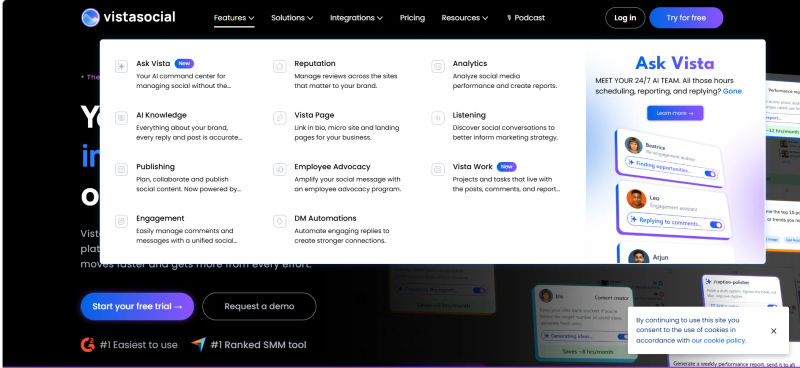
Vista Social is a cloud-based social media management platform designed to centralize publishing, engagement, analytics, and social listening. As a comprehensive vistasocial social media management tool, it serves as an all-in-one hub to streamline your digital marketing efforts.
While enterprise-level tools often require extensive onboarding sessions and dedicated account managers, this platform is engineered specifically for smaller teams. For those evaluating vistasocial for small business use cases, the software stands out by stripping away overly technical jargon and presenting a clean, modern interface that solo entrepreneurs and small agencies can master in a single afternoon.
The platform currently holds a stellar 4.8 out of 5 rating on G2 based on over 1,075 reviews, with users consistently praising its user-friendly interface and real-time messaging capabilities. For a vistasocial small business user, it is not just about looking good; it is about functional efficiency and driving tangible results without needing a dedicated IT team.
In 2026, social media success relies heavily on consistent posting and cohesive content themes rather than disjointed, one-off posts. Sustained narratives drive higher engagement and audience retention.
Vista Social is built to facilitate this kind of strategic planning. It allows you to batch-create content, organize it visually, and ensure your brand narrative remains consistent across platforms without requiring you to log in every single day.
If you are a decision-maker who handles your own marketing, you need a tool that acts as a seamless extension of your daily workflow, not a frustrating interruption. Vista Social targets this exact pain point by consolidating your social networks—including newer, highly relevant platforms like TikTok and YouTube Shorts—into one actionable dashboard.
Deep Dive: Evaluating Vista Social's Key Features
To truly understand if Vista Social is the right investment for your company, we need to look past the generic feature lists and evaluate how these tools actually function in a real-world, day-to-day business environment.
1. AI-Powered Content Scheduling and Automation
The "empty calendar" syndrome is a massive hurdle for small business owners. Staring at a blank screen while trying to draft engaging captions for five different platforms is a massive time sink. Vista Social addresses this with deeply integrated, highly functional AI enhancements.
Unlike older tools that require you to generate text in a separate AI platform like ChatGPT and paste it over, Vista Social features contextual automations built directly into the publishing window.
You can input a basic prompt or a link to your latest blog post, and the AI will generate platform-specific captions. It understands that a professional LinkedIn post requires a vastly different tone than a trendy TikTok caption.
Crucially for 2026, Vista Social has expanded its AI to include brand voice training. You are no longer stuck with generic, robotic-sounding text.
You can train the AI on your specific brand voice by feeding it past successful posts, or by creating custom prompt templates that dictate your exact style, preferred emojis, and formatting. This ensures your automated content sounds authentically like you.
Furthermore, the current landscape shows that human-first, authentic content is surpassing highly polished, perfect posts. Audiences favor relatable experiences.
Vista Social's scheduling tool allows you to easily upload raw, behind-the-scenes video content and schedule them seamlessly. Speed tests of the platform's media uploader show it handles large video files efficiently, a crucial factor when dealing with modern, video-first social strategies.
2. Unified Inbox: Managing Engagement Without the Stress
One of the most frustrating aspects of managing social media is the fragmented nature of customer communication. A customer might ask a pricing question on an Instagram Reel, complain about a delayed shipment on X (formerly Twitter), and send a detailed inquiry via Facebook Messenger.
Vista Social's Unified Inbox consolidates all these interactions into a single, manageable feed. In 2026, we are seeing a significant decline in public feed interactions in favor of private communities and direct messages.
Consumers are prioritizing one-on-one relationships over broad reach. Vista Social has adapted to this trend by ensuring its inbox captures direct messages, story replies, and private mentions instantly.
The inbox allows you to assign conversations to team members (if you have them), tag messages for sentiment analysis, and use saved replies for frequently asked questions. By centralizing this process, the average small business owner can clear their inbox in 15 minutes a day rather than constantly checking their phone.
3. Visual Planning and Calendar Management
For businesses that rely on visual appeal—such as retail, food and beverage, or real estate—the grid matters. Vista Social provides a robust visual planner that allows you to drag and drop posts to see exactly how your Instagram or TikTok feed will look before anything goes live.
The calendar view is highly customizable. You can filter by network, post status, or specific marketing campaign. It also provides visual cues for optimal posting times based on your specific audience's historical engagement data, taking the guesswork entirely out of your scheduling strategy.
4. Local SEO: Google Business Profile & Review Management
A critical feature often overlooked by standard social media schedulers is local search optimization. For local small businesses, Vista Social Google Business integration is non-negotiable.
Vista Social treats your Google Business Profile as a primary network. You can schedule Google Updates, Offers, and Events directly from the calendar, complete with call-to-action buttons and automated first comments.
Is Vista Social the easiest tool for you? Compare it for free on AuthenCIO's unbiased platform.
Crucially, Vista Social pulls all Google Reviews into the Unified Inbox. You can read and reply to customer feedback without logging into the Google dashboard. This is highly effective for international businesses; for instance, handling VistaSocial review management Germany operations allows you to filter and respond to localized German reviews from the same central inbox. Promptly replying to reviews is a major local SEO ranking signal in 2026, and Vista Social simplifies this global process.
Real-World Use Cases: How Small Businesses Use Vista Social
Understanding a software's features is one thing; applying them to your unique business model is another. Here is how small business owners are practically utilizing Vista Social in 2026 to save time and drive revenue.
1. The 'First 30 Days' Setup Checklist
To maximize your subscription value immediately, your first 30 days should be highly structured.
Connect All Profiles: Begin by linking every active social account, including your Google Business Profile. Vista Social handles the technical hurdles of connecting Instagram and TikTok business accounts smoothly.
Import Historical Data: If you are migrating from another tool, export your content libraries and import them into Vista Social via CSV. This ensures you do not lose your best-performing historical content.
Set Up the Unified Inbox: Configure your notification settings so you are only alerted to high-priority messages, filtering out spam and bot mentions.
Batch Schedule Month One: Dedicate a four-hour block to use the AI caption generator and visual calendar to schedule 30 days of consistent content themes.
Configure Automated Reporting: Set up a monthly performance report to be automatically emailed to you on the 1st of every month.
2. Step-by-Step: Setting Up Automated Reporting
Analytics can be overwhelming, but they are essential. In 2026, SEO is expanding beyond traditional search engines to include social platforms. You need to know what keywords and formats are driving views.
Vista Social emphasizes real-time analytics and customizable reports. To set this up quickly:
Navigate to the Reports tab on the main dashboard.
Select Custom Report Builder.
Drag and drop the widgets that matter most to your bottom line: Audience Growth, Engagement Rate, and Web Traffic Impact.
Add the Competitor Benchmarking widget to track how your growth compares to three local competitors.
Schedule the report for automated email delivery to yourself or your stakeholders.
This completely eliminates the need to manually pull data into spreadsheets, saving you hours every month.
3. Service-Based Business Workflow: Plumbers & Consultants
If you run a service-based business—like a local plumbing company in North America or a B2B consultancy in Asia—your needs differ vastly from an e-commerce brand. You aren't selling aesthetic products; you are selling trust and expertise.
For a plumbing company, Vista Social's Google Business Profile integration is the star. The owner can use the mobile app to snap a quick "before and after" photo of a pipe repair, use the AI tool to generate a quick caption highlighting their emergency services, and post it directly to Facebook and Google Updates simultaneously. Later, they can reply to a new 5-star Google Review directly from the unified inbox.
For a B2B consultant operating internationally, localized engagement is the priority. For example, in a typical vista social small business thailand workflow, a legal consultant in Bangkok can use the platform to schedule a month's worth of thought-leadership text posts for regional clients on LinkedIn.
They can train the AI on their specific professional tone, ensuring the drafted posts sound authoritative. Additionally, teams running a vistasocial small business thailand presence can track specific regional industry keywords using Vista Social's listening tools to find ongoing local conversations to jump into, establishing their authority in new markets.
Find Perfect Software For Your Business
Vista Social Pricing 2026: Is It Budget-Friendly?
Pricing transparency is critical for small businesses. The frustration of hidden fees for adding additional team members or social profiles is a common pain point in the SaaS industry.
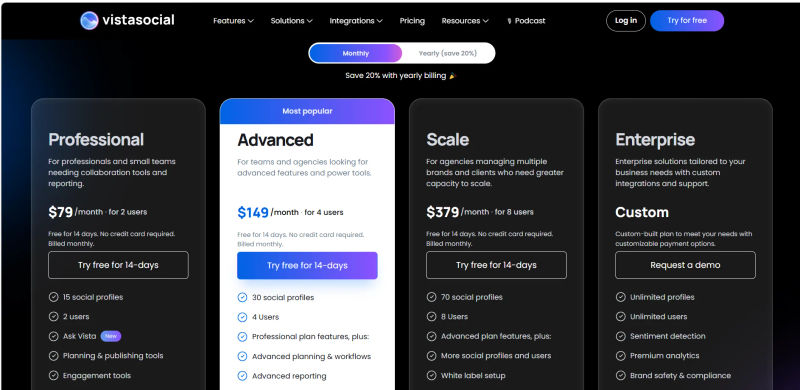
First, let's define a crucial term: what is a social profile? In the SaaS world, a "social profile" generally means one specific account on one platform. For example, connecting one Instagram account and one Facebook Business Page counts as two social profiles.
In 2026, Vista Social maintains a highly competitive pricing structure designed to scale with your business without penalizing growth.
Free Plan: Ideal for solopreneurs just starting out. It allows limited profile connections (usually up to 3) and basic scheduling. However, it lacks the advanced AI, unified inbox, and deep analytics features.
Pro Plan (Starting around $79/month): This is the sweet spot for most small businesses. It includes the unified inbox, AI assistant, review management, and comprehensive reporting for a generous number of profiles.
Pro+ Plan (Starting around $149/month): Adds advanced features like custom branding for reports, deeper competitor analysis, and approval workflows for larger teams.
It is important to note user feedback regarding pricing. While AppSumo users rate Vista Social at 4.35 out of 5 from verified reviews, highlighting its feature richness, some have noted limitations like post volume caps on higher tiers.
If you are an agency posting hundreds of times a day, you must carefully review the volume limits on the tier you select. However, for a standard small business posting 1 to 3 times daily, these caps will never be an issue.
When conducting a feature-by-feature cost analysis per social profile, Vista Social proves to be incredibly budget-friendly. Unlike tools that charge per user and per profile, Vista Social's bundled approach offers true scalability for small budgets.
Vista Social vs. Competitors: Finding the Best Social Media Management Tool for Small Business
While Vista Social is a powerhouse, it is not the only player in the game. Depending on your specific operational style, one of these alternatives might be a better fit. Here is how Vista Social stacks up against the competition in 2026.
1. Vista Social vs. Metricool
When evaluating Vista Social metricool comparisons, Metricool is a formidable competitor for data-driven owners. If your primary concern is tracking the exact ROI of your social campaigns down to the penny, Metricool's analytics are arguably deeper. Metricool also offers a fantastic free tier highly generous for single users.
Regional considerations matter, too. For users researching "Vista Social vs Metricool Germany", Metricool (based in Spain) often appeals to EU businesses prioritizing localized support hours. However, Vista Social remains fully GDPR compliant globally with 24/7 support bridging any time zone gaps.
Ultimately, Vista Social wins on ease of use and inbox management. Metricool's interface can feel clinical and spreadsheet-like. While Metricool's mobile app is fantastic for checking statistical dashboards on the go, Vista Social's app offers a smoother experience for managing your unified inbox and replying to comments. Choose Metricool for deep data or EU-native support; choose Vista Social for an easier daily workflow.
2. Vista Social vs. Buffer & Later
This is the battle for simplicity versus visual aesthetics. Buffer is the grandfather of easy scheduling. If you literally only want to put text and a link into a queue and walk away, Buffer is unmatched in its minimalist approach.
Buffer's mobile app is also incredibly reliable for quickly queuing text-based posts. However, Buffer's analytics and inbox features are basic compared to Vista Social.
Later, on the other hand, is built for visual-first brands. If you run a boutique clothing store and your entire strategy revolves around the Instagram grid and TikTok aesthetics, Later's visual planner is slightly more refined, and its mobile app shines when you need to preview your visual grid from your phone.
But Later's pricing scales up quickly as you add users. Vista Social sits comfortably in the middle, offering a better balance of visual planning and comprehensive network support at a lower price point.
Join thousands of happy users who found their ideal software using AuthenCIO's free comparison tool.
3. Vista Social vs. Iconosquare & SocialBee
Iconosquare is an enterprise-grade analytics tool that happens to do scheduling. It starts at a higher price point ($83/month for Advanced) and is overkill for a business with fewer than 10 employees.
Its deep industry benchmarking is incredible, but its mobile application can feel a bit heavy and slow for quick tasks. It is not built for the time-poor DIY owner.
SocialBee is unique because it focuses heavily on evergreen content recycling. You create categories (e.g., "Motivational Quotes," "Product Promos") and SocialBee endlessly cycles through them. If your strategy relies on evergreen content, SocialBee is brilliant.
However, SocialBee's app is functional but can feel clunky compared to modern standards. For the 2026 trend of timely, human-first content, Vista Social's calendar approach is far more relevant and easier to navigate.
4. Vista Social vs. Zoho Social
When evaluating vista social zoho social, the primary differentiator is ecosystem dependency. Zoho Social is fantastic, but best used if you are already entrenched in the Zoho ecosystem (Zoho CRM, Zoho Desk) to turn social interactions into sales leads.
In a direct vistasocial vs zoho social matchup for independent users, Vista Social wins on usability. If you use standalone tools for business operations, Zoho Social's interface can feel dated.
Regional needs also matter. For those researching vistasocial vs zoho social germany, both platforms offer strict GDPR compliance for European markets. However, Vista Social is more agile, supports a wider array of modern networks (like TikTok and Google Business Profile), and delivers a smoother standalone experience.
Try AuthenCIO
Move to faster, smarter software evaluation with AI
Final Verdict: Should You Invest in Vista Social in 2026?
After a thorough evaluation of the 2026 social media landscape, our verdict is clear: Vista Social perfectly balances power with simplicity for small businesses.
Buy Vista Social if:
You are a time-poor small business owner managing your own social media.
You need a unified inbox to manage DMs and Google Reviews in one place.
You want AI that can be trained on your specific brand voice.
You need a tool that handles modern video formats (Reels, TikToks) flawlessly.
You want enterprise-level features on a small business budget.
Avoid Vista Social if:
You are a massive enterprise agency posting thousands of times a month (due to volume caps).
You only care about Instagram grid aesthetics and nothing else (Later might be better).
You are purely focused on deep, granular data exportation and ad tracking (Metricool is a strong alternative).
You are already heavily invested in the Zoho software ecosystem (stick with Zoho Social).
Global Relevance: For international users searching for a Vista Social review Germany or reading localized VistaSocial reviews Germany, the platform's multi-language AI and timezone scheduling are highly adaptable. Whether you need a specific VistaSocial review Germany or are comparing broader Vista Social reviews Germany, the consensus is positive: it offers exceptional value and compliance for European markets.
Ultimately, Vista Social simplifies social media management, removing friction from daily marketing tasks so you can focus on growing your business.