
.webp&w=64&q=75)
Introduction
Small business owners in 2026 cannot afford to waste money on bloated software. You need a tool that schedules posts, provides analytics, and handles engagement without eating into your profit margins.
Streamline your software evaluation process
If you are evaluating the most affordable social media management tools 2026 has to offer, Vista Social is likely on your radar. But is it actually the most cost-effective option for your specific needs, or are there hidden limitations that will force you into an expensive upgrade?
Choosing the right platform is not just about finding the lowest monthly fee; it is about understanding exactly what you get for that price. This article breaks down the Vista Social cost comparison against six top competitors. We will analyze pricing differences, hidden costs, billing cycles, and plan limitations to help you make a definitive, budget-friendly decision today.
Key Takeaways
Vista Social remains a top budget contender in 2026: While it is no longer the absolute cheapest tool for single-user accounts, its pricing tiers offer unmatched value for growing agencies and teams that need to accommodate multiple users without per-seat fees.
Top alternatives depend on your workflow: If Vista Social doesn't fit your needs, Buffer offers the most flexible pay-as-you-go model for solo creators, Metricool is the best budget option for analytics-heavy users, and SocialBee excels at automated content recycling.
Beware of hidden scaling costs: When evaluating these budget tools, always factor in the cost of adding extra social profiles, team members, or premium features like approval workflows. What looks like the cheapest base subscription can quickly inflate as your brand grows.
Quick Comparison: Vista Social Costs at a Glance
Platform | Best For | Core Advantage |
|---|---|---|
Vista Social | Growing agencies & teams | Multi-user access and profile bundling without per-seat penalties. |
Creators & growing teams | Flexible scaling (Pro plan at $25/mo) with excellent visual grid planning, unified inbox, and cheap add-ons for extra social sets. | |
Metricool | Analytics-focused users | Exceptional data-to-dollar ratio and actionable reporting. |
Buffer | Solo creators | True pay-as-you-go model ($6/mo per channel) to control spend. |
SocialBee | Evergreen content posters | Advanced automation for requeuing top-performing posts. |
Zoho Social | Existing Zoho users | Deep integration with Zoho CRM and lead generation tools. |
Later | Visual-first brands | Drag-and-drop visual planning tailored for Instagram and TikTok. |
Iconosquare | Data-driven marketers | Granular metrics and industry benchmarking to prove ROI. |
*Note: All prices shown reflect typical monthly billing. Vendors often offer lower pricing for annual commitments, but those discounts are excluded here for easier comparison. Actual costs may vary depending on your requirements, usage volumes, and negotiated terms.
Software Covered in this Article
To help you evaluate Vista Social in the right context, this article compares it against a carefully curated set of competitors:








2026 Quick Comparison: Vista Social vs. Top Budget Competitors
The landscape of social media management tools has shifted significantly by 2026. Over the last three years, the average price of marketing software has steadily increased, driven largely by the integration of AI content generation, advanced social listening, and deeper analytics.
For a small business owner on a tight budget, this creates a frustrating problem: "Feature Fatigue."
You are often forced to pay premium rates for complex tools when all you really need is reliable scheduling, basic reporting, and a unified inbox.
Budget unpredictability caused by tools that change their pricing models frequently has made it difficult for decision-makers to forecast their annual marketing expenses.
Furthermore, many software providers advertise low monthly rates that are only valid if you commit to an annual upfront payment, creating a cash-flow hurdle for smaller operations.
When evaluating the best budget social media tools for small business, you must look beyond the marketing copy. A tool that advertises itself as affordable might charge you a hefty penalty for every additional user seat or limit your historical data to just 30 days unless you upgrade to a premium tier.
We have selected Vista Social, Iconosquare, Later, SocialBee, Buffer, Zoho Social, and Metricool for this comparison because they represent the core options for budget-conscious businesses in 2026. Each tool has a distinct pricing philosophy—from Buffer's pay-per-channel model to Vista Social's profile-bundling approach.
Understanding how these pricing structures align with your specific workflow is the only way to guarantee you are getting true value for your money.
Vista Social Pricing Deep Dive: Value for Money Analysis
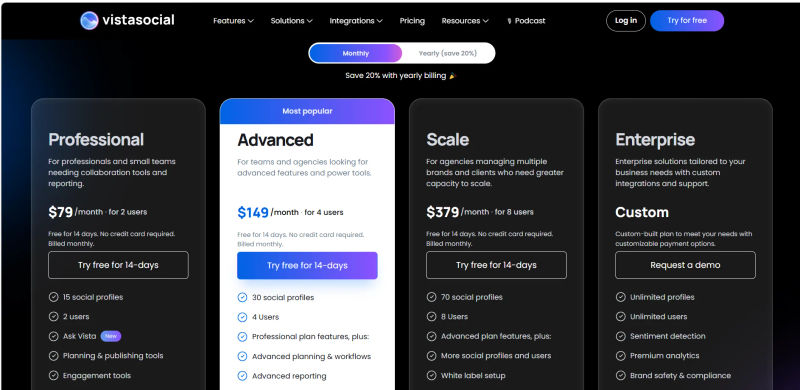
When evaluating vista social pricing official social media management 2026, the platform's vista social pricing remains highly competitive compared to legacy enterprise tools. If you are analyzing the exact vista social cost or overall vistasocial pricing, here is the official breakdown.
Vista Social offers a generous Free plan that includes 3 social profiles and 1 user. This is an excellent starting point for a solopreneur who wants to test the platform without committing financially.
However, most small businesses will need to upgrade to a paid tier. Based on vista social pricing official 2026 data, the Professional Plan starts at a vista social monthly price (or vistasocial monthly price) of $39 per month. If you choose vista social yearly billing via the vistasocial annual plan, the vista social price is discounted by roughly 20%, bringing your effective cost down. This $39/month tier supports up to 5 social profiles and includes multiple users, making it highly competitive for small teams. It includes bulk scheduling, a unified inbox, and basic reporting.
If you need to scale, the Advanced Plan jumps to $79 per month, supporting 10 to 30 profiles, while the Enterprise Plan scales up to $149 per month for 25 to 80 profiles. This transparent vista social pricing 2026 structure ensures you know exactly what your vistasocial cost will be as you grow.
Who is this best for? Vista Social is unequivocally best for growing agencies and multi-account managers. Because the Professional plan allows for multiple users at a low base cost, it is ideal for a small boutique agency or a collaborative team of two where both individuals need access without triggering a per-user fee penalty.
Vista Social Value & Limitations
While Vista Social is incredibly cost-effective, it is not without its limitations. If you want to add a single extra social profile beyond your plan's limit, you cannot simply pay a small add-on fee; you must jump to the next tier, which represents a significant price hike from $79 to $149.
Additionally, you must be aware of how they structure their AI features. The "Advanced AI" included in the base plan is primarily limited to basic caption generation.
If you want deep 2026-specific trends like AI-driven social listening, competitor sentiment analysis, or high-volume automated content creation, those features are strictly gated behind the $149 Advanced tier.
Vista Social International Pricing: Germany & Thailand
Vista Social does not currently offer localized currency pricing for users in Germany or Thailand in 2026; all plans are billed exclusively in US Dollars (USD). This means your actual vista social germany pricing and vista social thailand cost will fluctuate slightly based on your bank's daily exchange rate and any applicable foreign transaction fees.
For German users searching for vista social kosten, the base Pro plan at $15/month translates to roughly €13.50 to €14.50 per month. European users should also note that Value Added Tax (VAT) is applied at checkout unless a valid business VAT ID is provided.
Similarly, the vistasocial thailand cost for the entry-level Pro plan converts to approximately 500 to 550 THB per month. When calculating your final vista social thailand cost, remember to factor in standard credit card conversion fees. While there are no dedicated regional discounts, the baseline USD pricing remains highly competitive for agencies and creators in both Europe and Southeast Asia.
Pallyy: Best for Visual Creators and Grid Planning
Pallyy stands out as a visually driven platform designed specifically for Instagram-first creators and visual marketers. In 2026, Pallyy's Pro plan costs $25 per month and offers unlimited posting for one "social set" (one profile per major network) and one user. It features a highly intuitive drag-and-drop grid planner, a unified social inbox for comment management, and an integrated link-in-bio tool.
Who is this best for? Pallyy is best for visual content creators. If your strategy revolves around maintaining an aesthetic Instagram feed, organizing media assets, and scheduling content visually across multiple platforms without complex approval workflows, Pallyy offers the exact toolset you need at a highly affordable price for a solo user.
Pallyy Value & Limitations
When comparing Pallyy to Vista Social, the decision hinges entirely on your team size and posting volume. Pallyy is significantly cheaper for a solo creator at $25 per month, whereas Vista Social's comparable tier is $39 per month. However, Pallyy heavily restricts its entry-level tiers; its $15 Starter plan limits you to just 20 posts per month, effectively forcing active users immediately onto the Pro plan.
The most critical limitation surfaces when you need to scale your team. If you want to add a second user—such as a virtual assistant, a co-manager, or a client—Pallyy requires an immediate upgrade to its Agency tier at $99 per month. Vista Social natively includes multiple users in its base $39 and $79 tiers without penalty. Consequently, Vista Social remains the undisputed winner for collaborative teams and growing agencies, while Pallyy dominates as the premier scheduling tool for solo Instagram and TikTok specialists
Metricool: Best for Analytics-Focused Small Businesses
When evaluating Vista Social vs Metricool, Metricool stands out as a powerhouse for businesses that prioritize data over complex publishing workflows. In 2026, Metricool's pricing remains highly attractive for small operations needing clear, actionable reporting.
Metricool offers a Free plan that allows you to manage one brand (which includes one profile per major network) but limits your historical data and competitor tracking. The true value unlocks at the Starter Plan, which costs $25 per month on a monthly billing cycle. This plan allows you to manage up to 5 brands and includes up to 2,000 scheduled posts per month.
For users searching for a definitive Vistasocial vs Metricool breakdown: Vista Social provides a stronger unified inbox and social listening features, while Metricool delivers deeper analytics. Anyone comparing Vista Social Metricool pricing will find both tools highly affordable, but the Vistasocial Metricool feature sets cater to different daily priorities.
Who is this best for? Metricool is best for analytics-focused small businesses. If your primary goal is to understand your audience demographics, track growth metrics, and generate clean reports for stakeholders, Metricool offers the best data-to-dollar ratio on the market.
Metricool Value & Limitations
When comparing Metricool vs Vista Social 2026 pricing, the decision comes down to your primary workflow and location. Metricool is cheaper at $25 per month compared to Vista Social's $79 per month.
Regional availability is also a key factor. When evaluating vista social vs metricool germany (or vistasocial vs metricool germany), both platforms operate seamlessly, but Metricool offers stronger European localization. For users comparing vista social vs metricool thailand (or vistasocial vs metricool thailand), neither tool offers a native Thai interface, but both provide reliable global uptime and process international payments smoothly despite USD billing.
However, Vista Social offers a more robust unified inbox and better collaboration tools for multiple users. Metricool’s base plan also limits your ability to track multiple competitors simultaneously.
If you are a solo decision-maker who needs deep analytics, Metricool wins. If you have a team of two that needs to collaborate on scheduling and community management, Vista Social's Professional plan is the better investment.
Find Perfect Software For Your Business
Buffer: Best Pay-As-You-Go Pricing for Solo Creators
Buffer has maintained its famous pay-as-you-go pricing model into 2026, making it one of the most flexible options available for micro-businesses.
Buffer's Essentials Plan costs $6 per month, per social channel. There are no bundle requirements.
If you only want to manage a Twitter and a LinkedIn account, you only pay $12 per month. This plan includes robust publishing tools, basic analytics, and engagement features.
Who is this best for? Buffer is best for pay-as-you-go solo creators. If you are a solopreneur who only focuses on one or two highly engaged platforms, Buffer prevents you from paying for capacity you will never use.
Buffer Value & Limitations
The debate of Buffer vs Vista Social for small business hinges entirely on your channel count. Buffer is undeniably the cheapest social media scheduler 2026 has to offer—until you scale.
If you manage three channels, Buffer is $18 per month. If you manage seven channels, Buffer is $42 per month, making it more expensive than Vista Social's $79 per month Professional plan.
Furthermore, Buffer charges extra for team collaboration features, whereas Vista Social includes multiple users in its base Pro tier. If you plan to expand your social presence across multiple platforms, Vista Social offers better long-term budget predictability.
SocialBee: Best for Automated Content Recycling on a Budget
SocialBee takes a different approach to social media management, focusing heavily on content categorization and evergreen recycling to save users time.
In 2026, SocialBee's Accelerate Plan is priced at $49 per month. This tier allows for one workspace, one user, and up to 10 social profiles. The core value of SocialBee is its ability to automatically requeue your best-performing content, saving you hours of manual scheduling every week.
Who is this best for? SocialBee is best for automated content recycling on a budget. If your strategy relies on sharing evergreen blog posts, promotional offers, or educational content repeatedly, SocialBee's automation engine is highly efficient.
SocialBee Value & Limitations
When reviewing SocialBee pricing against Vista Social, the limitations become painfully apparent for growing teams. SocialBee's $49 plan only includes one user.
If you hire a virtual assistant or bring on a co-manager, you cannot simply add a cheap user seat. You are forced to upgrade to their Agency plan, which costs $99 per month—an immediate $50 price jump just to add a second user.
Vista Social, at $39 per month, accommodates small teams natively.
Additionally, SocialBee's unified inbox is not as seamless as Vista Social's, making Vista the better choice for brands prioritizing direct customer engagement.
Zoho Social: Best for Teams Needing CRM and Social Integration
Zoho Social is part of the massive Zoho ecosystem, focusing on business integration rather than standalone social growth.
When comparing VistaSocial vs Zoho Social on pricing, Vista Social offers better value for agencies needing broad network support and lower costs per profile. Conversely, Zoho Social justifies its price through deep lead generation and customer relationship management features.
Zoho Social's Premium Plan costs $40 per month (strictly annual billing). This includes one brand (seven channels) and three team members, offering excellent publishing tools, custom reports, and direct Zoho CRM integration.
Who is this best for? If your small business already uses Zoho for email, accounting, or lead management, Zoho Social is a logical addition to your tech stack.
Zoho Social Value & Limitations
At $40 per month, Zoho Social pricing plans appear directly competitive with Vista Social's $39 per month plan.
However, Zoho strictly limits you to a single brand. If you are a boutique agency managing three different client brands, Zoho will force you to buy expensive add-ons for each brand, skyrocketing your costs.
Vista Social's multi-profile flexibility makes it significantly cheaper for multi-brand management.
Furthermore, Zoho’s user interface can feel dated compared to the modern, streamlined experience offered by Vista Social or Later.
Join thousands of happy users who saved on software by comparing on AuthenCIO.
Later: Best for Visual-First Brands and Instagram Growth
Later started as an Instagram scheduling tool and has retained its visual-first DNA into 2026, making it a favorite for lifestyle and e-commerce brands.
Later's Growth Plan costs $50 per month.
It includes three users and one social set (one profile per platform: Instagram, Facebook, Twitter, Pinterest, TikTok, LinkedIn). It features a highly intuitive visual drag-and-drop calendar and excellent Link-in-Bio tools.
Who is this best for? Later is best for visual-first brands and Instagram growth. If you run a boutique retail shop, a bakery, or a lifestyle brand where Instagram and TikTok are your primary revenue drivers, Later's visual planning interface is superior to almost everything else on the market.
Later Value & Limitations
When comparing Later software cost 2026 to Vista Social, you must look closely at post limits. Later's Growth plan restricts you to 150 posts per profile per month.
While this is enough for standard small businesses, high-volume posters or brands managing aggressive Twitter campaigns will hit this wall quickly. Vista Social does not impose these strict per-profile posting limits on its paid tiers.
Furthermore, Later charges heavily for additional social sets, making Vista Social the more affordable option if you are managing multiple distinct brands.
Iconosquare: Best for Data-Driven Decision Makers
Iconosquare is the premium option among these budget-friendly tools, focusing heavily on deep, actionable analytics and reporting.
The Pro Plan starts at $69 per month (billed annually). It includes two team members and up to three social profiles.
Iconosquare provides incredibly granular data on follower growth, engagement rates, and industry benchmarks that other tools simply do not offer at the base level.
Who is this best for? Iconosquare is best for data-driven decision makers. If your small business relies on highly optimized, data-backed social campaigns and you need to prove exact ROI to stakeholders, Iconosquare's reporting suite justifies its higher price tag.
Iconosquare Value & Limitations
Iconosquare is noticeably more expensive than Vista Social ($83 versus $79) and offers fewer profiles (three versus five) on its base tier.
For a small business owner on a tight budget, Iconosquare might represent feature fatigue.
Unless you have a dedicated data analyst on your team who can actually utilize Iconosquare's advanced metrics, Vista Social provides more than enough reporting capability at a significantly lower cost, freeing up budget for actual ad spend.
Decision Factors: Hidden Costs and Scalability in 2026
When evaluating the most affordable social media management tools 2026 has to offer, the base subscription price is only half the story. The true cost of software is often buried in the limitations of the pricing tiers. To avoid budget unpredictability, you must audit the hidden costs of social media tools before inputting your credit card.
Here is a checklist of must-have versus nice-to-have features to help you navigate 2026 plan limitations:
Must-Have Features (Ensure these are in your base plan):
Multi-platform scheduling: Does it support the platforms you actually use, including newer formats like YouTube Shorts and TikTok?
Unified inbox: Can you reply to comments and DMs from one centralized dashboard without logging into native apps?
Adequate user seats: Does the plan cover you and your assistant, or will you pay a $15 to $50 monthly penalty for a second login?
Nice-to-Have Features (Often gated behind expensive tiers):
Advanced AI credits: Many tools now limit AI prompts to a credit system. Once you run out of credits, you must pay extra.
Historical data access: Budget tools often restrict analytics to the last 30 or 90 days. If you need year-over-year reporting, expect to pay a premium.
Competitor tracking: Monitoring rival brands is frequently locked behind Advanced or Enterprise plans.
Vista Social scores highly in transparency. User reviews consistently highlight its per-profile pricing as advantageous, particularly for agencies. However, scalability challenges arise for mid-sized businesses as costs escalate from the $79 Pro plan to the $149 Advanced plan. If you only need to add one extra user or profile, this steep jump can be frustrating.
Migration and Support
One of the largest hidden hurdles in adopting new software is the migration process. Fear of losing historical data or having to manually rebuild a content calendar keeps many small business owners locked into overpriced contracts.
Unfortunately, most budget-friendly social media tools in 2026 do not offer automated migration for your existing scheduled posts. If you are moving from a legacy platform to Vista Social or Metricool, expect to use bulk CSV uploads to rebuild your queue.
Furthermore, customer support quality varies wildly based on your pricing tier. On base plans—such as Vista Social’s $39 Professional tier or Later’s $40 Growth tier—support is strictly limited to email ticketing with a 24-to-48-hour service level agreement.
If you encounter a critical API disconnection during a major product launch, you will not have access to live chat or dedicated account managers unless you upgrade to Enterprise-level tiers.
Try AuthenCIO
Move to faster, smarter software evaluation with AI
Final Verdict: Which Affordable Tool Should You Choose?
Determining the social media management ROI for small business operations requires matching the tool to your exact operational needs. There is no single cheapest tool; there is only the tool that offers the best value for your specific use case.
Choose Metricool if you are a solo operator who prioritizes deep analytics and reporting above all else.
Choose Buffer if you only manage one or two social channels and want absolute control over your monthly spend.
Choose Pallyy if you are a solo visual creator or small team that wants a powerful drag-and-drop grid planner, unified inbox, and unlimited posting without per-post caps.
Choose Later if your brand is entirely visual and Instagram or TikTok are your primary revenue channels.
Choose SocialBee if you want to save time by automatically recycling evergreen content and do not need multiple users.
Choose Zoho Social if your business already operates within the Zoho CRM ecosystem and you only manage one brand.
Choose Iconosquare if you require deep analytics and are willing to pay a premium for data-driven insights.
Choose Vista Social if you are a growing agency, a multi-brand manager, or a small collaborative team looking for the best overall balance of publishing, engagement, and multi-user access without breaking the bank.
Wildcard for Zero Budget: If you have absolutely zero budget to spend, Metricool’s Free Plan is the most robust option available in 2026, offering excellent analytics and scheduling for a single brand without requiring a credit card.
By understanding these 2026 pricing structures, evaluating billing cycles, and avoiding hidden fees, you can eliminate feature fatigue, streamline your marketing overhead, and finally choose a budget-friendly tool that actually helps your business grow.